
django-loci
.. image:: https://github.com/openwisp/django-loci/actions/workflows/ci.yml/badge.svg :target: https://github.com/openwisp/django-loci/actions/workflows/ci.yml :alt: CI build status

.. image:: https://coveralls.io/repos/openwisp/django-loci/badge.svg :target: https://coveralls.io/r/openwisp/django-loci

.. image:: https://img.shields.io/librariesio/release/github/openwisp/django-loci :target: https://libraries.io/github/openwisp/django-loci#repository_dependencies :alt: Dependency monitoring
.. image:: https://img.shields.io/gitter/room/nwjs/nw.js.svg?style=flat-square :target: https://gitter.im/openwisp/general

.. image:: https://badge.fury.io/py/django-loci.svg :target: http://badge.fury.io/py/django-loci

.. image:: https://pepy.tech/badge/django-loci :target: https://pepy.tech/project/django-loci :alt: downloads
.. image:: https://img.shields.io/badge/code%20style-black-000000.svg :target: https://pypi.org/project/black/ :alt: code style: black

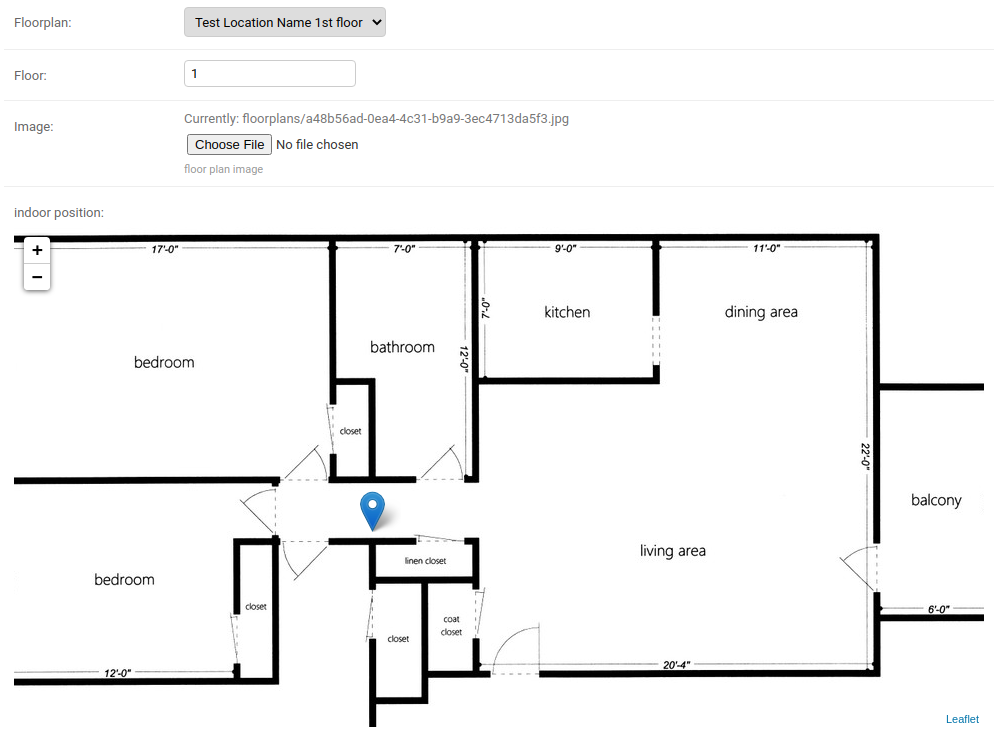
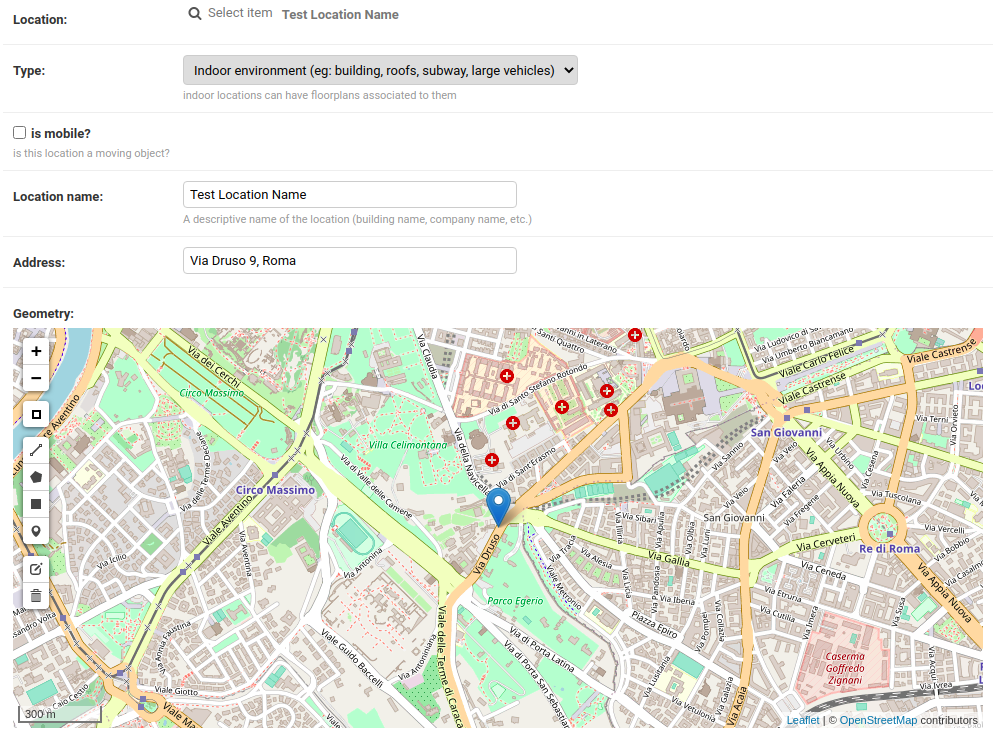
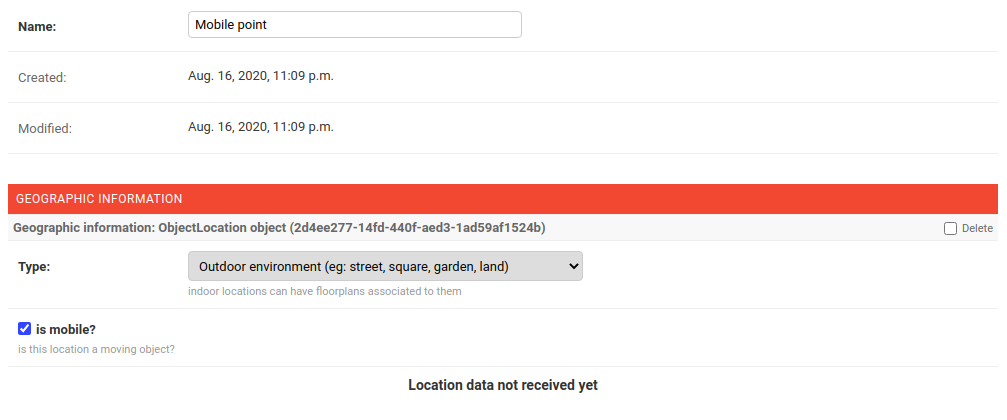
Reusable django-app for storing GIS and indoor coordinates of objects.
.. image:: https://raw.githubusercontent.com/openwisp/django-loci/master/docs/indoor.png :target: https://raw.githubusercontent.com/openwisp/django-loci/master/docs/indoor.png :alt: Indoor coordinates
.. image:: https://raw.githubusercontent.com/openwisp/django-loci/master/docs/map.png :target: https://raw.githubusercontent.com/openwisp/django-loci/master/docs/map.png :alt: Map coordinates
.. image:: https://raw.githubusercontent.com/openwisp/django-loci/master/docs/mobile.png :target: https://raw.githubusercontent.com/openwisp/django-loci/master/docs/mobile.png :alt: Mobile coordinates
.. contents:: Table of Contents: :backlinks: none :depth: 3
Dependencies
- Python >= 3.10
- GeoDjango (
see GeoDjango Install Instructions <https://docs.djangoproject.com/en/dev/ref/contrib/gis/install/#requirements>_) - One of the databases supported by GeoDjango
Compatibility Table
=========== ============== django-loci Python version 0.2 2.7 or >=3.4 0.3 - 0.4 >=3.6 1.0 >=3.7 1.1 >=3.8 dev >=3.10 =========== ==============
Install stable version from pypi
Install from pypi:
.. code-block:: shell
pip install django-loci
Install development version
First of all, install the dependencies of GeoDjango <https://docs.djangoproject.com/en/4.2/ref/contrib/gis/>_:
Geospatial libraries <https://docs.djangoproject.com/en/4.2/ref/contrib/gis/install/geolibs/>_Spatial database <https://docs.djangoproject.com/en/4.2/ref/contrib/gis/install/spatialite/>, for development we use Spatialite, a spatial extension ofsqlite <https://www.sqlite.org/index.html>
Install tarball:
.. code-block:: shell
pip install https://github.com/openwisp/django-loci/tarball/master
Alternatively you can install via pip using git:
.. code-block:: shell
pip install -e git+git://github.com/openwisp/django-loci#egg=django_loci
If you want to contribute, install your cloned fork:
.. code-block:: shell
git clone [email protected]:<your_fork>/django-loci.git
cd django_loci
python setup.py develop
Setup (integrate in an existing django project)
First of all, set up your database engine to one of the spatial databases suppported by GeoDjango <https://docs.djangoproject.com/en/4.2/ref/contrib/gis/db-api/#spatial-backends>_.
Add django_loci and its dependencies to INSTALLED_APPS in the
following order:
.. code-block:: python
INSTALLED_APPS = [
    # ...
    "django.contrib.gis",
    "django_loci",
    "django.contrib.admin",
    "leaflet",
    "channels",
    # ...
]
Configure CHANNEL_LAYERS according to your needs, a sample
configuration can be:
.. code-block:: python
ASGI_APPLICATION = "django_loci.channels.asgi.channel_routing"
CHANNEL_LAYERS = {
    "default": {
        "BACKEND": "channels_redis.core.RedisChannelLayer",
        "CONFIG": {
            "hosts": [("127.0.0.1", 6379)],
        },
    },
}
Now run migrations:
.. code-block:: shell
./manage.py migrate
Troubleshooting
Common issues and solutions when installing GeoDjango.
Unable to load the SpatiaLite library extension
If you get the following exception:

::

    django.core.exceptions.ImproperlyConfigured: Unable to load the SpatiaLite library extension

You need to specify the ``SPATIALITE_LIBRARY_PATH`` in your
``settings.py`` as explained in the `django documentation regarding how to
install and configure spatialte
<https://docs.djangoproject.com/en/4.2/ref/contrib/gis/install/spatialite/>`_.

Issues with other geospatial libraries
~~~~~~~~~~~~~~~~~~~~~~~~~~~~~~~~~~~~~~

Please refer to the `geodjango documentation on troubleshooting issues
related to geospatial libraries
<https://docs.djangoproject.com/en/4.2/ref/contrib/gis/install/#library-environment-settings>`_.

Settings
--------

``LOCI_FLOORPLAN_STORAGE``
~~~~~~~~~~~~~~~~~~~~~~~~~~

============ ========================================
**type**:    ``str``
**default**: ``django_loci.storage.OverwriteStorage``
============ ========================================

The django file storage class used for uploading floorplan images.

The filestorage can be changed to a different one as long as it has an
``upload_to`` class method which will be passed to
``FloorPlan.image.upload_to``.

To understand the details of this statement, take a look at the code of
`django_loci.storage.OverwriteStorage
<https://github.com/openwisp/django-loci/blob/master/django_loci/storage.py>`_.

``DJANGO_LOCI_GEOCODER``
~~~~~~~~~~~~~~~~~~~~~~~~

============ ==========
**type**:    ``str``
**default**: ``ArcGIS``
============ ==========

Service used for geocoding and reverse geocoding.

Supported geolocation services:

- ``ArcGIS``
- ``Nominatim``
- ``GoogleV3`` (Google Maps v3)

``DJANGO_LOCI_GEOCODE_FAILURE_DELAY``
~~~~~~~~~~~~~~~~~~~~~~~~~~~~~~~~~~~~~

============ =======
**type**:    ``int``
**default**: ``1``
============ =======

Amount of seconds between geocoding retry API calls when geocoding
requests fail.

``DJANGO_LOCI_GEOCODE_RETRIES``
~~~~~~~~~~~~~~~~~~~~~~~~~~~~~~~

============ =======
**type**:    ``int``
**default**: ``3``
============ =======

Amount of retry API calls when geocoding requests fail.

``DJANGO_LOCI_GEOCODE_API_KEY``
~~~~~~~~~~~~~~~~~~~~~~~~~~~~~~~

============ ========
**type**:    ``str``
**default**: ``None``
============ ========

API key if required (eg: Google Maps).

System Checks
-------------

``geocoding``
~~~~~~~~~~~~~

Use to check if geocoding is working as expected or not.

Run this checks with:

::

    ./manage.py check --deploy --tag geocoding

Extending django-loci
---------------------

*django-loci* provides a set of models and admin classes which can be
imported, extended and reused by third party apps.

To extend *django-loci*, **you MUST NOT** add it to
``settings.INSTALLED_APPS``, but you must create your own app (which goes
into ``settings.INSTALLED_APPS``), import the base classes of django-loci
and add your customizations.

Extending models
~~~~~~~~~~~~~~~~

This example provides an example of how to extend the base models of
*django-loci* by adding a relation to another django model named
`Organization`.

.. code-block:: python

    # models.py of your app
    from django.db import models
    from django_loci.base.models import (
        AbstractFloorPlan,
        AbstractLocation,
        AbstractObjectLocation,
    )

    # the model ``organizations.Organization`` is omitted for brevity
    # if you are curious to see a real implementation, check out django-organizations


    class OrganizationMixin(models.Model):
        organization = models.ForeignKey("organizations.Organization")

        class Meta:
            abstract = True


    class Location(OrganizationMixin, AbstractLocation):
        class Meta(AbstractLocation.Meta):
            abstract = False

        def clean(self):
            # your own validation logic here...
            pass


    class FloorPlan(OrganizationMixin, AbstractFloorPlan):
        location = models.ForeignKey(Location)

        class Meta(AbstractFloorPlan.Meta):
            abstract = False

        def clean(self):
            # your own validation logic here...
            pass


    class ObjectLocation(OrganizationMixin, AbstractObjectLocation):
        location = models.ForeignKey(Location, models.PROTECT, blank=True, null=True)
        floorplan = models.ForeignKey(FloorPlan, models.PROTECT, blank=True, null=True)

        class Meta(AbstractObjectLocation.Meta):
            abstract = False

        def clean(self):
            # your own validation logic here...
            pass

Extending the admin
~~~~~~~~~~~~~~~~~~~

Following the previous `Organization` example, you can avoid duplicating
the admin code by importing the base admin classes and registering your
models with them.

But first you have to change a few settings in your ``settings.py``, these
are needed in order to load the admin templates and static files of
*django-loci* even if it's not listed in ``settings.INSTALLED_APPS``.

Add ``django.forms`` to ``INSTALLED_APPS``, now it should look like the
following:

.. code-block:: python

    INSTALLED_APPS = [
        # ...
        "django.contrib.gis",
        "django_loci",
        "django.contrib.admin",
        #      ↓
        "django.forms",  # <-- add this
        #      ↑
        "leaflet",
        "channels",
        # ...
    ]

Now add ``EXTENDED_APPS`` after ``INSTALLED_APPS``:

.. code-block:: python

    INSTALLED_APPS = [
        # ...
    ]

    EXTENDED_APPS = ("django_loci",)

Add ``openwisp_utils.staticfiles.DependencyFinder`` to
``STATICFILES_FINDERS``:

.. code-block:: python

    STATICFILES_FINDERS = [
        "django.contrib.staticfiles.finders.FileSystemFinder",
        "django.contrib.staticfiles.finders.AppDirectoriesFinder",
        "openwisp_utils.staticfiles.DependencyFinder",
    ]

Add ``openwisp_utils.loaders.DependencyLoader`` to ``TEMPLATES``:

.. code-block:: python

    TEMPLATES = [
        {
            "BACKEND": "django.template.backends.django.DjangoTemplates",
            "DIRS": [],
            "OPTIONS": {
                "loaders": [
                    "django.template.loaders.filesystem.Loader",
                    "django.template.loaders.app_directories.Loader",
                    # add the following line
                    "openwisp_utils.loaders.DependencyLoader",
                ],
                "context_processors": [
                    "django.template.context_processors.debug",
                    "django.template.context_processors.request",
                    "django.contrib.auth.context_processors.auth",
                    "django.contrib.messages.context_processors.messages",
                ],
            },
        }
    ]

Last step, add ``FORM_RENDERER``:

.. code-block:: python

    FORM_RENDERER = "django.forms.renderers.TemplatesSetting"

Then you can go ahead and create your ``admin.py`` file following the
example below:

.. code-block:: python

    # admin.py of your app
    from django.contrib import admin

    from django_loci.base.admin import (
        AbstractFloorPlanAdmin,
        AbstractFloorPlanForm,
        AbstractFloorPlanInline,
        AbstractLocationAdmin,
        AbstractLocationForm,
        AbstractObjectLocationForm,
        AbstractObjectLocationInline,
    )
    from django_loci.models import FloorPlan, Location, ObjectLocation


    class FloorPlanForm(AbstractFloorPlanForm):
        class Meta(AbstractFloorPlanForm.Meta):
            model = FloorPlan


    class FloorPlanAdmin(AbstractFloorPlanAdmin):
        form = FloorPlanForm


    class LocationForm(AbstractLocationForm):
        class Meta(AbstractLocationForm.Meta):
            model = Location


    class FloorPlanInline(AbstractFloorPlanInline):
        form = FloorPlanForm
        model = FloorPlan


    class LocationAdmin(AbstractLocationAdmin):
        form = LocationForm
        inlines = [FloorPlanInline]


    class ObjectLocationForm(AbstractObjectLocationForm):
        class Meta(AbstractObjectLocationForm.Meta):
            model = ObjectLocation


    class ObjectLocationInline(AbstractObjectLocationInline):
        model = ObjectLocation
        form = ObjectLocationForm


    admin.site.register(FloorPlan, FloorPlanAdmin)
    admin.site.register(Location, LocationAdmin)

Extending channel consumers
~~~~~~~~~~~~~~~~~~~~~~~~~~~

Extend the channel consumer of django-loci in this way:

.. code-block:: python

    from django_loci.channels.base import BaseLocationBroadcast
    from ..models import Location  # your own location model


    class LocationBroadcast(BaseLocationBroadcast):
        model = Location

Extend the broadcast consumer for all locations:

.. code-block:: python

    from django_loci.channels.base import BaseCommonLocationBroadcast
    from ..models import Location  # your own location model


    class CommonLocationBroadcast(BaseCommonLocationBroadcast):
        model = Location

Extending AppConfig
~~~~~~~~~~~~~~~~~~~

You may want to reuse the ``AppConfig`` class of *django-loci* too:

.. code-block:: python

    from django_loci.apps import LociConfig


    class MyConfig(LociConfig):
        name = "myapp"
        verbose_name = _("My custom app")

        def __setmodels__(self):
            from .models import Location

            self.location_model = Location

Installing for development
--------------------------

Install sqlite:

.. code-block:: shell

    sudo apt-get install sqlite3 libsqlite3-dev libsqlite3-mod-spatialite gdal-bin

Install your forked repo:

.. code-block:: shell

    git clone git://github.com/<your_fork>/django-loci
    cd django-loci/
    python setup.py develop

Install test requirements:

.. code-block:: shell

    pip install -r requirements-test.txt

Launch Redis:

.. code-block:: shell

    docker compose up -d redis

Create database:

.. code-block:: shell

    cd tests/
    ./manage.py migrate
    ./manage.py createsuperuser

Launch development server and SMTP debugging server:

.. code-block:: shell

    ./manage.py runserver

You can access the admin interface at http://127.0.0.1:8000/admin/.

Run tests with (make sure you have the `selenium dependencies
<https://openwisp.io/docs/dev/utils/developer/test-utilities.html#openwisp-utils-tests-seleniumtestmixin>`_
installed locally first):

.. code-block:: shell

    ./runtests

Contributing
------------

Please refer to the `OpenWISP Contribution Guidelines
<https://openwisp.io/docs/stable/developer/contributing.html>`_.

Questions
---------

See `Github Discussions
<https://github.com/openwisp/django-loci/discussions>`_.

Changelog
---------

See `CHANGES
<https://github.com/openwisp/django-loci/blob/master/CHANGES.rst>`_.

License
-------

See `LICENSE
<https://github.com/openwisp/django-loci/blob/master/LICENSE>`_.