
Dota 2 AI Coach
An intelligent AI assistant for Dota 2 that analyzes game situations in real-time and provides tactical advice through an overlay. The system uses RAG (Retrieval-Augmented Generation) for more relevant and well-grounded responses.
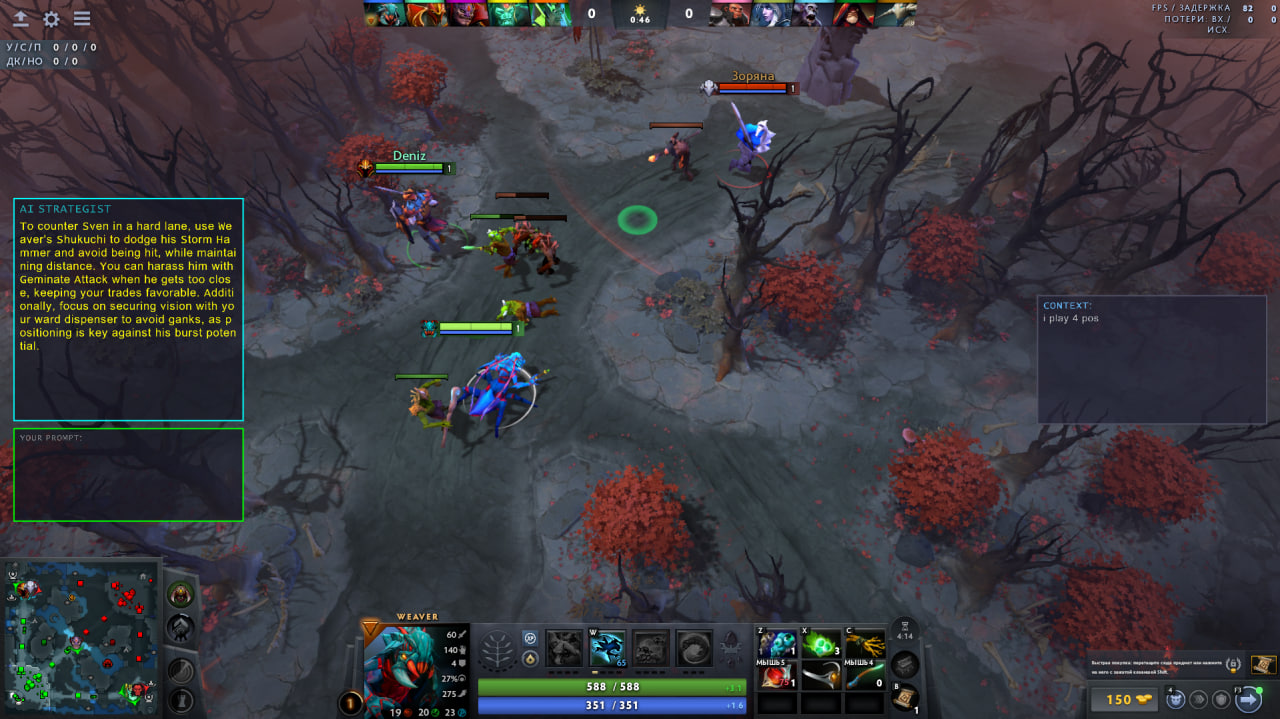
Features
- 🎮 Dota 2 Integration via GSI (Game State Integration)
- 🤖 AI Provider Support: Google Gemini and OpenRouter
- 🔍 RAG System: Searches relevant information from knowledge base before generating responses
- 💬 Automatic Advice every N seconds
- ❓ Interactive Questions directly in-game
- ⌨️ Hotkey Management
- 📚 Built-in Knowledge Base with information about heroes, abilities, items
Requirements
- Go 1.24.0+
- Windows (uses WinAPI)
- Dota 2
- API key from Gemini or OpenRouter
Installation
# Clone the repository
git clone https://github.com/BrightGir/game-ai-helper.git
cd GameHelper

# Download dependencies
go mod tidy
Configuration
1. API Key
Create a .env file in the project root directory:
API_KEY=your_api_key_here
MODELS_DIR=storage (or folder where the BERT model will be located)
Where to get an API key:
- Gemini: https://makersuite.google.com/app/apikey
- OpenRouter: https://openrouter.ai/keys (paid models, some free options available)
💡 Tip: For best results, use advanced models. Free models work well for basic advice.
2. Dota 2 GSI Configuration
Before using the application, you need to configure Dota 2 to send game data to GameHelper:
- Locate your Dota 2 GSI config folder:
C:\Program Files (x86)\Steam\steamapps\common\dota 2 beta\game\dota\cfg\gamestate_integration\
💡 Tip: If the
gamestate_integrationfolder doesn't exist, create it manually.
- Create a new file in this folder named:
gamestate_integration_aicoach.cfg
- Copy and paste the following content into the file:
   "Dota 2 Integration Configuration"
   {
       "uri"           "http://localhost:6000"
       "timeout"       "5.0"
       "buffer"        "0.1"
       "throttle"      "0.1"
       "heartbeat"     "30.0"
       "data"
       {
           "provider"      "1"
           "map"           "1"
           "player"        "1"
           "hero"          "1"
           "abilities"     "1"
           "items"         "1"
       }
   }
- Save the file and restart Dota 2 if it's already running.
3. Application Settings
Edit config.json:
{
  "local_gsi_port": 6000,
  "provider": "openrouter",
  "model": "openai/gpt-4o-mini",
  "request_interval_seconds": 60,
  "silence_duration_seconds": 60,
  "hotkey_turn_overlay": 120,
  "hotkey_focus_overlay": 121,
  "minSimilarity": 0.7
}
Parameters:
local_gsi_port— port for GSI server (default 6000)provider—"gemini"or"openrouter"model— AI model:- Gemini:
gemini-2.5-flash,gemini-2.5-pro - OpenRouter:
google/gemma-3-27b-it:free,meta-llama/llama-3.2-3b-instruct:free,openai/gpt-4o-mini
- Gemini:
request_interval_seconds— automatic advice interval (seconds)silence_duration_seconds— pause after question before auto-advice (seconds)hotkey_turn_overlay— toggle overlay key (120=F9)hotkey_focus_overlay— focus key (121=F10)minSimilarity— minimum similarity threshold for RAG search (default 0.7)
⚠️ Important: Advice quality depends on the model. Advanced models provide significantly better results.
Usage 🎮
First Launch
Development mode:
go run ./cmd/game-helper
Or build and run:
# Build
go build -o GameHelper.exe ./cmd/game-helper

# Run
./GameHelper.exe
What happens on first run:
- BERT models for embedding are downloaded (may take a few minutes)
- Knowledge base is indexed in Chroma DB.
- You will see overlay
- Subsequent runs will be faster (uses cache)
Keep the console window open — closing it will stop the application.
Starting Dota 2
- Launch Dota 2 in Windowed Mode (Settings → Video → Display Mode → Borderless Window)
⚠️ IMPORTANT: Dota 2 must be running in Windowed Mode (not Fullscreen) for the overlay to work correctly.
Using the Overlay
The overlay consists of three main areas:
- AI Advice Panel — Shows automatic tactical advice and AI responses
- Question Input Field — Type your questions here
- Context Input Field — Add additional game context/notes
Hotkeys Reference
| Key | Action | Description |
|---|---|---|
F9 |
Toggle Overlay | Show or hide the entire overlay |
F10 |
Focus Overlay | Enable/disable text input mode (allows typing) |
Enter |
Submit | Send your question or save context |
How to Ask Questions
- Press
F10to focus the overlay (you'll see the input fields become active) - Click on the Question Input Field
- Type your question, for example:
- "What items should I buy next?"
- "How do I counter this hero?"
- "What's the best strategy for this situation?"
- Press
Enterto send the question - The AI will process your question and display the answer in the AI Advice Panel
Adding Game Context
You can provide additional context to help the AI give better advice:
- Press
F10to focus the overlay - Click on the Context Input Field (bottom section)
- Type relevant information, for example:
- "Enemy team has strong magic damage"
- "I'm playing as support"
- This context will be included in all future AI requests
Automatic Advice
The application automatically provides tactical advice every N seconds (configured in config.json as request_interval_seconds, default: 60 seconds).
- Advice appears automatically in the AI Advice Panel
- The system analyzes your current game state (hero, items, abilities, gold, etc.)
- Advice pauses for N seconds after you ask a manual question (configured as
silence_duration_seconds)
Architecture
┌─────────────────────────────────────────────────────┐
│            Dota 2 Game Client                       │
│  (Sends Game State)                                 │
└────────────────┬────────────────────────────────────┘
                 │ HTTP POST (JSON)
                 ▼
    ┌────────────────────────────┐
    │   GSI Handler              │
    │  (transport/http_gsi.go)   │
    │   localhost:6000           │
    └────────┬───────────────────┘
             │
             ▼
    ┌────────────────────────────┐
    │   Parser                   │
    │  (dota/parser.go)          │
    │  JSON → GameState          │
    └────────┬───────────────────┘
             │
             ▼
    ┌────────────────────────────┐
    │   Store (Thread-safe)      │
    │  (state/store.go)          │
    │  RWMutex + GameState       │
    └────────┬───────────────────┘
             │
             │ Reads state
             ▼
┌──────────────────────┐              ┌───────────────────┐
│  Prompt Handler      │              │  Overlay (UI)     │
│ (prompt.go)          │◄─────────────│ (ui/*.go)         │
│                      │ userPromptChan                   │
│ • Timer (auto)       │              │ • RayLib window   │
│ • User questions     │              │ • Hotkeys         │
└──────────┬───────────┘              │ • Text input      │
           │                          │ • GetContextText()│
           │ Calls Build()            │   (user notes)    │
           ▼                          └─────────┬─────────┘
┌──────────────────────────────────────┐        │
│  Builder (prompt/builder.go)         │◄───────┘
│                                      │  ContextProvider
│  1. store.Get() → GameState          │   (user notes)
│  2. ctxProvider.GetContextText()   │
│  3. Formats: hero, items,            │
│     abilities, user notes            │
│  4. pipeline.Execute()               │
└──────────┬───────────────────────────┘
           │ gameContext + question
           ▼
┌──────────────────────────────────────────────────────┐
│  Pipeline (prompt/pipeline.go)   [RAG SYSTEM]      │
│                                                      │
│  ┌─────────────────────────────────────────────┐     │
│  │ 1. generateSearchQueries()                  │     │
│  │    AI request → JSON with search queries    │────►├──► AI Client
│  └─────────────────────────────────────────────┘     │   (Gemini/OpenRouter)
│                        │                             │
│                        ▼                             │
│  ┌─────────────────────────────────────────────┐     │
│  │ 2. retrieveKnowledge()                      │     │
│  │    Search in vector DB                      │────►├──► Retriever
│  └─────────────────────────────────────────────┘     │   (BERT + Chroma)
│                        │                             │
│                        ▼                             │
│  ┌─────────────────────────────────────────────┐     │
│  │ 3. buildFinalPrompt()                       │     │
│  │    knowledge + gameState + question         │     │
│  └─────────────────────────────────────────────┘     │
└──────────────────────────┬───────────────────────────┘
                           │ finalPrompt (string)
                           ▼
              ┌─────────────────────────┐
              │      promptChan         │
              └────────────┬────────────┘
                           │
                           ▼
┌──────────────────────────────────────────────────────┐
│  AI Worker (ai_worker.go)                            │
│                                                      │
│  fetchAdviceWithRetry():                             │
│  • aiProvider.Ask(systemPrompt, finalPrompt)  ──────►├──► AI Client
│  • Retry logic (3 attempts)                          │   (Gemini/OpenRouter)
│  • Error handling                                    │
└──────────────────────────┬───────────────────────────┘
                           │ advice (AI response)
                           ▼
              ┌─────────────────────────┐
              │      adviceChan         │
              └────────────┬────────────┘
                           │
                           ▼
┌──────────────────────────────────────────────────────┐
│  Advice Consumer (ai_worker.go)                      │
│                                                      │
│  overlay.SetAiAdvice(advice)                         │
└──────────────────────────┬───────────────────────────┘
                           │
                           ▼
              ┌─────────────────────────┐
              │  Overlay displays       │
              │  advice to user          │
              └─────────────────────────┘
Project Structure
GameHelper/
├── cmd/
│   ├── game-helper/                   # Main application
│   │   ├── main.go                    # Entry point, initialization
│   │   ├── app.go                     # App structure, coordinates all components
│   │   ├── ai_worker.go               # AI request handler with retry logic
│   │   └── prompt.go                  # Prompt queue and timer management
│   └── rag/                           # RAG system tools
│       ├── base-knowledge-loader/     # Loads JSON knowledge bases and create chunks with LLM
│       ├── knowledge-vectorizer/      # Converts text to vectors and saves to assets/rag/knowledge.json
│       └── prompt-debug/              # Debug tool for running prompt scenarios
├── internal/
│   ├── ai/                            # AI provider integration
│   │   ├── gemini/                    # Google Gemini API client
│   │   │   ├── client.go              # Sends requests to Gemini API
│   │   │   └── types.go               # Request/response structures
│   │   ├── openrouter/                # OpenRouter API client
│   │   │   ├── client.go              # Sends requests to OpenRouter API
│   │   │   └── types.go               # Request/response structures
│   │   ├── factory/                   # Factory for creating AI clients
│   │   │   └── factory.go             # Selects client based on config
│   │   ├── types.go                   # Common Client interface
│   │   └── errors/                    # API error handling
│   │       └── errors.go              # ShouldRetry, APIError structures
│   ├── dota/                          # Game State Integration (GSI)
│   │   ├── parser.go                  # Parses JSON from Dota 2
│   │   └── types.go                   # GameState, Hero, Items, Abilities types
│   ├── prompt/                        # AI prompt generation using RAG
│   │   ├── builder.go                 # Composes context from state + knowledge
│   │   ├── pipeline.go                # RAG pipeline: queries → search → prompt
│   │   └── templates.go               # Text templates for prompts
│   ├── retriever/                     # Knowledge search (RAG component)
│   │   ├── retriever.go               # Vector search + similarity filtering
│   │   ├── bert.go                    # BERT model initialization
│   │   └── types.go                   # Searcher interface, result types
│   ├── state/                         # Thread-safe game state storage
│   │   └── store.go                   # RWMutex for concurrent access
│   ├── config/                        # Configuration management
│   │   └── config.go                  # Config structure + LoadConfig
│   ├── transport/                     # HTTP handler for GSI data
│   │   └── http_gsi.go                # Receives POST from Dota 2
│   └── ui/                            # Graphical overlay (RayLib)
│       ├── types.go                   # Overlay structure, UI state
│       ├── engine.go                  # Main rendering loop
│       ├── draw.go                    # Text rendering
│       ├── calculator.go              # Layout calculations
│       ├── click.go                   # Windows API for transparency
│       ├── input.go                   # Input handling
│       └── keyboard.go                # Hotkey handling
├── assets/                            # Embedded data and templates
│   ├── data/                          # Knowledge base in JSON
│   ├── prompts/                       # Text templates for prompts
│   │   ├── base-coach-system-prompt.txt
│   │   ├── bd-queries-generator.txt
│   │   ├── final-prompt.txt
│   │   └── *.txt
│   ├── rag/
│   │   └── knowledge.json             # Combined knowledge base
│   └── embed.go                       # go:embed directives
├── storage/                           # Batches cache and models
│   └── cache/                         # LLM response cache
│       ├── aghs_desc/
│       ├── heroes/
│       └── items/
├── config.json                        # Application configuration
├── .env                               # API key (create this)
├── gamestate_integration_aicoach.cfg  # Dota 2 GSI config (example)
├── go.mod
├── go.sum
├── README.md
└── LICENSE
Advanced
RAG Tools
These tools are for developers who want to rebuild or modify the knowledge base.
Loading Knowledge
go run ./cmd/rag/base-knowledge-loader
Loads base knowledge (heroes, items, abilities) from JSON files (dotaconstants, Stratz API) and creates text chunks using LLM.
Vectorization
go run ./cmd/rag/knowledge-vectorizer
Converts text knowledge to BERT vectors and stores them in assets/rag/knowledge.json
Prompt Debugging
go run ./cmd/rag/prompt-debug
Generation of final prompts based on data in internal/prompt/testdata
License
This project is distributed under the MIT License.