
Dumpify






Improve productivity and debuggability by adding .Dump() extension methods to Console Applications.
Dump any object in a structured and colorful way into the Console, Trace, Debug events or your own custom output.
How to Install
The library is published as a Nuget
Either run dotnet add package Dumpify, Install-Package Dumpify or use Visual Studio's NuGet Package Manager
Overview Video
An overview video hosted on the Open at Microsoft show
Features
- Dump any object in a structured, colorful way to Console, Debug, Trace or any other custom output
- Support Properties, Fields and non-public members
- Support max nesting levels
- Support circular dependencies and references
- Support styling and customizations
- Highly Configurable
- Support for different output targets: Console, Trace, Debug, Text, Custom
- Fast!
Examples:
Anonymous types
new { Name = "Dumpify", Description = "Dump any object to Console" }.Dump();

Support nesting and circular references
var moaid = new Person { FirstName = "Moaid", LastName = "Hathot", Profession = Profession.Software };
var haneeni = new Person { FirstName = "Haneeni", LastName = "Shibli", Profession = Profession.Health };

moaid.Spouse = haneeni;
haneeni.Spouse = moaid;

moaid.Dump();
//You can define max depth as well, e.g `moaid.Dump(maxDepth: 2)`

Support for Arrays, Dictionaries and Collections
var arr = new[] { 1, 2, 3, 4 }.Dump();

var arr2d = new int[,] { {1, 2}, {3, 4} }.Dump();

new Dictionary<string, string>
{
   ["Moaid"] = "Hathot",
   ["Haneeni"] = "Shibli",
   ["Eren"] = "Yeager",
   ["Mikasa"] = "Ackerman",
}.Dump();

You can ensure that arrays, dictionaries and collections don't output too much by allowing results to be truncated. Do this by setting the MaxCollectionCount property in the TruncationConfig.
int[] arr = [1, 2, 3, 4, 5, 6, 7, 8, 9, 10];

// Outputs only the first 5 elements with a truncation marker
arr.Dump(truncationConfig: new TruncationConfig { MaxCollectionCount = 5 });
// Shows: 1, 2, 3, 4, 5, [... 5 more]

// You can also truncate from the tail (last N elements)
arr.Dump(truncationConfig: new TruncationConfig { MaxCollectionCount = 5, Mode = TruncationMode.Tail });
// Shows: [... 5 more], 6, 7, 8, 9, 10

// Or show both head and tail with truncation in the middle
arr.Dump(truncationConfig: new TruncationConfig { MaxCollectionCount = 6, Mode = TruncationMode.HeadAndTail });
// Shows: 1, 2, 3, [... 4 more], 9, 10
You can turn on or off fields and private members
public class AdditionValue
{
    private readonly int _a;
    private readonly int _b;

    public AdditionValue(int a, int b)
    {
        _a = a;
        _b = b;
    }

    private int Value => _a + _b;
}


new AdditionValue(1, 2).Dump(members: new MembersConfig { IncludeFields = true, IncludeNonPublicMembers = true });

You can provide a custom filter to determine if members should be included or not
public class Person
{
    public string Name { get; set; }

    [JsonIgnore]
    public string SensitiveData { get; set; }
}

// Filter by attribute - exclude members with [JsonIgnore]
new Person()
{
    Name = "Moaid",
    SensitiveData = "We don't want this to show up"
}.Dump(members: new MembersConfig { MemberFilter = ctx => !ctx.Member.Info.CustomAttributes.Any(a => a.AttributeType == typeof(JsonIgnoreAttribute)) });

// Filter by value - exclude null or empty values (NEW!)
new Person()
{
    Name = "Moaid",
    SensitiveData = null
}.Dump(members: new MembersConfig { MemberFilter = ctx => ctx.Value is not null });

// Filter by depth - only show top-level properties (NEW!)
myNestedObject.Dump(members: new MembersConfig { MemberFilter = ctx => ctx.Depth == 0 });
The MemberFilter receives a MemberFilterContext which provides:
ctx.Member- Access to member metadata (Name, Type, Attributes)ctx.Value- The actual value of the member (lazily evaluated)ctx.Source- The parent object containing the memberctx.Depth- The current nesting depth during rendering
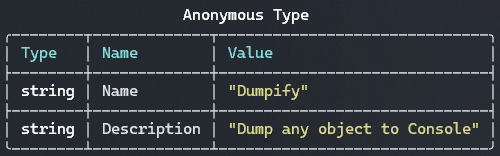
### You can turn on or off row separators and a type column
```csharp
//globally
DumpConfig.Default.TableConfig.ShowMemberTypes = true;
DumpConfig.Default.TableConfig.ShowRowSeparators = true;

new { Name = "Dumpify", Description = "Dump any object to Console" }.Dump();

//or Per dump
new { Name = "Dumpify", Description = "Dump any object to Console" }.Dump(tableConfig: new TableConfig { ShowRowSeparators = true, ShowMemberTypes = true });
Customize table border style
If tables look garbled in your terminal (VS Code, Windows Terminal, etc.), you can change the border style:
// Use ASCII borders for maximum compatibility
DumpConfig.Default.TableConfig.BorderStyle = TableBorderStyle.Ascii;

// Or use Square borders (simpler Unicode characters)
DumpConfig.Default.TableConfig.BorderStyle = TableBorderStyle.Square;

// Available styles: Rounded (default), Square, Ascii, None, Heavy, Double, Minimal, Markdown
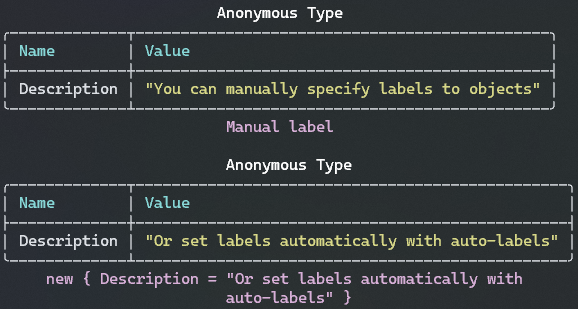
You can set custom labels or auto-labels
new { Description = "You can manually specify labels to objects" }.Dump("Manual label");

//Set auto-label globally for all dumps if a custom label wasn't provider
DumpConfig.Default.UseAutoLabels = true;
new { Description = "Or set labels automatically with auto-labels" }.Dump();
You can customize colors
var package = new { Name = "Dumpify", Description = "Dump any object to Console" };
package.Dump(colors: ColorConfig.NoColors);
package.Dump(colors: new ColorConfig { PropertyValueColor = new DumpColor(Color.RoyalBlue)});

You can turn on or off type names, headers, lables and much more
var moaid = new Person { FirstName = "Moaid", LastName = "Hathot", Profession = Profession.Software };
var haneeni = new Person { FirstName = "Haneeni", LastName = "Shibli", Profession = Profession.Health };
moaid.Spouse = haneeni;
haneeni.Spouse = moaid;

moaid.Dump(typeNames: new TypeNamingConfig { ShowTypeNames = false }, tableConfig: new TableConfig { ShowTableHeaders = false });

There are multiple output options (Console, Trace, Debug, Text) or provide your own
var package = new { Name = "Dumpify", Description = "Dump any object to Console" };
package.Dump(); //Similar to `package.DumpConsole()` and `package.Dump(output: Outputs.Console))`
package.DumpDebug(); //Dump to Visual Studio's Debug source
package.DumpTrace(); //Dump to Trace
var text = package.DumpText(); //The table in a text format

using var writer = new StringWriter();
package.Dump(output: new DumpOutput(writer)); //Custom output
Custom Type Handlers
You can register custom handlers to control how specific types are rendered. This is useful for types that need special formatting, truncation, or transformation before display.
// Register a custom handler for byte arrays to show only the first few bytes
DumpConfig.Default.AddCustomTypeHandler(typeof(byte[]), (obj, type, valueProvider, memberProvider) =>
{
    var bytes = (byte[])obj;
    if (bytes.Length <= 8)
    {
        return bytes;
    }

    // Return a summary for large byte arrays
    return $"byte[{bytes.Length}]: {BitConverter.ToString(bytes.Take(8).ToArray())}...";
});

new byte[] { 0x01, 0x02, 0x03, 0x04, 0x05, 0x06, 0x07, 0x08, 0x09, 0x0A }.Dump();
// Output: "byte[10]: 01-02-03-04-05-06-07-08..."

// Remove a custom handler when no longer needed
DumpConfig.Default.RemoveCustomTypeHandler(typeof(byte[]));
Every configuration can be defined per-Dump or globally for all Dumps, e.g:
DumpConfig.Default.TypeNamingConfig.UseAliases = true;
DumpConfig.Default.TypeNamingConfig.ShowTypeNames = false;
DumpConfig.Default.ColorConfig.TypeNameColor = Color.Gold;
DumpConfig.Default.MaxDepth = 3;
//Much more...
Features for the future 0.7.0 release
- Add configuration for formatting Anonymous Objects type names
- Text renderer
- Better rendering of Delegates
- Write the
Countvalues of dictionaries and IEnumerables in the name, e.gDictionary<string, string>(3) - Add an option to limit how many elements to render for collections and arrays.
- consider changing the default color scheme to VSCode's
- Documentation
- Consider changing the style/view of ObjectDescriptors without properties (currently empty table)
- Fix simplified type names with Collection expressions (IEnumearble
col = [1, 2, 3]);
To do
- Live outputs
- Add custom rendering for more types:
- Exceptions, AggregateExceptions, etc...
- Consider using Max Depth for Descriptors
- Refactor Renderers and make it better extendable
- Add more renderers
- Text Renderers
- re-introduce Json
- CSharp Renderer
- Consider Decoupling from Spectre.Console
- More sync between Custom Descriptors and Custom Renderers
- Think how we can mark type's descriptor as needing special rendering.
- The current CustomDescriptorGenerator must generate a value
- Consider ValueTuple
- Refactor SpectureTableRenderer to share customization code