
Epic Calendar
Compose Multiplatform library for displaying epic calendars.
ATTENTION
This library is super experimental!
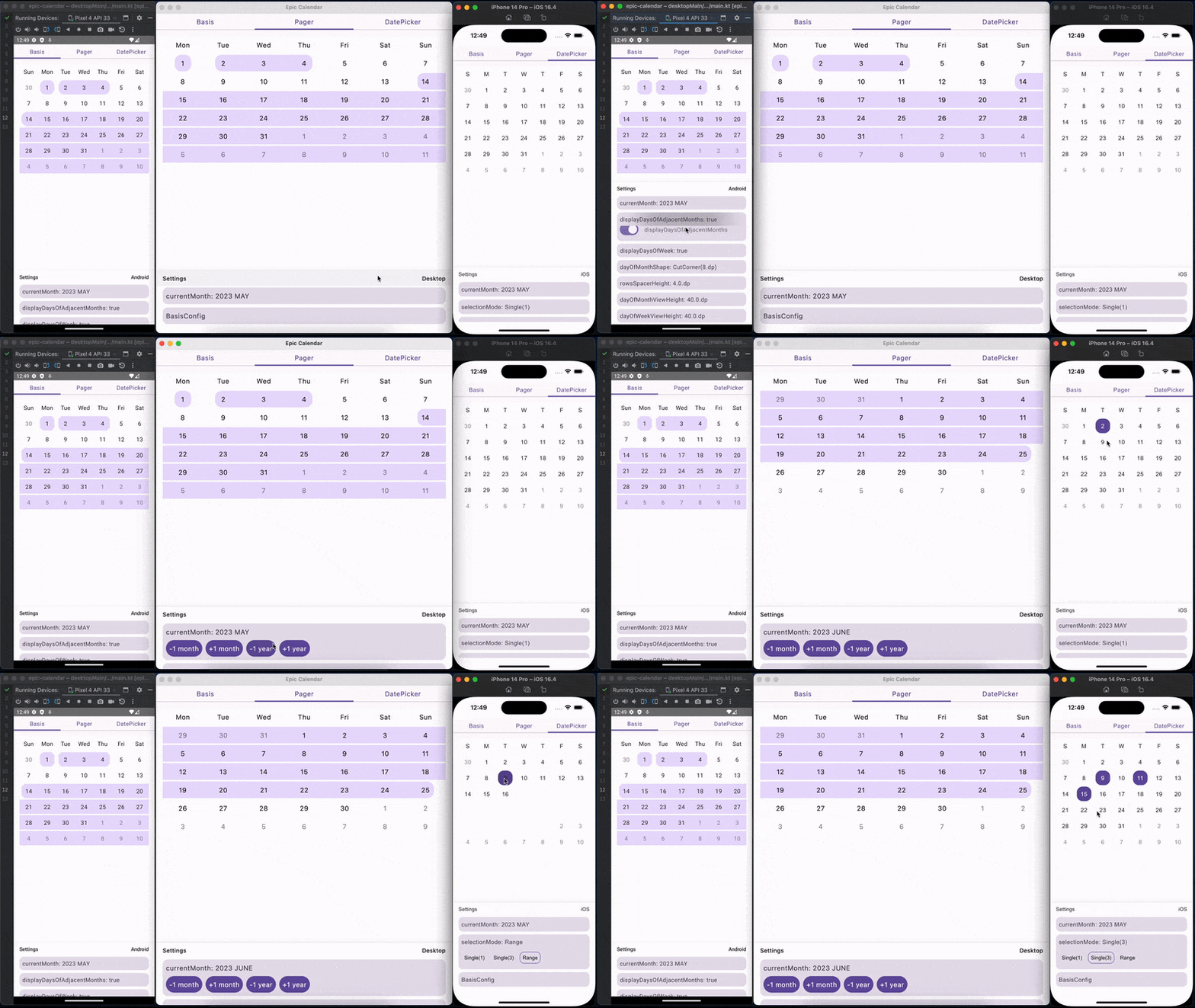
Kotlin Multiplatform supported targets
- android
- ios
- jvm
- js
Dependencies
The library is published on MavenCentral.
dependencies {
    commonMainImplementation("io.github.epicarchitect:epic-calendar-compose:1.0.8")
}
Basis calendar setup
BasisEpicCalendar(
    state = rememberBasisEpicCalendarState(
        config = rememberBasisEpicCalendarConfig(
            rowsSpacerHeight = 4.dp,
            dayOfWeekViewHeight = 40.dp,
            dayOfMonthViewHeight = 40.dp,
            columnWidth = 40.dp,
            dayOfWeekViewShape = RoundedCornerShape(16.dp),
            dayOfMonthViewShape = RoundedCornerShape(16.dp),
            contentPadding = PaddingValues(0.dp),
            contentColor = Color.Unspecified,
            displayDaysOfAdjacentMonths = true,
            displayDaysOfWeek = true
        )
    )
)
If you want to change config dynamically, use rememberMutableBasisEpicCalendarConfig().
If you want to change state dynamically, use rememberMutableBasisEpicCalendarState().
Pager calendar setup
EpicCalendarPager(
    state = rememberEpicCalendarPagerState(
        config = rememberEpicCalendarPagerConfig(
            basisConfig = rememberBasisEpicCalendarConfig(
                contentColor = Color.Red
            )
        )
    )
)
The EpicCalendarPager is based on a BasisEpicCalendar so it accepts a basisConfig,
you can pass it using rememberEpicCalendarPagerConfig.
So you can customize the appearance using rememberBasisEpicCalendarConfig.
Date picker setup
EpicDatePicker(
    state = rememberEpicDatePickerState(
        config = rememberEpicDatePickerConfig(
            pagerConfig = rememberEpicCalendarPagerConfig(
                basisConfig = rememberBasisEpicCalendarConfig(
                    displayDaysOfAdjacentMonths = false
                )
            ),
            selectionContentColor = MaterialTheme.colorScheme.onPrimary,
            selectionContainerColor = MaterialTheme.colorScheme.primary
        )
    )
)
The EpicDatePicker is based on a EpicCalendarPager so it accepts a pagerConfig,
you can pass it using rememberEpicDatePickerConfig.
Date picker selection mode
Date picker has 3 features to pick dates:
- Single date selection
- Multiple date selection
- Date range selection
EpicDatePicker(
    state = rememberEpicDatePickerState(
        // for range
        selectionMode = EpicDatePickerState.SelectionMode.Range,
        // or for single date
        selectionMode = EpicDatePickerState.SelectionMode.Single(),
        // or for multiselect
        selectionMode = EpicDatePickerState.SelectionMode.Single(maxSize = 5)
    )
)
Selected dates can be obtained from state.selectedDates.
Draw ranges
To draw ranges use Modifier.drawEpicRanges(ranges, color)
from io.github.epicarchitect:calendar-compose-ranges.
val myRanges: List<ClosedRange<kotlinx.datetime.LocalDate>>
val myRangeColor: androidx.compose.ui.graphics.Color

// for simple BasisEpicCalendar
BasisEpicCalendar(
    modifier = Modifier.drawEpicRanges(
        ranges = myRanges,
        color = myRangeColor
    )
)

// and for pager
EpicCalendarPager(
    pageModifier = { page ->
        Modifier.drawEpicRanges(
            ranges = myRanges,
            color = myRangeColor
        )
    }
)
Provide setup globally
At the moment this is a very experimental thing,
but you can pass the default settings using
LocalBasisEpicCalendarConfig, LocalEpicCalendarPagerConfig, LocalEpicDatePickerConfig
val defaultBasisConfig = defaultBasisEpicCalendarConfig().copy(
    contentPadding = PaddingValues(horizontal = 16.dp),
    displayDaysOfAdjacentMonths = false,
    displayDaysOfWeek = false,
    dayOfMonthViewShape = RoundedCornerShape(8.dp),
    rowsSpacerHeight = 2.dp
)
val defaultPagerConfig = defaultEpicCalendarPagerConfig().copy(
    basisConfig = defaultBasisConfig
)
val defaultDatePickerConfig = defaultEpicDatePickerConfig().copy(
    pagerConfig = defaultPagerConfig,
    selectionContainerColor = MaterialTheme.colorScheme.primary,
    selectionContentColor = MaterialTheme.colorScheme.onPrimary
)
CompositionLocalProvider(
    LocalBasisEpicCalendarConfig provides defaultBasisConfig,
    LocalEpicCalendarPagerConfig provides defaultPagerConfig,
    LocalEpicDatePickerConfig provides defaultDatePickerConfig
) {
    YourApplicationThatUsesEpicCalendars()
}
Samples
More examples can be found in the sample directory.