
EPUB Optimizer


A Node.js utility to optimize EPUB files by compressing HTML, CSS, images and recompressing the archive. This tool can significantly reduce EPUB file sizes while maintaining compatibility with e-readers and ensuring EPUB specification compliance.
Why Use EPUB Optimizer?
- ✅ Can dramatically reduce file size - The original author workflow often produces files 70-90% smaller
- ✅ Validates before publishing - EPUBCheck must succeed before the requested output is replaced
- ✅ Offers explicit quality trade-offs - Choose balanced, lossless, or the complete author workflow
- ✅ Uses the EPUB package as source of truth - Discovers modern and legacy content through
container.xmland the OPF manifest - ✅ Handles tricky EPUBs gracefully - Refuses DRM-encrypted books, leaves obfuscated/embedded fonts intact, and skips downscaling for fixed-layout titles instead of corrupting them
- ✅ Zero setup with Docker - No need to install Node.js, Java, or other dependencies
- ✅ Battle-tested - Used for real book publishing workflows
- ✅ Structured results - Optional JSON reports, strict mode, and per-step profiling
- ✅ Explicit controls - Generic, lossless, repair, and complete author workflows
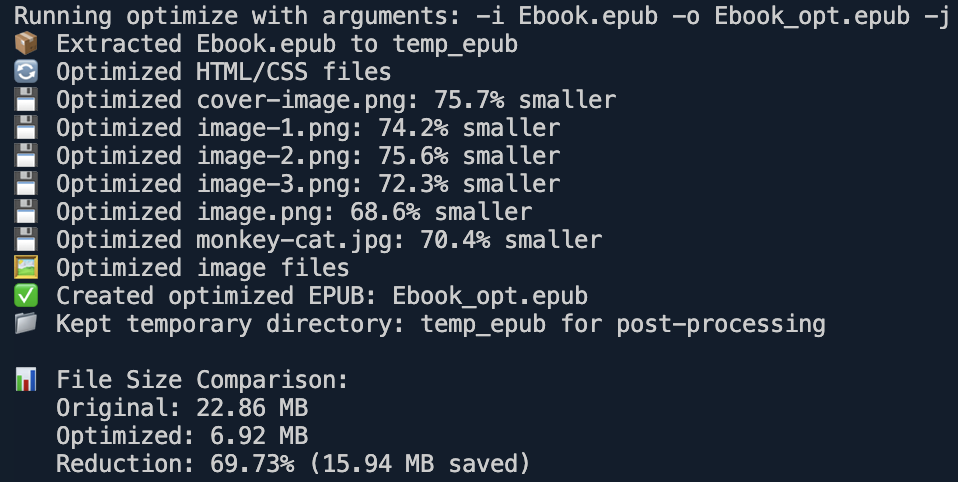
Results
Measured on a 57 MB image-heavy EPUB (12 full-page PNGs), with EPUBCheck-clean output:
| Preset | Output | Reduction | EPUBCheck |
|---|---|---|---|
balanced (default) |
8.3 MB | −85.5% | 0 errors / 0 warnings |
author |
8.3 MB | −85.5% | 0 errors / 0 warnings |
repair |
8.3 MB | −85.5% | 0 errors / 0 warnings |
lossless |
~unchanged | by design (no lossy image changes) | 0 errors / 0 warnings |
Most of the savings come from image optimization (PNG→JPEG + recompression), so results scale with how image-heavy your book is. Peak memory stays bounded (~0.5 GB on this 57 MB input).
Table of Contents
- Quick Start
- Migrating to v3
- Features
- About This Project
- Requirements
- Installation
- EPUBCheck Setup
- Docker Alternative
- Usage
- Project Structure
- Development Information
- Linting and Formatting
- Minification
- Modular Fix Scripts
- Common Issues
- Troubleshooting
- Dependencies
- License
About This Project
I use this project to optimize EPUB files that I create using Pages on Mac. My workflow is:
- Write (text and images) in Pages.
- Create a manual summary page with bookmark links to chapters and sections. The author workflow preset can synchronize these subsections from the manual summary page to the system navigation files - both EPUB3 toc.xhtml and EPUB2 NCX - so they appear in e-reader navigation menus.
- Export my work as an EPUB file.
- Fill in the required information.
- For "Cover": check the option "Use the first page as the book cover image".
- For "Layout": check the reflowable option and "Use table of contents". For "Embed fonts", see the Important Note for Apple Pages Users section below to decide based on whether preserving your typography/design is important to you.
After exporting, my original EPUB file is about 24.4MB. I use the author workflow preset to optimize it (resulting in about 7.3MB). Then I test the result in Apple Books, Kindle Previewer, etc.
This project started with this workflow (I don't use any other tools), but anyone who wants to optimize their EPUB file is welcome to try it! The default pnpm optimize path is generic. My complete Pages/manual-summary workflow is available through pnpm optimize:author, --preset author, or --author-workflow. If you have any questions or issues, let me know. Enjoy! :)
⚠️ Important Note for Apple Pages Users
Apple Pages applies DRM encryption to embedded fonts for copyright protection. This means:
- ✅ Optional font optimization can work on unencrypted TTF fonts when
--fontsis enabled andfontminis installed locally - ❌ Font optimization WILL NOT work on Pages EPUBs if you check "Embed fonts"
- 🔒 Why? Apple encrypts fonts to protect font vendors from piracy (this is intentional and legal)
Your Decision: To Embed Fonts or Not?
This depends on whether preserving your book's design and typography is important to you.
Option 1: Keep "Embed fonts" checked (Preserve design - recommended if typography matters)
- ✅ Your embedded typography and intended design are preserved more consistently
- ✅ Consistent appearance across all e-readers
- ✅ Full control over typography
- ❌ Fonts remain at their original size (typically 1-3 MB total, can't be optimized due to DRM encryption)
- 📊 My image-heavy workflow still achieves about 85-90% total reduction from image/HTML/CSS optimization
Option 2: Uncheck "Embed fonts" (Maximum optimization - recommended if design is not critical)
- ✅ Maximum file size reduction potential - optimize images/HTML/CSS and optionally subset compatible fonts with
--fonts - ✅ Better performance - smaller files load faster
- ✅ More compatible - readers' preferred fonts are used (better accessibility)
- ✅ Cleaner output - no encrypted font files that can't be processed
- ❌ You lose control over typography - readers will see their default fonts
- ❌ Your book's appearance becomes unpredictable across devices
- ❌ Design integrity may be compromised
Choose based on your priority:
- Professional publications where typography matters → Embed fonts (accept 1-3 MB overhead)
- Maximum file size and performance → Don't embed fonts (lose design control)
Quick Start
Note: Traditional usage accepts absolute or relative file paths. Docker Compose automatically shares the repository directory with the container, so Docker commands also use simple relative paths.
Fastest: run the published image (no clone, no build):
docker run --rm -v "$PWD:/epub-files" ghcr.io/kiki-le-singe/epub-optimizer \
  -i YourBook.epub -o YourBook-optimized.epub
The image ships Node.js, Java, and EPUBCheck pre-installed and supports amd64 and arm64 (Apple Silicon).
Traditional installation:
pnpm install
pnpm build
pnpm optimize -i YourBook.epub -o YourBook-optimized.epub
The default balanced preset performs generic optimization without running the modifying XHTML repair or author workflow passes.
Or use Docker Compose (recommended if you cloned the repository):
git clone https://github.com/kiki-le-singe/epub-optimizer.git
cd epub-optimizer
# Place YourBook.epub in this directory, then run:
docker compose run --build --rm optimizer \
  -i YourBook.epub -o YourBook-optimized.epub
The first run builds the image and optimizes the EPUB. Later runs can omit --build.
For the complete Pages/manual-summary author workflow:
docker compose run --rm optimizer \
  -i YourBook.epub -o YourBook-optimized.epub --preset author
Migrating to v3
Version 3 makes the default command safer and less specific to this project's original author workflow:
pnpm optimizenow uses the genericbalancedpreset. It does not apply XHTML repairs, lazy loading, or author structure changes unless explicitly requested.pnpm optimize:author,--preset author, and--author-workflowrun the complete Pages/manual-summary workflow, including repairs, lazy loading, cover navigation, summary synchronization, and chapter sections.- For behavior close to the old generic v2 pipeline without the author structure changes, use
pnpm optimize ... --repair --lazy-loading. - Input, output, and JSON report paths must be different. The output is created as a candidate and replaces the requested output only after EPUBCheck succeeds.
- Use
--strictto reject warnings,--profileto inspect step durations, and--report-jsonfor a machine-readable result.
Features
- Discovers the package/content root through
META-INF/container.xmland resolves navigation/resources through the OPF manifest - HTML/XHTML minification (removes whitespace, comments, and unnecessary code)
- CSS optimization (minifies and combines rules)
- Image compression (JPEG, PNG, WebP, GIF, AVIF, and SVG according to the selected preset and quality settings)
- PNG to JPEG conversion for non-transparent images (significantly reduces file size)
- JavaScript minification (reduces script size)
- Optional font subsetting via
--fontsfor trusted local workflows only; requires installingfontminseparately - SVG optimization (minifies SVG files using SVGO)
- Image downscaling (optionally resizes large images to a max dimension for e-reader compatibility)
- Lazy loading for images (adds
loading="lazy"to all<img>tags in XHTML for EPUB3 readers) - Cross-platform archive processing (pure JavaScript implementation with no external ZIP binaries)
- Archive recompression (EPUB-compliant ZIP packaging with proper compression settings)
- EPUB validation against the EPUB specification, with optional structured success and failure reports
- Transactional output publication after successful EPUBCheck validation
- Optional XHTML repair mode via
--repair - Optional author workflow preset (syncs subsections from a manual summary page, updates cover navigation, and applies the project author's structure fixes)
- Balanced, lossless, and author presets
- Strict failure mode, per-step profiling, and JSON run reports
- Non-destructive doctor/inspect mode for OPF, navigation, internal reference, image weight, and optimization-risk summaries
- Archive extraction limits, zip-slip and symlink rejection, and safe OPF/manifest/navigation path resolution
- Graceful handling of special EPUBs: detects
META-INF/encryption.xmland refuses DRM-encrypted books instead of silently corrupting them, while still optimizing books whose only encrypted resources are fonts (the fonts are left byte-for-byte intact) - Fixed-layout aware: automatically disables image downscaling for pre-paginated (
rendition:layout) EPUBs so page images stay aligned with the declared viewport - Animation-safe image processing: preserves every frame of animated GIF/WebP/AVIF and caps image-processing memory to avoid blow-ups on image-heavy books
- Modular fix scripts for EPUB and OPF structure
- Command-line interface with customizable options
- File size comparison reporting
- Automated unit, EPUBCheck E2E, and Docker E2E test suites
Note:
- Font subsetting limitation: Apple Pages EPUBs with embedded fonts are encrypted by Apple for DRM protection, preventing font optimization. Font subsetting is disabled by default and
fontminis not installed as a runtime dependency because its legacy dependency tree currently produces production audit findings. Use--fontsonly for trusted local workflows after installingfontminyourself. The optimizer detects these encrypted fonts automatically: it optimizes everything else and leaves the encrypted fonts untouched, so books exported with "Embed fonts" are still optimized safely (only books that encrypt actual content are refused).- Lazy loading is enabled by the author preset or explicitly with
--lazy-loading.
Requirements
Only required for traditional installation (skip if using Docker):
- Node.js 22 or higher (CI validates Node.js 22 and 24)
- Java Runtime Environment (JRE) 17 or higher for EPUBCheck (CI and Docker use OpenJDK 17)
- pnpm 10.30.3, pinned by the repository's
packageManagerfield
Installation
# Clone the repository
git clone https://github.com/kiki-le-singe/epub-optimizer.git
cd epub-optimizer

# Install dependencies
pnpm install

# Build the project (required before running optimize commands)
pnpm build
EPUBCheck Setup
This tool requires EPUBCheck to validate EPUB files. Follow these steps:
- Download EPUBCheck from the official website
- Extract the downloaded zip file
- Copy the extracted
epubcheck-x.x.xfolder (where x.x.x is the version) to the root of this project - Make sure the folder is named
epubcheckto match the path inepubcheckPathin src/utils/config.ts
Or simply run bash scripts/install-epubcheck.sh from the project root — it downloads and installs the pinned EPUBCheck version into epubcheck/ for you.
CI and Docker pin the EPUBCheck version and its sha256 checksum centrally in scripts/install-epubcheck.sh (single source of truth); the download is verified against the checksum before installation.
Docker Alternative
You must have Docker installed with Docker Compose v2. Docker Desktop includes both.
Pre-built Image (GHCR)
Every release publishes a multi-arch image (amd64 and arm64, including Apple Silicon) to GitHub Container Registry. It is the fastest way to use the optimizer — no clone, no build, no Node.js or Java to install:
docker run --rm -v "$PWD:/epub-files" ghcr.io/kiki-le-singe/epub-optimizer \
  -i your-book.epub -o your-book-optimized.epub
Pin a specific release with a version tag, e.g. ghcr.io/kiki-le-singe/epub-optimizer:3.5.0 (images are published starting with v3.5.0). Building locally with Compose (below) remains fully supported and is the right choice when modifying the source.
Docker Compose provides a containerized environment with all dependencies pre-installed. It automatically mounts the repository directory, so the same relative EPUB paths work on Windows, macOS, and Linux. When working from a clone, Compose builds the image locally.
Docker Requirements
- Docker Desktop, or Docker Engine with Docker Compose v2
Docker Installation
# Clone the repository
git clone https://github.com/kiki-le-singe/epub-optimizer.git
cd epub-optimizer

# Build the local image (includes all dependencies)
docker compose build
Docker Quick Start
# Build when needed, then optimize an EPUB from the repository directory
docker compose run --build --rm optimizer \
  -i your-book.epub -o your-book-optimized.epub
Benefits of Docker approach:
- ✅ No need to install Node.js, Java, or pnpm
- ✅ Works consistently across all platforms (Windows, Mac, Linux)
- ✅ Includes EPUBCheck automatically
- ✅ Uses the dependency versions tested by the project
- ✅ Automatically mounts the working directory and accepts relative EPUB paths
- ✅ Runs non-root with no network, no Linux capabilities, and a read-only container filesystem
Usage
Available Scripts
| Script | Description |
|---|---|
build |
Build TypeScript for production (with minification) |
build:dev |
Build TypeScript for development (no minification) |
build:prod |
Build TypeScript with minification for production |
minify:safe |
Safely minify JavaScript in dist/ directory (runs the TS source via Node's native type-stripping) |
optimize |
Run optimizer, keeping temp files |
optimize:author |
Run the complete project-author workflow, including repairs and structure updates |
optimize:repair |
Run generic optimization plus modifying XHTML repair passes |
optimize:lossless |
Avoid lossy image conversion, recompression, and resizing |
optimize:clean |
Run optimizer, removing temp files afterward |
cleanup |
Remove temporary files |
test |
Run tests in watch mode |
test:run |
Run tests once and exit |
test:coverage |
Run tests with coverage report |
test:e2e |
Validate every public pnpm optimization workflow with fixtures and EPUBCheck |
test:docker |
Validate raw Docker and the complete Docker Compose workflow matrix with EPUBCheck |
release:check |
Validate a requested release version against package.json and optional tag/ref guards |
release:prepare |
Merge develop → main, bump package.json, and push main in one command (--dry-run to preview) |
lint |
Lint TypeScript files in src and scripts directories |
lint:fix |
Lint and auto-fix TypeScript files in src and scripts |
format |
Auto-format all .ts, .json, and .md files with Prettier |
format:check |
Check formatting of all .ts, .json, and .md files with Prettier |
Modern Workflow
# Build for development (faster, not minified)
pnpm build:dev

# Build for production (with minification)
pnpm build
# or
pnpm build:prod

# Then run the optimizer
pnpm optimize -i YourBook.epub -o YourBook-optimized.epub

# Or use the project author's Pages/manual-summary workflow
pnpm optimize:author -i YourBook.epub -o YourBook-optimized.epub

# Avoid lossy image changes
pnpm optimize:lossless -i YourBook.epub -o YourBook-optimized.epub

# Apply the explicit XHTML repair passes
pnpm optimize:repair -i YourBook.epub -o YourBook-optimized.epub

# Reject warnings, print timings, and write a machine-readable report
pnpm optimize -i YourBook.epub -o YourBook-optimized.epub \
  --strict --profile --report-json reports/optimization-report.json

# Inspect an EPUB without writing an optimized output
pnpm optimize --doctor -i YourBook.epub \
  --report-json reports/doctor-report.json

# Run tests
pnpm test
# or run tests once and exit
pnpm test:run
# run the EPUBCheck end-to-end fixture after pnpm build
pnpm test:e2e

# after docker compose build, run the raw Docker and Compose fixtures
pnpm test:docker
Command Line Options
Usage: epub-optimizer [options]

Options:
  -i, --input       Input EPUB file path                    [string] [default: "mybook.epub"]
  -o, --output      Output EPUB file path                   [string] [default: "mybook_opt.epub"]
  -t, --temp        Temporary directory for processing      [string] [default: "temp_epub"]
  --jpg-quality     JPEG compression quality (0-100)        [number] [default: 70]
  --png-quality     PNG compression quality (0-1 scale)     [number] [default: 0.6]
  --lang            UI language for labels (e.g. fr, en)    [string] [default: "fr"]
  --fonts           Enable experimental font subsetting      [boolean] [default: false]
  --preset          Optimization preset: balanced, lossless, author
  --repair          Apply potentially modifying XHTML repairs
  --author-workflow Enable the complete author workflow, including repairs
  --author-config   JSON overrides for the author workflow's summary, cover, and CSS class mapping
  --convert-png     Convert large opaque PNG files to JPEG when safe
  --no-convert-png  Disable PNG-to-JPEG conversion
  --lazy-loading    Add loading="lazy" to XHTML images
  --no-lazy-loading Disable lazy loading
  --max-image-dim   Maximum image width/height; 0 disables resizing
  --strict          Fail when a step emits warnings or errors
  --profile         Print execution time for each pipeline step
  --report-json     Write a structured pipeline report to a JSON file
  --doctor, --inspect
                    Inspect an EPUB without optimizing or writing an output EPUB
  --clean           Clean temporary files after processing  [boolean] [default: false]
  -h, --help        Show help message                       [boolean]
  -v, --version     Show version number                     [boolean]

Examples:
  pnpm optimize -i book.epub -o book-optimized.epub            Basic optimization
  pnpm optimize:clean -i book.epub -o book-opt.epub            Optimize and clean temp files
  pnpm optimize -i book.epub -o book-opt.epub --jpg-quality 85 Higher JPEG quality (less compression)
  pnpm optimize -i book.epub -o book-opt.epub --png-quality 0.9 Higher PNG quality (less compression)
  pnpm optimize -i book.epub -o book-opt.epub --fonts          Enable font subsetting
  pnpm optimize:lossless -i book.epub -o book-opt.epub         Avoid lossy image changes
  pnpm optimize:repair -i book.epub -o book-opt.epub           Apply XHTML repair passes
  pnpm optimize:author -i book.epub -o book-opt.epub           Use the author's Pages/manual-summary workflow
  pnpm optimize -i input.epub -o output.epub --jpg-quality 85 --png-quality 0.8 Custom image settings
  pnpm optimize --doctor -i input.epub                         Inspect without modifying the EPUB
Script Differences:
pnpm optimize- Optimizes the EPUB file and keeps temporary files for inspectionpnpm optimize:lossless- Skips lossy image conversion, recompression, and resizingpnpm optimize:repair- Same as optimize, plus explicit XHTML repair passespnpm optimize:author- Complete author workflow: generic optimization, repairs, lazy loading, cover navigation, summary page, and chapter sectionspnpm optimize:clean- Same as optimize but removes temporary files afterwardpnpm cleanup- Manually removes the temporary directory (temp_epub)
Modes and Presets
| Behavior | balanced |
lossless |
author |
|---|---|---|---|
| HTML/CSS/JavaScript minification | Yes | Yes | Yes |
| SVG optimization | Yes | Yes | Yes |
| PNG-to-JPEG conversion | Yes | No | Yes |
| Raster image resize/re-encode | Yes | No | Yes |
| Default maximum image dimension | 1600 px | Disabled | 1600 px |
| Lazy loading | No | No | Yes |
| XHTML repairs | No | No | Yes |
| Author structure workflow | No | No | Yes |
balancedis the default generic preset. It optimizes content and images without applying XHTML repairs or author structure changes.losslessmeans no lossy raster processing. Text, CSS, JavaScript, and SVG files are still optimized, so the output is not byte-for-byte identical to the input.authorruns this project's complete Pages/manual-summary workflow and is equivalent topnpm optimize:author.--repairexplicitly enables the potentially modifying XHTML repair passes.--author-workflowremains supported and always enables the complete author workflow, including repairs.--author-configoptionally adapts the author workflow to another summary/cover/class mapping. Without it, the original project-author workflow is unchanged.- Font subsetting is opt-in through
--fontsand is not enabled by any preset.
Applicable CLI options override preset defaults. For example, --preset balanced --no-convert-png disables PNG-to-JPEG conversion. The lossless preset always skips lossy raster processing, and the author workflow always includes repairs and author structure updates.
Doctor / Inspect Mode
Use --doctor or --inspect to analyze an EPUB without publishing a candidate output and without modifying the input archive:
pnpm optimize --doctor -i book.epub
pnpm optimize --inspect -i book.epub --report-json reports/book-doctor.json
Doctor mode extracts the EPUB to a system temporary directory, reads container.xml and the OPF manifest, prints a console summary, writes JSON when --report-json is provided, and removes its temporary extraction directory. It does not run the optimizing processors and it does not replace EPUBCheck.
The report includes OPF path/version, manifest and spine counts, EPUB3/NCX navigation presence, internal reference counts and missing targets, image byte totals and largest images, duplicate image basenames, large raster images, opaque PNG conversion candidates, and other optimization-risk hints.
Optional Author Workflow Configuration
pnpm optimize:author continues to use the original Pages/manual-summary conventions by default: chapter-2.xhtml, cover.xhtml, cover spine id cover, chapter classes p6/p8, section class p7, and navigation classes s3/s4.
For a different authoring workflow, create a JSON file containing only the values that differ:
{
  "summaryHref": "contents.xhtml",
  "coverSpineId": "front-cover",
  "chapterClasses": ["chapter-link"],
  "sectionClasses": ["section-link"],
  "summaryEntryClass": "chapter-link",
  "coverNavClass": "toc-cover",
  "sectionNavClass": "toc-section"
}
Then pass it to the same author command:
pnpm optimize:author -i book.epub -o book-optimized.epub \
  --author-config author-workflow.json
The configuration is validated before structure updates. Unknown keys, unsafe paths, and invalid class/id values fail the run while preserving the temporary directory for debugging.
Structured Reports and Profiling
--strictalso fails the run on processing or EPUBCheck warnings; processing and EPUBCheck errors always fail.--profileprints each pipeline step's status and duration.--report-json reports/report.jsonwrites a structured report on success and on pipeline failures that occur after preflight path validation.- The report directory is created automatically. Local reports under
reports/are ignored by Git.
Reports contain the configured input/output paths, preset, strict mode, timestamps, total duration, size reduction when available, per-step statuses/durations/messages, before/after content metrics, integrity checks, and the final error when a run fails:
{
  "input": "/books/input.epub",
  "output": "/books/output.epub",
  "preset": "balanced",
  "strict": true,
  "success": true,
  "durationMs": 1234,
  "content": {
    "before": {
      "manifestItems": 42,
      "spineItems": 18,
      "contentDocuments": 20,
      "images": 12,
      "navigationEntries": 36,
      "missingReferences": 0
    },
    "after": {
      "manifestItems": 42,
      "spineItems": 18,
      "contentDocuments": 20,
      "images": 12,
      "navigationEntries": 36,
      "missingReferences": 0
    },
    "integrity": {
      "valid": true,
      "newMissingReferences": [],
      "issues": []
    }
  },
  "steps": [
    {
      "name": "Extract EPUB",
      "status": "success",
      "durationMs": 42,
      "messages": []
    }
  ]
}
The report path must differ from the input and output EPUB paths and must be absent or a regular file. A report write failure fails the command.
Safety Model
The final EPUB is transactional: the optimizer creates a hidden candidate next to the requested output, validates that candidate with EPUBCheck, and publishes it only after validation succeeds. If optimization, packaging, validation, or publication fails before the commit, the candidate is discarded, the previous output remains untouched, and any temporary processing directory already created is preserved for debugging.
Before packaging, the optimizer also compares the extracted EPUB before and after processing. Publication is blocked if manifest, spine, document, image, or navigation counts decrease, or if processing introduces a new missing internal reference. Existing input issues remain visible in the report without turning a previously processable EPUB into a false failure.
Cleanup and JSON report writing happen after the validated EPUB is published. If either of these later operations fails, the command exits non-zero but keeps the newly published, EPUBCheck-validated output.
Input, output, and report collisions are rejected, including aliases through symbolic links or hard links and case-only aliases on macOS/Windows. Existing output and report targets must be regular files.
Temporary-directory cleanup is guarded: the optimizer refuses filesystem roots, the current working directory, the home directory, and any temp directory containing the input or output EPUB. Build and manual cleanup scripts also refuse paths outside the project or system temp directories.
Archive extraction rejects unsafe absolute/traversal paths and symbolic links. It also limits archives to 20,000 entries, 512 MB per file, 2 GB total extracted size, and a maximum compression ratio of 1000:1.
META-INF/container.xml and the OPF package document are the source of truth for content discovery. OPF and navigation references are resolved safely and cannot escape the extracted EPUB root.
Docker Usage
Docker Compose is the recommended cross-platform Docker interface. It automatically builds or reuses the local image, mounts the repository at /epub-files, and lets the CLI use normal relative paths.
First run or rebuild after updating the repository:
docker compose run --build --rm optimizer \
  -i book.epub -o book-optimized.epub
Later runs:
docker compose run --rm optimizer \
  -i book.epub -o book-optimized.epub
Custom image quality:
docker compose run --rm optimizer \
  -i book.epub -o book-optimized.epub \
  --jpg-quality 50 --png-quality 0.4
Complete author workflow:
docker compose run --rm optimizer \
  -i book.epub -o book-optimized.epub \
  --preset author --clean
Author workflow with an optional configuration file:
docker compose run --rm optimizer \
  -i book.epub -o book-optimized.epub \
  --preset author --author-config author-workflow.json
Compose command breakdown:
docker compose run- Run theoptimizerservice defined incompose.yaml--build- Build or refresh the image before running; needed on the first run and after code updates--rm- Remove the stopped one-off container after processing- Arguments after
optimizerare passed directly to the EPUB optimizer
By default, Compose shares the repository directory with the container. Place EPUB files in that directory and use their normal relative names. Temporary files also appear there unless --clean is used.
Advanced: raw Docker
Raw docker run remains supported, but its bind-mount syntax varies by shell. The image now works from /epub-files, so the EPUB arguments themselves remain relative:
docker build -t epub-optimizer .
docker run --rm -v "$PWD:/epub-files" epub-optimizer \
  -i book.epub -o book-optimized.epub
Debugging with Temporary Files
Traditional usage:
# Keep temp files for inspection (default behavior)
pnpm optimize -i book.epub -o book-opt.epub
# Inspect temp_epub/ directory

# Custom temp location
pnpm optimize -i book.epub -o book-opt.epub -t my-debug-folder

# Clean up when done
pnpm cleanup
Docker usage:
# Temp files automatically appear in your current directory
docker compose run --rm optimizer \
  -i book.epub -o book-optimized.epub
# Inspect temp_epub/ directory on your host

# Custom temp location (still visible on host)
docker compose run --rm optimizer \
  -i book.epub -o book-optimized.epub \
  -t my-debug-folder

# Clean temp files after processing
docker compose run --rm optimizer \
  -i book.epub -o book-optimized.epub \
  --clean
What's in the temp directory?
- Extracted EPUB structure
- Processed HTML/CSS/JavaScript files
- Optimized images
- Modified fonts only when
--fontsis enabled - All intermediate processing artifacts
This is invaluable for debugging optimization issues or understanding what the tool does to your EPUB.
Failures before successful cleanup preserve temporary files even when --clean was requested. This keeps the failed processing state available for debugging. A later report-writing failure can occur after cleanup and publication have already succeeded.
Project Structure
epub-optimizer/
├── .github/workflows/
│   ├── ci.yml                 # Node 22/24, EPUBCheck, and Docker E2E validation
│   ├── epubcheck-watch.yml    # Weekly check for new EPUBCheck releases (opens an issue)
│   └── release.yml            # Manual release automation with CI gates, GHCR image, tag, and GitHub Release
├── compose.yaml            # Recommended cross-platform Docker interface
├── Dockerfile              # Multi-stage production container image
├── docker-entrypoint.sh    # Docker defaults and CLI entrypoint
├── dist/                   # Compiled JavaScript (production code)
├── package.json            # Package configuration
├── README.md               # Documentation
├── tsconfig.json           # TypeScript configuration
├── vitest.config.ts        # Test configuration
├── epubcheck/              # EPUBCheck for EPUB validation (not included in repo)
├── scripts/                # Build and maintenance scripts
│   ├── clean-path.ts          # Guarded cleanup helper used instead of rm -rf
│   ├── docker-e2e.ts          # Docker fixture test runner
│   ├── e2e-epubcheck.ts       # Local fixture test runner with EPUBCheck
│   ├── install-epubcheck.sh   # Single source of the EPUBCheck version (CI + Docker)
│   ├── minify-dist.ts         # Smart minification script for JavaScript files
│   ├── prepare-release.ts     # Merge develop→main + bump (pnpm release:prepare)
│   └── validate-release.ts    # Release version/tag/ref guards (pnpm release:check)
└── src/                    # Source code directory
    ├── index.ts            # optimizeEPUB(): extract + run every content processor
    ├── pipeline.ts         # In-process CLI orchestrator (bin entry point)
    ├── cli.ts              # yargs-based argument parser
    ├── types.ts            # TypeScript type definitions
    ├── types.d.ts          # Additional TypeScript declarations
    ├── processors/         # Processing modules (called by index.ts)
    │   ├── archive-processor.ts    # EPUB extraction/compression (zip-slip safe)
    │   ├── html-processor.ts       # HTML/CSS processing
    │   ├── js-processor.ts         # JavaScript minification
    │   ├── svg-optimizer.ts        # SVG optimization
    │   ├── lazy-img.ts             # Add loading="lazy" to <img>
    │   ├── font-processor.ts       # Optional font subsetting
    │   ├── image-converter.ts      # PNG → JPEG conversion (parallel)
    │   └── image-processor.ts      # Resize + re-encode (single-pass, parallel)
    ├── scripts/            # Post-processing steps (exported run(opts) fns)
    │   ├── create-epub.ts  # Package the final EPUB archive
    │   ├── validate-epub.ts # Run EPUBCheck via java
    │   ├── utils.ts        # Shared helpers (RunOpts, isEntryPoint, …)
    │   ├── fix/            # General XHTML fix scripts (modular)
    │   │   ├── fix-span-tags.ts
    │   │   ├── fix-xml.ts
    │   │   ├── remove-empty-styles.ts
    │   │   └── index.ts    # runFixes(): call every fix in sequence
    │   └── ops/            # EPUB structure modifications
    │       ├── add-cover-image-property.ts
    │       ├── update-cover-linear.ts
    │       ├── update-toc-with-cover.ts
    │       ├── update-summary-page.ts
    │       ├── add-chapter-sections-to-toc.ts
    │       └── update-structure.ts # runStructureUpdates(): call every op
    └── utils/              # Utility modules
        ├── config.ts       # Application configuration
        ├── epub-utils.ts   # OPF / TOC file discovery
        ├── output-transaction.ts # Candidate output commit/rollback
        ├── author-workflow-config.ts # Optional validated author workflow mapping
        ├── epub-doctor.ts    # Non-destructive EPUB inspection and optimization-risk summary
        ├── epub-integrity.ts # Before/after content metrics and regression checks
        ├── path-safety.ts  # Safe path resolution inside the extracted EPUB
        ├── pipeline-options.ts # Preset resolution
        ├── run-report.ts   # Structured results and profiling
        └── i18n.ts         # Localized label lookup
Note: Test files are colocated with their respective source files but omitted from this structure for clarity.
Development Information
This project is built with TypeScript and uses modern ESM modules. Here's how the development workflow works:
Source and Build Separation
- TypeScript source files are in the
src/andscripts/directories - The compiled JavaScript output goes to the
dist/directory - The production build is highly optimized:
- Test files (
*.test.ts) are completely excluded - No TypeScript declaration files (*.d.ts) are generated
- No source maps are included
- JavaScript files are minified using Terser
- Comments are removed from the final code
- Test files (
- You must run
pnpm buildbefore running anyoptimizecommands
Import Structure
- The project uses TypeScript's
NodeNextmodule resolution, which mirrors Node.js ESM semantics exactly - Relative imports must include the explicit
.jsextension in source files (e.g.,import { foo } from './foo.js'), matching what Node.js resolves at runtime - Type-only imports use
import type(enforced byverbatimModuleSyntax) so they are fully erased at build time
Testing
- Test files are colocated with the source files they test (e.g.,
src/index.tsandsrc/index.test.ts) - This "side-by-side" approach has several advantages:
- Easy to locate tests for any module
- Promotes keeping tests updated when changing implementation
- Makes it clear which parts of the codebase are covered by tests
- Simplifies relative imports between tests and implementation
- Tests are written using Vitest, a modern test framework compatible with Jest syntax
- Run tests with
pnpm test(watch mode) orpnpm test:run(single run) - Run tests with coverage using
pnpm test:coverage pnpm test:e2eruns the publicoptimize,optimize:clean,optimize:lossless,optimize:repair, andoptimize:authorcommands, including a configured author workflow- Every pnpm E2E output is checked for content integrity and validated with EPUBCheck; clean/keep-temp behavior and workflow-specific transformations are also verified
- The author E2E fixture also checks before/after content integrity, sequential NCX navigation, and a maximum output-size ratio to catch compression regressions
pnpm test:dockervalidates raw Docker balanced/author plus Docker Compose balanced, lossless, repair, author, and configured-author workflows- Docker E2E verifies reports, content integrity, EPUBCheck output, workflow-specific transformations, and clean/keep-temp behavior
- CI validates the project on Node.js 22 and 24, and runs the Docker E2E workflow on Node.js 24
- Unit tests run in a Node.js environment and mock external dependencies where appropriate
Release Validation
Releases are cut from GitHub Actions with the manual Release workflow. Prepare main with pnpm release:prepare X.Y.Z (merges develop → main, bumps package.json, pushes main; add --dry-run to preview), then dispatch the workflow from main — there is no version input; it reads the version from package.json. The workflow validates that the run is on main and the vX.Y.Z tag does not already exist (locally or remotely), runs the CI quality gates and E2E suites, pushes the multi-arch image to GHCR (ghcr.io/kiki-le-singe/epub-optimizer, tagged X.Y.Z and latest), creates the annotated tag, and creates the GitHub release as a draft — review/polish the auto-drafted notes, then click Publish.
Before creating a release manually, run the CI quality gates plus coverage, audit, and local Docker checks:
pnpm release:check --version 3.3.1
pnpm lint
pnpm format:check
pnpm build
pnpm test:run
pnpm test:coverage
pnpm audit --prod
pnpm test:e2e
docker compose config --quiet
docker compose build
pnpm test:docker
Also validate a representative real EPUB through both execution paths:
pnpm optimize:author -i YourBook.epub -o YourBook-pnpm.epub \
  --strict --report-json reports/YourBook-pnpm-report.json

docker compose run --rm optimizer \
  -i YourBook.epub -o YourBook-docker.epub \
  --preset author --strict --report-json reports/YourBook-docker-report.json
A successful release candidate exits with code 0, passes EPUBCheck without errors or warnings in strict mode, and produces reports with "success": true and "content.integrity.valid": true.
Development and Production
- For development: Make changes to TypeScript files and run
pnpm build:dev - For production: Run
pnpm buildto create a minified, optimizeddist/directory - The
optimizecommands run against the compiled code indist/
Linting and Formatting
- Linting:
pnpm run lintlints all TypeScript files in thesrcandscriptsdirectories.pnpm run lint:fixdoes the same, but also auto-fixes issues where possible.
- Formatting:
pnpm run formatauto-formats all.ts,.json, and.mdfiles in the project using Prettier.pnpm run format:checkchecks formatting without making changes (useful for CI).
Minification
The production build process includes:
- TypeScript compilation
- Smart JavaScript minification with Terser:
- Minifies all files in both
src/andscripts/directories - Maintains class names and function names for better error reporting
- Compresses and mangles variables for reduced file size
- Minifies all files in both
- Comment removal
Note: The minification script (
minify:safe) runsscripts/minify-dist.tsdirectly via Node's native TypeScript stripping (node --experimental-strip-types), not on compiled JavaScript. This keeps the build toolchain dependency-free (nots-node/tsx) while always using the latest TypeScript logic for minification.
Modular Fix Scripts
Every processing step is a plain async function. pipeline.ts runs them all in-process (no sub-process spawns), forwarding a shared { tempDir, lang, output } down the chain.
- Explicit repair passes (span tags, XML/XHTML sanity, empty styles) live in
src/scripts/fix/. They run only with--repairor the author workflow because they intentionally modify document structure. - Author workflow structure modifications (cover linear, TOC, summary page, chapter sections) live in
src/scripts/ops/.src/scripts/ops/update-structure.tsexportsrunStructureUpdates(opts), and the pipeline runs it only when--author-workflowis enabled. - To enable/disable a step, comment or uncomment the corresponding
await …(opts)call in the matching orchestrator file. - To add a new step, create a script that exports
async run(opts: RunOpts)and add anawait run(opts)line in the orchestrator. - Each leaf script also auto-runs when executed directly (
node dist/src/scripts/fix/fix-xml.js); theisEntryPoint()guard keeps that from firing on import.
Customizing the Optimization Process
Use the default generic optimizer for EPUBs that do not need the project author's Pages/manual-summary workflow:
pnpm optimize -i book.epub -o book-opt.epub
If you do want the complete Pages/manual-summary workflow, enable the author preset:
pnpm optimize:author -i YourBook.epub -o YourBook-optimized.epub
# equivalent:
pnpm optimize -i YourBook.epub -o YourBook-optimized.epub --preset author
The existing project-author conventions remain the defaults. To adapt summary/cover paths or CSS classes without editing source code, use --author-config author-workflow.json as documented under Optional Author Workflow Configuration.
For deeper source-level customization, there are two levels of granularity:
Wholesale (in src/pipeline.ts) — comment out an entire step to disable a whole group at once:
- Omit
--repairand the author preset to skip all modifying XHTML repair passes. - Omit
--author-workflow/--preset authorto skip all author workflow structure updates. - EPUBCheck validation is required for transactional publication. When a run fails, inspect the preserved temporary directory instead of disabling validation.
Granular (in the orchestrator files) — keep some steps, skip others:
- Example: Skip adding cover to TOC — comment out
await updateTocWithCover(opts)insrc/scripts/ops/update-structure.ts - Example: Skip adding cover to summary page — comment out
await updateSummaryPage(opts)in the same file - Example: Skip setting cover as first page — comment out
await updateCoverLinear(opts)in the same file - Example: Skip chapter sections synchronization — comment out
await addChapterSectionsToToc(opts)in the same file (useful if you don't have subsections in your manual summary page) - Example: Disable specific XML/HTML fixes — comment out the relevant
await …(opts)call insrc/scripts/fix/index.ts
After making any customizations, rebuild the project with pnpm build to apply your changes.
Common Issues
Docker Issues
"docker: command not found"
- Install Docker first: Download Docker
- Make sure Docker Desktop is running
"docker compose is not a docker command"
- Install Docker Compose v2 or update Docker Desktop
- Verify with
docker compose version
"Permission denied" or file access errors
- Ensure your EPUB file is in the project root or mounted directory
- Check file permissions (especially on Linux/Mac)
Traditional Installation Issues
"Java not found" or EPUBCheck errors
- Install Java JRE 17+ (see Requirements)
- Download EPUBCheck manually (see EPUBCheck Setup)
"pnpm command not found"
- Install pnpm:
npm install -g pnpm
Build errors
- Run
pnpm buildbefore usingpnpm optimize - Try
pnpm installif dependencies are missing
File Issues
"Input file not found"
- Check your file path and name (case-sensitive)
- Make sure the EPUB file is in the correct directory
- Use relative paths from the project root
"Output file permission errors"
- Check write permissions in the output directory
- Try a different output filename
Troubleshooting
If you encounter any issues, please check the GitHub issues page for existing issues or open a new one.
Dependencies
This project uses the following dependencies:
System Requirements
- Node.js 22 or higher
- Java Runtime Environment (JRE) 17 or higher (for EPUBCheck validation)
- pnpm 10.30.3
Key npm Packages
- cheerio - For robust HTML/XHTML DOM manipulation
- clean-css - For CSS minification
- fs-extra - Enhanced file system operations
- html-minifier-terser - For HTML minification
- sharp - For image optimization (JPEG, PNG, WebP, GIF, AVIF, SVG)
- unzipper - For extracting EPUB files
- yazl - For cross-platform EPUB archive creation (pure JavaScript ZIP implementation)
- yargs - For command-line argument parsing
Development Dependencies
- typescript - For static typing and compilation
- terser - For JavaScript minification
- vitest - For testing
- typescript-eslint - For linting TypeScript code
- prettier - For code formatting
License
This project is licensed under the MIT License. See the LICENSE file for more details.