
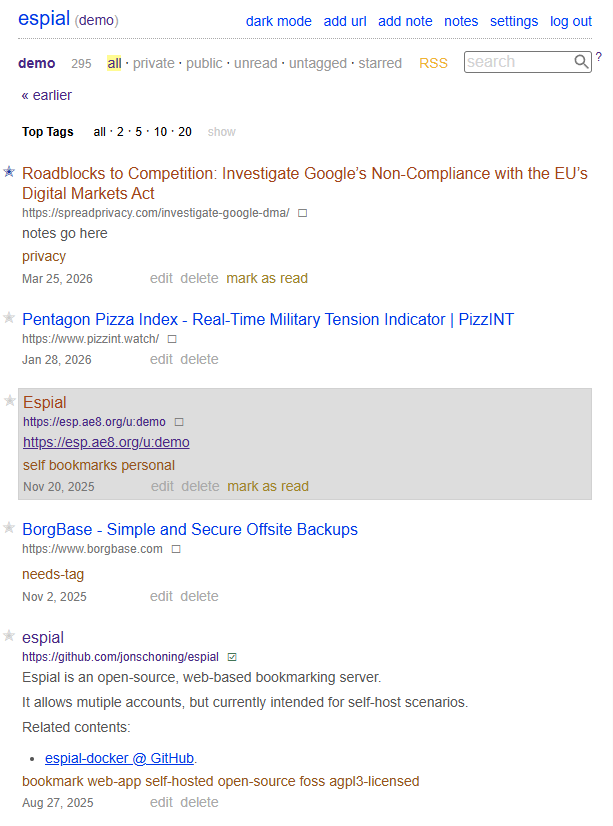
Espial
Espial is an open-source, web-based bookmarking server.
It allows mutiple accounts, but currently intended for self-host scenarios.
The bookmarks are stored in a sqlite3 database, for ease of deployment & maintenence.
The easist way for logged-in users to add bookmarks, is with the "bookmarklet", found on the Settings page.
Demo Server
Log in with:
- username:
demo - password:
demo
https://espdemo.ae8.org/u:demo
Installation
Docker Setup
See:
https://github.com/jonschoning/espial-docker
Server Setup (From Source)
- Install the Stack executable here:
- Build executables:
stack build
- Create the database:
stack exec migration -- createdb
- Create a user:
stack exec migration -- createuser --userName myusername --userPassword myuserpassword
- Import a pinboard bookmark file for a user (optional):
stack exec migration -- importbookmarks --userName myusername --bookmarkFile sample-bookmarks.json
- Import a firefox bookmark file for a user (optional):
stack exec migration -- importfirefoxbookmarks --userName myusername --bookmarkFile firefox-bookmarks.json
- Start a production server:
stack exec espial
Configuration
See config/settings.yml for changing default run-time parameters & environment variables.
config/settings.ymlis embedded into the app executable when compiled and also read once when the app starts. Current settings inconfig/settings.ymlwill override the embedded compile-time settings.config/settings.ymlvalues formatted like_env:ENV_VAR_NAME:default_valuecan be overridden by the specified environment variable.- Example:
_env:PORT:3000- environment variable
PORT - default app http port:
3000
Request IP Logging
Espial supports the IP_FROM_HEADER environment variable for request logging.
IP_FROM_HEADER=true: log the client IP from theX-Real-IPorX-Forwarded-Forheader when present, and fall back to the peer address if neither header is available.IP_FROM_HEADER=false: log the peer address from the HTTP connection.
Only set IP_FROM_HEADER=true if your application is safely positioned behind a trusted reverse proxy.
SSL / Reverse Proxy
Espial does not terminate TLS itself. Run it behind a reverse proxy that handles HTTPS and forwards traffic to Espial over HTTP.
For container-based deployment examples, including production-oriented layouts, see the espial-docker repository:
Minimal Caddy example:
Localhost without a real domain:
https://localhost:3050 {
    reverse_proxy localhost:3000
}
or with a domain:
espial.example.com {
  reverse_proxy 127.0.0.1:3000
}
With the domain setup:
- Caddy terminates TLS for
espial.example.com. - Espial continues listening on HTTP, locally on
127.0.0.1:3000- If using Docker Compose, it would like like
espial:3000
- If using Docker Compose, it would like like
- Set
IP_FROM_HEADER=trueonly when Espial is reachable solely through that trusted proxy.
If you are using Cloudflare:
- Prefer Cloudflare SSL mode
Full (strict). - use
header_up X-Forwarded-For {http.request.header.CF-Connecting-IP} - If traffic can reach Espial directly without passing through your trusted proxy, do not enable
IP_FROM_HEADER=true, because client IP headers can be spoofed.
Archive Backends
Espial supports configurable archive backends for saving bookmark snapshots.
Set the backend with archive-backend in config/settings.yml:
-
disabled: archiving is turned off (default). -
wayback-machine: enables submission to the Internet Archive Wayback Machine.Wayback Machine support requires the following settings:
-
wayback-machine-access-key -
wayback-machine-secret-keyCreate these by signing in to your Internet Archive account and generating S3-style API credentials at
https://archive.org/account/s3.php.
Ifwayback-machineis selected but the access key or secret key is missing, archiving is disabled at runtime.
-
-
archivebox07: queues the URL in a local ArchiveBox 0.7 instance and stores an ArchiveBox link on the bookmark.IMPORTANT - ArchiveBox stores all archive data in a single global index space, so this arcive-backend is best suited to single-user Espial instances.
Recommended setup is to use Docker Compose to run the ArchiveBox instance
- Simple example, running on localhost: docker-compose.archivebox07.yml
- See https://github.com/jonschoning/espial-docker for more examples intended for deployment
- In all examples, you must change the
ARCHIVEBOX_PASSWORDfrom it's default value.
ArchiveBox support requires the following settings:
-
archivebox-urlarchivebox-urlis the URL espial uses to sign in to ArchiveBox and submit URLs through the web UI. In Docker Compose this is typicallyhttp://archivebox:8000. -
archivebox-public-url(optional)Public ArchiveBox URL stored on bookmarks.
-
archivebox-usernameplusarchivebox-passwordEspial signs in to the ArchiveBox web UI with these credentials before submitting URLs.
-
archivebox-tag(optional)A tag Espial adds to submissions (example:
espial). -
archivebox-plugins(optional)Comma-separated list of ArchiveBox methods (plugins) to request when submitting URLs, e.g.
title,favicon,singlefile,screenshot.
Set the ArchiveBox admin credentials in the override path by supplying:
ARCHIVEBOX_USERNAME=...ARCHIVEBOX_PASSWORD=...
The
Makefileincludes the following helpers: -docker-compose-up-archivebox07-docker-compose-up-d-archivebox07-docker-compose-exec-archivebox07Or start the instance manually via docker compose, example:
docker compose -f docker-compose.archivebox07.yml upConfigure the enrivonment variable
ARCHIVE_METHODSto control which archive methods ArchiveBox uses:environment: - ARCHIVE_METHODS=title,favicon,singlefile,screenshotAvailable ARCHIVE_METHODS plugins:
archive_org,dom,favicon,git,headers,htmltotext,media,mercury,pdf,readability,screenshot,singlefile,title,wget
If
ARCHIVE_METHODSis unset/not-present, ArchiveBox will uses all plugins.For additional information and configuration, refer to the ArchiveBox repository
Optional proxy settings for archive requests:
archive-socks-proxy-hostarchive-socks-proxy-port
Related Projects
Also, see the android app for adding bookmarks via an Android Share intent:
https://github.com/jonschoning/espial-share-android
Development
Backend
- Install the
yesodcommand line tool:
stack install yesod-bin --install-ghc
- Start a development server:
yesod devel
Frontend
- See
frontend/folder
CLI
Migration commands are run via:
stack exec migration -- <command> [options]
All commands take an optional --conn parameter for the database location; if omitted, the database location is loaded from config/settings.yml.
Commands
| Command | Example |
|---|---|
createdb |
stack exec migration -- createdb |
createuser |
stack exec migration -- createuser --userName myusername --userPassword myuserpassword |
createuser (password file) |
stack exec migration -- createuser --userName myusername --userPasswordFile mypassword.txt |
deleteuser |
stack exec migration -- deleteuser --userName myusername |
createapikey |
stack exec migration -- createapikey --userName myusername |
deleteapikey |
stack exec migration -- deleteapikey --userName myusername |
importbookmarks |
stack exec migration -- importbookmarks --userName myusername --bookmarkFile sample-bookmarks.json |
importfirefoxbookmarks |
stack exec migration -- importfirefoxbookmarks --userName myusername --bookmarkFile firefox-bookmarks.json |
importnetscapebookmarks |
stack exec migration -- importnetscapebookmarks --userName myusername --bookmarkFile bookmarks.html |
importnotes |
stack exec migration -- importnotes --userName myusername --noteDirectory ./notes |
exportbookmarks |
stack exec migration -- exportbookmarks --userName myusername --bookmarkFile exported-bookmarks.json |
exportnetscapebookmarks |
stack exec migration -- exportnetscapebookmarks --userName myusername --bookmarkFile exported-bookmarks.html |
printmigratedb |
stack exec migration -- printmigratedb |
showuser |
stack exec migration -- showuser --userName myusername |
importbookmarks Command Notes:
See sample-bookmarks.json, which contains a JSON array, each line containing a FileBookmark object.
Example:
[ {"href":"http://raganwald.com/2018/02/23/forde.html","description":"Forde's Tenth Rule, or, \"How I Learned to Stop Worrying and \u2764\ufe0f the State Machine\"","extended":"","time":"2018-02-26T22:57:20Z","shared":"yes","toread":"yes","tags":"raganwald"},
, {"href":"http://downloads.haskell.org/~ghc/latest/docs/html/users_guide/flags.html","description":"7.6. Flag reference \u2014 Glasgow Haskell Compiler 8.2.2 User's Guide","extended":"-fprint-expanded-synonyms","time":"2018-02-26T21:52:02Z","shared":"yes","toread":"no","tags":"ghc haskell"},
]