
 d4
d4
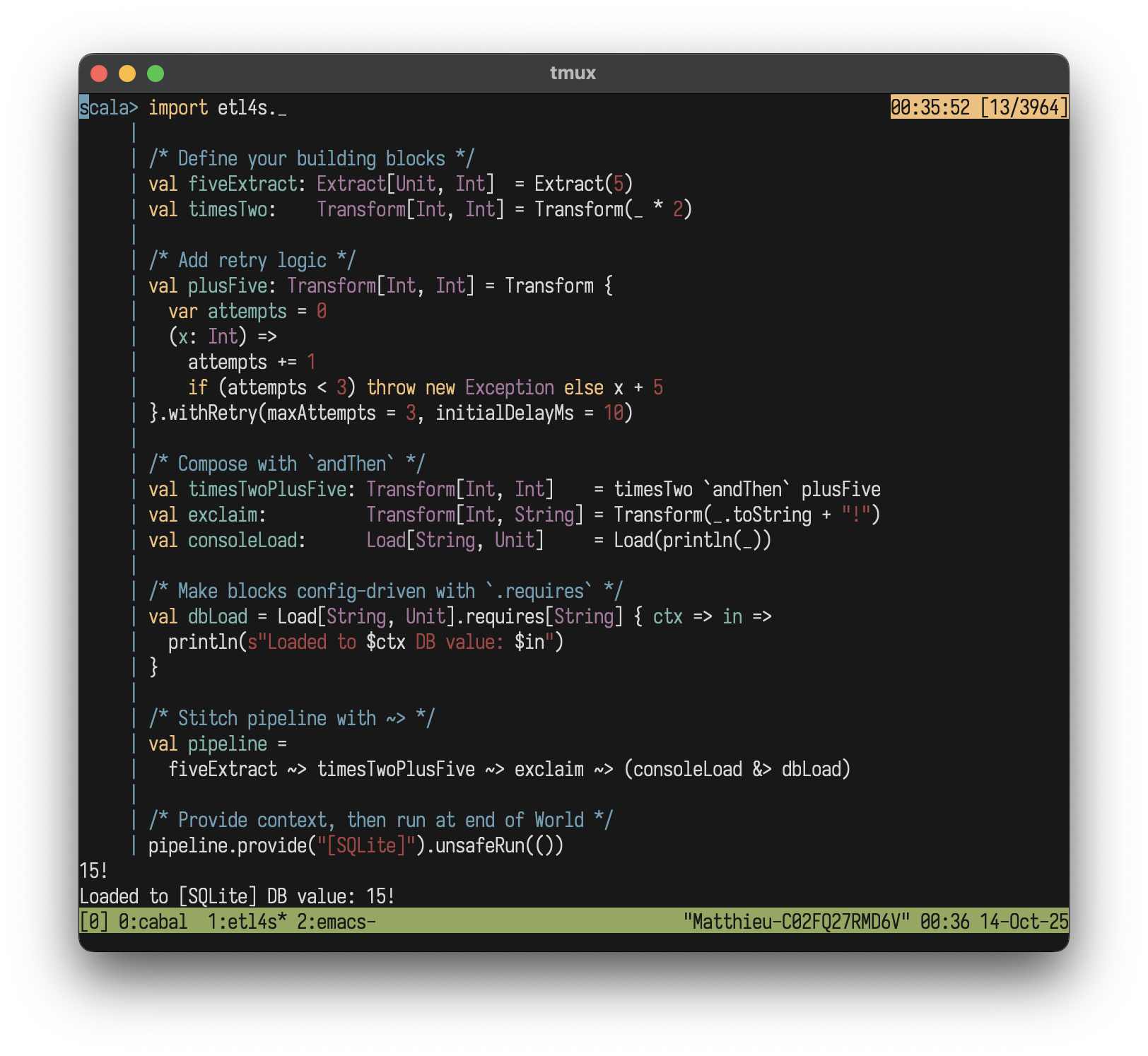
 etl4s
etl4s
Powerful, whiteboard-style ETL
A lightweight, zero-dependency library for writing type-safe, beautiful ✨🍰 data flows in functional Scala. Battle-tested at Instacart
Features
- Declarative, typed pipeline endpoints
- Use Etl4s.scala like a header file
- Type-safe, compile-time checked
- Config-driven by design
- Easy, monadic composition of pipelines
- Built-in retry/failure handling
- Automatic tracing
- Drop-in telemetry
- Data lineage visualization
Installation
etl4s is on MavenCentral and cross-built for Scala, 2.12, 2.13, 3.x
"xyz.matthieucourt" %% "etl4s" % "1.9.1"
Or try in REPL:
scala-cli repl --scala 3 --dep xyz.matthieucourt:etl4s_3:1.9.1
All you need:
import etl4s._
Quick Example
import etl4s._

val getUser  = Extract("John Doe")
val getOrder = Extract("Order #1234")
val combine  = Transform[(String, String), String] { case (user, order) =>
  s"$user placed $order"
}
val saveDb    = Load[String, String](s => { println(s"DB: $s"); s })
val sendEmail = Load[String, Unit](s => println(s"Email: $s"))

val pipeline = (getUser & getOrder) ~> combine ~> (saveDb & sendEmail)

pipeline.unsafeRun()
Why etl4s?
- Ultimately, these nodes and pipelines are just reifications of functions and values with a few extra niceties.
- Chaotic, framework-coupled ETL codebases that grow without an imposed discipline drive dev teams and data orgs to their knees.
- etl4s is a lightweight DSL to enforce discipline, type-safety, and reuse of pure functions - and see functional ETL for what it is... and could be.
But seriously, why etl4s? Why not raw functions??
-
Clean, easy to edit graphs: Raw function composition can obscure the high-level flow of data and monadic-stacks, although mightily useful and time-tested, don't impose a strict discipline on assignment and creating new bindings. etl4s uses a declarative DSL (
~>,&,&>) to define pipelines as explicit, type-safe graphs. This makes your data flows easy to read, reason about, and modify: like a whiteboard diagram. -
Reusable, typed endpoints: Pipelines are declarative values with clear contracts (
Node[In, Out]). Share them across teams as portable, composable components or libs. -
Built-in resilience and parallelism: Instead of manually writing boilerplate for error handling and concurrency, etl4s provides clean, chainable methods. Add automatic retries with
.withRetry, handle failures with.onFailure, and run tasks in parallel with the&>operator, keeping your core logic clean. -
Automatic state tracking: Pipeline steps often need to react to upstream events - validation failures, warnings, timeouts, but threading state manually through function calls is painful. etl4s uses ThreadLocal
Tracechannels that flow automatically: downstream steps can checkTrace.hasErrors,Trace.getLogs, orTrace.getElapsedTimeMilliswithout any wiring. Call.unsafeRunTrace()for full execution details. -
Metrics by design: In ETL, metrics aren't just infra-monitoring, they're business logic... especially at the peripheries in Extractors and Loaders. Yet, metric collection is typically bolted on afterwards, or run as side-processes. etl4s bakes the
Etl4sTelemetryinterface into every pipeline. Add counters, gauges, and histograms directly in your business logic withTelcalls (zero-cost until you provide an implementation). Works with any backend: Prometheus, DataDog, OpenTelemetry. -
Lineage visualization for free: Because etl4s pipelines are data structures, you can attach metadata and automatically generate lineage diagrams with
.toMermaidor.toDot... impossible with plain functions. -
Clean configuration and dependency management: Avoid "parameter drilling" configuration objects through nested functions. etl4s provides a simple dependency injection system (
.requiresand.provide) that automatically infers and injects the minimal required configuration for any part of your pipeline.
Core Concepts
etl4s has one core building block:
Node[-In, +Out]
A Node wraps a lazily-evaluated function In => Out. Chain them with ~> to build pipelines.
To improve readability and express intent, etl4s defines four aliases: Extract, Transform, Load and Pipeline. All behave the same under the hood.
val step = Transform[String, Int](_.length)
step("hello")  // 5
Running pipelines:
pipeline(input)- call like a function.unsafeRun(input)- explicit run.safeRun(input)- returnsTry[Out].unsafeRunTrace(input)- returnsTrace(logs, timing, errors).safeRunTrace(input)- returnsTracewithTry[Out]
DI: Use .requires to turn any Node into a Reader[Config, Node]. The ~> operator works between Nodes and Readers. See Configuration.
Type safety
etl4s won't let you chain together "blocks" that don't fit together:
 val fiveExtract: Extract[Unit, Int]        = Extract(5)
 val exclaim:     Transform[String, String] = Transform(_ + "!")

 fiveExtract ~> exclaim
The above will not compile with:
-- [E007] Type Mismatch Error: -------------------------------------------------
4 | fiveExtract ~> exclaim
  |                ^^^^^^^
  |                Found:    (exclaim : Transform[String, String])
  |                Required: Node[Int, Any]
Operators
etl4s uses a few simple operators to build pipelines:
| Operator | Name | Description | Example |
|---|---|---|---|
~> |
Connect | Chains operations in sequence | e1 ~> t1 ~> l1 |
& |
Combine | Group sequential operations with same input | t1 & t2 |
&> |
Parallel | Group concurrent operations with same input | t1 &> t2 |
>> |
Sequence | Runs nodes in order with same input | p1 >> p2 |
Configuration
Declare what each step .requires, then .provide it later:
import etl4s._

case class Cfg(key: String)

val A = Extract("data")
val B = Transform[String, String].requires[Cfg] { cfg => data =>
  s"${cfg.key}: $data"
}

val pipeline = A ~> B

pipeline.provide(Cfg("secret")).unsafeRun(())  /* "secret: data" */

/** NOTE (Scala 2.x)
  * Use: `Node.requires[Cfg, In, Out](cfg => in => out)` syntax
  */
etl4s automatically infers the smallest shared config for your pipeline. Just .provide once.
Read more here
Parallelizing Tasks
etl4s has an elegant shorthand for grouping and parallelizing operations that share the same input type:
/* Simulate slow IO operations (e.g: DB calls, API requests) */

val e1 = Extract { Thread.sleep(100); 42 }
val e2 = Extract { Thread.sleep(100); "hello" }
val e3 = Extract { Thread.sleep(100); true }
Sequential run of e1, e2, and e3 (~300ms total)
val sequential: Extract[Unit, (Int, String, Boolean)] =
     e1 & e2 & e3
Parallel run of e1, e2, e3 on their own JVM threads with Scala Futures (~100ms total, same result, 3X faster)
import scala.concurrent.ExecutionContext.Implicits.global

val parallel: Extract[Unit, (Int, String, Boolean)] =
     e1 &> e2 &> e3
Mix sequential and parallel execution (first two parallel (~100ms), then third (~100ms)):
val mixed = (e1 &> e2) & e3
Full example of a parallel pipeline:
val consoleLoad: Load[String, Unit] = Load(println(_))
val dbLoad:      Load[String, Unit] = Load(x => println(s"DB Load: ${x}"))

val merge = Transform[(Int, String, Boolean), String] { case (i, s, b) =>
    s"$i-$s-$b"
  }

val pipeline =
  (e1 &> e2 &> e3) ~> merge ~> (consoleLoad &> dbLoad)
Handling Failures
withRetry
Retry failed operations:
import etl4s._

var n = 0
val A = Transform[Int, String] { x =>
  n += 1
  if (n < 3) throw new RuntimeException("fail")
  else "ok"
}.withRetry(maxAttempts = 3, initialDelayMs = 10)

Extract(42) ~> A  /* Succeeds on 3rd attempt */
onFailure
Catch exceptions and recover:
import etl4s._

val A = Extract[Unit, String](_ => throw new RuntimeException("Boom!"))
  .onFailure(e => s"Error: ${e.getMessage}")

A.unsafeRun(())  /* Returns "Error: Boom!" */
Conditional Branching
Route data through different pipelines with If, ElseIf, and Else:
val pipeline = extractUser
  .If(_.tier == "premium")      (validateUser ~> enrichUser ~> toPremiumOffer)
  .ElseIf(_.tier == "standard") (validateUser ~> toStandardOffer)
  .Else                         (toGuestNotice)
Branch on config only with IfCtx/ElseIfCtx:
val pipeline = sourceReader
  .IfCtx(_.isBackfill)(backfillBranch)
  .ElseIfCtx(_.isDryRun)(dryRunBranch)
  .Else(normalBranch)
Plain Node branches are automatically lifted to Reader when mixed with config-aware branches - no manual wrapping needed.
Read more here.
Side Effects
Use .tap() for side effects without disrupting pipeline flow:
import etl4s._

val A: Extract[Any, List[String]] = Extract(_ => List("a.txt", "b.txt"))
                                       .tap(files => println(s"Processing: $files"))

val B = Transform[List[String], Int](_.size)

A ~> B
Chain side effects with >>:
val logStart = Node { println("Starting...") }
val logEnd   = Node { println("Done!") }

val pipeline = logStart >> (A ~> B) >> logEnd
pipeline.unsafeRun()
Tracing
Nodes can access and update their runtime state with ThreadLocal channels spawned for free. All state is automatically shared across your entire pipeline. Read more here
val A = Transform[String, Int] { s =>
  if (s.isEmpty) Trace.error("empty")
  s.length
}

val B = Transform[Int, String] { n =>
  if (Trace.hasErrors) "FALLBACK" else s"len: $n"
}

(A ~> B).unsafeRun("")  /* "FALLBACK" */
Telemetry
etl4s provides a minimal Etl4sTelemetry interface for observability. All pipeline run methods automatically look for this interface in implicit scope.
Tel is etl4s's telemetry API object with the same method names as the trait for consistency. All Tel calls are no-ops by default - zero overhead until you provide an implementation.
val A = Transform[List[String], Int] { data =>
  Tel.withSpan("op") {
    Tel.addCounter("n", data.size)
    Tel.setGauge("v", data.size.toDouble)
    data.map(_.length).sum
  }
}

/* By default Tel calls are no-ops (zero cost) */
A.unsafeRun(data)

/* Implement Etl4sTelemetry for your backend */
implicit val telemetry: Etl4sTelemetry = MyPrometheusProvider()
A.unsafeRun(data) /* metrics flow to Prometheus */
The Etl4sTelemetry interface has just 4 methods: withSpan, addCounter, setGauge, recordHistogram
which cover 95% of observability needs.
unsafeRunTrace captures all Tel calls as structured TelemetryData with OTLP-compatible spans and metrics:
val trace = pipeline.unsafeRunTrace(data)

/* Then collects what you want ... */
trace.spans
trace.counterTotals
trace.toOtelJson
Read more in the Telemetry guide.
Lineage
Track data lineage and visualize pipeline dependencies. Attach metadata to any Node or Reader then call .toDot, .toJson or .toMermaid
on individual instances or on Sequences:
val A = Node[String, String](identity)
  .lineage(
    name = "A",
    inputs = List("s1", "s2"),
    outputs = List("s3"),
    schedule = "0 */2 * * *"
  )

val B = Node[String, String](identity)
  .lineage(
    name = "B",
    inputs = List("s3"),
    outputs = List("s4", "s5")
  )
Export lineage as JSON, DOT (Graphviz), or Mermaid diagrams:
Seq(A, B).toJson
Seq(A, B).toDot
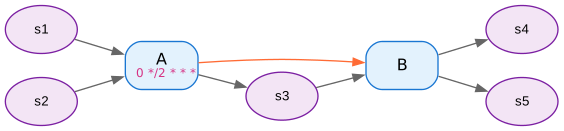
Seq(A, B).toMermaid
graph LR
    classDef pipeline fill:#e1f5fe,stroke:#01579b,stroke-width:2px,color:#000
    classDef dataSource fill:#f3e5f5,stroke:#4a148c,stroke-width:2px,color:#000
    classDef cluster fill:#e8f5e8,stroke:#2e7d32,stroke-width:2px,color:#000

    A["A<br/>(0 */2 * * *)"]
    B["B"]
    s1(["s1"])
    s2(["s2"])
    s3(["s3"])
    s4(["s4"])
    s5(["s5"])

    s1 --> A
    s2 --> A
    A --> s3
    s3 --> B
    B --> s4
    B --> s5
    A -.-> B
    linkStyle 6 stroke:#ff6b35,stroke-width:2px

    class A pipeline
    class B pipeline
    class s1 dataSource
    class s2 dataSource
    class s3 dataSource
    class s4 dataSource
    class s5 dataSource
etl4s automatically infers dependencies by matching output -> input sources. Nodes don't need to be connected with ~> for lineage tracking. Explicit dependencies via upstreams also supported.
Examples
Chain two pipelines
Simple UNIX-pipe style chaining of two pipelines:
import etl4s._

val p1 = Pipeline((i: Int) => i.toString)
val p2 = Pipeline((s: String) => s + "!")

val p3 = p1 ~> p2
Complex chaining
Connect the output of two pipelines to a third:
import etl4s._

val namePipeline = Pipeline("John Doe")
val agePipeline  = Pipeline(30)
val toUpper      = Transform[String, String](_.toUpperCase)
val consoleLoad  = Load[String, Unit](println(_))

val combined =
  for {
    name <- namePipeline
    age <- agePipeline
    _ <- Extract(s"$name | $age") ~> toUpper ~> consoleLoad
  } yield ()
Real-world examples
etl4s works great with anything:
- Spark / Flink / Beam
- ETL / Streaming
- Distributed Systems
- Local scripts
- Big Data workflows
- Web-server dataflows
Inspiration
- Debasish Ghosh's Functional and Reactive Domain Modeling
- Akka Streams DSL
- Various Rich Hickey talks