






Event Deep Research
AI Agent that researchs the lifes of historical figures and extracts the events into a structured JSON timeline.
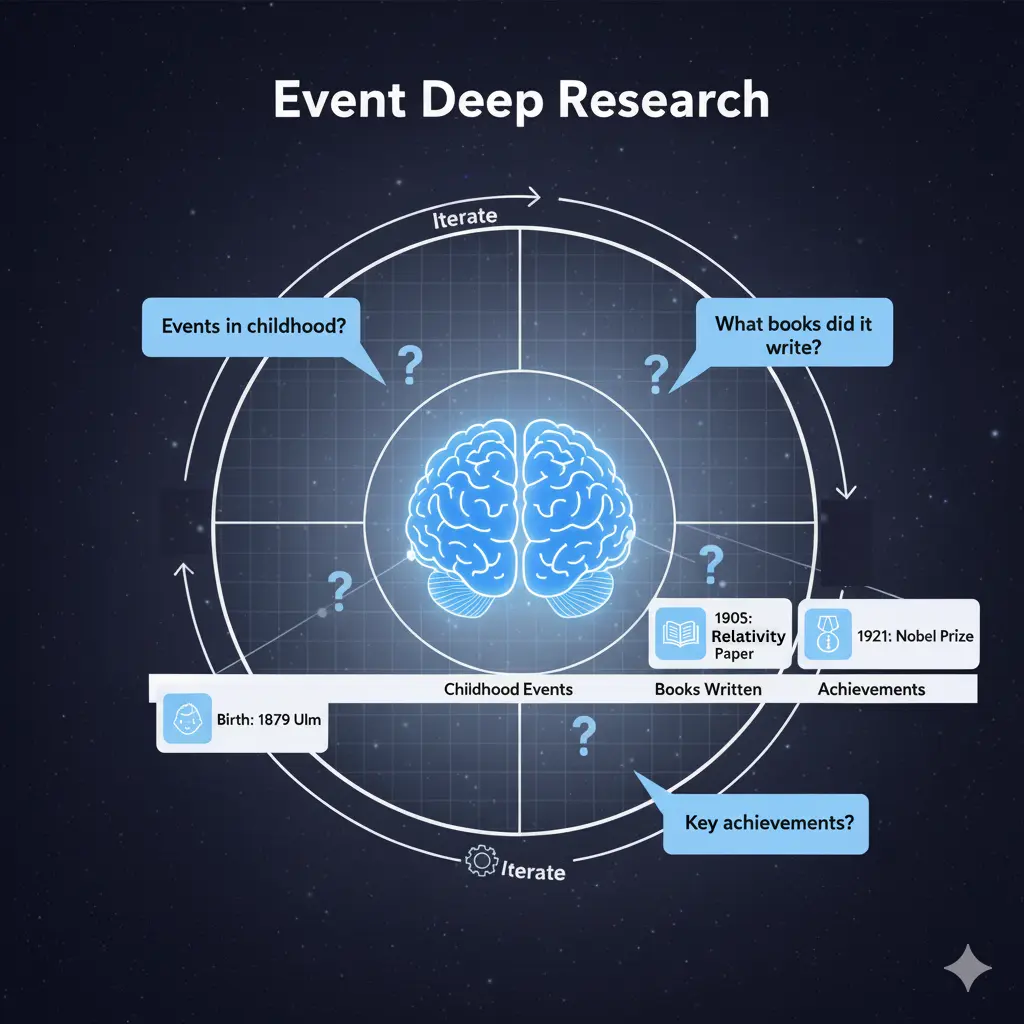
Table of Contents
Features
- Supervisor Agent with multiple tools (Research, think, Finish)
- Merge Workflow to incorporate and deduplicate events from multiple sources
- Support for OpenAI, Anthropic, Google, or Local models (Ollama)
Demo / Example
https://github.com/user-attachments/assets/ebda1625-fdf6-4f3b-a5d2-319d6db40ec2
Input:
{
  "person_to_research": "Albert Einstein"
}
Output:
{
  "structured_events": [
    {
      "name": "Birth in Ulm",
      "description": "Albert Einstein was born in Ulm, Germany to Hermann and Pauline Einstein",
      "date": {"year": 1879, "note": "March 14"},
      "location": "Ulm, German Empire",
      "id": "time-1879-03-14T00:00:00Z"
    },
    {
      "name": "Zurich Polytechnic",
      "description": "Entered the Swiss Federal Polytechnic School in Zurich to study physics and mathematics",
      "date": {"year": 1896, "note": ""},
      "location": "Zurich, Switzerland",
      "id": "time-1896-01-01T00:00:00Z"
    },
    {
      "name": "Miracle Year Papers",
      "description": "Published four groundbreaking papers on photoelectric effect, Brownian motion, special relativity, and mass-energy equivalence",
      "date": {"year": 1905, "note": ""},
      "location": "Bern, Switzerland",
      "id": "time-1905-01-01T00:00:00Z"
    },
    {
      "name": "Nobel Prize in Physics",
      "description": "Awarded Nobel Prize for his discovery of the law of the photoelectric effect",
      "date": {"year": 1921, "note": ""},
      "location": "Stockholm, Sweden",
      "id": "time-1921-01-01T00:00:00Z"
    },
    {
      "name": "Death in Princeton",
      "description": "Albert Einstein died at Princeton Hospital after refusing surgery for an abdominal aortic aneurysm",
      "date": {"year": 1955, "note": "April 18"},
      "location": "Princeton, New Jersey, USA",
      "id": "time-1955-04-18T00:00:00Z"
    }
  ]
}
🚀 Installation
Prerequisites
- Python 3.12+
- uv (Python package manager)
Setup
# 1. Clone the repository
git clone https://github.com/bernatsampera/event-deep-research.git
cd event-deep-research

# 2. Create virtual environment and install dependencies
uv venv && source .venv/bin/activate
uv sync

# 3. Set up environment variables
cp .env.example .env
# Edit .env with your API keys:
# FIRECRAWL_BASE_URL  (https://api.firecrawl.com/v1)
# - FIRECRAWL_API_KEY (required for production, optional for local testing)
# - TAVILY_API_KEY (required)
# - OPENAI_API_KEY, ANTHROPIC_API_KEY, or GOOGLE_API_KEY (Change model in configuration.py)

# 4. Start the development server
uvx --refresh --from "langgraph-cli[inmem]" --with-editable . --python 3.12 langgraph dev --allow-blocking
# Open http://localhost:2024 to access LangGraph Studio
Usage
Via LangGraph Studio (Recommended)
- Start the development server:
uvx --refresh --from "langgraph-cli[inmem]" --with-editable . --python 3.12 langgraph dev --allow-blocking - Open http://localhost:2024
- Select the
supervisorgraph - Input your research query:
{ "person_to_research": "Albert Einstein" } - Watch the agent work in real-time!
Configuration (configuration.py)
llm_model: Primary LLM model to use for both structured output and tools

# Optional overrides to change the models used for different parts of the workflow
structured_llm_model: Override model for structured output
tools_llm_model: Override model for tools
chunk_llm_model: Small model for chunk biographical event detection

# Maximum tokens for the models
structured_llm_max_tokens: Maximum tokens for structured output model
tools_llm_max_tokens: Maximum tokens for tools model

# Maximum retry attempts for the models
max_structured_output_retries: Maximum retry attempts for structured output
max_tools_output_retries: Maximum retry attempts for tool calls

# Values from graph files
default_chunk_size: Default chunk size for text processing
default_overlap_size: Default overlap size between chunks
max_content_length: Maximum content length to process
max_tool_iterations: Maximum number of tool iterations
max_chunks: Maximum number of chunks to process for biographical event detection
Architecture / Internals
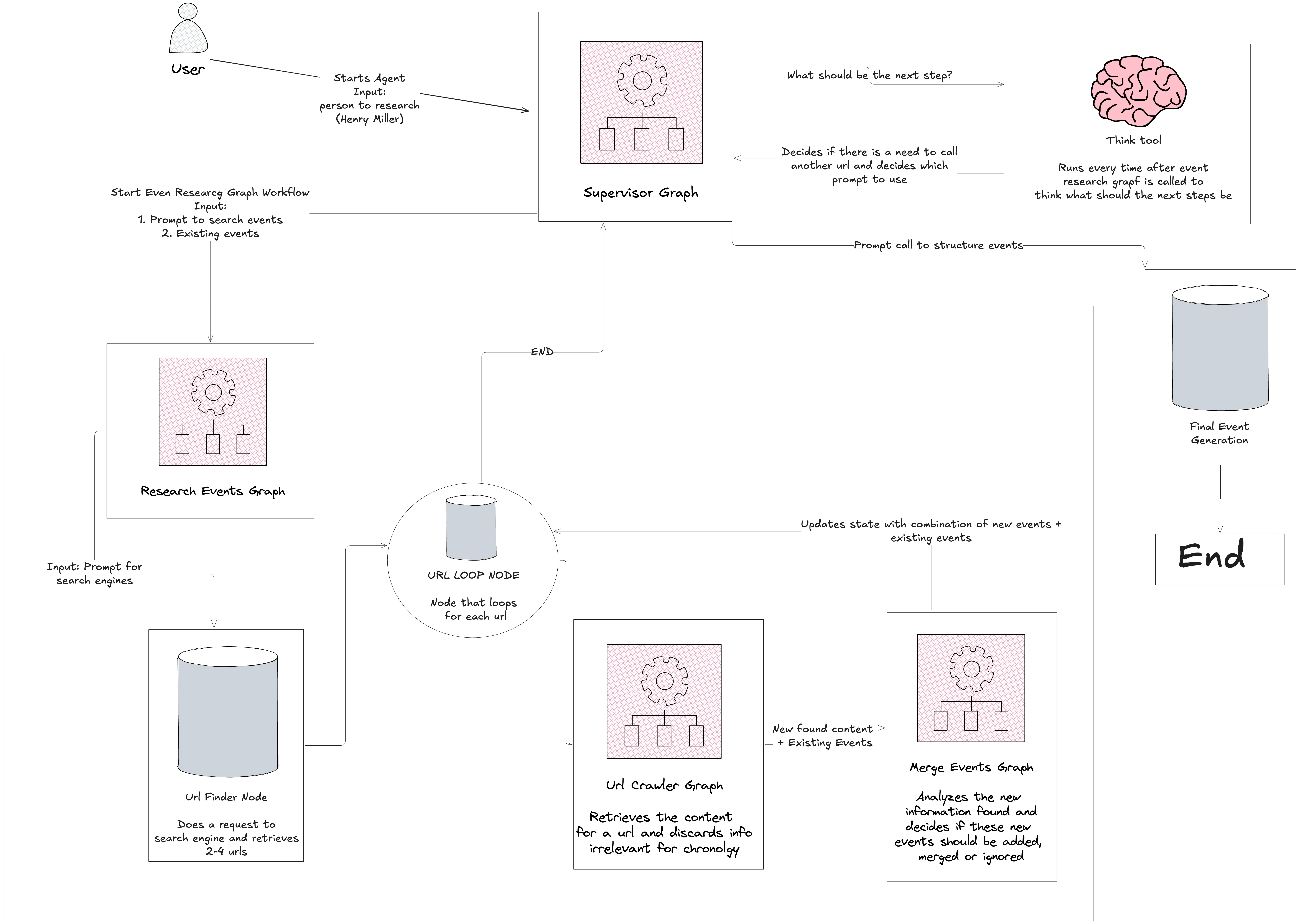
- Supervisor Agent - Coordinates the entire workflow, decides next steps
- Research Agent - Finds relevant biographical sources, manages crawler and merge agents
- URL Crawler - Extracts content from web pages with Firecrawl
- Merge Agent - Combines and deduplicates events
Roadmap / Future Work
- Add images to relevant events
- Improve speed of merge graph
Contributing
We welcome contributions! This is a great project to learn:
- Fork the repository
- Create a feature branch:
git checkout -b feature/amazing-feature - Commit your changes:
git commit -m 'Add amazing feature' - Push to the branch:
git push origin feature/amazing-feature - Open a Pull Request
See the open issues for a full list of proposed features and known issues.
License
Distributed under the MIT License. See LICENSE.txt for details.
Acknowledgments
- LangChain - Foundational LLM framework
- LangGraph - Multi-agent orchestration
- Open Deep Research - Research methodology inspiration
- Firecrawl - Web scraping
- Tavily - Web search