
Spotify: UI Clone with React Native / Expo
web demo: Expo Spotify

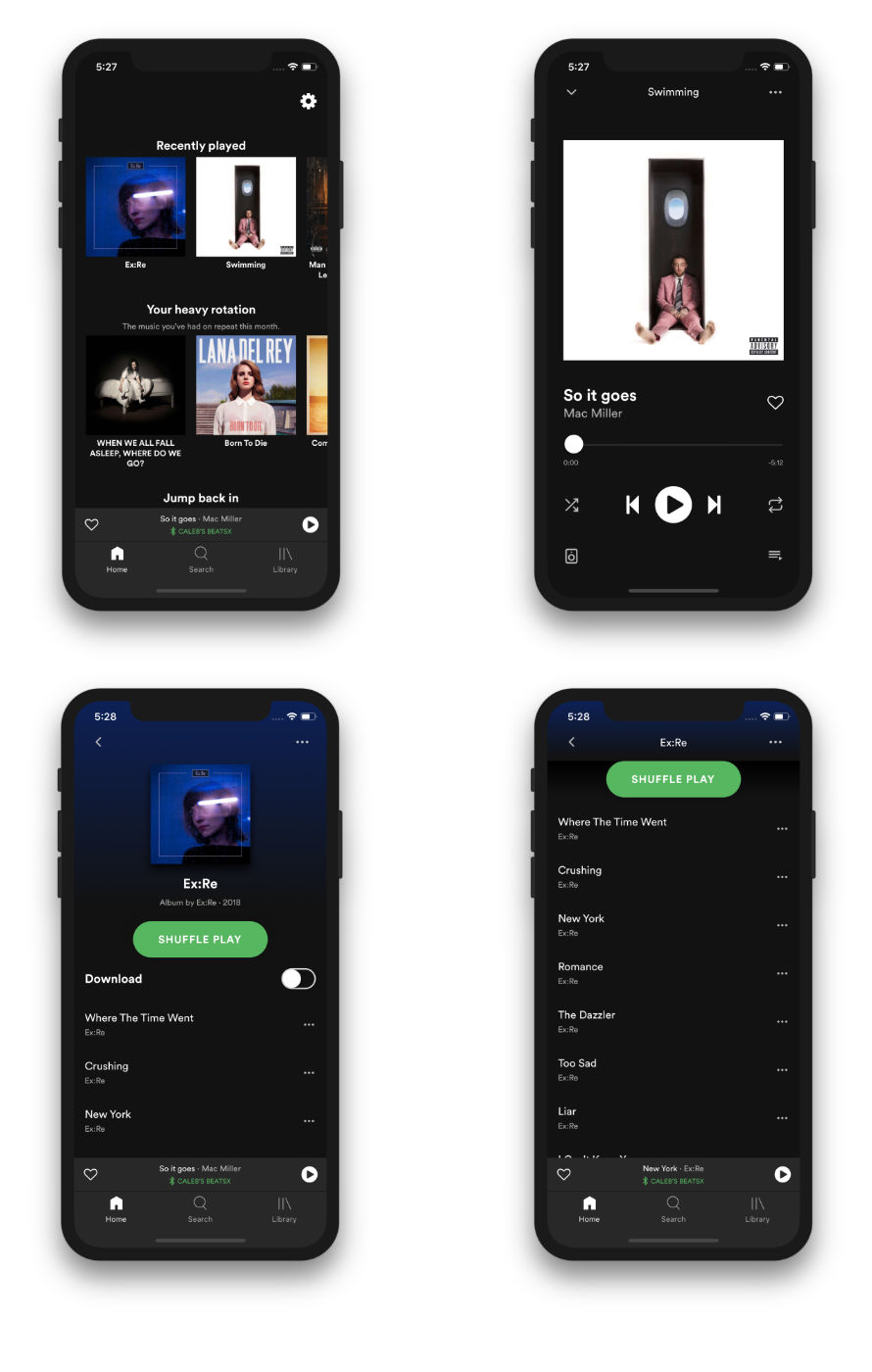
Table of Contents
Install & Build
First, make sure you have Expo CLI installed: npm install -g expo-cli
Install:
yarn
Run Project Locally:
yarn dev
Features
- Expo SDK 48
- iOS, Android and PWA (Web App)
- React Navigation v6
- React Context
- PropTypes
Linting
- run:
yarn lintfor a list of linting warnings/error in cli - prettier and airbnb config
- make sure you have prettier package installed on your atom/vscode editor
- then make sure to enable these options (packages → prettier):
- eslint integration
- stylelint integration
- automatic format on save (toggle format on save)
- be aware of the
.prettierignorefile
Update Linting Packages:
yarn add @babel/core eslint-config-airbnb eslint-config-prettier eslint-plugin-import eslint-plugin-import-helpers eslint-plugin-jsx-a11y eslint-plugin-prettier eslint-plugin-react eslint-plugin-react-hooks eslint-plugin-react-native prettier --dev
Expo Web
Currently Expo Web support is not production ready, but if you want to see how this project looks on the web as a PWA (Progressive Web App)... using react-native-web and react-dom.
PWA: Expo Spotify looks best on a mobile device, but not bad on desktop!
Dev with Expo Web
- Remove node_modules if they exist:
rm -rf nodes_modules - Install/Re-install:
yarn - Start development:
yarn weborexpo start --web - Build PWA:
yarn web-buildorexpo build:web
a couple manual changes within index.html i found needed to be made so far:
- to make splash screen work: "mobile-web-app-capable" => "apple-mobile-web-app-capable"
- status bar transparent: apple-mobile-web-app-status-bar-style="default" => "black-translucent"
- no white background: add background color within body{background-color: #121212; ...}
- check output meta: double image meta tags
- check output js: double/triple js packages
Release Notes
version 0.5.0 (current)
- upgraded to Expo SDK 48
- upgraded to Expo SDK 47
- upgraded to Expo SDK 46
- upgraded to Expo SDK 45
- upgraded to React Navigation v6
- upgraded to React Navigation v5
- Removed ScreenProps for React Context
version 0.4.0
- upgraded to Expo SDK 44
- upgraded to Expo SDK 43
- upgraded to Expo SDK 42
version 0.3.0
- upgraded to Expo SDK 41
- upgraded to Expo SDK 40
- upgraded to Expo SDK 39
- upgraded to Expo SDK 38
version 0.2.0
- upgraded to React Navigation v4
- upgraded to Expo SDK 37
- upgraded to Expo SDK 36
- upgraded to Expo SDK 35
version 0.1.0
- Expo Web support
- upgraded to Expo SDK 34
- upgraded to Expo SDK 33
- started with React Navigation v3
- iOS and Android
- Tab Navigation (stacks created)
- Home
- Horizontal Album component
- Album Screen
- animation opacity on header
- scroll sticky of shuffle button
- current song playing shows in album list view
- Album More Options (added by @bidah)
- blur view
- SafeAreaView example
- action list with supporting icons
- Header animation on scroll event
- animation opacity on iPhoneX notch
- animation opacity on cog icon
- Search
- Sticky search bar (animated width)
- Playlists sections added (with mock data)
- Library
- Menu items from mock data
- Custom Bar for Music Player added to
<BottomTabBar />
- Home
- Modals (bottom to top)
- Music Player