
FerroTunnel 🦀






High-performance reverse tunnel you can embed in your Rust applications.
FerroTunnel multiplexes streams over a single connection (like ngrok/Cloudflare Tunnel) but ships as a library-first crate. Expose local services behind NAT, route HTTP by hostname, intercept requests with plugins with minimal memory footprint and sub-millisecond latency. Works as CLI or Client::builder() API. Written in Rust.
Prerequisites
- Rust 1.90+: FerroTunnel uses modern Rust features for performance and safety.
- Cargo: Required for building and installing from source.
- Git: For cloning the repository during development.
Installation
Linux / macOS (recommended)
curl -fsSL https://tunnel.ferrolabs.ai/install.sh | bash
Cargo
cargo install ferrotunnel-cli
Quick Start
# Start server; enter the token at the prompt or set FERROTUNNEL_TOKEN
ferrotunnel server

# Start client in another terminal; use the same token via env or prompt
ferrotunnel client --server localhost:7835 --local-addr 127.0.0.1:8080 --tunnel-id my-app
Library
[dependencies]
ferrotunnel = "1.0"
tokio = { version = "1", features = ["full"] }
use ferrotunnel::Client;

#[tokio::main]
async fn main() -> ferrotunnel::Result<()> {
    let mut client = Client::builder()
        .server_addr("tunnel.example.com:7835")
        .token("my-secret-token")
        .local_addr("127.0.0.1:8080")
        .tunnel_id("my-app")
        .build()?;

    client.start().await?;

    tokio::signal::ctrl_c().await?;
    client.shutdown().await
}
HTTP/2 and Connection Pooling
FerroTunnel v1.0.3+ includes automatic HTTP/2 support and connection pooling for improved performance:
Server-side: The HTTP ingress automatically detects and handles both HTTP/1.1 and HTTP/2 connections from clients.
Client-side: Connection pooling reuses HTTP connections to local services, eliminating per-request TCP handshake overhead:
use ferrotunnel_http::{HttpProxy, PoolConfig};
use std::time::Duration;

// Create proxy with custom pool configuration
let pool_config = PoolConfig {
    max_idle_per_host: 32,           // Max idle connections per host (default: 32)
    idle_timeout: Duration::from_secs(90), // Connection idle timeout (default: 90s)
    prefer_h2: false,                 // Prefer HTTP/2 when available (default: false)
};

let proxy = HttpProxy::with_pool_config("127.0.0.1:8080".into(), pool_config);
CLI: Use default pool settings (no flags needed) or customize via the library API.
Benefits:
- 🚀 Eliminates TCP handshake overhead per request
- 🔄 HTTP/2 multiplexing reduces connection count
- 🧹 Background eviction prevents resource leaks
- 📈 Significantly improves throughput (target: 800-1000 MB/s)
gRPC Tunneling
FerroTunnel v1.0.6+ natively tunnels gRPC traffic over HTTP/2 with zero configuration.
How it works: The server-side ingress automatically detects gRPC requests by inspecting the Content-Type: application/grpc header. Detected gRPC streams are forwarded over a dedicated HTTP/2 connection to the local service, preserving HTTP/2 trailers (including grpc-status and grpc-message) end-to-end.
CLI — no special flags needed; detection is automatic:
# Expose a local gRPC server running on port 50051
ferrotunnel client --server tunnel.example.com:7835 --local-addr 127.0.0.1:50051 --tunnel-id my-grpc-service
Library:
use ferrotunnel::Client;

#[tokio::main]
async fn main() -> ferrotunnel::Result<()> {
    let mut client = Client::builder()
        .server_addr("tunnel.example.com:7835")
        .token("my-secret-token")
        .local_addr("127.0.0.1:50051")  // gRPC server port
        .tunnel_id("my-grpc-service")
        .build()?;

    client.start().await?;
    tokio::signal::ctrl_c().await?;
    client.shutdown().await
}
What is preserved end-to-end:
- HTTP/2 stream multiplexing
- gRPC trailers (
grpc-status,grpc-message, custom metadata) - Streaming RPCs (server-streaming, client-streaming, bidirectional)
- Standard gRPC status codes and error propagation
QUIC Transport
FerroTunnel v1.0.7+ supports QUIC as an alternative transport for the tunnel control plane, providing built-in TLS 1.3 encryption, native stream multiplexing (no head-of-line blocking), and lower connection latency.
CLI — enable with the quic feature flag:
# Build with QUIC support
cargo build --features quic

# Server: keep the TCP control plane on :7835 and add a shared-state QUIC listener on :7836
# Token is read from FERROTUNNEL_TOKEN, --token-file, or the secure prompt.
ferrotunnel server --quic-bind 0.0.0.0:7836 --tls-cert server.crt --tls-key server.key

# Client: connect via QUIC
ferrotunnel client --server 127.0.0.1:7836 --quic --tls-skip-verify
--tls-skip-verify is explicit insecure mode for local or self-signed testing only.
Library:
use ferrotunnel::Client;
use ferrotunnel_common::QuicConfig;

#[tokio::main]
async fn main() -> ferrotunnel::Result<()> {
    let quic = QuicConfig {
        enabled: true,
        cert_path: Some("client.crt".into()),
        key_path: Some("client.key".into()),
        skip_verify: true,
        ..Default::default()
    };

    let mut client = Client::builder()
        .server_addr("tunnel.example.com:7836")
        .token("my-secret-token")
        .local_addr("127.0.0.1:8080")
        .quic(&quic)
        .build()?;

    client.start().await?;
    tokio::signal::ctrl_c().await?;
    client.shutdown().await
}
Key benefits:
- No head-of-line blocking — each tunnel stream uses a native QUIC stream
- Built-in TLS 1.3 encryption (mandatory in QUIC)
--quic-0rttis reserved for future 0-RTT support; current clients fall back to a full handshake- UDP-based — works better on lossy networks
HTTP/3 Ingress
FerroTunnel v1.0.8+ can accept browser-facing HTTP/3 traffic on a UDP ingress
port while preserving the existing HTTP/1.1, HTTP/2, WebSocket, and gRPC paths.
HTTP/3 ingress is separate from QUIC tunnel transport: it uses h3 +
h3-quinn for public client requests, then forwards through the same strict
Host-based tunnel routing as the TCP HTTP ingress.
CLI — enable with the http3 feature flag:
# Build with HTTP/3 ingress support
cargo build -p ferrotunnel-cli --features http3

# Server: HTTP/1.1+HTTP/2 on TCP :8080, HTTP/3 on UDP :8443
# Token is read from FERROTUNNEL_TOKEN, --token-file, or the secure prompt.
ferrotunnel server \
  --http-bind 0.0.0.0:8080 \
  --http3-bind 0.0.0.0:8443 \
  --tls-cert server.crt \
  --tls-key server.key
When HTTP/3 is enabled, the TCP HTTP ingress advertises it with Alt-Svc, for
example Alt-Svc: h3=":8443"; ma=86400.
Library:
use ferrotunnel::Server;

#[tokio::main]
async fn main() -> ferrotunnel::Result<()> {
    let mut server = Server::builder()
        .bind("0.0.0.0:7835".parse().unwrap())
        .http_bind("0.0.0.0:8080".parse().unwrap())
        .http3(
            "0.0.0.0:8443".parse().unwrap(),
            "server.crt",
            "server.key",
        )
        .token("my-secret-token")
        .build()?;

    server.start().await
}
Deployment notes:
- Requires TLS certificate and private key because HTTP/3 runs over QUIC/TLS 1.3
- Requires UDP reachability to the HTTP/3 bind port
- Keeps strict
Hostheader routing; unknown hosts return404 Tunnel not found
Features
| Feature | Description |
|---|---|
| Embeddable | Use as a library with builder APIs |
| HTTP/2 | Automatic HTTP/1.1 and HTTP/2 protocol detection |
| Connection Pooling | Efficient connection reuse for improved performance |
| Plugin System | Auth, rate limiting, logging, circuit breaker |
| Dashboard | Real-time WebUI at localhost:4040 |
| TLS 1.3 | Secure connections with rustls |
| Mutual TLS | Client certificate authentication |
| Observability | Prometheus metrics + OpenTelemetry tracing |
| WebSocket | Transparent WebSocket upgrade tunneling |
| gRPC | Native gRPC tunneling over HTTP/2 with trailer preservation |
| QUIC | Optional QUIC transport with native stream multiplexing |
| HTTP/3 | Optional browser-facing HTTP/3 ingress with Alt-Svc advertising |
| TCP & HTTP | Forward both HTTP and raw TCP traffic |
Choose FerroTunnel when: You need many services over a single connection, HTTP routing, plugins, or resource efficiency.
See Architecture for detailed analysis of the multiplexing trade-off.
Security: Why Rust Matters
Traditional C/C++ tunneling solutions (OpenSSH, OpenVPN, stunnel) have suffered from 30+ critical memory safety vulnerabilities over the past decade—buffer overflows, use-after-free, double-free, race conditions, and heap corruption.
FerroTunnel eliminates these entire vulnerability classes at compile time using Rust's ownership system:
- ✅ Zero unsafe code (
#![forbid(unsafe)]at workspace level) - ✅ Memory safety guaranteed (no buffer overflows, use-after-free, double-free)
- ✅ Thread safety enforced (no data races possible)
- ✅ Pure Rust crypto (rustls instead of OpenSSL—zero legacy vulnerabilities)
Security Features:
- TLS 1.3-only enforcement with mutual TLS support
- Token-based authentication with constant-time comparison
- Built-in rate limiting and frame size limits
- Automated dependency scanning (
cargo-auditin CI)
See docs/security.md for detailed CVE comparison, vulnerability analysis, and security best practices.
Ideal For
FerroTunnel's memory-safe architecture and minimal resource footprint make it perfect for security-critical and resource-constrained environments:
- 🔐 Crypto & Blockchain Infrastructure - High security requirements, integrates seamlessly with Rust blockchain ecosystems (Solana, Polkadot, Cosmos)
- 📡 IoT Devices - Low memory overhead (<100MB/1k tunnels), zero memory vulnerabilities, ideal for edge gateways and smart devices
- ⚡ Edge Computing - Sub-millisecond latency, efficient resource usage, compile-time safety guarantees
- 🖥️ Embedded Systems - No garbage collector, predictable performance, cross-compilation friendly
- 🏢 Enterprise Security - Zero unsafe code, automated dependency scanning, compliance-ready audit trails
Why it matters: Traditional C/C++ tunnels require constant security patches for memory vulnerabilities. Embedded/IoT devices often can't be easily updated, making Rust's compile-time safety guarantees essential.
CLI Reference
Server
ferrotunnel server [OPTIONS]
| Option | Env Variable | Default | Description |
|---|---|---|---|
| (env only) | FERROTUNNEL_TOKEN |
optional | Auth token; not a CLI flag so it can't leak via argv |
--token-file |
FERROTUNNEL_TOKEN_FILE |
- | Read auth token from a file |
--bind |
FERROTUNNEL_BIND |
0.0.0.0:7835 |
Control plane |
--http-bind |
FERROTUNNEL_HTTP_BIND |
0.0.0.0:8080 |
HTTP ingress |
--tcp-bind |
FERROTUNNEL_TCP_BIND |
- | TCP ingress |
--tls-cert |
FERROTUNNEL_TLS_CERT |
- | TLS certificate |
--tls-key |
FERROTUNNEL_TLS_KEY |
- | TLS private key |
--quic-bind* |
FERROTUNNEL_QUIC_BIND |
- | QUIC endpoint (UDP) |
--http3-bind** |
FERROTUNNEL_HTTP3_BIND |
- | HTTP/3 ingress endpoint (UDP) |
Client
ferrotunnel client [OPTIONS]
| Option | Env Variable | Default | Description |
|---|---|---|---|
--server |
FERROTUNNEL_SERVER |
required | Server address |
--token |
FERROTUNNEL_TOKEN |
optional | Auth token; if omitted, uses env or prompts securely |
--local-addr |
FERROTUNNEL_LOCAL_ADDR |
127.0.0.1:8000 |
Local service |
--tunnel-id |
FERROTUNNEL_TUNNEL_ID |
(auto) | Tunnel ID for HTTP routing |
--dashboard-port |
FERROTUNNEL_DASHBOARD_PORT |
4040 |
Dashboard port |
--dashboard-bind |
FERROTUNNEL_DASHBOARD_BIND |
127.0.0.1 |
Dashboard bind address |
--dashboard-allow-non-loopback |
FERROTUNNEL_DASHBOARD_ALLOW_NON_LOOPBACK |
false |
Allow exposed dashboard bind; requires auth token |
--dashboard-auth-token |
FERROTUNNEL_DASHBOARD_AUTH_TOKEN |
generated | Dashboard API auth token |
--tls |
FERROTUNNEL_TLS |
false | Enable TLS; requires --tls-ca unless --tls-skip-verify is explicit |
--tls-ca |
FERROTUNNEL_TLS_CA |
- | CA certificate for verified TLS |
--quic* |
FERROTUNNEL_QUIC |
false | Use QUIC transport |
--quic-0rtt* |
FERROTUNNEL_QUIC_0RTT |
false | Enable 0-RTT reconnection |
For TCP/TLS clients, --tls requires --tls-ca unless --tls-skip-verify is explicitly set.
* Requires --features quic at build time.
** Requires --features http3 at build time.
See ferrotunnel-cli/README.md for all options.
Crates
| Crate | Description |
|---|---|
ferrotunnel |
Main library with builder APIs |
ferrotunnel-cli |
Unified CLI binary |
ferrotunnel-core |
Tunnel logic and transport |
ferrotunnel-protocol |
Wire protocol and codec |
ferrotunnel-http |
HTTP/TCP ingress and proxy |
ferrotunnel-plugin |
Plugin system |
ferrotunnel-observability |
Metrics and dashboard |
ferrotunnel-common |
Shared types |
Installation
Pre-built Binaries
Download from GitHub Releases.
From Source
cargo install ferrotunnel-cli
macOS (Homebrew)
brew tap ferro-labs/ferrotunnel
brew install ferrotunnel
Docker
Using Pull
You can pull the official image from GitHub Container Registry:
# Pull the latest image
docker pull ghcr.io/ferro-labs/ferrotunnel:latest

# Run as a server using FERROTUNNEL_TOKEN from the host environment
export FERROTUNNEL_TOKEN=secret
docker run -e FERROTUNNEL_TOKEN -p 7835:7835 -p 8080:8080 ghcr.io/ferro-labs/ferrotunnel:latest server
Using Docker Compose
For more complex setups, use the provided docker-compose.yml:
docker-compose up --build
Examples
Ready-to-run examples are maintained in a separate repository:
https://github.com/ferro-labs/tunnel-examples
Documentation
- CLI Reference
- Contributing & Code of Conduct
- Architecture
- Benchmark & Performance
- Deployment Guide
- Plugin Development
- Security
Development
# Build
cargo build --workspace

# Test
cargo test --workspace

# Lint
cargo clippy --workspace --all-targets -- -D warnings

# Benchmark
cargo bench --workspace
Developer Tools
tools/loadgen- Load testingtools/soak- Stability testingtools/profiler- Performance profiling
Benchmark
FerroTunnel is benchmarked against rathole and frp. Unlike rathole/frp which use 1:1 TCP forwarding, FerroTunnel uses multiplexed streams over a single connection the same architecture used by ngrok and Cloudflare Tunnel (HTTP/2 multiplexing). This enables HTTP routing, plugins, and multi-service tunnels.
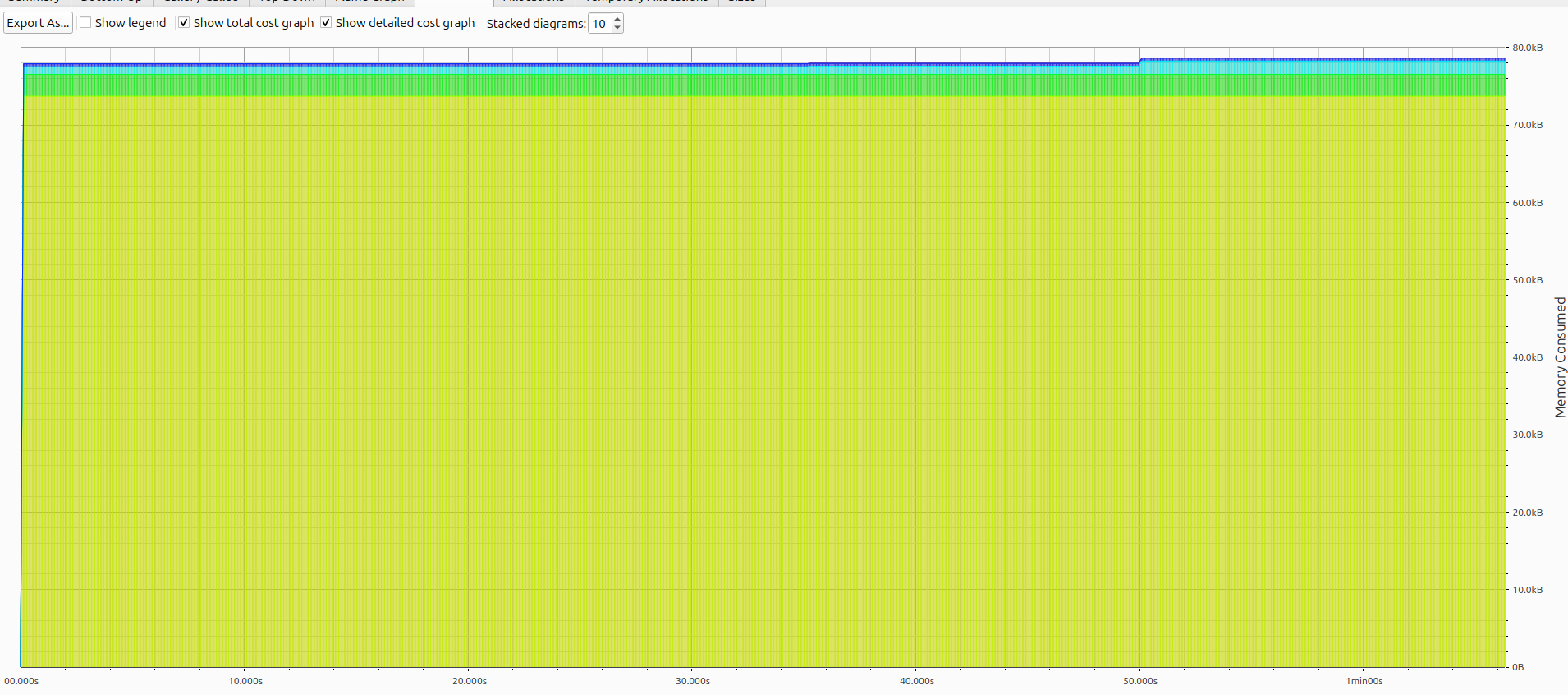
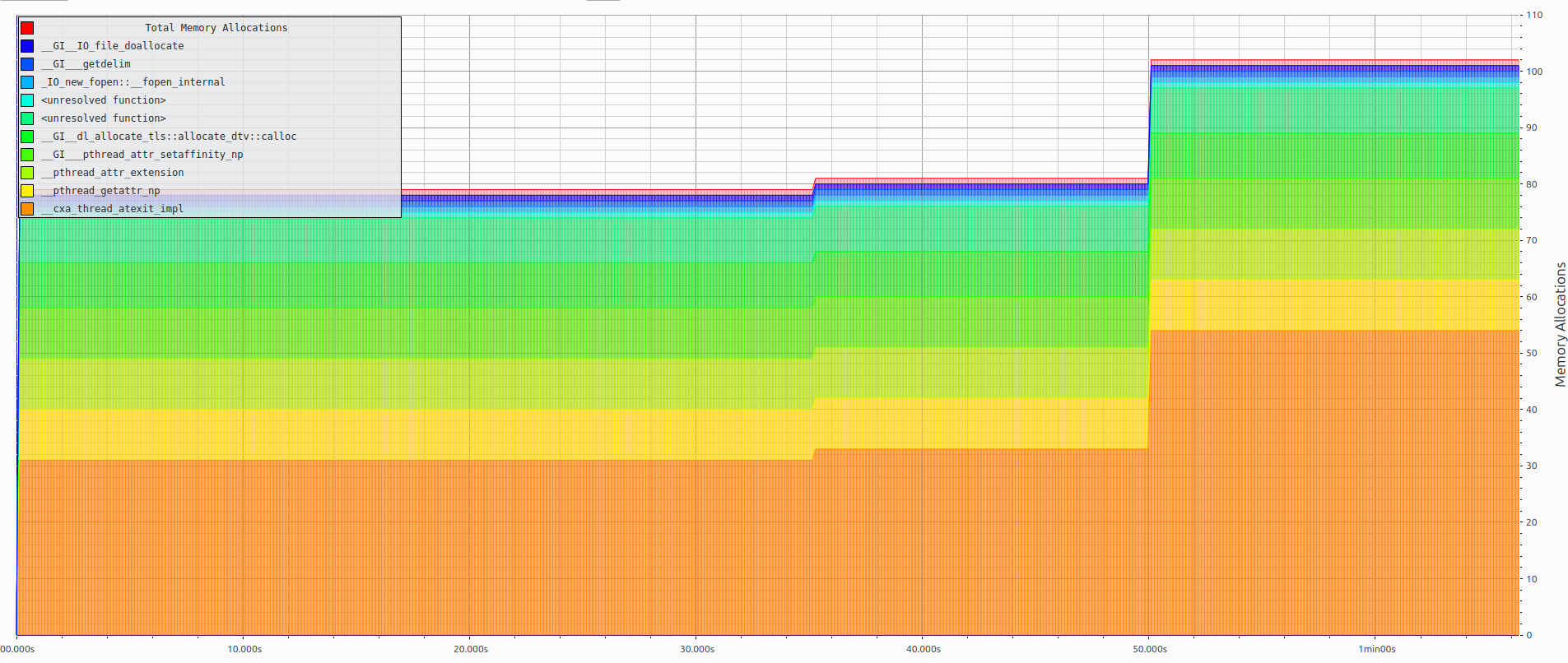
Memory profile: flat heap usage, minimal allocations under load
See docs/benchmark.md for detailed analysis of the architectural trade-offs.
License
Licensed under either of Apache License 2.0 or MIT at your option.