
File Explorer
Overview
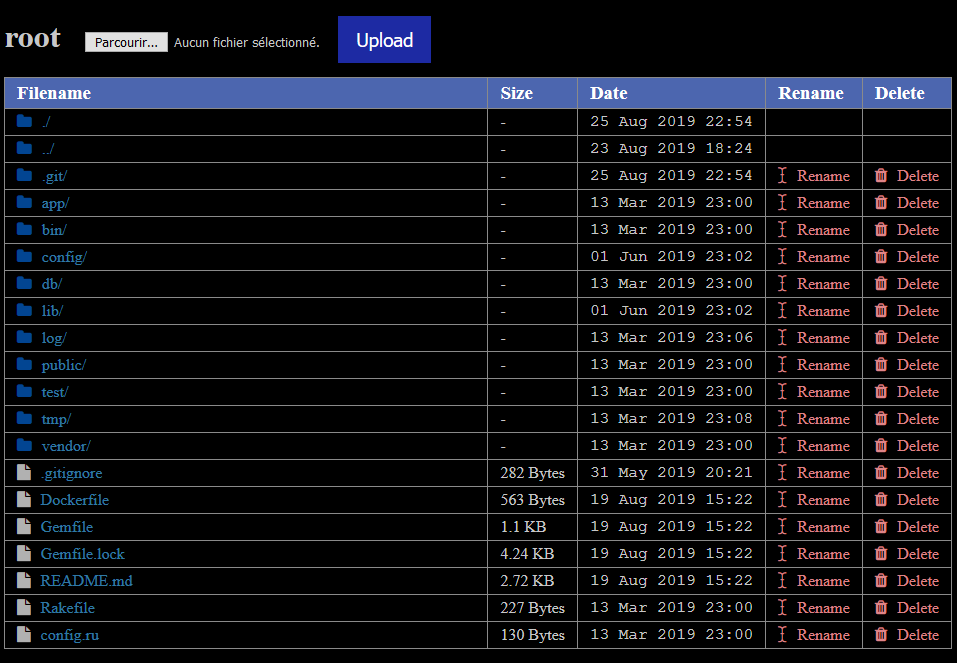
This project offers a very simple file explorer to see files in a directory, it allows to display and download files.
This also allows to rename and delete files and directories simply by clicking a button.
This project was quickly created to simplify the management of files on a web server.
Security
You should protect the access to this application at least by adding a Basic Auth in your Apache or Nginx configuration, indeed there is no permission system implemented and anyone having access to this could delete all your files easily.
Setup
We provide 2 ways to install this project on your server, using your server directly or using Docker.
Directly
To configure and launch it you need a few things:
- Install a recent ruby version on your computer
gem install bundlerbundle install
After that you should be all done and ready to work.
To launch the Rails server you can just use:
bundle exec rails s -b 0.0.0.0
You can specify the folder in which you want it to be launched (defaults to the current directory) by setting the BASE_DIRECTORY environment variable before launching the server.
You can also use the BASE_URL environment variable to display the correct URL at the top in the breadcrumbs.
BASE_DIRECTORY=PATH_TO_YOUR_DIRECTORY bundle exec rails s -b 0.0.0.0
Using Docker
Rebuild the docker image
If you want to rebuild this project Docker image it is easy. We provide a Dockerfile in the repository to enable anyone to create a valid image of this project.
docker build -t fileexplorer .
Launch the docker image
You should create a Rails secret and replace "RAILS_SECRET" by it. To generate
a Rails secret just launch bundle exec rails secret and use the value
generated.
Base directory is the directory you want the file explorer to explore. If you
choose a directory, you should ensure that your docker has the right to write
in it. You can mount any directory in your docker using the -v Docker
parameter.
You must launch the following commands as root on Unix or as Administrator on Windows:
If you built your own image you can launch it like this:
docker create --name fileexplorer -p 127.0.0.1:8689:3000 -e SECRET_KEY_BASE=RAILS_SECRET -e BASE_DIRECTORY=/ fileexplorer
docker start -a fileexplorer
You can alternatively use the public docker image published on Docker Hub by doing a docker pull:
docker image pull adrientoub/file-explorer:latest
docker run -p 127.0.0.1:8689:3000 -e SECRET_KEY_BASE=RAILS_SECRET -e BASE_DIRECTORY=/ -it adrientoub/file-explorer:latest
Tests
To run the tests just run the following command:
bundle exec rake