
FileShelf
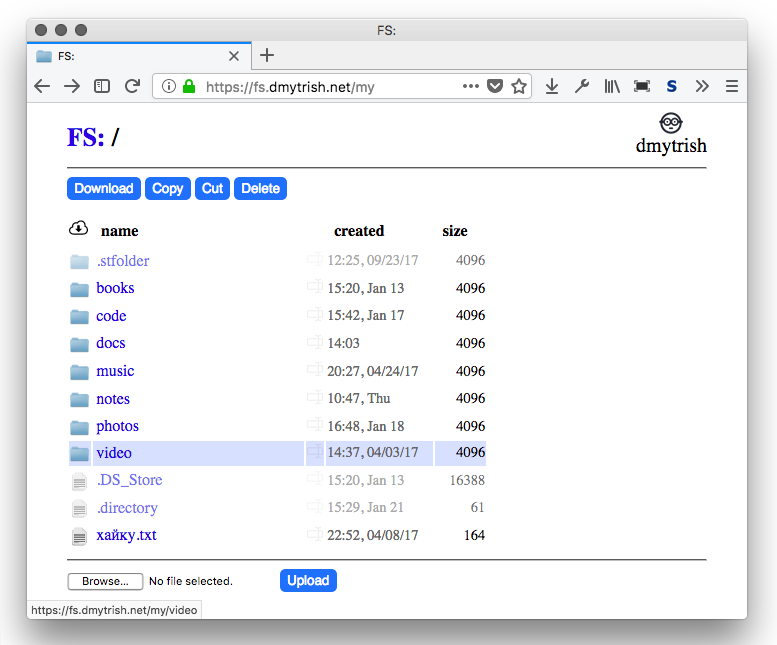
FileShelf is a simple web-based file manager:
Features
- fast directory browsing using lightweight pages;
- core functionality works without JavaScript, progressive enhancement; noscript/w3m/elinks compatible;
- file uploading/downloading;
- creating new files/directories, rename/delete, copy/cut/paste files;
File content plugins out of the box:
- viewing pdf files using your browser;
- editing text files using CodeMirror (with vim mode);
- reading epub files using epub.js;
- playing html5-compatible audio files from a directory;
- playing html5-compatible video files (
mp4/ogv; notavi, unfortunately);
FileShelf is extensible: write any file plugin you like!
Optional features:
- offloading large static files to Nginx;
- multiuser setup;
- basic HTTP authentication;
Install and run
To serve a directory (./storage by default) in a single-user mode:
$ /path/to/fileshelf/fileshelf.sh $DIRECTORY
Now check http://localhost:8021.
Docker
Inside this repository directory (or just use the supplied docker-compose.yml):
$ docker-compose up
and check http://localhost:8021
Configuration
FileShelf can take a configuration file as a parameter:
$ ./fileshelf.sh -c conf.json
Some values in the configuration file may be overriden from command line:
$ ./fileshelf.sh --port=8021 --debug
Configuration options are listed here: fileshelf/config.py
An example of a simple configuration file:
{
    "host": "0.0.0.0",
    "port": 8021,
    "debug": true,
    "storage_dir": "~/fileshelf"
}