financial-chat
A financial chat application powered by LangChain, LangGraph, OpenBB, Claude 3 Opus, and Streamlit.
Blog Articles
If you're curious about the journey of building this project, check out these blog articles:
- Building an Agentic Stock Analysis Tool with LangChain, OpenBB, and Claude 3 Opus
- Expanding the AI Stock Analysis Agent with Fundamental and Technical Tools
- Improving the Edge: Trendlines, Sectors, and Sentiment
- Unlocking Alpha: Harnessing Relative Strength for AI-Driven Stock Selection
- Seeing the Bigger Picture: Adding Chart-Based Technical Analysis
- Empowering the AI Stock Analysis Agent with Universe Scanning
- Risk Management in AI Stock Trading: A Key to Success
- Converting the AI Stock AgentExecutor to LangGraph
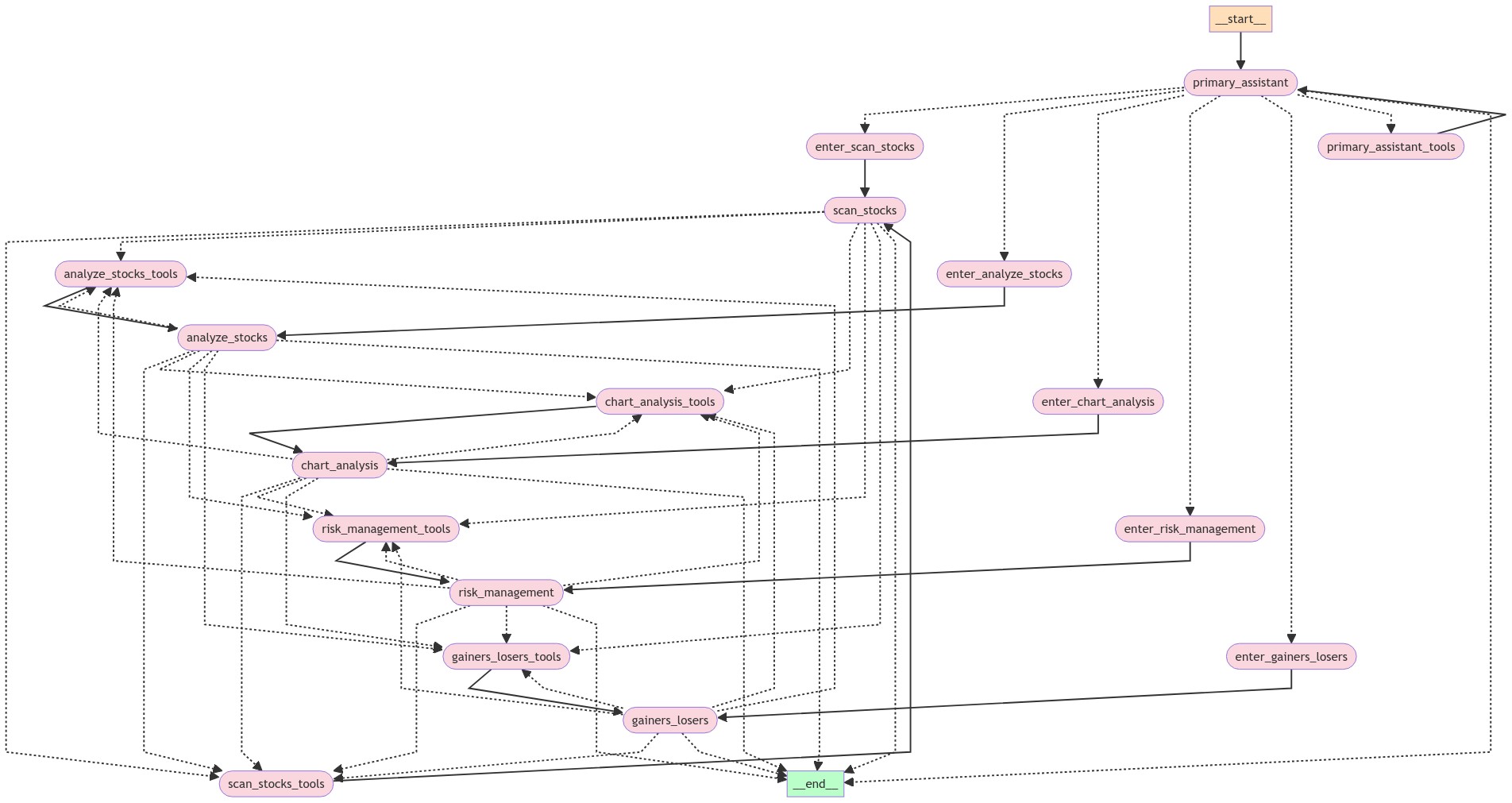
- Unleashing the Power of Multiple Agents with LangGraph
- Deploying the AI Stock Analysis Agent on AWS with Copilot
Features
- Fetches financial data using OpenBB
- Generates technical analysis summaries using AI
- Provides stock price history, quantitative stats, and more
- Calculates relative strength for stocks
- Sentiment analysis on news articles
- Universe scanning using FinViz filters
- Risk management techniques using technically-derived stops and R Multiples
- Interactive Streamlit UI for chat-based interaction
- Multiple Agent Workflows using LangGraph
- Deployment to AWS with the Copilot CLI
Installation
- Install the required dependencies using Poetry:
poetry install
- Set up the necessary environment variables. You can create an
.envat the project root for these:
export OPENAI_API_KEY=<your-api-key>
export OPENBB_TOKEN=<your-openbb-token>
export TIINGO_API_KEY=<your-tiingo-api-key>
export IMGUR_CLIENT_ID=<your-imgur-client-id>
export IMGUR_CLIENT_SECRET=<your-imgur-client-secret>
export FMP_API_KEY=<fmp-api-key>
export INTRINIO_API_KEY=<intrinio-api-key>
Usage
Streamlit UI
Run the Streamlit app:
streamlit run app/ui.py
FastAPI Server
Start the FastAPI server:
uvicorn app.server:app --host 0.0.0.0 --port 8080
You can view the Swagger Docs and test out the Playground, courtesy of LangServe.
Docker
Build the Docker image:
docker build -t financial-chat .
Run the Docker container:
docker run -p 8080:8080 --env-file .env financial-chat
Project Structure
app/: Main application codechains/: LangChain agent and promptsfeatures/: Feature-specific code (technical analysis, charting)tools/: Custom tools for data retrieval and analysisui.py: Streamlit UIserver.py: FastAPI server
Dockerfile: Dockerfile for building the applicationpyproject.toml: Project dependencies and configurationREADME.md: Project documentation
Flowchart