

FIT Dashboard



A high-performance activity analytics dashboard for Garmin FIT files. Available as a Tauri v2 desktop app or a Docker-deployable web app. Built with Rust, DuckDB, and React.
[!IMPORTANT] Garmin is a registered trademark of Garmin Ltd. or its subsidiaries. This project is an independent, open-source tool and is not affiliated with, endorsed by, sponsored by, or approved by Garmin Ltd.
[!NOTE] This project repository is dynamically mirrored in Codeberg as a backup. An alternative docker image is available at codeberg.org/arpanghosh8453/fit-dashboard.
Contents
- Features
- Getting Started
- Getting FIT Files from Garmin
- Usage
- Export Formats
- Tech Stack
- Project Structure
- API Reference
- Configuration
- Security
- Acknowledgements
- Love This Project?
- Declaration
- License
Screenshots
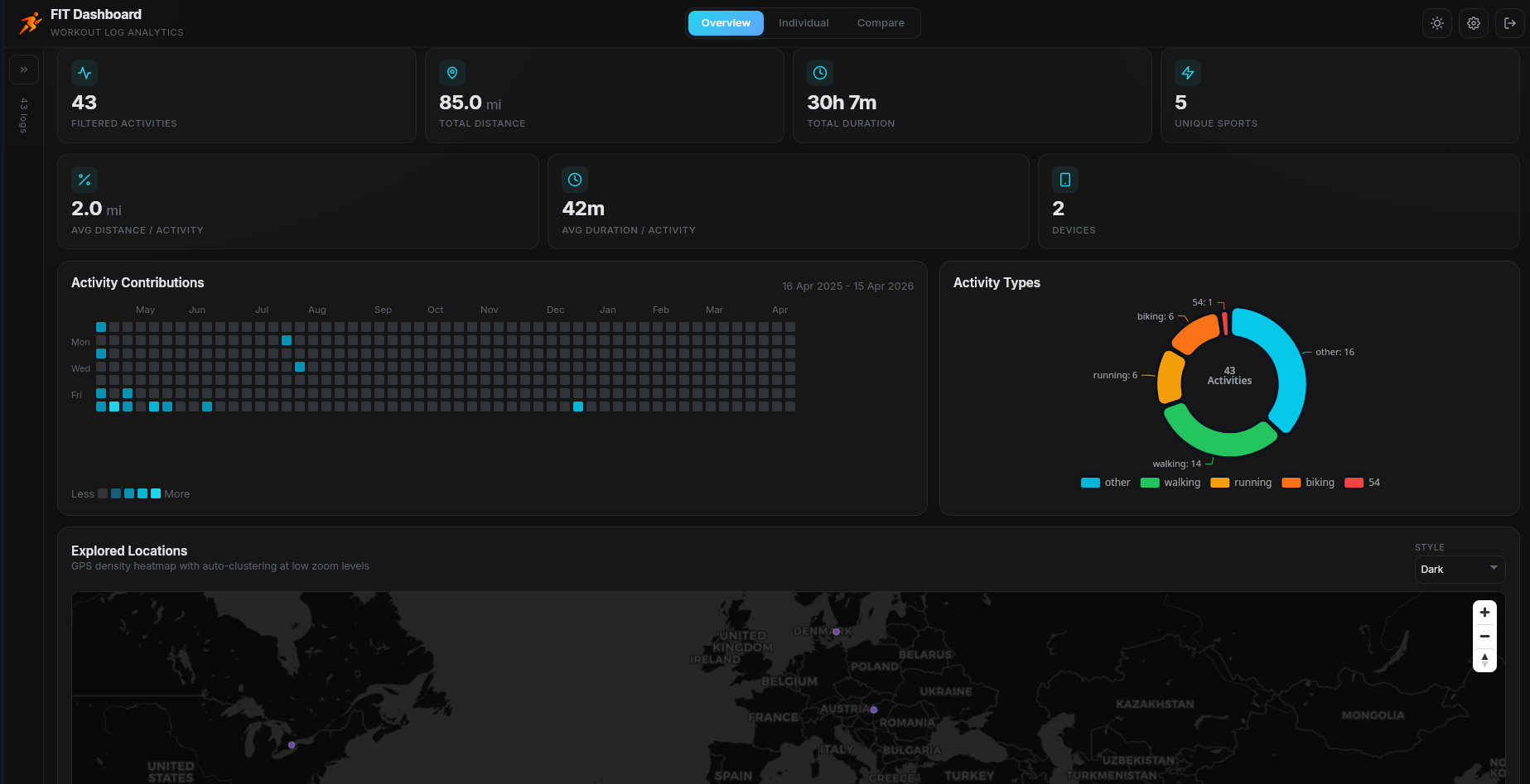
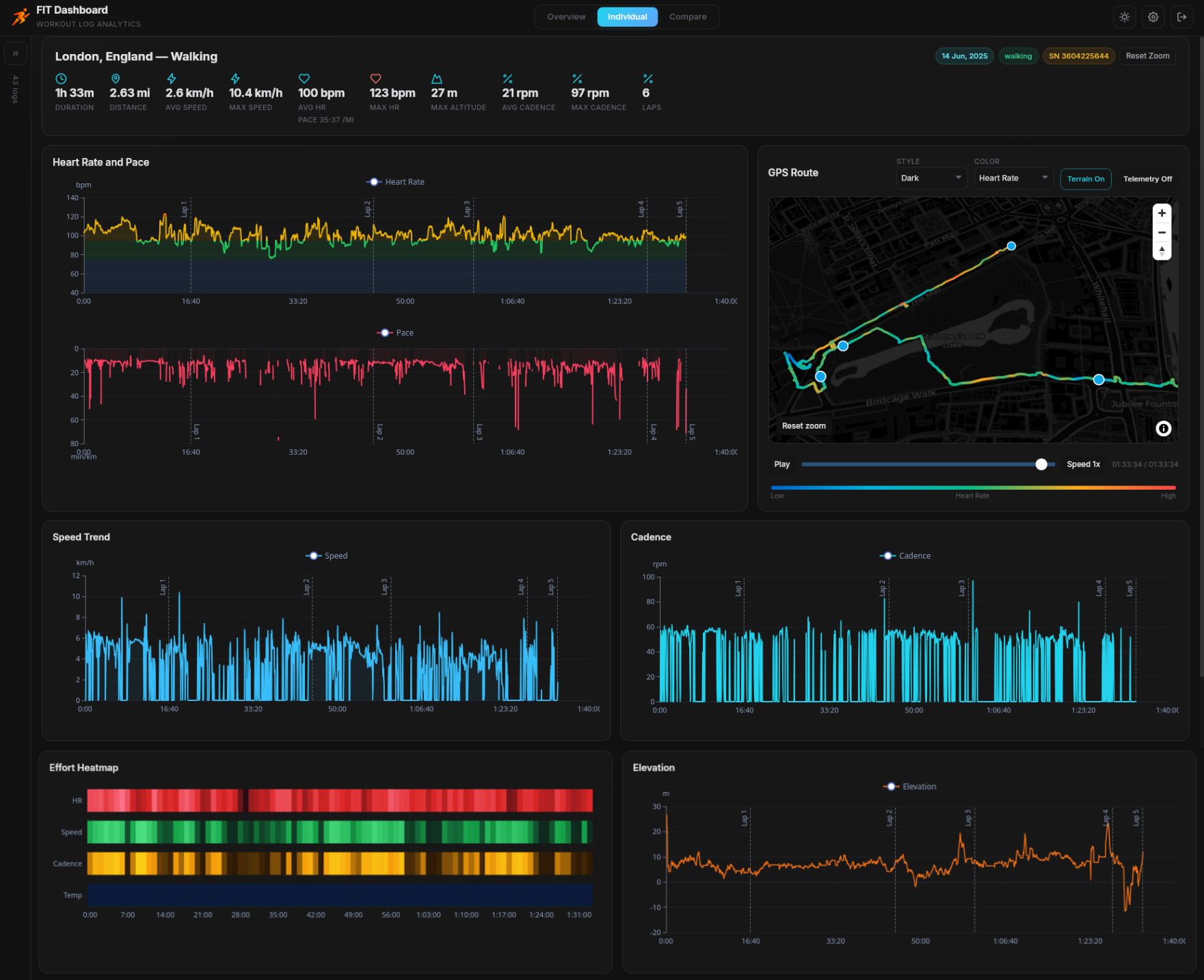
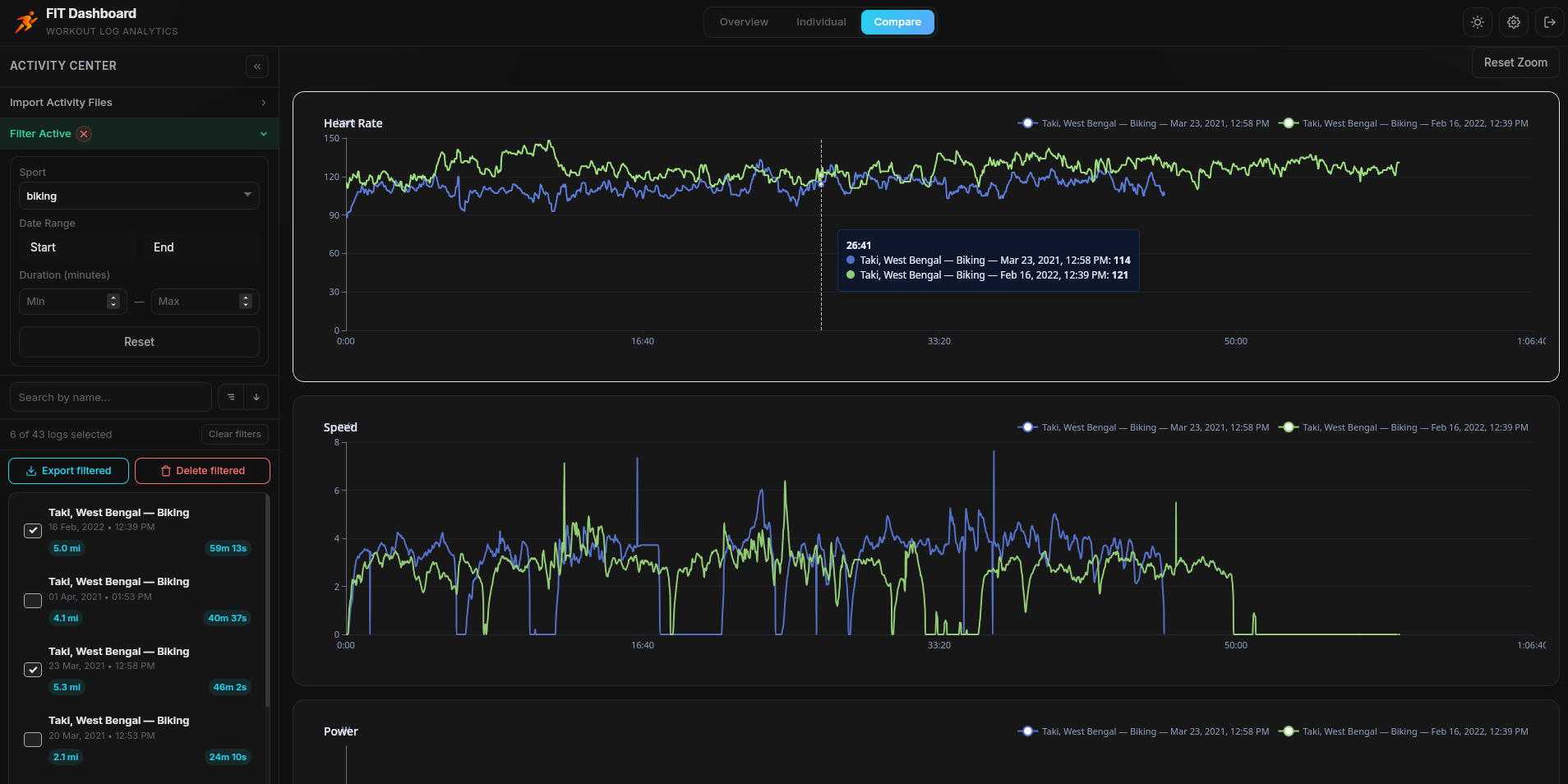
Features
- FIT File Parsing: Native Rust parser using the
fitparsercrate. Supports all standard Garmin FIT activity files with automatic field extraction. - High-Performance Storage: DuckDB-powered analytical database with automatic downsampling for fast time-series queries. Handles hundreds of activities with millions of data points.
- Interactive Telemetry Charts: ECharts-powered visualization of speed, heart rate, cadence, altitude, power, and temperature. Synchronized zoom/pan with Ctrl+scroll guarding to prevent accidental navigation.
- Activity Map: MapLibre GL map with dynamic path coloring by metric (speed, HR, cadence, altitude, power, temperature, time). Hover tooltips show telemetry details at each point. Supports multiple map styles.
- Overview Dashboard: Aggregate statistics across all imported activities — total distance, total duration, activity count, and recent activity feed with interactive map overlay.
- Advanced Filtering: Filter by sport type, date range, duration range, and full-text search. Collapsible filter panel with bordered container design.
- Bulk Export: Export filtered activities as CSV, JSON, GPX, or KML. Uses the File System Access API to write directly to a chosen folder. Fallback to individual browser downloads when the API is unavailable.
- Single Export: Right-click any activity to export it individually via the context menu with format submenu.
- Bulk Delete: Delete all filtered activities at once with inline confirmation and progress overlay.
- Inline Management: Rename and delete activities with inline UI — no browser dialogs. All destructive actions require explicit confirmation.
- Session Persistence: Authentication tokens persist across browser refreshes with a configurable 72-hour TTL (web) or until logout (desktop).
- Dark & Light Themes: Modern glassmorphism design with CSS custom properties. Theme toggles instantly across the entire interface.
- Responsive Layout: Collapsible sidebar with a persistent expand strip. Works on desktop and tablet viewports.
- Import Queue: Batch import multiple FIT files with sequential processing for stability. Duplicate detection prevents re-importing the same file.
- Password Protection: Argon2-hashed credentials with session-based authentication. First-use onboarding flow for initial setup.
- Cross-Platform: Desktop builds for Windows, macOS, and Linux.
- Multi-language Support: Deutsch, English, Español, Français, Magyar, Italiano, Nederlands, Polski, Português, Turkce, 中文, 日本語, 한국어
Getting Started
Prebuilt Binaries (Windows/MacOS/Linux)
Download desktop binaries from the Releases page and install for your platform:
- Linux:
.AppImage/.deb(depending on release artifacts) - macOS:
.dmg(requires an additional De-Quarantine step, read below) - Windows:
.msiandexeinstallers
After installation, launch FIT Dashboard and complete onboarding on first run.
macOS: "App is damaged" Fix
If you downloaded the macOS build and see "FIT Dashboard is damaged and can't be opened", macOS Gatekeeper is blocking an unsigned app (this is a security warning, not a corrupted file). Use one of the methods below to open the app:
Method 1: Right-click to Open
- Locate the app in your Applications folder (or wherever you placed it).
- Right-click (or Control+click) on
FIT Dashboard.app. - Select Open from the context menu and confirm Open in the dialog.
Method 2: Remove the quarantine attribute (Terminal)
Open Terminal and run the following. Type xattr -cr , then drag the .app bundle onto the Terminal window (it will paste the full path), then press Enter:
xattr -cr <drag-and-drop-FIT-Dashboard.app-here>
After running this, try opening the app again.
Note: Apple charges for developer signing; unsigned releases may require these steps. This warning means Gatekeeper prevented launch, not that the file is corrupted.
Development
Prerequisites
# Clone the repository
git clone https://github.com/your-username/fit-dashboard
cd fit-dashboard

# Install frontend dependencies
npm install

# Start the Rust backend (web server mode)
cd src-tauri
cargo run --features web
# Backend starts at http://localhost:8080

# In another terminal, start the frontend dev server
cd fit-dashboard
npm run dev
# Frontend starts at http://localhost:5173

# Tauri desktop dev mode
npm run tauri:dev

# Tauri production build
npm run tauri:build
Open http://localhost:5173 in your browser. On first launch, the onboarding screen appears to set up your username and password.
Docker Deployment (Self-hosted)
Use the prebuilt GHCR image:
cd docker
docker compose up -d
Build locally from source instead:
cd docker
docker compose -f docker-compose-build.yml up --build -d
Open http://localhost:8088 in your browser. The Nginx reverse proxy serves the frontend and proxies API requests to the Rust backend.
Data Persistence
All data (DuckDB database, config) is stored in a Docker named volume mapped to /data/fit-dashboard inside the container. Data persists across container restarts and image updates.
The desktop app runs the Rust backend natively with Tauri IPC — no web server needed.
Getting FIT Files from Garmin
If your activities are in Garmin Connect, you can export FIT files in two ways.
Option A: Bulk export all data (recommended)
Use Garmin's data export portal:
Steps:
- Sign in with your Garmin account.
- Go to Data Management and choose Export Your Data.
- Request the export and wait for Garmin to prepare the archive.
- Download the ZIP archive when it's ready from email
- Extract the ZIP on your computer.
- Find activity files (FIT/TCX/GPX) in the extracted folders - The exported zip contains a folder (DI_CONNECT/DI-Connect-Fitness-Uploaded-Files) containing your raw FIT activity files.
- In FIT Dashboard, use Import to select or drag-and-drop those files.
When to use this option:
- You want a full history export.
- You are migrating from Garmin Connect to local storage.
Option B: Export one activity at a time
Use the activity page in Garmin Connect:
Steps:
- Open the Activities page.
- Click an activity to open details.
- Open the gear menu (top-right on the activity page).
- Click Export Original (or Export TCX/GPX depending on availability).
- Repeat for each activity you want.
- Import downloaded files into FIT Dashboard.
When to use this option:
- You only need a few activities.
- You want to re-export specific workouts.
Tips:
- FIT is the preferred format when available, because it usually includes the richest telemetry.
- You can import
.fit,.tcx, and.gpxfiles in FIT Dashboard. - If duplicate files are imported, FIT Dashboard will skip them automatically. But if you have the save activity file in different format, it may still cause duplicate. We de-duplicate them based on file hash and exact start and end timestamp match of an activity.
Option C: Use Garmin-CLI tool
If you prefer the command line, Garmin-CLI can list your activities and download the original Garmin export for a specific activity. This can be easily automated to batch download multiple activities.
Steps:
-
Install Garmin-CLI (
cargo install garmin-cli, or use the pre-built MacOS/linux binary). -
Sign in once with password and OTP (if applicable):
garmin auth login. -
List your activities and copy the activity ID you want:
garmin activities list. use--limit 20to limit the result to last 20 activities -
Download the original FIT export for that activity:
garmin activities download <activity-id> -
Unzip the downloaded archive to get the
.fitfile, then import that file into FIT Dashboard.
[!TIP] You are automate the whole process with this one liner (update the limit to match your need, here it's set as 50)
garmin activities list --limit 50 | awk 'NR>2 && $1 ~ /^[0-9]+$/ {print $1}' | while read -r id; do garmin activities download "$id" && unzip "activity_${id}.zip" && rm "activity_${id}.zip"; done
When to use this option:
- You want to batch pull individual activities without using the Garmin Connect web UI.
- You want a repeatable way to fetch specific activity files by ID.
Usage
- Import: Open the sidebar Import section and select one or more
.fitfiles - Browse: Activities appear in the sidebar, sorted by date. Use filters to narrow down
- Analyze: Click an activity to view telemetry charts, map path, and performance insights
- Export: Right-click an activity for single export, or use "Export filtered" for bulk export
- Overview: Switch to the Overview tab for aggregate statistics across all activities
Export Formats
| Format | Description |
|---|---|
| CSV | Full time-series with all telemetry fields. Metadata JSON embedded in the first row. Speed in both m/s and km/h. |
| JSON | Structured export with activity metadata and full records array. Pretty-printed for readability. |
| GPX | Standard GPS Exchange Format with track segments. Extensions include heart rate, cadence, and power. |
| KML | Google Earth format with 3D line path using absolute altitude mode. |
Single export: Right-click → Export → choose format → browser download.
Bulk export: Click "Export filtered" → choose format → select destination folder → files are written one by one with progress overlay.
Tech Stack
Backend (Rust)
| Component | Purpose |
|---|---|
| Tauri v2 | Desktop application framework (feature-gated behind tauri-app) |
| Axum | Web REST API server for Docker/web deployment (feature-gated behind web) |
| DuckDB | Embedded analytical database — fast aggregations over millions of records |
| fitparser | Native FIT file parsing — no external tools required |
| Argon2 | Password hashing for authentication |
Frontend (React)
| Component | Purpose |
|---|---|
| React 18 + TypeScript | UI framework |
| Vite | Build tool with HMR |
| Zustand | Lightweight state management |
| ECharts | Telemetry charts with synchronized zoom |
| MapLibre GL | Interactive map with cooperative gestures |
| Vanilla CSS | Custom design system with CSS variables, dark/light theming |
Project Structure
fit-dashboard/
├── src-tauri/                   # RUST BACKEND
│   └── src/
│       ├── main.rs              # Entry point (feature-gated: Tauri or Axum)
│       ├── server.rs            # Axum REST API routes
│       ├── database.rs          # DuckDB schema, queries, downsampling
│       ├── fit_parser.rs        # FIT file parsing with fitparser crate
│       ├── models.rs            # Shared data structures
│       ├── auth.rs              # Password hashing & session management
│       ├── state.rs             # Shared application state
│       └── tauri_app.rs         # Tauri IPC command handlers
│
├── src/                         # REACT FRONTEND
│   ├── components/
│   │   ├── Dashboard.tsx        # Main layout — sidebar, header, content
│   │   ├── ActivityChart.tsx    # ECharts telemetry visualization
│   │   ├── ActivityMap.tsx      # MapLibre map with path coloring
│   │   ├── ActivityInsights.tsx # Derived statistics & heatmaps
│   │   ├── SettingsPanel.tsx    # Slide-over settings drawer
│   │   ├── Onboarding.tsx      # First-use setup flow
│   │   ├── UnlockScreen.tsx    # Password unlock screen
│   │   └── DonationBanner.tsx  # Support banner
│   ├── stores/
│   │   ├── activityStore.ts    # Activity data & selection state
│   │   └── settingsStore.ts    # Theme, units, map style settings
│   ├── lib/
│   │   ├── api.ts              # Backend adapter (Tauri IPC / Axios)
│   │   └── exportUtils.ts      # CSV/JSON/GPX/KML export builders
│   ├── types.ts                # TypeScript type definitions
│   ├── styles.css              # Complete design system
│   ├── App.tsx                 # Root component with auth flow
│   └── main.tsx                # React entry point
│
├── docker/                      # DOCKER CONFIG
│   ├── Dockerfile              # Combined backend + frontend image build
│   ├── docker-compose.yml      # Prebuilt GHCR image deployment
│   ├── docker-compose-build.yml# Local source build deployment
│   └── nginx.conf              # Reverse proxy config
│
├── index.html                   # HTML entry point
├── vite.config.ts               # Vite configuration
├── tsconfig.json                # TypeScript configuration
└── package.json                 # Node.js dependencies
API Reference
All endpoints require the X-Session header after authentication (except /api/status, /api/onboard, and /api/unlock).
| Method | Endpoint | Description |
|---|---|---|
GET |
/api/status |
Server status and onboarding check |
POST |
/api/onboard |
First-time user setup (username + password) |
POST |
/api/unlock |
Authenticate and receive session token |
POST |
/api/logout |
Invalidate current session |
POST |
/api/import-fit |
Import FIT file (multipart form data) |
GET |
/api/activities |
List all activities |
GET |
/api/overview |
Aggregate statistics |
GET |
/api/records/:id |
Telemetry records with ?resolution_ms= downsampling |
PATCH |
/api/activities/:id |
Rename activity |
DELETE |
/api/activities/:id |
Delete activity |
Configuration
| Setting | Default | Description |
|---|---|---|
| Session TTL | 72 hours | Web session token lifetime. Desktop tokens persist until logout. |
| API Base | http://localhost:8080 |
Backend URL, configurable via VITE_API_BASE env var |
| Resolution | 10,000 ms | Default telemetry downsampling interval for chart queries |
| Export Resolution | 1,000 ms | Higher-resolution records used during export operations |
Security
FIT Dashboard is designed as a local-first application. The web/Docker mode does NOT include TLS/HTTPS.
- Passwords are hashed with Argon2 before storage
- Session tokens are generated server-side and validated on every request
- For internet-facing deployments, use a reverse proxy (Nginx, Caddy, Traefik) with TLS termination
Acknowledgements
- fitparser for robust FIT decoding.
- DuckDB for fast embedded analytics.
- MapLibre GL JS for rendering activity maps.
- Tile/map providers used by built-in styles:
- ECharts for charting.
- Tauri and Axum for desktop and web runtime foundations.
Love This Project?
If FIT Dashboard helps your training workflow, consider supporting ongoing development:
- Give this repository a star.
- Share it with other athletes, coaches, and data enthusiasts.
- Get a supporter badge via Ko-fi.
Declaration
FIT Dashboard is a personal open-source project maintained in public. I started this project as an offline alternative to my other project garmin-grafana
- It is not affiliated with Garmin, Strava, Golden Cheetah, or any map/tile provider.
- All trademarks and product names are the property of their respective owners.
- Map data and tiles remain subject to each provider's attribution and usage terms.
- This project is AI assisted. Some feature implementations includes using Claude Opus 4.5 and Codex 5.3. Although design, artitecture, behaviour and implementation decisions are always made by myself. I test out features throughly before each release and try my best to address any reported issue within a reasonable timeline.
License
Copyright © 2025 Arpan Ghosh. Licensed under the GNU Affero General Public License v3.0.