



FlintML is the all-in-one, self-hosted ML platform for real-world teams. Simple, flexible, fast to deploy, and built for people solving actual problems—not chasing hype.
🚀 Quickstart
curl -sL https://raw.githubusercontent.com/flintml/flint/main/flintml-quickstart.sh | bash
FlintML will become available at localhost:8701. The first time you execute code may take a couple of minutes while FlintML downloads the relevant worker image.
Note: ensure Docker is installed and you are on a Linux (or WSL) machine (ARM currently not supported.)
 Why FlintML?
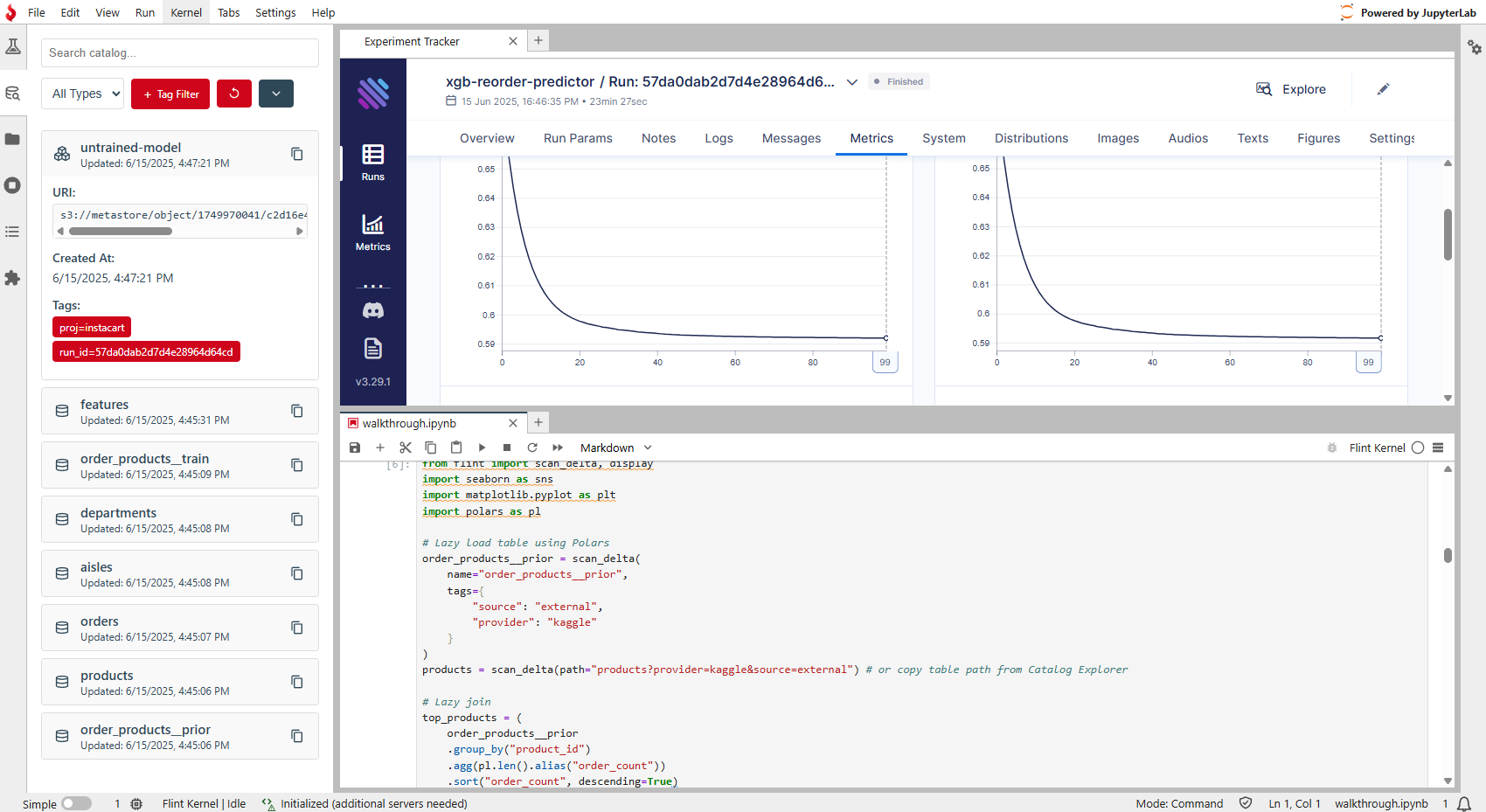
FlintML enables teams to deliver end-to-end ML quickly and with minimal infrastructure overhead. With FlintML, all key components of the MLOps process are centralised, providing an integrated and developer-centric experience.
Core features:
 Delta Lake storage layer – adds ACID guarantees and time travel to your data pipelines with scalable, versioned storage.
- Unified data catalog – tables, models, artefacts, and any other file types are treated as first-class data citizens.
- Efficient data processing with Polars – leverage lazy execution for memory-efficient data operations.
Integrated tools:
- Experiment tracking with Aim – run experiments and compare them all in one place.
- Familiar notebook development environment – all functions are seamlessly integrated with Jupyter Lab.
- Workflow orchestration via Dagster (WIP*) – load data, retrain models, and run inference on a schedule.
Platform & Deployment:
- Flexible and reproducible compute – switch between compute drivers to fit your use case, or write your own.
- Composable, declarative infrastructure – have full control over your Docker Compose deployment.
🔎 Demo
To get a sense of what you can do with FlintML, check out the Instacart Kaggle example. You can also read about FlintML concepts and check out the reference to learn more about the platform's capabilities
⚙️ Customising Your Deployment
Data Storage
FlintML ships with its own Storage service that depends on the mounts, storage_data and storage_meta. If you wish to specify custom volumes, you should create an override docker-compose.override.yml and compose it when spinning up flint. See the docs.
Environment Variables
FLINT_PORT
Defines the port number at which the FlintML platform will be served.
Default of 8701.
STORAGE_USER and STORAGE_PASSWORD.
These environment variables define the login credentials that Worker Containers and services in the Flint Control Plane use to authenticate to the Flint Catalog.
Defaults are admin and password respectively.
DRIVER_CONFIG
This must be the file path to the desired Worker Configuration.
No default. See example env file.
DOCKER_SOCKET
FlintML uses Worker Containers to execute code and run jobs. These containers are orchestrated by the configured driver. If the Local Driver is selected, the Docker socket must be mounted to the Compute Manager service in the Flint Control Plane.
Since mounting the Docker socket has security implications, the default value for this environment variable is /dev/null, meaning that the Docker socket IS NOT mounted.
The quickstart uses the Local Driver for simplicity and thus mounts the docker socket. See example env file.
Worker Configuration
To see the full worker specificaton, see the schema. Some example configurations are provided below.
Local Driver with mounted NAS volume:
driver:
  type: local
  image: flintml/worker-base:latest
  mounts:
    # <mount_name>: <host_mount_point>
    image-data: /mnt/nas/images # Will be available at `/mnt/image-data` inside worker container.
To customise compute environments, you will need to use a custom image.
Building Locally
All FlintML codefiles live under src/. You will see two sets of Compose, env and worker config files - build and release-template. release-template files are used to define the release tarball and thus can be ignored for local development.
To build locally, you must firstly build the base worker image so it exists in your local Docker registry:
docker build -f ./src/worker-base/Dockerfile -t worker-base:latest ./src/
Then you can spin up the platform by using the build files:
docker compose -f ./src/docker-compose.build.yml --env-file ./src/.env.build up
Note: If you update the dependencies of any packages in src/common-lib, make sure you run ./update-common-lib.sh to update dependant Poetry lock files.
🎯 Roadmap
- Workflows (in-progress)
- Data upload support (can be achieved by defining a worker mount but is inconvenient)
- Libcloud driver
- Multi-user support
🤝 Contributing
We would be stoked for you to get involved with FlintML development! If you'd like to get more involved, please contact us at [email protected].