Fred's Roadtrip Storyteller
Listen to historical markers as you travel - Learn about local history as you drive.
- KMP (Kotlin Multi-Platform) Compose-based Proof-of-concept experimental app using Google Maps for iOS and Android.
- Pure Kotlin App using SHARED core and SHARED Compose based UI, running in native Kotlin.





YouTube series following the development of the app:

Assets
- Wiki: Fred's Roadtrip Storyteller Wiki
- Link to Marketing site source: https://github.com/realityexpander/FredsRoadtripStorytellerWebsite
- Link to Marketing Site: https://FredsRoadtripStoryteller.com
Screen Shots
Android Screenshots
iOS Screenshots
note: screenshots may differ slightly from current version
External Locations for Promoting Project
-
Join the KMP Developers Group:
-
Support email:
- [email protected]
- Email forwarding service (Free): https://app.improvmx.com/
- Hostinger hosting dashboard: https://hpanel.hostinger.com/ realityexpanderdev acct
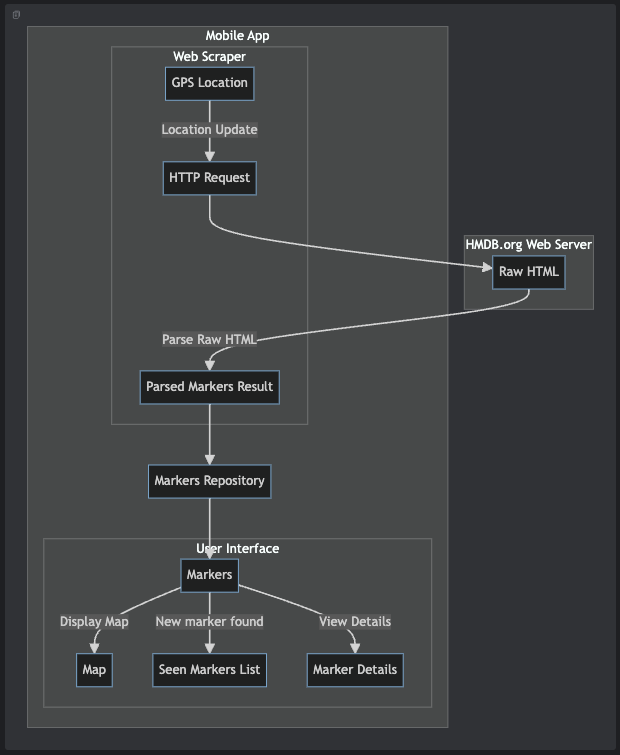
Application Architecture
Developer notes
INSTALLATION
-
Secrets Files
- Check the
*.examplefiles for proper placement - Must create
AppSecrets.plistfrom within Xcode - in password vault, for google maps account ID's. - Can get
google-services.jsonfrom Google Cloud Console for google maps account ID's.- Get a Google Maps API key
- Check the
-
Add to
local.propertiesfile located in the root directory (create if it doesn't exist):MAPS_API_KEY=YOUR_KEYwhereYOUR_KEYis your key from previous step;sdk.dir=YOUR_SDK_PATHwhereYOUR_SDK_PATHis a path to Android SDK in your system.
-
From root dir, must run
./gradlew :shared:generateDummyFramework. -
Must run
pod updatethenpod installin theiosAppfolder. -
Must build the Android app before running the iOS app.
-
Open project in IntelliJ IDEA or Android Studio and run the
androidAppconfiguration. -
Note: There are many spurious warning messages from the AS IDE and pop-up warnings.
- It seems these can be safely ignored. (I assume they will address these issues in upcoming releases)
Source: (Code snapshot taken 10/8/23) https://github.com/JetBrains/compose-multiplatform/tree/master/examples/cocoapods-ios-example
Latest commit Ran & Built with:
- Android Studio Koala | 2023.3.2 Canary 2
- Build #AI-233.14475.28.2332.11606850, built on March 21, 2024
- Runtime version: 17.0.10+0-17.0.10b1087.21-11572160 aarch64
- VM: OpenJDK 64-Bit Server VM by JetBrains s.r.o.
- macOS 14.4
- GC: G1 Young Generation, G1 Old Generation
- Memory: 4096M
- Cores: 10
- Metal Rendering is ON
- Registry:
- ide.tooltip.initialDelay=812
- ide.browser.jcef.gpu.disable=true
- debugger.new.tool.window.layout=true
- analyze.exceptions.on.the.fly=true
- ide.experimental.ui=true
- Non-Bundled Plugins:
- com.c5inco.modifiers (1.0.15)
- dev.j-a.swift (0.21.0.336-233)
- wu.seal.tool.jsontokotlin (3.7.4)
- idea.plugin.protoeditor (233.13135.65)
- com.wakatime.intellij.plugin (14.3.11)
- com.github.airsaid.androidlocalize (3.0.0)
- DBN (3.4.3073.0)
- net.seesharpsoft.intellij.plugins.csv (3.3.0-233)
- com.jetbrains.kmm (0.8.2(233)-8)
- com.squareup.sqldelight (2.0.1)
- com.developerphil.adbidea (1.6.15)
- org.jetbrains.compose.desktop.ide (1.6.1)
- by.overpass.svg-to-compose-intellij (0.14)
- com.github.copilot (1.5.0.5148)
- mobi.hsz.idea.gitignore (4.5.2)
- com.abeade.plugin.figma.import (1.0.8)
Code style
KMP Stuff
-
KMP Jetbrains Wizard (basic)
-
KMP Wizard
-
All kinds of libraries
-
Settings
-
Storage (Store5)
-
Location KMM implementation concept
-
kSoup - HTML parser for scraping web pages
- This thing is a hack and a half way of scraping, but until jSoup is ported, its what we got. -https://github.com/MohamedRejeb/ksoup
-
Painter resources
-
Material Design 3
-
Drawers
-
https://developer.android.com/jetpack/compose/components/drawer
-
WebView
-
Screen Orientation
-
https://www.geeksforgeeks.org/detect-screen-orientation-in-android-using-jetpack-compose/
-
https://codingwithrashid.com/how-to-get-screen-orientation-in-android-jetpack-compose/
-
Build Config
-
Lottie for Compose (Android only?)
-
https://github.com/airbnb/lottie/blob/master/android-compose.md
Android
-
Adding markers
-
Background tracking
-
Location Visualizer
- https://github.com/JetBrains/compose-multiplatform/blob/7c2bec465489d706451fa3ad5810d060f5bc7773/examples/imageviewer/shared/src/commonMain/kotlin/example/imageviewer/view/LocationVisualizer.common.kt
- https://github.com/JetBrains/compose-multiplatform/blob/7c2bec465489d706451fa3ad5810d060f5bc7773/examples/imageviewer/shared/src/iosMain/kotlin/example/imageviewer/view/LocationVisualizer.ios.kt
-
Problems
-
Clustering markers not updated
-
Compose Clustering
-
Compose Samples
-
Billing
-
https://medium.com/androiddevelopers/working-with-google-play-billing-part-2-b859b55426d2
-
Nice example in compose: https://www.answertopia.com/jetpack-compose/a-jetpack-compose-in-app-purchasing-tutorial/
-
Book from the author: https://www.ebookfrenzy.com/pdf_previews/JetpackCompose1.4EssentialsPreview.pdf
-
Handling test licenses: https://play.google.com/console/u/2/developers/7466162782462237210/license-tester
-
In-app products dashboard: https://play.google.com/console/u/2/developers/7466162782462237210/app/4975423493158681529/managed-products
-
https://reintech.io/blog/implementing-in-app-purchases-kotlin-google-play-billing-library
-
https://www.namiml.com/blog/set-up-iap-google-play-android-app
iOS
-
https://developers.google.com/maps/documentation/ios-sdk/utility/setup
-
Location Manager
-
Map Utils (clustering)
-
Long running background location updates
-
Location picker
-
Touch map for location
-
Continuous updates
-
How to convert iOS UIImage to Compose ImageBitmap in Compose Multiplatform?
-
Maps stuff
-
Override MKMapViewDelegateProtocol in Compose Multiplatform to receive pin selected events
-
How to programmatically select annotation in Google Maps iOS?
-
https://stackoverflow.com/questions/49156832/ios-google-map-programmatically-select-annotation-swift
-
SwiftUI iOS 14 MapKit Annotation Tap Gesture (didSelect)
-
Meet MapKit for SwiftUI https://developer.apple.com/videos/play/wwdc2023/10043/
-[Solved] iOS 17 MapKit: How to use Map(selection:)? -https://www.hackingwithswift.com/forums/swiftui/ios-17-mapkit-how-to-use-map-selection/22886
https://www.hackingwithswift.com/books/ios-swiftui/integrating-mapkit-with-swiftui
-
STORE stuff
-
StoreHelper Quick Start: https://github.com/russell-archer/StoreHelper/blob/main/Documentation/quickstart.md
-
StoreHelper Guide https://github.com/russell-archer/StoreHelper/blob/main/Documentation/guide.md#get-started
-
Simulate Location
Dev notes
-
Why mutableStateList
-
KMM Location services example app
-
Kotlin Swift - Jetpack Compose iOS, ComposeUIViewController, UIViewControllerRepresentable, UIKitView...
Asset links
Potential app names:
Play store badge generator: https://play.google.com/intl/en_us/badges/
Privacy Policy: https://www.privacypolicygenerator.info/ https://www.privacypolicygenerator.info/download.php?lang=en&token=dhslNflkEHizHHbsBssrE8zM1p5AXwnR
Firebase console: https://console.firebase.google.com/u/0/project/talkingmarkers/overview
Photo editors
-
Photoshop editor: https://www.photopea.com/
-
Location Markers
-
Material Design Palette

Original Readme:
Compose Multiplatform iOS CocoaPods example
This example showcases using Kotlin Multiplatform shared module in Swift as a CocoaPods framework.
The official Kotlin documentation provides more information on working with CocoaPods:
- CocoaPods overview and setup;
- Add dependencies on a Pod library;
- Use a Kotlin Gradle project as a CocoaPods dependency;
Setting up your development environment
To setup the environment, please consult these instructions.
How to run
Choose a run configuration for an appropriate target in IDE and run it.