

FreeDrive
Self-hosted cloud storage with a familiar Drive-like UX.
Single Go binary, embedded SQLite, disk-backed storage, admin panel, and modern web UI.
Licensed under MIT



Table of Contents
- Overview
- Screenshots
- Core Features
- Admin Capabilities
- Architecture
- Security Model
- Quick Start
- Production Install (systemd)
- Configuration
- API Reference
- Project Structure
- Deployment Options
- Operations
- Star History
- Troubleshooting
- Contributing
- License
Overview
FreeDrive is an open-source, self-hosted storage platform designed to feel instantly familiar for users coming from mainstream cloud drives.
What makes it practical:
- Single binary backend (
Go) with embedded web assets - Embedded SQLite database (no external DB required)
- Local disk storage backend
- JWT access + refresh-token authentication
- User and admin workspaces in one application
- Simple deployment with direct binary run or
systemd
FreeDrive is ideal for:
- Developers wanting full ownership of files and auth
- Small teams needing private internal storage
- Self-hosting enthusiasts who want low operational overhead
Screenshots
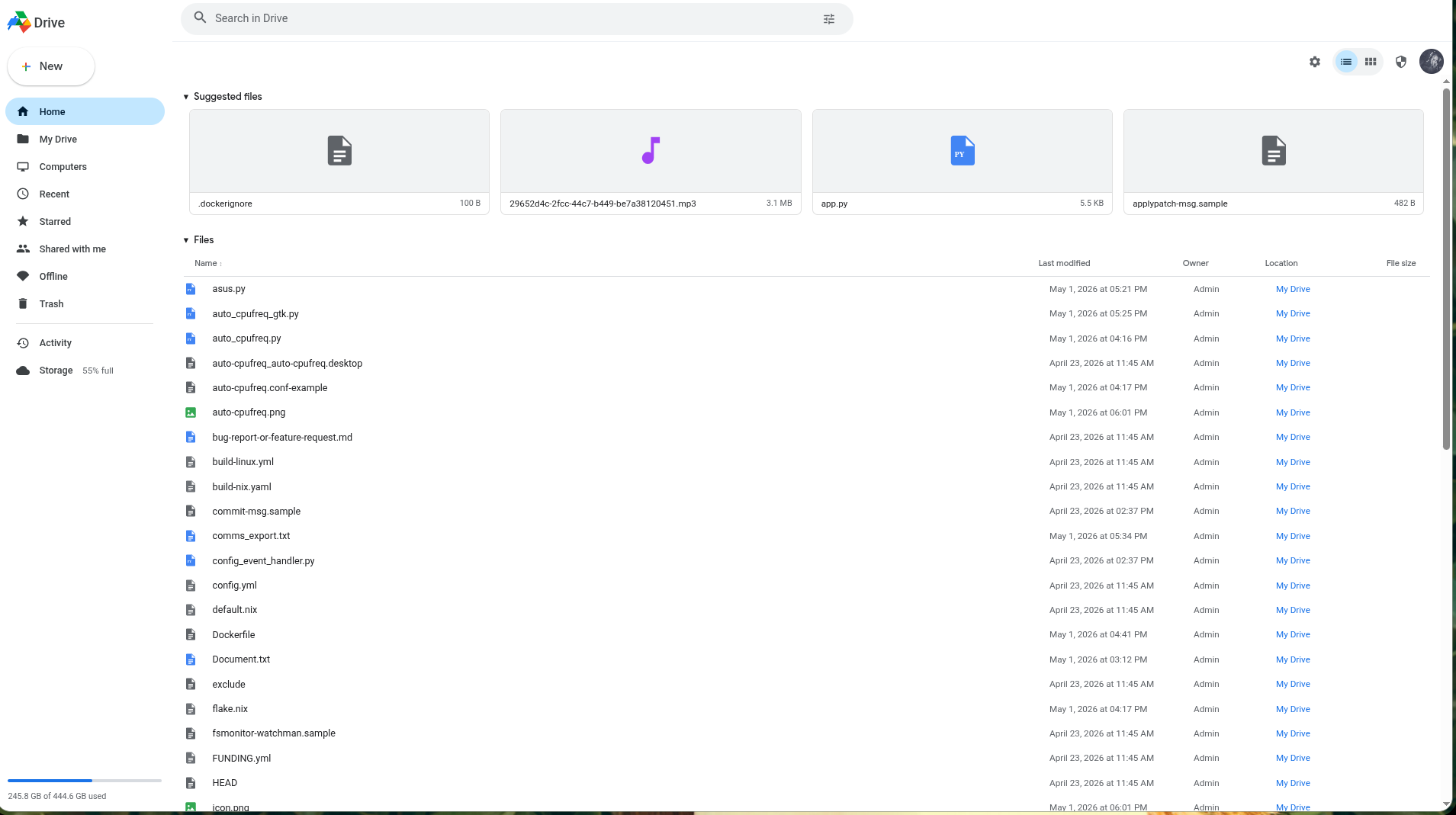
User Workspace
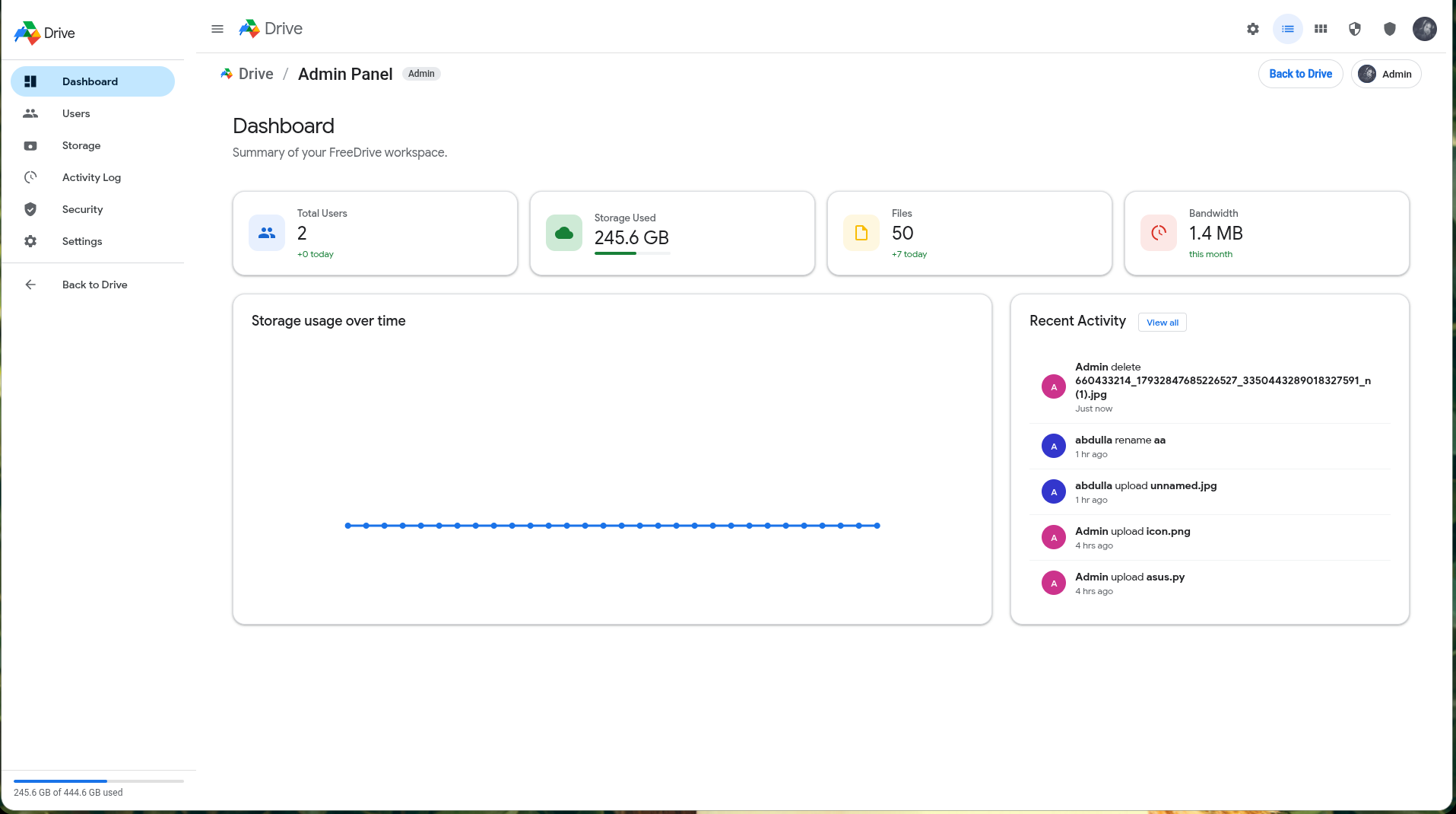
Admin Workspace
Core Features
1. Drive-like File Management UX
- Folder-based navigation and root view
- Suggested/recent style listings
- List/grid view switching
- Search and search filters
- Context menus and keyboard shortcuts
2. File Lifecycle
- Upload files via web UI
- Download encrypted blob payloads with metadata headers
- Rename and move files between folders
- Soft delete to Trash
- Restore from Trash
- Permanent delete
3. Versioning Support
- File version records are kept when content is updated
- List versions per file
- Restore an earlier version
4. Sharing Model
- User-to-user sharing data model (
user_shares) - Share-link data model (
share_links) - "Shared with me" and "Shared by me" listing paths
5. Storage & Quota Awareness
- Per-user quota enforcement during uploads/content updates
- Used-bytes accounting on delete/restore/permanent-delete paths
- Disk usage endpoint for runtime visibility
6. Activity Logging
- File/folder actions are recorded in activity logs
- User and admin activity listing endpoints
7. Embedded App Delivery
- Frontend is embedded with
go:embed - Single process serves API + SPA + static assets
Admin Capabilities
Admin routes are role-protected and available under /api/v1/admin/*.
User Management
- List users
- Create users
- Update role/quota/username
- Delete users (with self-delete protection)
- Trigger password reset email flow
Invite System
- Create invite links with:
- role
- max uses
- quota bytes
- List invites
- Invite usage tracking and expiration checks
Operational Controls
- View aggregate stats (
total_users,total_used,total_quota) - View global activity feed
- Save/retrieve admin settings
- Run backup snapshot for admin settings
Email / SMTP
- SMTP test endpoint
- Password reset email dispatch
- Configurable sender and TLS behavior
Architecture
FreeDrive follows a clean layered structure:
apilayer: HTTP routes, handlers, middlewareservicelayer: business logic (auth, file, folder)repositorylayer: persistence interfaces + SQLite implementationsstoragelayer: disk blob IO
Runtime flow summary:
- Request hits
chirouter - Global middleware stack executes (CORS, rate-limit, recover, logger)
- Auth middleware validates JWT when required
- Handler validates input and calls service/repo
- Service applies policy (quota/ownership/versioning/activity)
- Response serialized as JSON
Security Model
Authentication
- Access token: JWT
- Refresh token: random token, stored hashed in DB
- Token rotation on refresh
- Logout revokes refresh token
Authorization
- Protected API group requires valid access token
- Admin routes use explicit admin-role middleware
- User-scoped operations enforce ownership checks in services
Secrets
FREEDRIVE_JWT_SECRETcan be provided via env- If omitted, it is generated and stored in
data/jwt_secret.key
Rate Limiting
Global limiter enabled in router:
100 req/secburst 200
Storage Note
Frontend transmits encrypted payload metadata (iv, encrypted size), and backend stores encrypted blob data and file metadata. If your threat model requires strict end-to-end guarantees, review the current crypto/key flow before production rollout.
Quick Start
Prerequisites
- Go (matching
go.modrequirements) - Linux/macOS/WSL recommended for local development
Run Locally
go mod download
go run ./cmd/freedrive
Open:
http://localhost:8080
Default bootstrap admin (if first user is auto-created):
- Email:
[email protected] - Password:
admin123
Important: change defaults immediately in non-dev environments.
Run Published Docker Image
docker pull ghcr.io/abdullaabdullazade/freedrive:latest
docker run -d \
  --name freedrive \
  -p 8080:8080 \
  -e [email protected] \
  -e FREEDRIVE_ADMIN_PASSWORD=change-me-now \
  -v freedrive-data:/app/data \
  ghcr.io/abdullaabdullazade/freedrive:latest
Docker Hub image tags are published as docker.io/metalninjasabdulla/freedrive:<tag>.
Run With Docker Compose
cp .env.example .env
docker compose up -d --build
Open:
http://localhost:8080
Runtime data is stored in the freedrive-data Docker volume. Update .env before first start to set a strong admin password and optional JWT secret.
Production Install (systemd)
The repository includes scripts/install.sh for Linux host installation.
chmod +x scripts/install.sh
./scripts/install.sh
What it does:
- Prompts for admin credentials
- Downloads the latest release binary
- Installs binary to
/opt/freedrive/freedrive - Writes env file at
/etc/freedrive/freedrive.env - Creates/starts
freedrive.service
To update an existing systemd installation to the latest release:
curl -fsSL https://abdullaabdullazade.github.io/freedrive/update.sh -o update.sh
chmod +x update.sh
./update.sh
The updater verifies the release checksum, keeps your existing data and /etc/freedrive/freedrive.env, backs up the current binary to /opt/freedrive/freedrive.bak, installs the new binary, and restarts freedrive.service.
Operational commands:
sudo systemctl status freedrive
sudo systemctl restart freedrive
sudo journalctl -u freedrive -f
Browser encryption note: uploads use WebCrypto when the browser allows it. Use http://localhost:8080 or HTTPS for encrypted uploads; on plain HTTP server addresses, FreeDrive warns first and uploads without browser-side encryption.
Note: current systemd template runs service as root. For hardened production setups, consider a dedicated system user and tighter filesystem permissions.
Configuration
Environment variables loaded by internal/config/config.go:
| Variable | Description | Default |
|---|---|---|
FREEDRIVE_PORT |
HTTP port | 8080 |
FREEDRIVE_DATA_DIR |
Data directory (DB, blobs, keys) | ./data |
FREEDRIVE_JWT_SECRET |
JWT signing secret | auto-generated if empty |
FREEDRIVE_MAX_UPLOAD_MB |
Max upload size (MB) | 5120 |
FREEDRIVE_ADMIN_EMAIL |
Initial admin email | [email protected] |
FREEDRIVE_ADMIN_PASSWORD |
Initial admin password | admin123 |
API Reference
Base path: /api/v1
Public Auth
POST /auth/registerPOST /auth/loginPOST /auth/refreshPOST /auth/logoutPOST /auth/reset-password
Protected (Authenticated)
GET /me/storageGET /activityGET /disk-stats
Files
POST /files/uploadGET /filesGET /files/trashGET /files/{id}GET /files/{id}/downloadPATCH /files/{id}POST /files/{id}/contentDELETE /files/{id}POST /files/{id}/restoreDELETE /files/{id}/permanentGET /files/{id}/versionsPOST /files/{id}/versions/{version}/restore
Folders
POST /foldersGET /folders/rootGET /folders/{id}PATCH /folders/{id}DELETE /folders/{id}GET /folders/{id}/breadcrumb
Admin (Requires admin role)
GET /admin/usersPOST /admin/usersPATCH /admin/users/{id}DELETE /admin/users/{id}POST /admin/users/{id}/reset-passwordGET /admin/statsPOST /admin/invitesGET /admin/invitesGET /admin/activityGET /admin/settingsPOST /admin/settingsPOST /admin/test-emailPOST /admin/backup/run
Health
GET /health
Project Structure
cmd/freedrive/
  main.go                 # app bootstrap
  web/                    # embedded frontend (HTML/CSS/JS)

internal/
  api/
    router.go             # route graph + middleware wiring
    handlers/             # HTTP handlers
    middleware/           # auth, CORS, rate limit
  config/                 # env config + secret generation
  domain/                 # core entities
  repository/             # interfaces
  repository/sqlite/      # sqlite repos + migrations
  service/                # business logic
  storage/                # local disk blob storage

scripts/
  install.sh              # systemd installation helper

docs/
  index.html              # project landing page
  screenshots/            # marketing screenshots
Deployment Options
Typical demo/production options:
- VPS (
Hetzner,DigitalOcean,AWS EC2) with systemd - Containerized self-managed deployment (custom Dockerfile)
- PaaS for demo environments (
Railway,Render,Fly.io)
Recommended production baseline:
- Reverse proxy (
CaddyorNginx) with HTTPS - Periodic backup for
FREEDRIVE_DATA_DIR - Strong admin password and rotated JWT secret policy
- Non-root runtime user when possible
Operations
Data You Should Back Up
At minimum:
- SQLite DB (
$FREEDRIVE_DATA_DIR/*.db) - Blob storage (
$FREEDRIVE_DATA_DIRfile hierarchy) - JWT secret (
$FREEDRIVE_DATA_DIR/jwt_secret.keyif auto-generated) - Admin settings snapshot (
data/settings.jsonand optional backup output)
Upgrading
- Stop service
- Replace binary
- Start service
- Check logs and health endpoint
sudo systemctl stop freedrive
# replace binary
sudo systemctl start freedrive
curl -s http://localhost:8080/api/v1/health
Star History
Troubleshooting
Service starts but UI fails
- Confirm process is running:
systemctl status freedrive - Check logs:
journalctl -u freedrive -f - Validate port mapping / firewall
Login fails unexpectedly
- Verify JWT secret consistency across restarts
- Ensure system clock is correct
- Confirm refresh token table integrity
Upload returns size/form errors
- Check
FREEDRIVE_MAX_UPLOAD_MB - Ensure reverse proxy request body limits are aligned
SMTP test/reset mail fails
- Re-check server/port/auth/TLS settings
- Verify sender domain policy (SPF/DKIM/relay restrictions)
Contributing
Contributions are welcome.
Suggested workflow:
- Fork repository
- Create feature branch
- Add/adjust tests where applicable
- Submit focused PR with clear change summary
If you are proposing architecture-level changes, open an issue first for design alignment.
License
MIT License. See LICENSE.