
Full-Funnel AI Marketing Analytics Platform



















Natural language marketing analytics powered by MCP, dbt Semantic Layer, and ML lead scoring. Works with Claude Desktop, OpenCode, Gemini CLI, and Antigravity IDE.
"Which channels actually drive revenue, not just clicks?"
This system answers that question in 15 seconds via natural language — backed by multi-touch attribution, a production ML scoring API, and dashboards fed from a single governed semantic layer running across 5 data warehouses.
The Problem
Companies run ads across Google, Meta, and organic channels. Marketing claims leads. Sales says they're low quality. The CEO asks: "Where should we spend next quarter?"
Answering this requires joining data from 5+ platforms, building attribution models, scoring leads, and making it all accessible to non-technical stakeholders. Most teams cobble together spreadsheets and one-off queries. This project builds the production system — at $0/month base cost.
+ Show Table of Contents
Show Table of Contents- Demo
- Who This Is Built For
- The Core Insight
- What This Project Does
- CI/CD & Production Readiness
- Data Architecture
- Importing Your Own Data
- MCP Servers
- AI Clients
- AI-Powered Commands
- Metrics Governed by the Semantic Layer
- Stack & Cost
- Quick Start
- Project Structure
- Key Design Decisions
- Swapping to Real Platform Data
- Multi-Warehouse Portability
- Documentation
- Contributing
- License
Full documentation index →
docs/README.md
Demo
Predefined commands: type
/marketingand see the magic happens:

View the dashboards for all commands available:
[/marketing] | [/attribution] | [/campaign] | [/pipeline] | [/traffic]
Hero Query
"Show me the complete marketing funnel for Q1 2025: ad spend across Google and Meta, website sessions by channel, lead conversion rates, and final revenue. Calculate blended CAC and ROAS."
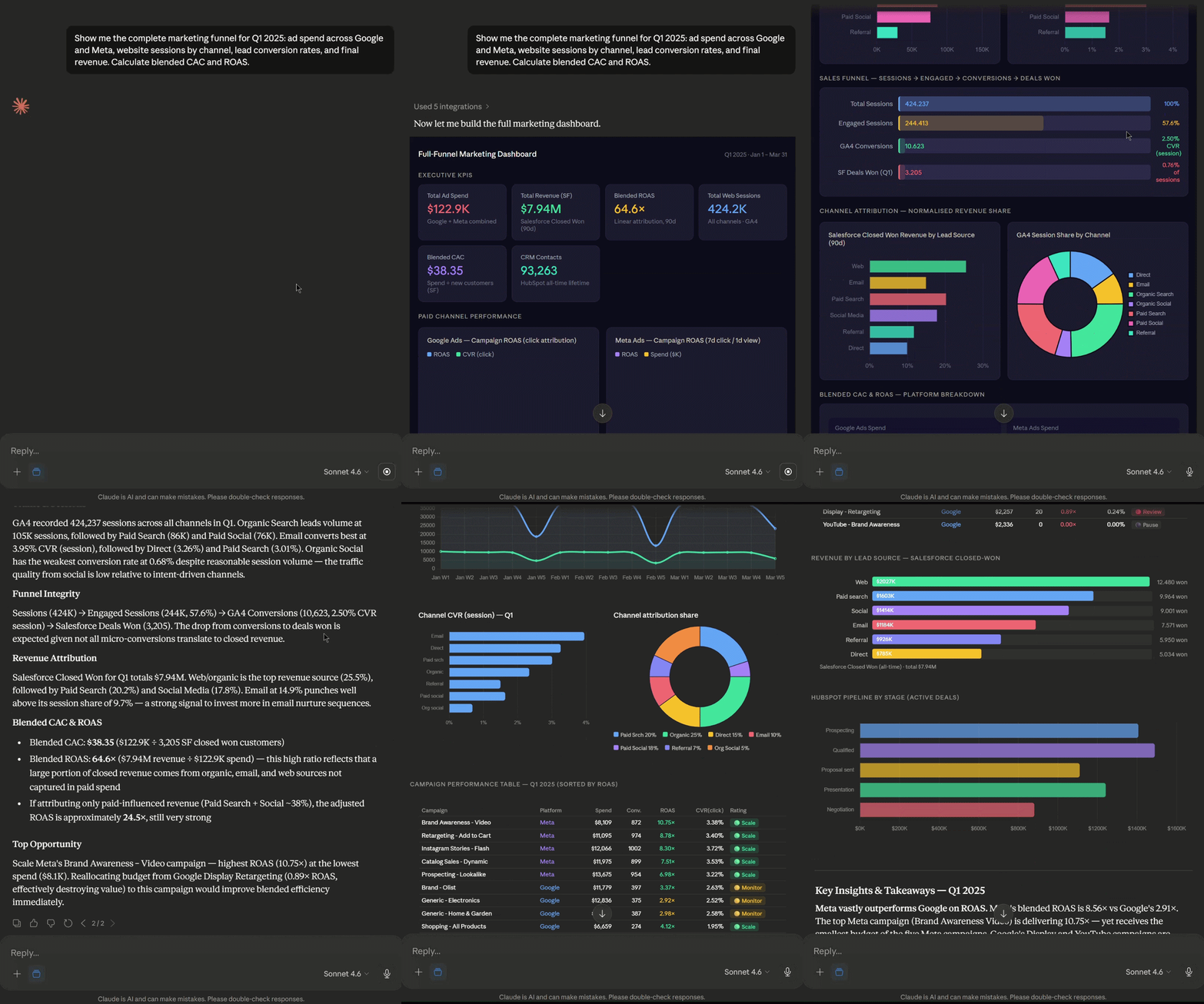
The AI queries the dbt semantic layer via MCP, pulls GA4 traffic and CRM pipeline data from mock platform servers, and returns a formatted analysis with KPI cards, charts, and recommendations — in ~15 seconds. Works from Claude Desktop, OpenCode, Gemini CLI, or Antigravity IDE.
Other queries this system handles
- "Compare first-touch vs last-touch attribution for our top channels"
- "Score this lead: came from Google Ads, visited 5 pages, 3 min on site"
- "Which product categories have the highest CAC but lowest LTV?"
- "What should we change about our ad spend next quarter?"
Who This Is Built For
| Role | What they see |
|---|---|
| Paid Media / Growth Analytics | Multi-touch attribution (4 models), ROAS by channel, spend optimization |
| RevOps Analyst | Full-funnel pipeline, CRM integration, lead routing automation |
| Data Scientist | XGBoost lead scoring, MLflow experiment tracking, FastAPI deployment |
| Analytics Engineer | dbt semantic layer, MCP architecture, multi-warehouse + multi-client portability |
| BI / Data Analyst | Looker Studio dashboards, Streamlit app, React artifacts |
| Marketing Analyst | CAC/LTV analysis, channel comparison, attribution model comparison |
The Core Insight: Governance is What Makes AI Analytics Reliable
Most AI-to-SQL tools fail because they lack a source of truth. When an AI writes SQL on behalf of a marketing manager who can't verify it, you need guaranteed correctness.
This project solves that with the dbt Semantic Layer (MetricFlow): define "ROAS" once in YAML, and every AI client, dashboard, and ML pipeline consumes the exact same definition — SUM(attributed_revenue) / SUM(ad_spend) with the correct filters and joins, forever.
According to The 2025 Metabase Community Data Stack Report: "Average confidence in AI-generated queries is just 5.5/10 without a semantic layer. Tools like dbt MCP (60+ tools) now provide production-grade MCP servers that give LLMs deterministic metric definitions, reducing hallucination and enforcing governance across platforms like Snowflake and Databricks."
This project implements exactly that architecture — moving from 5.5/10 confidence to deterministic, production-grade certainty.
What This Project Does
Architecture: Three Heads, One Spine
Full-stack analytics portfolio — data ingestion through AI-powered natural language querying, built entirely on free/trial tiers.
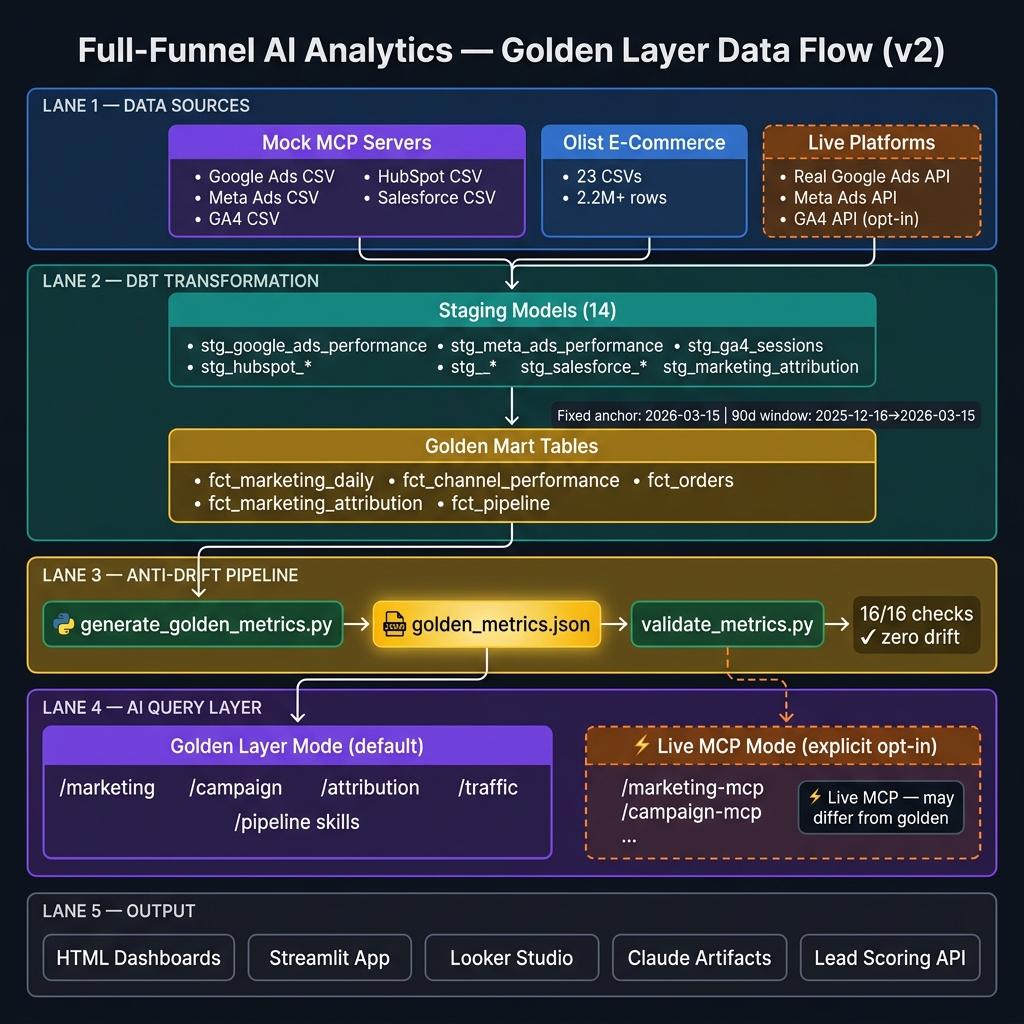
View original architecture diagram (SVG)
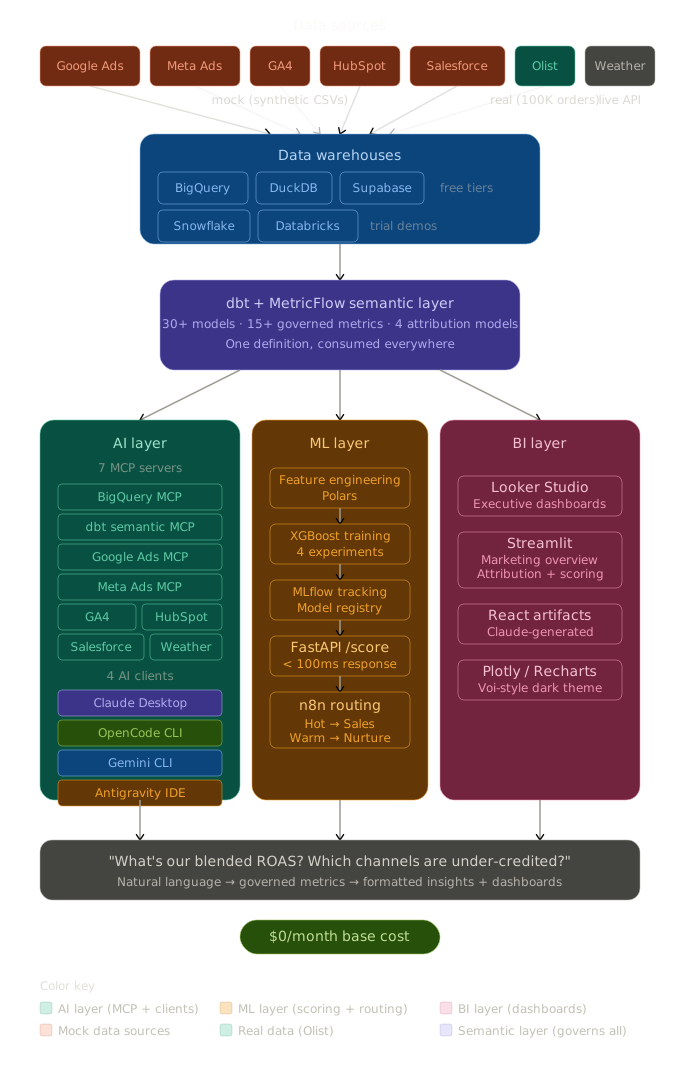
| Pillar | What it does | Tech |
|---|---|---|
| AI Layer | Query marketing data in plain English, generate dashboards | 7 MCP servers + Claude Desktop, OpenCode, Gemini CLI, Antigravity |
| ML Layer | Predict which leads become high-value customers | XGBoost + MLflow + FastAPI /score + n8n auto-routing |
| BI Layer | Self-serve dashboards for marketing and sales teams | Looker Studio + Streamlit + Claude React artifacts |
For a detailed breakdown of every model, metric, and semantic definition see docs/architecture.md.
CI/CD & Production Readiness
The project ships with four GitHub Actions workflows that enforce zero metric drift from source to dashboard.
Workflows
| Workflow | Trigger | What it does |
|---|---|---|
ci.yml |
Every pull request | dbt compile + test on DuckDB → generate golden metrics → validate drift → pytest. No cloud creds needed. |
warehouse-deploy.yml |
Push to main |
Deploys dbt to BigQuery and Snowflake in parallel → regenerates golden_metrics.json → commits it back to the repo. |
scheduled-refresh.yml |
Daily 06:00 UTC | Appends synthetic data → dbt run/test → regenerates golden metrics with --live flag → validates. |
daily-synthetic-data.yml |
Daily 05:00 UTC | Adds one new day of realistic synthetic data to mock CSVs. Can be manually triggered with a custom --days count. |
The Zero-Drift Guarantee
Raw data
  → dbt staging/intermediate/mart models
  → generate_golden_metrics.py  (reads mart tables, writes dashboards/golden_metrics.json)
  → validate_metrics.py         (re-queries warehouse, diffs vs JSON — exits 1 if any drift)
  → HTML dashboards + Claude skills + Streamlit app  (all read golden_metrics.json)
Every PR gate and every warehouse deploy runs validate_metrics.py. If a metric in the dashboard diverges from the warehouse by more than the configured tolerance, the workflow fails and blocks the merge.
GitHub Secrets Required
To enable BigQuery and Snowflake deploys, add these secrets in Settings → Secrets and variables → Actions:
| Secret | Platform |
|---|---|
GCP_PROJECT_ID |
BigQuery |
GCP_SERVICE_ACCOUNT_KEY_JSON |
BigQuery |
SNOWFLAKE_ACCOUNT |
Snowflake |
SNOWFLAKE_USER |
Snowflake |
SNOWFLAKE_PASSWORD |
Snowflake |
SNOWFLAKE_WAREHOUSE |
Snowflake |
SNOWFLAKE_DATABASE |
Snowflake |
SNOWFLAKE_SCHEMA |
Snowflake |
The DuckDB PR gate needs no secrets — it runs entirely locally inside the Actions runner.
See the Production Readiness Guide for full setup instructions, including how to create a BigQuery service account and configure Snowflake.
Data Architecture — What Lives Where
| Layer | Location | In git? | How it's created |
|---|---|---|---|
| Olist raw dataset | data/olist/*.csv |
❌ Never (400MB) | python scripts/download_olist_data.py |
| Mock marketing CSVs | data/mock_marketing/*.csv |
✅ Yes (~10MB) | Generated once; CI recreates without Olist via --standalone |
| DuckDB warehouse | data/olist_analytics.duckdb |
❌ Never | load_duckdb.py + dbt run locally |
| Golden metrics snapshot | dashboards/golden_metrics.json |
✅ Yes (~50KB) | CI commits it after every deploy |
To update your local DuckDB after a git pull:
git pull                                                   # get new CSVs + golden_metrics.json
python scripts/load_duckdb.py                             # load CSVs into DuckDB
cd dbt_project && dbt run --target duckdb && cd ..        # rebuild mart tables
Claude dashboards update after git pull alone (they read golden_metrics.json).
Streamlit and DuckDB queries need all three steps above.
See Data Import Guide for the full explanation including how this maps to a real production pipeline (Fivetran → BigQuery → dbt Cloud).
Importing Your Own Data
The platform supports three ways to bring in real data — from a spreadsheet, a CSV file, or a live warehouse.
Streamlit Data Sources UI (easiest)
streamlit run streamlit_app/app.py
Click Data Sources in the sidebar to open the three-tab interface:
| Tab | What it does |
|---|---|
| File Upload | Drag-and-drop a CSV or Excel file, preview 20 rows, choose which table to replace, and save it to data/mock_marketing/ |
| Warehouse Connection | Configure and test a connection to DuckDB, BigQuery, or Snowflake. Preview any mart table. Saves to ~/.full_funnel_connectors.json (never committed to git). |
| MCP Server Status | Live view of all 6 MCP servers — CSV path, row count, and latest date in the data. |
After saving a file, rebuild the pipeline from the terminal:
python scripts/load_duckdb.py
cd dbt_project && dbt run --target duckdb && cd ..
python scripts/generate_golden_metrics.py
python scripts/validate_metrics.py   # must exit 0
See Updated Data in Claude
Once golden_metrics.json is regenerated, every Claude skill (/marketing, /attribution, /campaign, etc.) reads the new numbers automatically. In Claude Code on the web, push the updated JSON to the repo so the container has the latest file.
See the Data Import Guide for all three import methods, column mapping tables, and troubleshooting tips.
MCP Servers
| Server | What it exposes | Key tools |
|---|---|---|
| BigQuery | Warehouse queries | execute_query, list_tables, get_schema |
| dbt Semantic Layer | Governed metrics + SQL generation | text_to_sql, get_metrics, get_dimensions (60+ tools) |
| Google Ads | Campaign performance, keywords | get_campaign_performance, get_keyword_performance, list_campaigns |
| Meta Ads | Ad sets, reach, purchases | get_campaign_insights, get_ad_set_breakdown, list_campaigns |
| GA4 | Sessions, channels, conversions | get_traffic_by_channel, get_daily_trend, get_device_breakdown |
| HubSpot | Contacts, deals, pipeline | get_contacts_by_source, get_deal_pipeline, search_contacts |
| Salesforce | Opportunities, accounts, revenue | get_opportunity_pipeline, get_revenue_by_source, get_quarterly_forecast |
All mock servers use the exact same tool interface as real platform APIs. Swap mock → production with zero code changes. See docs/mcp_servers.md for full server reference.
AI Clients
| Client | MCP Support | Unique Strength | Cost |
|---|---|---|---|
| Claude Desktop | Native (best) | Cowork plugin, React artifact rendering, multi-tool chaining | $20/mo (optional) |
| OpenCode | Native | 75+ models (Claude, Gemini, GPT, Llama, local), open source | Free + API costs |
| Gemini CLI | Native | Native BigQuery integration, free generous rate limits | Free |
| Antigravity IDE | Native (MCP Store) | Manager View with parallel agents, VS Code fork | Free (preview) |
The same 7 MCP servers work with ALL 4 clients. No code changes between clients.
AI-Powered Commands
Type these in Claude Code CLI or Antigravity to generate a deep-dive analysis artifact:
| Command | What it does |
|---|---|
/marketing |
Full exec dashboard — KPIs, spend, funnel, pipeline |
/attribution |
Channel attribution deep-dive — scatter, waterfall, insights |
/pipeline |
Sales pipeline — funnel stages, deal velocity, lifecycle |
/campaign |
Paid campaign performance — Google vs Meta, budget pacing |
/traffic |
GA4 traffic — sessions trend, channel breakdown, anomalies |
Commands live in .claude/commands/ (Claude CLI) and .opencode/commands/ (OpenCode). Same logic, both formats. You can add your own commands as well.
Claude Desktop
Since Claude Desktop doesn't support command files, use Projects:
- Open Claude Desktop → Projects → New Project
- Paste
claude_desktop_project_instructions.mdinto Project Instructions - Use natural language instead of slash commands:
| CLI Command | Claude Desktop Equivalent |
|---|---|
/marketing |
"marketing dashboard" |
/attribution |
"which channels are working?" |
/traffic |
"show me sessions" |
/campaign |
"google vs meta performance" |
/pipeline |
"show me deals" |
Metrics Governed by the Semantic Layer
| Metric | Definition | Category |
|---|---|---|
| Blended CAC | Total ad spend / New customers | Marketing |
| Blended ROAS | Attributed revenue / Total ad spend | Marketing |
| Channel ROAS | Revenue (per attribution model) / Channel spend | Attribution |
| First-Touch Revenue | Revenue credited to first interaction | Attribution |
| Last-Touch Revenue | Revenue credited to last interaction | Attribution |
| Linear Revenue | Revenue split equally across touchpoints | Attribution |
| AOV | Total revenue / Total orders | Revenue |
| Customer LTV | Predicted lifetime revenue per customer | Revenue |
| Lead Score | ML-predicted probability of high-value conversion | Scoring |
| Pipeline Velocity | Weighted pipeline value / Days in period | Pipeline |
| Win Rate | Closed Won / (Closed Won + Closed Lost) | Pipeline |
| Conversion Rate | Conversions / Sessions | Website |
Stack & Cost
Total base cost: $0/month. Claude Pro ($20/mo) optional for Cowork plugin + React artifacts.
| Component | Tool | Cost |
|---|---|---|
| Primary Warehouse | BigQuery | $0 — 10GB + 1TB queries/month free |
| Local Dev | DuckDB | $0 — open source |
| Postgres Demo | Supabase | $0 — 500MB free |
| Semantic Layer | dbt Core + MetricFlow | $0 — open source |
| ML Tracking | MLflow | $0 — open source, self-hosted |
| Scoring API | FastAPI | $0 — open source |
| Automation | n8n | $0 — self-hosted |
| BI Dashboards | Looker Studio | $0 — free with Google |
| Interactive App | Streamlit | $0 — community cloud |
| Weather API | Open-Meteo | $0 — no key needed |
| MCP Servers | Open source | $0 |
| AI: Claude Desktop | Cowork + React artifacts | $20/month (optional) |
| AI: OpenCode | Terminal + 75 models | $0 (free + API costs) |
| AI: Gemini CLI | BigQuery native | $0 (free generous limits) |
| AI: Antigravity IDE | Parallel agents | $0 (free public preview) |
Enterprise warehouse demos use free trials: Snowflake (30-day, ~$400 credits) and Databricks (14-day).
Quick Start
See the Step-by-Step Setup Guide for full instructions.
# 1. Clone
git clone https://github.com/YOUR_USERNAME/full-funnel-ai-analytics.git
cd full-funnel-ai-analytics

# 2. Setup
python -m venv .venv && source .venv/bin/activate
pip install -r requirements.txt
cp .env.example .env  # Fill in your credentials

# 3. Download and generate data
python scripts/download_olist_data.py
python scripts/generate_mock_marketing_data.py

# 4. Load into warehouses
python scripts/load_bigquery.py
python scripts/load_duckdb.py

# 5. Build dbt models
cd dbt_project && dbt build --target duckdb && cd ..

# 6. Generate the golden metrics snapshot (used by all dashboards and Claude skills)
python scripts/generate_golden_metrics.py
python scripts/validate_metrics.py   # confirms 0 drift — must exit 0

# 7. Start ML tracking and train model
bash scripts/run_mlflow_server.sh &
python ml/src/train.py

# 8. Start scoring API
cd api && uvicorn main:app --port 8000 &

# 9. Configure MCP for your preferred client
# Claude Desktop: copy mcp_servers/claude_desktop_config.example.json
#                 to ~/Library/Application Support/Claude/claude_desktop_config.json
# OpenCode: already configured at .opencode/opencode.json — run `opencode`
# Gemini CLI: gemini --mcp-server "bigquery=uvx mcp-server-bigquery --project YOUR_PROJECT"

# 10. Query in natural language from any client:
# "Show me blended ROAS across Google and Meta for Q1 2025,
#  with attribution model comparison and lead quality breakdown."
Project Structure
full-funnel-ai-analytics/
├── .github/
│   └── workflows/
│       ├── ci.yml                        # PR gate (DuckDB — no cloud creds needed)
│       ├── warehouse-deploy.yml          # Deploy to BigQuery + Snowflake on push to main
│       ├── scheduled-refresh.yml         # Daily dbt run + golden metrics refresh (06:00 UTC)
│       └── daily-synthetic-data.yml      # Daily synthetic data append (05:00 UTC)
│
├── dbt_project/                          # Semantic layer + transformations
│   ├── models/
│   │   ├── staging/                      #   14 staging models (Olist + marketing)
│   │   ├── intermediate/                 #   4 intermediate (LTV, funnel, unified campaigns)
│   │   ├── marts/                        #   11 mart models (facts + dimensions)
│   │   ├── semantic_models/              #   MetricFlow definitions
│   │   └── metrics/                      #   15+ governed metrics
│   ├── macros/                           #   Attribution model logic + cross-db helpers
│   ├── dbt_project.yml                   #   vars block: window dates, time spine bounds
│   └── profiles.yml.example             #   DuckDB + BigQuery + Snowflake profiles
│
├── mcp_servers/                          # 7 MCP servers (work with all 4 clients)
│   ├── mock_google_ads_server.py
│   ├── mock_meta_ads_server.py
│   ├── mock_ga4_server.py
│   ├── mock_hubspot_server.py
│   ├── mock_salesforce_server.py
│   └── weather_server.py
│
├── scripts/
│   ├── _warehouse_adapters.py            # Uniform DuckDB / BigQuery / Snowflake connection layer
│   ├── generate_golden_metrics.py        # Reads mart tables → writes dashboards/golden_metrics.json
│   ├── validate_metrics.py              # Re-queries warehouse, diffs vs JSON (exits 1 on drift)
│   ├── daily_synthetic_append.py        # Appends N realistic days to mock marketing CSVs
│   ├── load_duckdb.py
│   ├── load_bigquery.py
│   └── generate_mock_marketing_data.py
│
├── streamlit_app/
│   ├── app.py                            # Main dashboard with connection status badge
│   ├── pages/
│   │   └── connectors.py                 # Data Sources page (file upload, warehouse config, MCP status)
│   └── lib/
│       └── connector_registry.py         # Connection factory + config (~/.full_funnel_connectors.json)
│
├── tests/
│   ├── conftest.py                       # Pytest fixtures (loads golden_metrics.json)
│   ├── test_golden_metrics.py           # 20+ assertions on golden metrics structure and sanity
│   └── test_api.py                      # FastAPI lead scoring endpoint tests
│
├── dashboards/
│   ├── golden_metrics.json              # Pre-computed snapshot — single source of truth for all dashboards
│   ├── js/metrics.js                    # Canonical metric functions (ROAS, CVR, attribution normalisation)
│   ├── full_funnel_marketing_dashboard.html
│   ├── attribution_dashboard.html
│   ├── campaign_performance_dashboard.html
│   ├── pipeline_dashboard.html
│   └── traffic_ga4_dashboard.html
│
├── cowork_plugin/                        # Claude Desktop Cowork plugin
│   ├── commands/                         #   /marketing, /attribution, /pipeline, /score
│   └── skills/                           #   Brand voice, metric definitions, workflows
│
├── .opencode/                            # OpenCode CLI config + commands + skills
│   ├── opencode.json                     #   MCP server config
│   ├── commands/                         #   Same commands (OpenCode format)
│   └── skills/
│
├── ml/                                   # Lead scoring ML pipeline
│   ├── src/train.py                      #   XGBoost + MLflow tracking
│   └── notebooks/                        #   EDA, training, evaluation
│
├── api/                                  # FastAPI lead scoring endpoint
│   ├── main.py                           #   POST /score, GET /health, GET /model-info
│   └── Dockerfile
│
├── automation/                           # n8n lead routing workflow
│   └── n8n_workflow.json
│
├── warehouse_configs/                    # Setup scripts per warehouse
│   ├── bigquery/
│   ├── snowflake/
│   ├── databricks/
│   ├── supabase/
│   └── duckdb/
│
└── docs/
    ├── README.md                         # Documentation index — start here
    ├── architecture.md                   # Full medallion architecture, MetricFlow models, AI agent internals
    ├── mcp_servers.md                    # How mock MCP servers work + swap-to-production guide
    ├── ml_model.md                       # XGBoost, MLflow, FastAPI scoring, n8n integration
    ├── images/
    │   ├── full_funnel_architecture_flow_v2.png   # Architecture diagram v2
    │   ├── full_funnel_architecture_flow.png      # Architecture diagram v1
    │   └── full_funnel_architecture_flow.svg      # Architecture diagram (SVG)
    └── guides/
        ├── production_readiness_guide.md  # CI/CD setup, GitHub secrets, BigQuery SA creation
        ├── data_import_guide.md           # Import data via UI, CSV, or live warehouse
        ├── connector_ui_guide.md          # Data Sources page walkthrough + live dashboard capabilities
        ├── setup_guide.md
        ├── commands_guide.md
        ├── portability_guide.md
        ├── data-warehouse-plan.md
        └── claude_desktop_project_instructions.md
Key Design Decisions
Why MCP instead of LangChain?
MCP is an open standard (Linux Foundation) for AI tool calling — it eliminates the middleware layer. The result: simpler code, fewer dependencies, and a direct connection between any LLM and any data source. Unlike LangChain, which ties you to its abstraction layer, MCP servers work with Claude Desktop, OpenCode, Gemini CLI, Antigravity, Cursor, and any future MCP-compatible client.
Why mock MCP servers?
The mock servers expose the exact same tool interface as real platform APIs. When you swap mock → production, all client configurations, commands, and dashboards work without code changes. This proves the MCP abstraction layer works — and that the system is vendor-agnostic and LLM-agnostic.
Why MetricFlow?
When AI writes SQL on behalf of someone who can't verify it, you need guaranteed correctness. MetricFlow ensures "ROAS" always means the same thing — defined once in YAML, consumed everywhere: AI queries, BI dashboards, ML features.
Why 5 warehouses?
Not because you'd run 5 in production — but because it proves the semantic layer is truly warehouse-agnostic. Same dbt models, same metrics, same MCP interface, different execution engine. This directly answers "but we use Snowflake" — you show it working on Snowflake.
Why 4 AI clients?
Same principle — it proves the MCP architecture is LLM-agnostic. This directly answers "but we use GPT-4" — you show the same servers working with any client.
Why a golden metrics JSON?
The dashboards/golden_metrics.json file is pre-computed from the dbt warehouse and is the single source of truth for all dashboards and Claude skills. Every number a dashboard shows is copied verbatim from this file — no recalculation by the AI, no rounding drift, no stale aggregates. validate_metrics.py re-queries the warehouse and diffs against this file, guaranteeing bit-for-bit reproducibility. See CLAUDE.md §14 for the full rule set.
Swapping to Real Platform Data
| Mock Server | Production Replacement | Setup |
|---|---|---|
mock_google_ads_server.py |
cohnen/mcp-google-ads |
Google Ads API developer token + OAuth |
mock_meta_ads_server.py |
meta-ads-mcp-server (npx) |
Meta access token with ads_read |
mock_ga4_server.py |
GrowthSpree GA4 MCP | Google OAuth |
mock_hubspot_server.py |
Official HubSpot MCP | HubSpot access token |
mock_salesforce_server.py |
Airbyte agent connector | Salesforce Connected App |
See docs/mcp_servers.md for the full swap guide including tool interface compatibility requirements.
Multi-Warehouse Portability
The entire stack is warehouse-agnostic. Only connection config changes between warehouses — all dbt models, MetricFlow definitions, MCP interfaces, client commands, and dashboards stay identical.
| What stays the same | What changes |
|---|---|
| All dbt model SQL (Jinja handles dialects) | ~/.dbt/profiles.yml connection details |
| All MetricFlow semantic models and metrics | One MCP binary/config per warehouse |
| All MCP server tool interfaces | Minor SQL dialect differences (auto-handled by dbt macros) |
| All client commands, skills, and dashboards |
See the Portability Guide for Snowflake, Databricks, and Supabase setup steps.
Documentation
See the complete documentation index at
docs/README.md— includes quick-find table, reading paths by role, and descriptions of every doc.
| Document | Description |
|---|---|
| Architecture v2 | Latest system architecture diagram |
| Architecture Deep-Dive | Medallion layers, MetricFlow semantic models, AI agent internals, dbt CLI reference |
| Mock MCP Servers | How the five FastMCP mock servers work, tool schemas, date filtering, and swap-to-production guide |
| ML Model & MLflow | XGBoost lead scoring, MLflow experiment tracking, FastAPI /score endpoint, n8n automation status |
| Production Readiness Guide | CI/CD setup, GitHub secrets, BigQuery service account creation, warehouse deploy walkthrough |
| Data Import Guide | Import data via Streamlit UI, direct CSV, or live BigQuery/Snowflake connection |
| Connector UI Guide | Data Sources page walkthrough; live dashboard capabilities across Claude, Streamlit, and HTML |
| Setup & Execution Guide | Step-by-step instructions to get the full platform running locally |
| Analytical Commands Guide | Reference for all slash commands (/marketing, /campaign, /attribution, etc.) |
| Multi-Warehouse Portability Guide | Deploying to Snowflake or Databricks from the default BigQuery/DuckDB setup |
| BigQuery Data Warehouse Plan | BigQuery implementation plan and data warehouse architecture decisions |
| Claude Desktop Project Instructions | Configuring Claude Desktop Projects to use the analytical commands |

Build Status
Phase completion & project scale
| Phase | Status | Description |
|---|---|---|
| Phase 1: Data Foundation | ✅ Complete | Olist dataset + synthetic marketing data + warehouse loading |
| Phase 2: dbt Semantic Layer | ✅ Complete | 14 staging + 4 intermediate + 11 mart models |
| Phase 3: AI Layer (MCP) | ✅ Complete | 7 MCP servers + 4 AI client configs |
| Phase 4: ML Scoring | ✅ Complete | XGBoost + MLflow + FastAPI endpoint |
| Phase 5: Dashboards & Automation | ✅ Complete | Looker Studio + Streamlit + n8n routing |
| Phase 6: Portability & Polish | ✅ Complete | Snowflake/Databricks demos + documentation |
| Phase 7: Production Readiness & CI/CD | ✅ Complete | GitHub Actions, warehouse adapters, daily synthetic data, test suite, connector UI |
| Component | Detail |
|---|---|
| Data Volume | 23 CSV files, 2.2M+ rows, aligned across 2024–2026 |
| DuckDB Warehouse | 46 objects (staging views + mart tables), all populated |
| dbt Models | 29 models, all materialized, end-to-end verified |
| MCP Servers | 7 servers, column references cross-checked against source CSVs |
| Streamlit App | 5 tabs + Data Sources page, all DuckDB queries valid, AI analyst integrated |
| ML Pipeline | XGBoost trained on 93K rows, FastAPI /score endpoint live |
| Semantic Layer | 5 semantic models + 13+ metrics governed |
| CI/CD Workflows | 4 GitHub Actions workflows — PR gate, warehouse deploy, scheduled refresh, daily synthetic data |
| Test Suite | 20+ pytest assertions on golden metrics + FastAPI endpoint |
| Dependencies | 27 core packages, all importable |
Contributing
Contributions are welcome! This project is part of a portfolio demonstrating end-to-end Revenue Operations engineering capabilities.
- Fork the repository
- Create your feature branch (
git checkout -b feature/amazing-feature) - Commit your changes (
git commit -m 'Add amazing feature') - Push to the branch (
git push origin feature/amazing-feature) - Open a Pull Request
License
MIT License — see LICENSE for details.
Built with ☕ by Eduardo Cornelsen
Portfolio ·
LinkedIn
Full-stack Revenue Operations architecture — AI, ML, dbt Semantic Layer, and multi-warehouse analytics.
Revenue Operations · Analytics Engineering · AI/ML · Data Platform Architecture