
Fussel


Fussel is a static photo gallery generator that builds beautiful, mobile-friendly photo galleries from a directory of photos. Once generated, your gallery is a completely static site with no server-side code required.
✨ Features
- 🖼️ Static Site Generation - No server-side code required once generated
- 📷 EXIF Info Panel - View camera, lens, shot settings, and GPS data for each photo
- 👥 People Detection - Automatically creates galleries for people found in XMP face tags
- 🏷️ Face Tag Overlay - Face rectangles displayed over photos in the modal viewer
- 🔍 Zoom & Pan - Pinch/scroll to zoom and drag to pan photos in the viewer
- 🎨 Watermarking - Add watermarks to protect your photos
- 📱 Mobile Friendly - Responsive design that works on all devices
- 🌙 Dark Mode - Automatic dark mode support
- 🔄 EXIF Transpose - Uses EXIF data to automatically rotate photos
- 🔗 Clean URLs - Predictable slug-based URLs for easy sharing
- ⚡ Fast Generation - Parallel processing for quick builds
- ⬇️ Download Control - Optionally allow/prevent original photo downloads
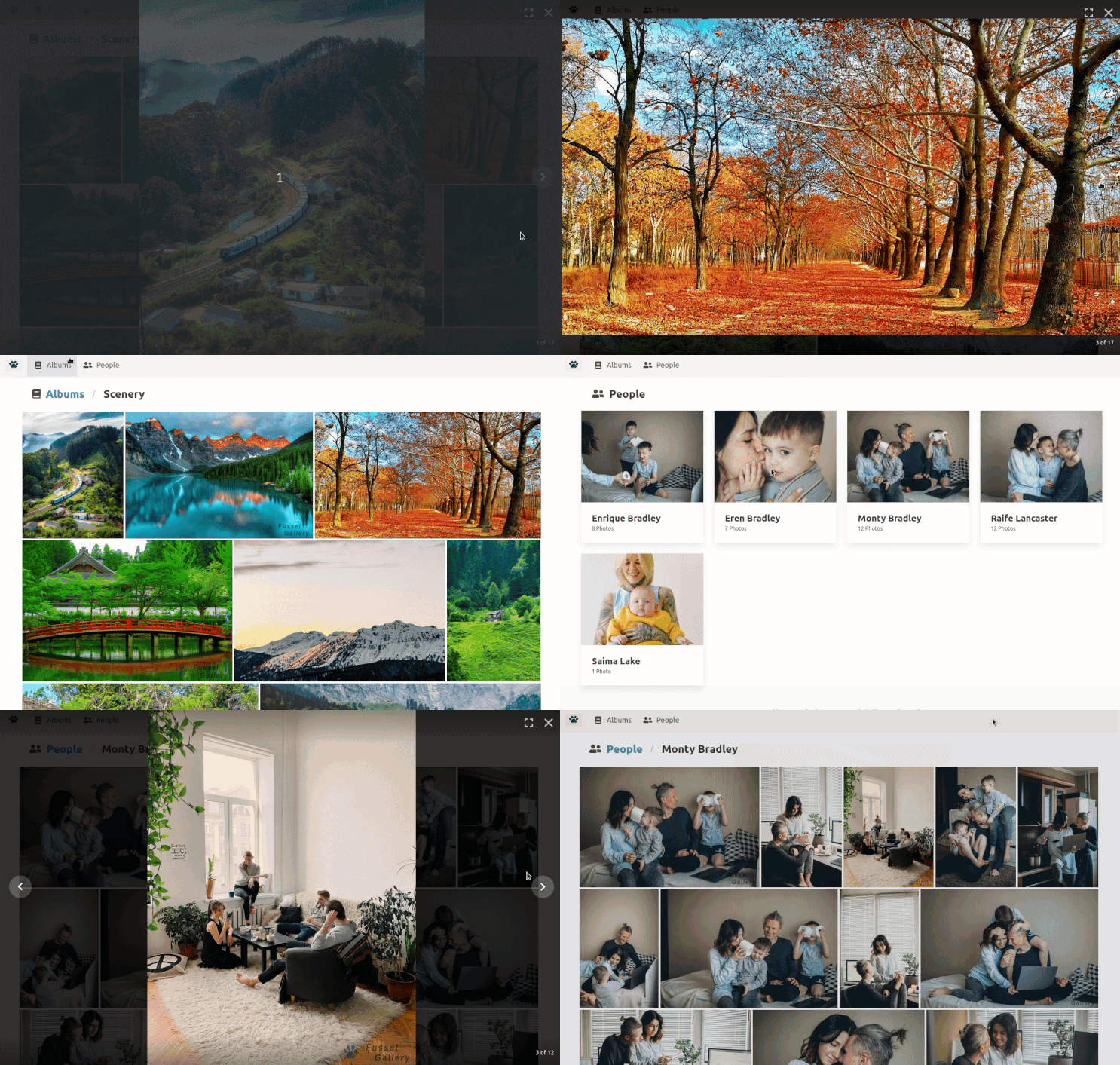
📸 Screenshots
| Albums View | Album View |
|---|---|
 |
 |
| People View | Person View |
|---|---|
 |
 |
🎬 Demo
🚀 Quick Start
Option 1: Using Docker (Recommended - No Dependencies Required)
Docker is the easiest way to run Fussel without installing any dependencies locally.
Using Docker Compose (Easiest)
-
Set your paths using environment variables:
export INPUT_DIR=/absolute/path/to/your/photos
export OUTPUT_DIR=/absolute/path/to/output
docker-compose up
Or edit
docker-compose.ymldirectly and replace the path placeholders. -
Optional: Customize settings via environment variables or
.envfile:# Example .env file (or export these before running docker-compose) INPUT_DIR=/home/user/photos OUTPUT_DIR=/home/user/gallery-output PUID=1000 # Your user ID (run 'id -u' to find it) PGID=1000 # Your group ID (run 'id -g' to find it) PARALLEL_TASKS=4 FACE_TAG_ENABLE=True WATERMARK_ENABLE=True -
After generation completes, your gallery will be in the
OUTPUT_DIRyou specified. You can preview it locally or upload it to a web host.
Using Docker Run
docker run \
  -v <input-dir>:/input:ro \
  -v <output-dir>:/output \
  -e PGID=$(id -g) \
  -e PUID=$(id -u) \
  -e INPUT_PATH="/input" \
  -e OUTPUT_PATH="/output" \
  -e PARALLEL_TASKS="4" \
  ghcr.io/cbenning/fussel:latest
Notes:
- Replace
<input-dir>and<output-dir>with absolute paths to your directories - The
PGIDandPUIDenvironment variables set the output folder permissions to match your user, preventing root-owned files - After the container completes, your generated gallery will be in
<output-dir>
See Docker Configuration below for all available options.
Option 2: Local Installation
If you prefer not to use Docker or want to develop Fussel, you can install it locally.
Prerequisites
- Python 3.10+
- uv - Python package manager (install)
- Node.js v18+ (LTS recommended)
- Yarn 1.22+ (required)
- Make (optional, but recommended for easier setup)
Installation Steps
-
Clone the repository:
git clone https://github.com/cbenning/fussel.git cd fussel -
Install dependencies:
make install -
Configure Fussel:
cp sample_config.yml config.ymlEdit
config.ymland set at minimum:gallery.input_path- Path to your photos directorygallery.output_path- Where to generate the site (default:site/)
-
Generate your gallery:
make generate -
Preview your site:
make serveThen visit
http://localhost:8000in your browser.
📁 Organizing Your Photos
Your photo directory structure determines your album structure. Each subfolder becomes an album. This section explains how to organize your photos before generating your gallery.
Directory Structure
Point gallery.input_path to a directory containing subfolders, where each subfolder name becomes an album name:
/home/user/Photos/gallery/
├── Album 1/
│   ├── photo1.jpg
│   └── photo2.jpg
├── Album 2/
│   ├── Sub Album 1/
│   │   └── photo3.jpg
│   └── photo4.jpg
└── Album 3/
    └── Sub Album 2/
        └── photo5.jpg
Supported Image Formats
Fussel supports common image formats:
- JPEG (
.jpg,.jpeg) - PNG (
.png) - GIF (
.gif)
⚙️ Configuration
The config.yml file (or Docker environment variables) controls all aspects of gallery generation.
Gallery Settings
gallery:
  input_path: "/path/to/photos"      # Required: Your photos directory
  output_path: "site/"               # Where to generate the site
  overwrite: False                   # Force rebuild all photos
  parallel_tasks: 4                  # Parallel processing workers
  exif_transpose: False              # Use EXIF rotation data
  allow_download: True               # Allow downloading original photos
Album Settings
gallery:
  albums:
    enable: True                     # Show Albums navigation button
    recursive: True                  # Process subfolders as albums
    recursive_name_pattern: "{parent_album} > {album}"  # Sub-album naming
Photos Settings
gallery:
  photos:
    enable: True                     # Show Photos navigation button (all photos view)
    sort_by: "date"                  # Default sort: 'date' or 'filename'
    sort_order: "desc"               # Default order: 'asc' or 'desc'
People/Face Detection
gallery:
  people:
    enable: True                     # Enable face detection from XMP tags
Watermark Settings
gallery:
  watermark:
    enable: True                     # Enable watermarks
    path: "web/src/images/fussel-watermark.png"  # Watermark image
    size_ratio: 0.3                  # Watermark size (0.0-1.0)
Site Settings
site:
  http_root: "/"                     # URL root (include trailing slash)
  title: "Fussel Gallery"            # Browser tab title
🐳 Docker Configuration
This section provides detailed information about Docker configuration options. For a quick start, see the Docker Quick Start section above.
Available Environment Variables
See docker/template_config.yml for all available configuration options. Key variables:
INPUT_PATH- Path to input photos (inside container)OUTPUT_PATH- Path to output directory (inside container)PARALLEL_TASKS- Number of parallel workers (default: 1)OVERWRITE- Force rebuild of all photos (default: False)EXIF_TRANSPOSE- Use EXIF data for rotation (default: False)ALLOW_DOWNLOAD- Allow downloading original photos (default: True)FACE_TAG_ENABLE- Enable face detection (default: True)WATERMARK_ENABLE- Enable watermarks (default: True)SITE_TITLE- Gallery title (default: "Fussel Gallery")SITE_ROOT- HTTP root path (default: "/")
Complete Docker Run Example
For advanced users who want to customize all options:
docker run \
  -v <input-dir>:/input:ro \
  -v <output-dir>:/output \
  -e PGID=$(id -g) \
  -e PUID=$(id -u) \
  -e INPUT_PATH="/input" \
  -e OUTPUT_PATH="/output" \
  -e PARALLEL_TASKS="4" \
  -e OVERWRITE="False" \
  -e EXIF_TRANSPOSE="False" \
  -e ALLOW_DOWNLOAD="True" \
  -e RECURSIVE="True" \
  -e RECURSIVE_NAME_PATTERN="{parent_album} > {album}" \
  -e FACE_TAG_ENABLE="True" \
  -e WATERMARK_ENABLE="True" \
  -e WATERMARK_PATH="web/src/images/fussel-watermark.png" \
  -e WATERMARK_SIZE_RATIO="0.3" \
  -e SITE_ROOT="/" \
  -e SITE_TITLE="Fussel Gallery" \
  ghcr.io/cbenning/fussel:latest
🌐 Hosting Your Gallery
Once generated, your gallery is a static site. You can host it anywhere:
-
Upload to any web host - Copy the contents of
gallery.output_pathto your web server's document root -
Use GitHub Pages - Push the output directory to a GitHub repository and enable Pages
-
Use a CDN - Upload to services like Netlify, Vercel, or Cloudflare Pages
-
Local preview - Use
make serveor Python's built-in server:make serveOr manually:
python -m http.server --directory <output_path>
🛠️ Development
Development Mode
Run the web app in development/watch mode with hot reload:
make dev
Or manually:
cd fussel/web && yarn start
Running Tests
make test
This runs:
- Python tests via pytest with coverage (output in
htmlcov/) - JavaScript tests via Vitest (
cd fussel/web && yarn test)
Code Formatting & Linting
make fmt     # Auto-format Python with ruff
make lint    # Check Python formatting without changes
Project Structure
fussel/
├── fussel/              # Main Python package
│   ├── generator/       # Gallery generation logic
│   └── web/             # Vite/React frontend
│       ├── src/
│       │   └── component/  # React components + tests
│       └── vite.config.js
├── tests/               # Python test suite
├── docker/              # Docker configuration
├── config.yml           # Your configuration (not in git)
└── sample_config.yml    # Configuration template
⬆️ Migrating from v2 to v3
v3 introduces new features and updated tooling. The steps below cover everything you need to do after pulling v3.
1. Update Python dependencies
v3 uses uv instead of pip. Install it, then:
make install
If you previously had a venv/ or .venv/, remove it first — uv manages its own .venv.
2. Update JavaScript dependencies
The build toolchain has changed from react-scripts (Create React App) to Vite. A fresh install is required:
cd fussel/web
rm -rf node_modules
yarn install
3. Update your config.yml
Several new configuration keys are available in v3. Add any you want to use — all are optional and have sensible defaults:
gallery:
  allow_download: True       # NEW: allow/prevent original photo downloads

  albums:
    enable: True             # NEW: show/hide Albums navigation button

  photos:                    # NEW section: all-photos view
    enable: True
    sort_by: "date"
    sort_order: "desc"
Copy from sample_config.yml for the full reference.
4. Regenerate your gallery
make generate
Your existing output_path will be updated in-place.
Breaking changes summary
| Area | v2 | v3 |
|---|---|---|
| Python package manager | pip / requirements.txt | uv / pyproject.toml |
| JS build tool | react-scripts (CRA) | Vite |
| JS test runner | Jest | Vitest |
massedit dependency |
required | removed |
| Python version | 3.8+ | 3.9+ |
❓ FAQ
How do I update Fussel?
If installed via make install:
git pull
make install
If using Docker:
docker pull ghcr.io/cbenning/fussel:latest
Can I customize the gallery appearance?
The gallery uses a React-based frontend built with Vite. You can modify styles and components in fussel/web/src/ and rebuild with make generate or cd fussel/web && yarn build.
Does Fussel modify my original photos?
No. Fussel only reads from your input directory and writes to your output directory. Your original photos are never modified.
How does the EXIF info panel work?
When viewing a photo in the modal, click the ⓘ button in the toolbar to open the info panel. It displays camera make/model, lens, shot settings (exposure, aperture, ISO, focal length), and GPS coordinates if present in the photo's EXIF data.
Why don't some photos show EXIF data?
EXIF data must be embedded in the photo file. Some tools strip EXIF on export (e.g. certain social media downloads, some editors). Photos taken with a smartphone or dedicated camera typically have full EXIF data.
📄 License
This project is licensed under the MIT License - see the LICENSE file for details.
🙏 Contributing
Contributions are welcome! Please feel free to submit a Pull Request.