

GameAP


GameAP is a free and open-source game server management panel that allows you to easily manage and deploy game servers. It provides a user-friendly web interface for managing game servers, users, and configurations.
Demo: https://demo.gameap.com
Requirements
You don't need to pre-install any dependencies. GameAP is distributed as a single binary file that includes all necessary dependencies.
You don't need any special hardware to run the application. A basic server with at least 1GB of RAM and a modern CPU should be sufficient for small to medium-sized deployments.
You can run the panel on different operating systems and database backends.
Operating System
GameAP can be installed on the following operating systems:
- Linux (Ubuntu, Debian, CentOS, etc.)
- Windows Server (2016, 2019, 2022, 2025), Windows 10, Windows 11
- MacOS
Architecture
GameAP follows a three-tier architecture consisting of the web panel, daemon agents, and game servers.
Administrators interact with GameAP through a browser via HTTP/HTTPS. The panel provides a web UI, a REST API, and a WebSocket endpoint for real-time events (task output, console streams, server metrics), and stores its data in a database, which can be either PostgreSQL, MySQL, or SQLite, depending on the deployment.
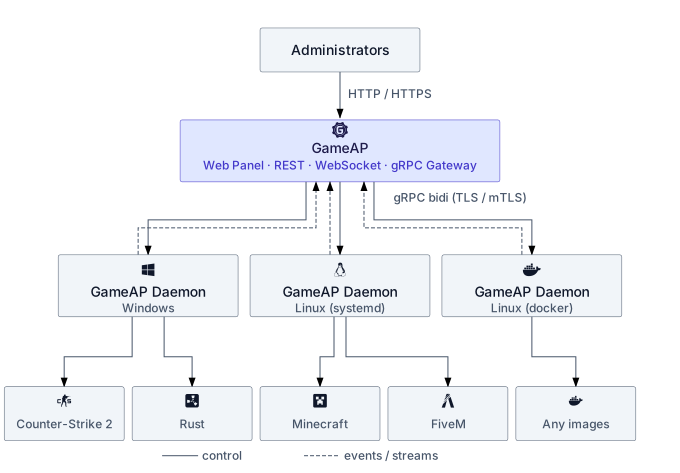
Each GameAP instance talks to one or more nodes over a gRPC bidirectional stream (secured with TLS / mTLS). The daemon opens a single long-lived connection to the panel, used for both control commands (task dispatch, console input, file operations) and upstream events (heartbeats, task status, server status, metrics). On every node, a lightweight agent called GameAP Daemon runs alongside the game servers. The daemon is responsible for controlling game server processes (starting, stopping, monitoring, and configuring them). It supports Windows, Linux, and macOS and offers a wide range of configuration options.
Database
GameAP supports the following databases:
- PostgreSQL
- MySQL / MariaDB
- SQLite
- Inmemory (for testing purposes only). Not persistent, data will be lost on restart.
Quick Start with Docker
The fastest way to get started with GameAP is using Docker:
# Using Docker Compose (recommended)
docker-compose up -d

# Or pull and run the pre-built image
docker pull gameap/gameap:latest
docker run -d -p 8025:8025 \
  -e DATABASE_DRIVER=sqlite \
  -e DATABASE_URL=file:/db.sqlite?_busy_timeout=5000&_journal_mode=WAL&cache=shared \
  -e ENCRYPTION_KEY=your-secret-key \
  -e AUTH_SECRET=your-auth-secret \
  gameap/gameap:latest
Access GameAP at http://localhost:8025
For detailed Docker deployment instructions, see DOCKER.md.
Configuration
GameAP is configured via environment variables. Below are the available configuration options:
Server Configuration
HTTP_HOST- HTTP server host (default:0.0.0.0)HTTP_PORT- HTTP server port (default:8025)HTTPS_PORT- HTTPS server port (default:443)
TLS Configuration
GameAP can terminate TLS itself or, if you prefer, sit behind a reverse proxy. For self-terminated TLS the panel accepts three certificate sources, evaluated in this order:
- ACME / Let's Encrypt —
ACME_ENABLED=trueplus theACME_*variables below. The panel obtains and renews the certificate automatically. - Static cert files —
TLS_CERT_FILE+TLS_KEY_FILE. - Inline cert content —
TLS_CERT+TLS_KEY(raw PEM or base64-encoded).
If none of the three is configured, the HTTPS listener does not start and the
panel only serves plain HTTP on HTTP_PORT.
TLS_CERT_FILE- Path to TLS certificate fileTLS_KEY_FILE- Path to TLS private key fileTLS_CERT- TLS certificate content (PEM or base64 encoded)TLS_KEY- TLS private key content (PEM or base64 encoded)TLS_FORCE_HTTPS- Force redirect HTTP to HTTPS (default:false). Whentrue, allHTTP_PORTrequests get a301redirect tohttps://${HTTP_HOST}:${HTTPS_PORT}.
Ports. HTTPS_PORT defaults to 443. Binding to a privileged port (≤1024)
needs CAP_NET_BIND_SERVICE — the systemd unit shipped by gameapctl panel install already grants it. In Docker, expose the port and run as root or set
--cap-add=NET_BIND_SERVICE.
Static TLS example
HTTP_HOST=panel.example.com
HTTP_PORT=80
HTTPS_PORT=443
TLS_CERT_FILE=/etc/ssl/gameap/fullchain.pem
TLS_KEY_FILE=/etc/ssl/gameap/privkey.pem
TLS_FORCE_HTTPS=true
Let's Encrypt (ACME) Configuration
GameAP embeds the go-acme/lego ACME client
and can manage Let's Encrypt certificates in-process — no external certbot,
no nginx, no cron. Renewal runs in a background goroutine and the certificate
is hot-swapped via tls.Config.GetCertificate, so renewals never restart the
HTTPS listener.
Two challenge solvers are supported:
| Solver | Wildcards | Network requirement | Best for |
|---|---|---|---|
http-01 |
❌ no | Inbound TCP/80 reachable from LE | Single-domain panels |
dns-01 |
✅ yes | API access to your DNS provider | Wildcards, firewalled VMs |
If the initial issuance fails (LE unreachable, DNS provider misconfigured, …) the panel exits with code 1 — there is no silent fallback to plain HTTP. Run against the LE staging endpoint while iterating on configuration.
ACME environment variables
ACME_ENABLED- Enable in-process ACME (default:false)ACME_CHALLENGE_TYPE-http-01ordns-01(default:http-01)ACME_EMAIL- Account email registered with Let's Encrypt (required)ACME_DOMAINS- Comma-separated list of domains. Wildcards (*.example.com) requiredns-01.ACME_DIRECTORY_URL- ACME directory endpoint (default: Let's Encrypt production; switch tohttps://acme-staging-v02.api.letsencrypt.org/directoryfor testing)ACME_DNS_PROVIDER- DNS provider name whenACME_CHALLENGE_TYPE=dns-01(currently built-in:cloudflare)ACME_RENEWAL_THRESHOLD- Renew when the cert has less than this duration remaining (default:720h= 30 days)ACME_RENEWAL_CHECK_INTERVAL- How often the background loop inspects the certificate (default:12h)ACME_PROPAGATION_TIMEOUT- Maximum wait for DNS propagation duringdns-01(default:180s)ACME_STORAGE_PATH- Subdirectory under thefiles.FileManagerroot used to persist the ACME account and certificate material (default:acme). WithFILES_DRIVER=local, this resolves to${FILES_LOCAL_BASE_PATH}/acme/. WithFILES_DRIVER=s3, it lives in the configured bucket — which is what enables multi-instance deployments.
HTTP-01 example
http-01 requires Let's Encrypt to reach http://${ACME_DOMAINS}/.well-known/acme-challenge/....
That means the panel must listen on port 80 (or have a reverse proxy that
forwards /.well-known/acme-challenge/* to it).
HTTP_HOST=panel.example.com
HTTP_PORT=80
HTTPS_PORT=443
TLS_FORCE_HTTPS=true

ACME_ENABLED=true
ACME_CHALLENGE_TYPE=http-01
[email protected]
ACME_DOMAINS=panel.example.com
The /.well-known/acme-challenge/{token} route is registered ahead of the
SPA fallback automatically; you do not need to configure it.
DNS-01 + Cloudflare example
dns-01 does not need port 80 to be reachable. Lego writes a TXT record at
_acme-challenge.<domain> via your DNS provider's API. The Cloudflare
provider reads its credentials directly from the environment.
HTTP_HOST=panel.example.com
HTTPS_PORT=443
TLS_FORCE_HTTPS=true

ACME_ENABLED=true
ACME_CHALLENGE_TYPE=dns-01
[email protected]
ACME_DOMAINS=*.example.com,example.com
ACME_DNS_PROVIDER=cloudflare

# Read by lego's cloudflare provider — scope the token to the relevant zone.
CLOUDFLARE_DNS_API_TOKEN=cf-token-with-Zone-DNS-Edit-permission
Other DNS providers will be added over time — open an issue if you need one.
Staging vs. production
Let's Encrypt enforces aggressive rate limits on the production directory (5 duplicate certs / week, 50 certs / week / registered domain, …). While testing, point at the staging endpoint to avoid getting locked out:
ACME_DIRECTORY_URL=https://acme-staging-v02.api.letsencrypt.org/directory
Browsers will warn about the staging certificate — that is expected. Switch back to the default production URL once the flow works end to end.
Multi-instance deployments
A single panel instance is fully self-contained. For horizontally scaled deployments:
dns-01is the supported path. SetCACHE_DRIVER=redis(the Redis client is also used as the distributed locker for renewals) andFILES_DRIVER=s3so every replica reads the same certificate. Only one replica at a time talks to LE; the rest pick up the new certificate from shared storage.http-01in a multi-instance setup needs sticky session affinity for/.well-known/acme-challenge/*at the load balancer (the challenge token lives in memory on the instance that received thePresentcall).dns-01is usually less hassle.
gameapctl helper
Editing config.env by hand is fine, but the friendlier path is:
gameapctl panel letsencrypt setup
gameapctl panel letsencrypt disable
setup is an interactive wizard (also accepts --challenge, --domains,
--email, --dns-provider, --staging, --env KEY=VALUE,
--non-interactive flags) that writes the variables and restarts the
gameap systemd service. disable clears the ACME_* keys.
Status endpoint
Admin-only GET /api/admin/letsencrypt/status returns the current ACME
state, useful for monitoring dashboards and the gameapctl polling logic:
{
  "enabled": true,
  "state": "active",
  "challenge_type": "http-01",
  "domains": ["panel.example.com"],
  "dns_provider": "",
  "not_before": "2026-04-01T00:00:00Z",
  "not_after":  "2026-06-30T00:00:00Z",
  "last_renewal_at": "2026-04-01T00:00:00Z",
  "next_renewal_check_at": "2026-04-01T12:00:00Z"
}
state is one of disabled, pending, active, renewing, failed.
Database Configuration
DATABASE_DRIVER- Database driver (required, options:mysql,postgres,sqlite,inmemory)DATABASE_URL- Database connection URL (required)- MySQL:
username:password@tcp(host:port)/database?parseTime=true - PostgreSQL:
postgres://username:password@host:port/database?sslmode=disable - SQLite:
file:path/to/database.db?_busy_timeout=5000&_journal_mode=WAL&cache=shared(parameters recommended for production) - Inmemory: For
inmemory, this can be left empty.
- MySQL:
Security Configuration
ENCRYPTION_KEY- Encryption key for sensitive dataAUTH_SECRET- Secret key for PASETO/JWT token generation (if not set, usesENCRYPTION_KEY)AUTH_SERVICE- Authentication service type (default:paseto)
RBAC Configuration
RBAC_CACHE_TTL- Role-based access control cache TTL (default:30s)
Cache Configuration
CACHE_DRIVER- Cache driver (options:memory,redis,postgres, default:memory)
Redis Cache
Used when CACHE_DRIVER is set to redis.
CACHE_REDIS_ADDR- Redis server address (default:localhost:6379)CACHE_REDIS_PASSWORD- Redis passwordCACHE_REDIS_DB- Redis database number (default:0)
Cache TTL
CACHE_TTL_RBAC- Cache TTL for RBAC data (default:24h)CACHE_TTL_GAMES- Cache TTL for games (default:48h)CACHE_TTL_NODES- Cache TTL for nodes (default:24h)CACHE_TTL_USERS- Cache TTL for users (default:6h)CACHE_TTL_PERSONAL_TOKENS- Cache TTL for personal tokens (default:24h)CACHE_TTL_SERVER_SETTINGS- Cache TTL for server settings (default:12h)
File Storage Configuration
FILES_DRIVER- File storage driver (options:local,s3)
Local Storage
Used when FILES_DRIVER is set to local.
FILES_LOCAL_BASE_PATH- Base path for local file storage
S3 Storage
Used when FILES_DRIVER is set to s3.
FILES_S3_ENDPOINT- S3-compatible endpoint URLFILES_S3_USE_SSL- Use SSL for S3 connections (default:true)FILES_S3_ACCESS_KEY_ID- S3 access key IDFILES_S3_SECRET_ACCESS_KEY- S3 secret access keyFILES_S3_BUCKET- S3 bucket name
Chunked Upload Sessions
Used by the resumable file-manager upload endpoints
(/api/file-manager/{server}/upload/sessions).
FILES_UPLOAD_CHUNK_SIZE- Server-decided chunk size returned to clients. Accepts plain bytes (8388608) or human-readable sizes with binary suffixes (8M,8MB,8MiB,1000KB,2GB). Default:8M.FILES_UPLOAD_SESSION_TTL- How long an in-progress upload session lives before janitor reclaims it (default:24h)FILES_UPLOAD_MAX_CHUNKS- Hard cap on chunks per file; bounds the maximum file size toFILES_UPLOAD_CHUNK_SIZE × FILES_UPLOAD_MAX_CHUNKS(default:1000000)FILES_UPLOAD_JANITOR_INTERVAL- How often the background janitor scans for expired upload sessions (default:1h)
Legacy Configuration
LEGACY_PATH- Path to legacy GameAP installation (default:/var/www/gameap/)LEGACY_ENV_PATH- Path to legacy .env file (default:/var/www/gameap/.env)
Global API Configuration
GLOBAL_API_URL- Global GameAP API URL for game updates (default:https://api.gameap.com)
Logger Configuration
LOGGER_LEVEL- Log level (options:debug,info,warn,error, default:info)LOGGER_LOG_DB_QUERIES- Enable database query logging (default:false)
UI Configuration
DEFAULT_LANGUAGE- Default UI language code
Plugins Configuration
PLUGINS_DISABLED- Disable plugins support (default:false)
Plugin Store Configuration
PLUGIN_STORE_URL- GameAP plugin store URL (default:https://plugins.gameap.dev/api)PLUGIN_STORE_LICENSE_KEY- License key for plugin store
Example Configuration
# Server
HTTP_HOST=panel.example.com
HTTP_PORT=8025
HTTPS_PORT=443

# --- TLS: pick ONE of (a), (b) or (c). Leave all commented out for plain HTTP. ---

# (a) Static cert files
# TLS_CERT_FILE=/etc/ssl/gameap/fullchain.pem
# TLS_KEY_FILE=/etc/ssl/gameap/privkey.pem
# TLS_FORCE_HTTPS=true

# (b) ACME / Let's Encrypt — HTTP-01 (port 80 must be reachable from LE)
# HTTP_PORT=80
# TLS_FORCE_HTTPS=true
# ACME_ENABLED=true
# ACME_CHALLENGE_TYPE=http-01
# [email protected]
# ACME_DOMAINS=panel.example.com

# (c) ACME / Let's Encrypt — DNS-01 + Cloudflare (supports wildcards)
# TLS_FORCE_HTTPS=true
# ACME_ENABLED=true
# ACME_CHALLENGE_TYPE=dns-01
# [email protected]
# ACME_DOMAINS=*.example.com,example.com
# ACME_DNS_PROVIDER=cloudflare
# CLOUDFLARE_DNS_API_TOKEN=cf-token-with-Zone-DNS-Edit-permission
# Use the staging endpoint while iterating to avoid LE rate limits:
# ACME_DIRECTORY_URL=https://acme-staging-v02.api.letsencrypt.org/directory

# Database
DATABASE_DRIVER=mysql
DATABASE_URL=gameap:password@tcp(localhost:3306)/gameap?parseTime=true

# Security
ENCRYPTION_KEY=your-secure-encryption-key-here
AUTH_SECRET=your-secure-auth-secret-here
AUTH_SERVICE=paseto

# Cache
CACHE_DRIVER=memory
# For Redis cache (also enables the distributed lock used by ACME renewals):
# CACHE_DRIVER=redis
# CACHE_REDIS_ADDR=localhost:6379

# File Storage
FILES_DRIVER=local
FILES_LOCAL_BASE_PATH=/var/lib/gameap/files
# For multi-instance deployments switch to S3 so every replica sees the same
# ACME storage:
# FILES_DRIVER=s3
# FILES_S3_ENDPOINT=https://s3.example.com
# FILES_S3_BUCKET=gameap
# FILES_S3_ACCESS_KEY_ID=...
# FILES_S3_SECRET_ACCESS_KEY=...

# Legacy
LEGACY_PATH=/var/www/gameap/

# Global API
GLOBAL_API_URL=https://api.gameap.com

# Logger
LOGGER_LEVEL=info

# Plugins
# PLUGINS_DISABLED=false

# Plugin Store
# PLUGIN_STORE_URL=https://plugins.gameap.dev/api
# PLUGIN_STORE_LICENSE_KEY=your-license-key