









Gemini Web To API 🚀
Transforms Google Gemini web interface into a standardized REST API.
Access Gemini's power without API keys — just use your cookies!
[!NOTE] This project is intended for research and educational purposes only. Please use responsibly and refrain from any commercial use.
[!WARNING] This project is not affiliated with Google. It uses reverse-engineered web cookies and may not comply with Google's Terms of Service. Use at your own risk — the author assumes no responsibility for any account actions or data loss.
🎯 Why Gemini Web To API?
Problem: You want to use Google Gemini's latest models, but you don't have an API key or prefer not to use one.
Solution: Creates a local API server that:
- ✅ Connects to Gemini's web interface using your browser cookies
- ✅ Exposes OpenAI / Claude / Gemini-compatible API endpoints
- ✅ No API keys needed — just cookies from your browser
- ✅ Handles authentication and session management automatically
Use Cases:
- Use Gemini without API keys
- Test Gemini integration locally
- Build applications leveraging Gemini's latest models
- Develop with cookie-based authentication
⚡ Quick Start
🐳 Option A — Docker Run (no setup required)
No cloning needed — pull and run directly from the registry.
Step 1 — Get your cookies
[!WARNING] Keep these values secure and never share or commit them — they provide direct access to your Google account.
- Go to gemini.google.com and sign in
- Press
F12→ Application → Storage → Cookies - Copy the values of
__Secure-1PSIDand__Secure-1PSIDTS
Step 2 — Run
docker run -d -p 4981:4981 \
  -e GEMINI_1PSID="your_psid_here" \
  -e GEMINI_1PSIDTS="your_psidts_here" \
  -e GEMINI_REFRESH_INTERVAL=30 \
  -e GEMINI_MAX_RETRIES=3 \
  -e APP_ENV=production \
  -e RATE_LIMIT_ENABLED=true \
  -e RATE_LIMIT_WINDOW_MS=60000 \
  -e RATE_LIMIT_MAX_REQUESTS=10 \
  -v ./cookies:/home/appuser/.cookies \
  --tmpfs /tmp:rw,size=512m \
  --tmpfs /home/appuser/.cache:rw,size=256m \
  --name gemini-web-to-api \
  --restart unless-stopped \
  ghcr.io/ntthanh2603/gemini-web-to-api:latest
Done! Jump to Test it. 🎉
🛠️ Option B — Build from source
Use this if you want to build for a specific architecture (amd64, arm64, etc.) or modify the source code.
Step 1 — Clone the repository
git clone https://github.com/ntthanh2603/gemini-web-to-api.git
cd gemini-web-to-api
Step 2 — Get your cookies and configure .env
[!WARNING] Keep these values secure and never commit your
.envfile — it contains credentials that provide access to your Google account.
-
Go to gemini.google.com and sign in
-
Press
F12→ Application → Storage → Cookies -
Copy the values of
__Secure-1PSIDand__Secure-1PSIDTS -
Create your
.envfrom the example:cp .env.example .env -
Paste your cookie values into
.env:GEMINI_1PSID=your_psid_here GEMINI_1PSIDTS=your_psidts_here GEMINI_REFRESH_INTERVAL=30 GEMINI_MAX_RETRIES=3 APP_ENV=production RATE_LIMIT_ENABLED=true RATE_LIMIT_WINDOW_MS=60000 RATE_LIMIT_MAX_REQUESTS=10
Step 3 — Run
Pick whichever method suits your setup:
| Method | Command | Requirements |
|---|---|---|
| 🐳 Docker Compose | docker compose up -d --build |
Docker |
| 🐹 Go direct | go run cmd/server/main.go |
Go 1.21+ |
| ⚡ Task (dev mode) | task dev |
Task |
Done! Jump to Test it. 🎉
✅ Test it
curl -X POST http://localhost:4981/openai/v1/chat/completions \
  -H "Content-Type: application/json" \
  -d '{"model": "gemini-advanced", "messages": [{"role": "user", "content": "Hello!"}]}'
Your Gemini Web To API is running at http://localhost:4981 🎉
✨ Features
- 🌉 Universal AI Bridge: One server, three protocols (OpenAI, Claude, Gemini)
- 🔌 Drop-in Replacement: Works with existing OpenAI / Claude / Gemini SDKs
- 🔄 Smart Session Management: Auto-rotates cookies to keep sessions alive
- ⚡ High Performance: Built with Go and Fiber for speed
- 🐳 Production Ready: Docker Compose support, Scalar UI, health checks
- 📝 Well Documented: Interactive API docs at
/docs
🛠️ Configuration
Environment Variables
| Variable | Required | Default | Description |
|---|---|---|---|
GEMINI_1PSID |
✅ Yes | — | Main session cookie from Gemini |
GEMINI_1PSIDTS |
✅ Yes | — | Timestamp cookie (prevents auth errors) |
GEMINI_REFRESH_INTERVAL |
❌ No | 30 |
Cookie rotation interval (minutes) |
GEMINI_MAX_RETRIES |
❌ No | 3 |
Max retry attempts when an API call fails |
PORT |
❌ No | 4981 |
Server port |
RATE_LIMIT_ENABLED |
❌ No | false |
Enable or disable rate limiting |
RATE_LIMIT_WINDOW_MS |
❌ No | 60000 |
Rate limit time window in milliseconds |
RATE_LIMIT_MAX_REQUESTS |
❌ No | 10 |
Maximum number of requests allowed per time window |
Configuration Priority
- Environment Variables (highest priority)
.envfile- Defaults (lowest priority)
🧪 Usage Examples
OpenAI SDK (Python)
from openai import OpenAI

client = OpenAI(
    base_url="http://localhost:4981/openai/v1",
    api_key="not-needed"
)

response = client.chat.completions.create(
    model="gemini-advanced",
    messages=[{"role": "user", "content": "Hello!"}]
)
print(response.choices[0].message.content)
Claude SDK (Python)
from langchain_anthropic import ChatAnthropic

llm = ChatAnthropic(
    base_url="http://localhost:4981/claude",
    model="gemini-advanced",
    api_key="not-needed"
)

response = llm.invoke("Explain quantum computing")
print(response.content)
Gemini Native SDK (Python)
import google.generativeai as genai

genai.configure(
    api_key="not-needed",
    transport="rest",
    client_options={"api_endpoint": "http://localhost:4981/gemini"}
)

model = genai.GenerativeModel("gemini-advanced")
response = model.generate_content("Write a poem about coding")
print(response.text)
cURL
curl -X POST http://localhost:4981/openai/v1/chat/completions \
  -H "Content-Type: application/json" \
  -d '{
    "model": "gemini-advanced",
    "messages": [{"role": "user", "content": "What is AI?"}],
    "stream": false
  }'
More examples are available in the examples/ directory.
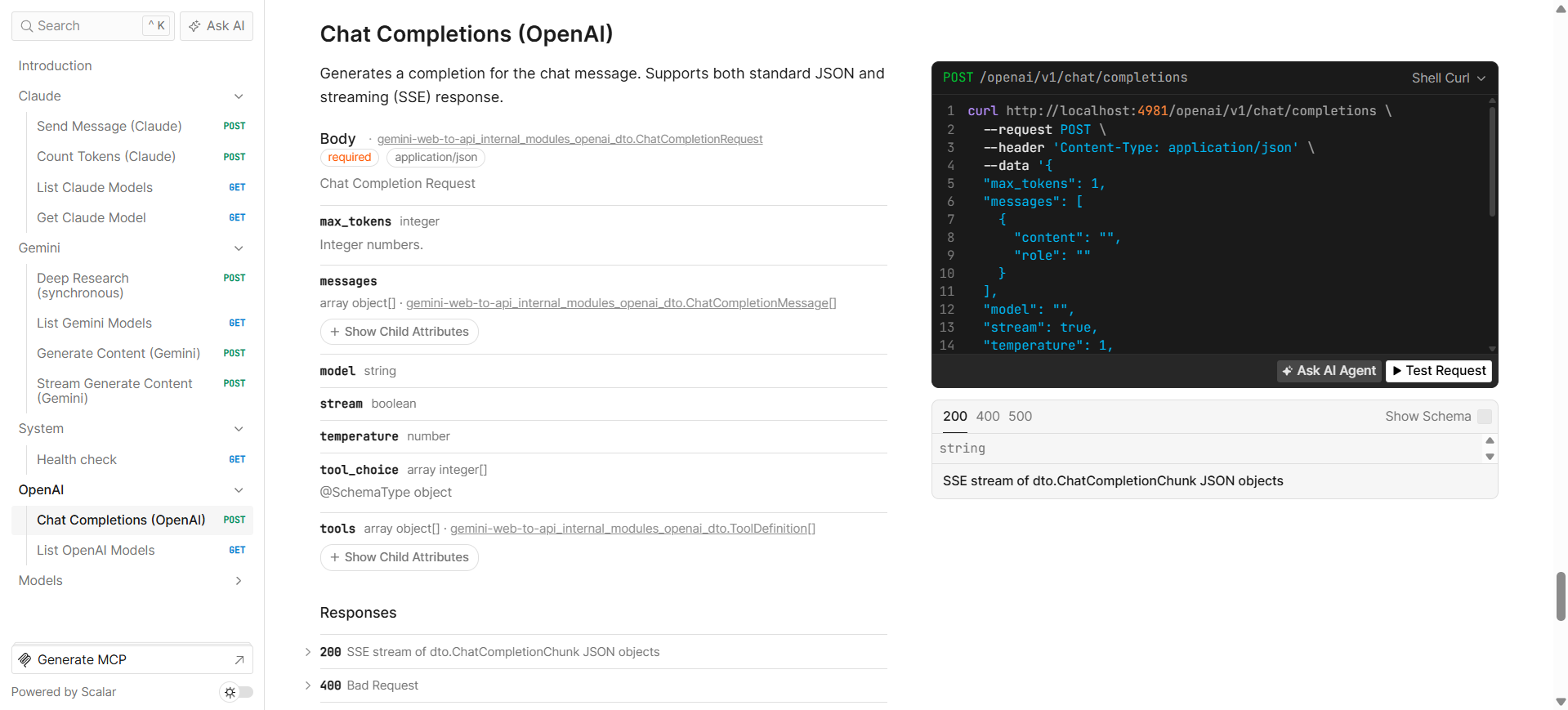
📘 API Documentation
Once running, visit http://localhost:4981/docs for interactive API documentation powered by Scalar.
🤝 Contributing
Contributions are welcome! Please feel free to submit a Pull Request.
- Fork the repository
- Create your feature branch (
git checkout -b feature/amazing-feature) - Commit your changes (
git commit -m 'Add some amazing feature') - Push to the branch (
git push origin feature/amazing-feature) - Open a Pull Request
📄 License
This project is licensed under the MIT License — see the LICENSE file for details.
⭐ Star History
If you find this project useful, please consider giving it a star! ⭐
🔗 Links
- GitHub: ntthanh2603/gemini-web-to-api
- Gemini Web: gemini.google.com
- Issues: Report a bug
Made with ❤️ by the Gemini Web To API team