
ggApp
ggApp是一个基于gg的游戏服务器示例, 引擎使用skynet,上层使用Lua开发。
Table of Contents
状态
stable(Make it better)
特点
- 对skynet引擎无任何修改
- 结构简单,易于使用
服务器
-
检出
d ~ && git clone https://github.com/sundream/ggApp --recursive -
依赖项
-
工具/库
- ubuntu18.04
# in ubuntu 16.04,you need change readline-dev to libreadline-dev sudo apt install -y protobuf-compiler protobuf-c-compiler readline-dev autoconf git subversion telnet netcat libcurl4-openssl-dev - centos
sudo yum install -y protobuf-compiler protobuf-c-compiler readline-devel autoconf git subversion telnet nc libcurl-devel
- ubuntu18.04
-
其他工具(非必要安装)
- lua-5.3.5
- python-2.7.16
url -R -O https://www.python.org/ftp/python/2.7.15/Python-2.7.16.tgz ar -zxvf Python-2.7.16.tgz d Python-2.7.16 /configure ake udo make install - luarocks for lua5.3
it clone https://github.com/luarocks/luarocks
d luarocks
/configure --lua-version=5.3 --with-lua-include=/usr/local/include
ake build
udo make install
-
-
安装DB(框架默认使用mongodb)
-
编译loginserver
d ~/ggApp/loginserver ake linux make macosx -
编译gameserver
d ~/ggApp/gameserver ake linux make macosx -
运行loginserver
-
首次启动准备工作
d ~/ggApp kdir -p loginserver/log -
直接启动
d ~/ggApp/loginserver /skynet src/app/config/loginserver.config / 启动后成功后控制台会提示start,另外log/game/game$DATE.log会记录启服/关服日志 / 你也可以在控制台中执行任何lua代码 -
shell管理
d ~/ggApp/loginserver/shell
h status.sh	# 查看状态
h start.sh		# 启动
h stop.sh		# 关闭
h restart.sh	# 重启
h kill.sh		# 强制关闭
-
-
导入app
首次启动/app有变动时执行 ython tools/script/add_app.py --app=tools/script/app.config --loginserver="127.0.0.1:8885" -
导入服务器列表
首次启动/服务器配置有变动时执行 ython tools/script/import_servers.py --appid=appid --config=tools/script/servers.dev.config --loginserver="127.0.0.1:8885" -
生成服务器配置文件
服务器配置有变动时执行 ython tools/script/generate_gameserver_config.py --config=tools/script/servers.dev.config --out=~/ggApp/gameserver/src/app/config -
运行gameserver
-
首次启动准备工作
d ~/ggApp gameserver_1为服务器名 n -s gameserver gameserver_1 kdir -p gameserver_1/log -
直接启动
d ~/ggApp/gameserver_1 /skynet src/app/config/gameserver_1.config / 启动后成功后控制台会提示start,另外log/game/game$DATE.log会记录启服/关服日志 / 你也可以在控制台中执行任何lua代码 -
shell管理
d ~/ggApp/gameserver_1/shell h status.sh # 查看状态 h start.sh # 启动 h stop.sh # 关闭 h restart.sh # 重启 h kill.sh # 强制关闭 -
执行gm指令
d ~/ggApp/gameserver_1/shell
h gm.sh #提示用法
h gm.sh 0 help help
h gm.sh 0 exec 'print(\"hello\")'
url 'http://127.0.0.1:18888/call/8 "gm","0 exec print(\"hello\")"'
-
客户端
see client/README.md
压测工具
see robot/README.md
服务器结构
- 节点结构
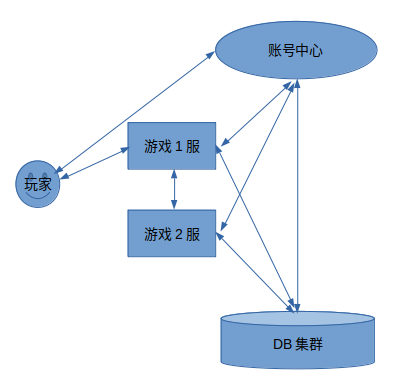
录服: 负责账密验证,充值回调验证等 戏服: 负责游戏玩法逻辑(根据不同需求可划分成不同功能服) B: 示例使用mongodb,你也可以使用redis集群/mongo集群 - 内部结构
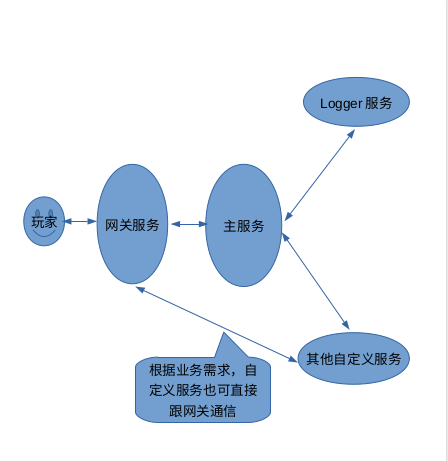
明: 这里的结构并不包括skynet本身启动的服务
关服务: 管理客户端连接,协议编码,协议加解密等。目前支持tcp,kcp,websocket网关,可选择使用/混合使用
服务: 负责游戏主要玩法逻辑,我们推荐大部分玩法在主服务实现,特定玩法可自定义服务实现
ogger服务: 日志处理
目录结构
- 大致目录结构
+~/ggApp
    +gg                         // 公共代码
	+loginserver				// 登陆服
	+gameserver					// 游戏服
		+src
			+gg					// -> ../../gg
			+app				// 游戏逻辑
			+proto				// 协议
		+shell					// 启服/关服等脚本
	+client						// 简易客户端(如可用来给服务器发送协议,快速登录等)
	+robot						// 压测工具
	+tools						// 其他工具
        +db                     // db配置示例
		+script					// 部分管理脚本
+~/db							// db(包含示例配置)
	+redis					// redis数据库
	+mongodb				// mongo数据库
开发环境
- centos运行服务器+window开发
	1. 安装samba
		sudo yum install -y samba samba-client

	2. 在/etc/samba/smb.conf下增加以下配置
	#$USER为你的用户名
	[$USER]
		comment = samba share folder
		path = /home/$USER
		available = yes
		browseable = yes
		public = yes
		writable = yes
		force user = $USER
		force group = $USER
		create mask = 0664
		directory mask = 0775

	3. 增加samba账户
		sudo touch /etc/samba/smbpasswd
		sudo smbpasswd -a $USER
		执行上面命令后会提示输入密码,输入两次密码创建samba账户

	4. 重启samba服务
		sudo systemctl restart smb nmb

	5. window下连接samba
		在资源管理器地址栏输入: \\$IP即可看到共享文件$USER
		右键$USER文件夹,点击<映射为网络驱动>,以便以后方便访问
文档
-
生成文档
果没有安装ldoc,可用以下指令安装 udo luarocks install ldoc / sudo apt install lua-doc # ubuntu下也可以用这种方式安装 前loginserver和gameserver进行了文档注释,可以用ldoc工具导出html文档,如: d loginserver doc . 行后将会生成doc目录,用浏览器打开doc/index.html即可查看文档 -
查看Wiki来了解更多细节
-
静态代码检查
前安装luacheck
udo luarocks install luacheck
/ sudo apt install lua-check	# ubuntu下也可以用这种方式安装
前loginserver和gameserver配置了luacheck静态检查规则,可以用luacheck进行检查,如:
d gameserver
uacheck . | tee /tmp/luacheck.out
一键部署
使用ggApp-ansible一键部署,他会自动帮我们 安装必要软件,安装依赖,生成db配置文件等.
社区
证书
ggApp is licensed under the MIT License,Version 0.3.0. See LICENSE for the full license text.