
Ghostty Theme Mixer
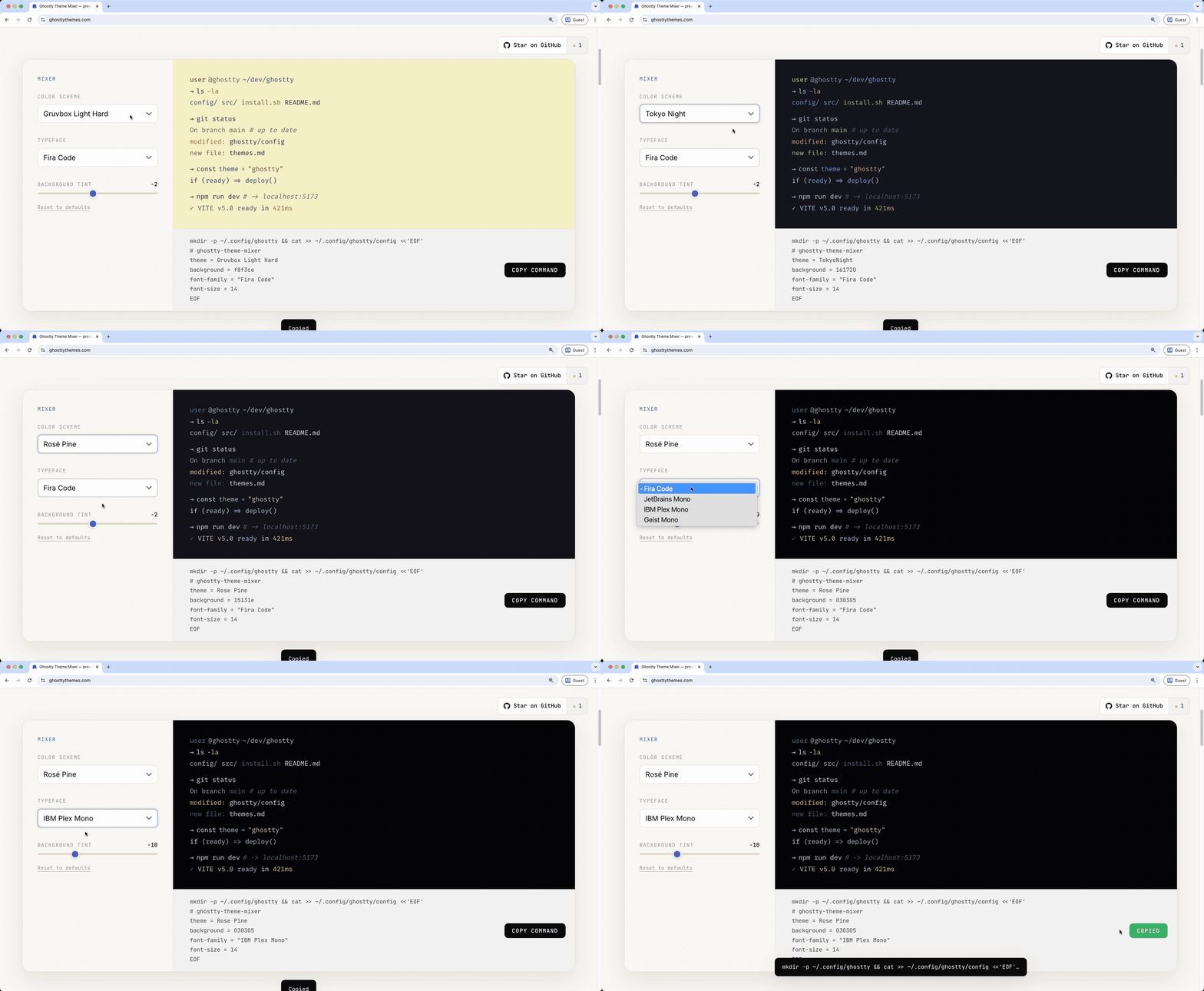
Live theme & font mixer for the Ghostty terminal. Preview 16 color schemes and 4 coding fonts, nudge the background tint, and copy a ready-to-paste config in one click.
→ Try it live at ghosttythemes.com
What's in it
- 16 themes — four Gruvbox variants, Tokyo Night (+ Storm), Catppuccin (Mocha + Latte), Nord, Dracula, Rosé Pine, Solarized (Dark + Light), Kanagawa, Everforest, GitHub Dark
- 4 typefaces — Fira Code, JetBrains Mono, IBM Plex Mono, Geist Mono
- Background tint slider — nudge any theme's background lighter or darker without losing the palette
- One-click config — copy the exact lines you need for
~/.config/ghostty/config
Apply your mix
- Pick theme + font + tint in the mixer
- Click Copy command
- Paste the command into any terminal (Ghostty included) and hit enter — it appends to
~/.config/ghostty/config - Reload Ghostty with
⌘ ⇧ ,— change is instant, no restart
If a theme name isn't recognised by your Ghostty version, run ghostty +list-themes | grep -i <name> to find the exact spelling.
Kept in sync with Ghostty
Theme keys in the mixer are verified weekly against iTerm2-Color-Schemes/ghostty — the upstream source Ghostty bundles its themes from. If a theme is ever renamed or removed upstream, a GitHub issue is opened automatically (see .github/workflows/check-themes.yml) so the mixer stays in lockstep with whatever you have installed.
FAQ & tips
My new theme didn't apply — what happened?
The most common cause is not reloading Ghostty. After pasting the command, hit ⌘ ⇧ , inside a Ghostty window to re-read the config. Opening a new window (⌘ N) also picks up the latest config.
The text colors changed but the background stayed the same.
You probably had a previous mixer run with the tint slider active, which set an explicit background = ... override. The gallery cards below the mixer now emit the theme's default background alongside theme = ... so the full palette flips — make sure you're on the latest site (hard-refresh with ⌘ ⇧ R).
My config file is getting cluttered with repeated # ghostty-theme-mixer blocks.
Purely cosmetic — Ghostty resolves duplicates by "last wins," so everything works correctly. If you want a clean slate, wipe every mixer-added line with:
sed -i.bak -E '/^# ghostty-theme-mixer$|^(theme|background|font-family|font-size) *=/d' ~/.config/ghostty/config && rm -f ~/.config/ghostty/config.bak
Then re-apply whichever theme you want from the mixer.
I pasted the command somewhere it shouldn't have gone and now Ghostty errors on startup.
If a mkdir ... line ended up inside your config file (e.g., you pasted into a text editor instead of a live terminal), strip it out:
sed -i.bak '/^mkdir /d' ~/.config/ghostty/config && rm -f ~/.config/ghostty/config.bak && grep -c '^mkdir' ~/.config/ghostty/config
The final grep -c should print 0 once the junk is gone. If it prints anything else (or the Ghostty error dialog still appears after ⌘ ⇧ ,), fall back to a manual edit:
nano ~/.config/ghostty/config
In nano: navigate to the offending line, Ctrl+K to cut it, Ctrl+O → Enter to save, Ctrl+X to exit. Then reload Ghostty.
A theme name from the mixer isn't recognised by my Ghostty.
Shouldn't happen — all 16 keys are verified weekly against upstream (see section above). But if it ever does, find the real spelling with ghostty +list-themes | grep -i <name> and open an issue so it gets fixed.
Where is Ghostty's config file?
~/.config/ghostty/config on both macOS and Linux. All mixer commands target this path.
Local development
It's a single static HTML file — no build step.
git clone https://github.com/mcvalosborne/ghostty-theme-mixer.git
cd ghostty-theme-mixer
open index.html
License
MIT