
Simple Automated CI/CD Pipeline for Git Projects
This Git-Push-Deploy solution enables automatic delivery of updates within your Git application sources directly to the cloud. The package can be applied as an add-on to Java, PHP, Ruby, Node.js, Python and Go projects, run on top of the certified stack templates.
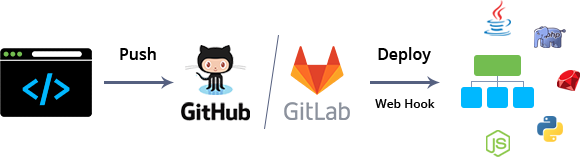
The workflow depends on the programming language used in your project:
- for Java-based projects, the package initiates creation of separate environment with a Maven build node, which will be responsible for interaction with remote Git repository, triggering your application builds and their deployment to application server
- for PHP/Ruby/Node.js/Python/Go apps, the package sets up a pipeline for project deployment directly to the ROOT context on a web server (consider that Ruby app servers are displayed with a deployment mode instead of a context within dashboard, though the actual project location is the same)
Note: The Git-Push-Deploy add-on only works with the default ROOT context on the application server. As a result, consider the following points before installation:
- If you have an already deployed application to the ROOT context, it will be overwritten by the package installation. To keep it, move your application to a custom context.
- The add-on supports push-trigger updates only for the application deployed to the ROOT context, so the managed deployment must remain in this context to ensure the proper operation of the package.
- Custom (non-ROOT) contexts and multiple contexts for the same repository are not supported.
All related deployment operations are performed via Application Platfom API. If a server runs multiple containers, all of them will be restarted sequentially (with a 30-second delay by default) during the update to eliminate possible application downtime. Beside that, a special ZDT Deployment option is used for PHP applications, ensuring their constant availability even with a single application server node.
Requirements
Before applying the package, please consider the following points:
- The solution is proven for use with GitHub and GitLab repositories
- For a proper package installation, some preliminary Git repository configurations are required:
- generated and remembered Personal Access Token that corresponds to your GitHub or GitLab account
- for integration with Java-powered app, the appropriate repository root should contain a pom.xml file with the following content as an obligatory basis (where groupId, artifactId and version values are optional):
<project>
    <modelVersion>4.0.0</modelVersion>
    <groupId>com.mycompany.app</groupId>
    <artifactId>my-app</artifactId>
    <version>1.0</version>
    <packaging>war</packaging>
    <build>
        <finalName>${project.artifactId}</finalName>
    </build>
</project>

How to Integrate Git-Push-Deploy Pipeline to PaaS Environment
To install the Git-Push-Deploy package, copy link to the manifest.jps file above and import it to your application platform dashboard.
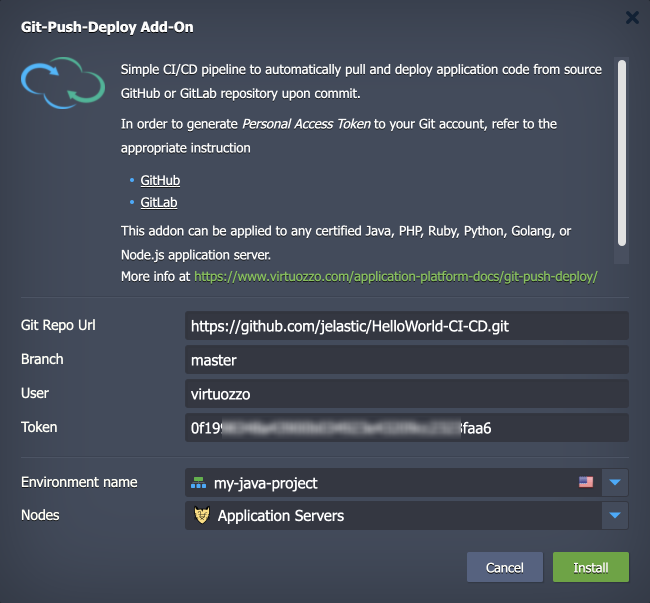
Within the opened installation window, specify the following data:
- Git Repo Url - HTTPS link to your application repo
- Branch - a project branch to be used
- User - your Git account login
- Token - personal Git access token for webhook generation (can be created within GitHub/GitLab account settings)
- Environment name - target environment your application should be deployed to
- Nodes - application server name (is fetched automatically upon selecting the environment)
Click Install and wait for the platform to configure CI/CD pipeline for your project. Once your application is deployed, all the further changes, committed to a source repository, will be automatically delivered to your environment.
For more information on the package please refer to the article Git-Push-Deploy to Containers.