

go-live


A really fast, super-tiny Go command line utility that serves a file directory over HTTP. Does one thing, and well. Can be used for local web development, production static-site serving, or as a network file host. By default, go-live serves the directory it is executed in.
Based on JavaScript's famous live-server utility. Supports Linux, Windows, and Mac, as well as ARM. See TODO list if interested in helping.
To use: Run go-live in your terminal while in directory you want to serve.
Use-Cases
- Local development of an HTML/JS project (can serve any frontend code).
- Host a production static site yourself as a GitHub Pages alternative. See tutorial here
- A lightweight network file host that can serve over a LAN or the whole Internet.
- Run on an embedded system or Kubernetes cluster to share files and host a static website on a network (full binary is less than 5MB).
Example

Install
MacOS Intel (with Brew)
brew tap antsankov/go-live && brew install go-live
MacOS Apple Silicon/M1/M2 (with Brew)
- For ARM (Mac M1 / M2) - make sure your Brew is istalled to
opt/homebrew. Brew does not do this by default, easiest way to do this is to install homebrew via the .pkg from thehomebrewgithub releases page.
brew tap antsankov/go-live && arch -arm64 brew install go-live
MacOS x64 (without Brew)
curl -LJO https://github.com/antsankov/go-live/releases/download/v1.2.1/go-live-mac-x64.zip && unzip go-live-mac-x64.zip && mv go-live /usr/local/bin/go-live && chmod +x /usr/local/bin/go-live && go-live
MacOS Apple Silicon/M1/M2 (without Brew)
curl -LJO https://github.com/antsankov/go-live/releases/download/v1.2.1/go-live-mac-arm64.zip && unzip go-live-mac-arm64.zip && mv go-live /usr/local/bin/go-live && chmod +x /usr/local/bin/go-live && go-live
Linux (using Snapcraft)
snap install go-live
Linux x32 (Ubuntu/RHEL/etc.):
sudo wget https://github.com/antsankov/go-live/releases/download/v1.2.1/go-live-linux-x32 -O /usr/bin/go-live && sudo chmod +x /usr/bin/go-live
Linux x64 (Ubuntu/RHEL/etc.):
sudo wget https://github.com/antsankov/go-live/releases/download/v1.2.1/go-live-linux-x64 -O /usr/bin/go-live && sudo chmod +x /usr/bin/go-live
Linux ARM32 (Ubuntu/RHEL/etc.):
sudo wget https://github.com/antsankov/go-live/releases/download/v1.2.1/go-live-linux-arm32 -O /usr/bin/go-live && sudo chmod +x /usr/bin/go-live
Linux ARM64 (Ubuntu/RHEL/etc.):
sudo wget https://github.com/antsankov/go-live/releases/download/v1.2.1/go-live-linux-arm64 -O /usr/bin/go-live && sudo chmod +x /usr/bin/go-live
Docker
docker pull antsankov/go-live
To run (will serve current directory on port 9000):
docker run --rm -v "${PWD}":/workdir -p 9000:9000 antsankov/go-live go-live
Windows
- Chocolatey coming soon! (Help wanted)
- Make sure when running that all necessary ports are open and user has permissions (Help wanted)
- QT based front-end? (Help wanted)
Go Get (must have Go installed)
GO111MODULE=on go get github.com/antsankov/go-live
Install From Source (must have Go installed)
git clone https://github.com/antsankov/go-live.git && cd go-live
make build && ./bin/go-live
Cross Compile for multiple systems
git clone https://github.com/antsankov/go-live.git && cd go-live
make cross-compile && ls release/
To Release
- For snapcraft it builds automatically when you push it
- For Mac and Homebrew, see https://github.com/mitchellh/gon
gon gon.json- Make sure to have XTools installed, and opened already.
- You need to have a valid developer certficate - check
security find-identity -p codesigning. If it is not valid, see https://developer.apple.com/forums/thread/86161 -- you need to check the info of the developer cert to see if the "Organizational Unit" certificate is installed. - For gon to work, you need to use the hacked version https://github.com/mitchellh/gon/issues/64#issuecomment-1336311570 to release on Apple Silicon
- The "ac-password" in gon is an App specfic password for your Apple ID.
- For docker (remember for version and for latest):
sudo docker build -t antsankov/go-live:v1.2.1 .andsudo docker push antsankov/go-live:v1.2.1
Flags
  -h  Print help message for go-live
  --help

  -c	Allow browser caching of pages. Can lead to stale results, off by default.
  --cache

  -d string
    	Select the directory you want to serve. Serves all subpaths that user has read permissions for. (default "./")
  --dir string
    	 (default "./")
  -p string
    	Set port to serve on. (default "9000")
  --port string
    	 (default "9000")
  -q	Quiet stops go-live from opening the browser when started.
  --quiet

  -s	Start in server mode on port 80 and in quiet.
  --serve

  -S	Enable HTTPS/TLS mode. Uses a self-signed certificate if --cert and --key are not provided.
  --https

  --cert string
    	Path to TLS certificate PEM file.

  --key string
    	Path to TLS private key PEM file.

  -v	Print the version of go-live.
  --version
Note: index.html is displayed automatically at the root of a directory.
Example: Serve a static site over Port 80
sudo go-live --dir ~/example.com/ --serve
HTTPS
Serve with an auto-generated self-signed certificate:
go-live --https
Serve with your own certificate:
go-live --https --cert server.pem --key server-key.pem
Providing --cert and --key automatically enables HTTPS.
Benchmarks
go-live vs caddy (Go), miniserve (Rust), and live-server (Node.js) serving files over HTTP on an Apple M2 Pro.
| Server | Version | Language | Binary Size |
|---|---|---|---|
| go-live | v1.3.0 | Go | 5.8 MB |
| caddy | v2.11.1 | Go | 70 MB |
| miniserve | v0.33.0 | Rust | 5.3 MB |
| live-server | v1.2.2 | Node.js | 9.2 MB + 76 MB Node.js runtime |
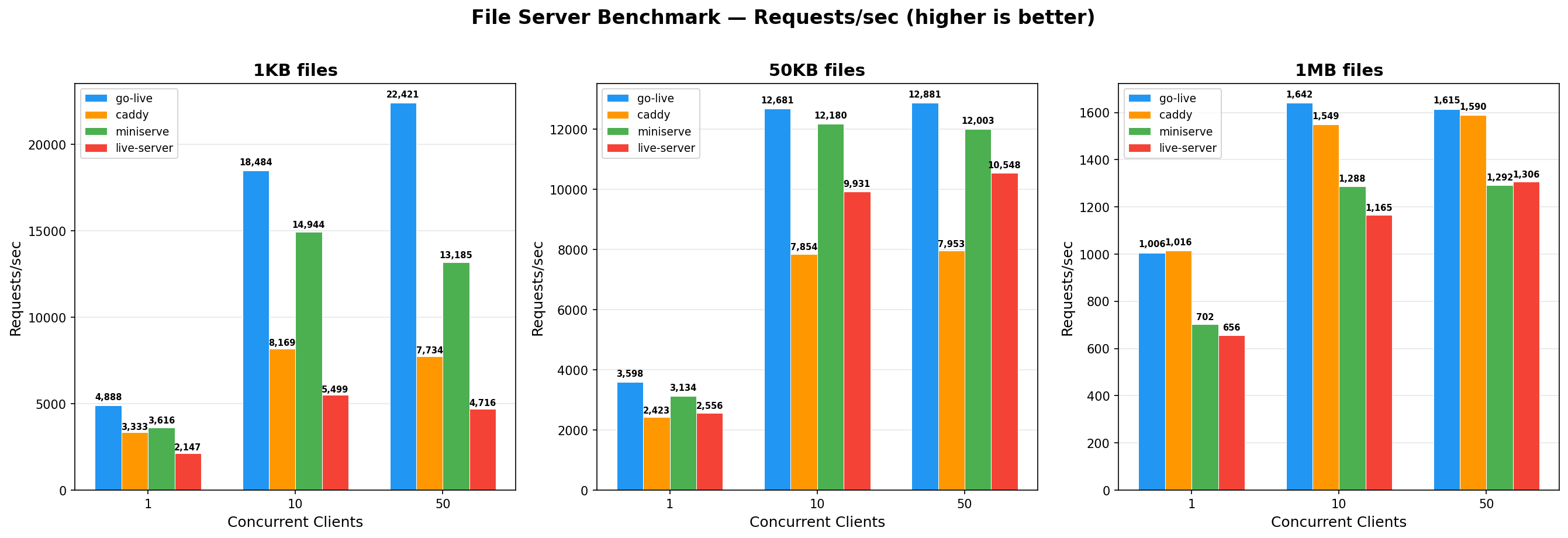
Requests/sec measures fully completed, successful HTTP requests where the entire response body was downloaded. For example, 165 req/s on a 10MB file means ~1.65 GB/s of delivered data.
go-live is the fastest across all file sizes and concurrency levels. For small files at 50 concurrent clients, go-live handles 22,421 req/s — 2.9x caddy, 1.7x miniserve, and 4.8x live-server.
Why is go-live fast?
Go's net/http file server uses sendfile(2) — a kernel syscall that transfers file data directly from disk to the network socket without copying through userspace. This zero-copy path is why go-live and caddy (also Go) lead on large files.
miniserve (Rust/hyper/tokio) does not use sendfile. Every byte goes disk → kernel → userspace → kernel → socket. Tokio also fakes async file I/O by dispatching blocking reads to a thread pool, adding context-switching overhead. This is why miniserve falls behind even Node.js's live-server on larger files, despite being faster on small files where raw request processing speed matters more.
Run benchmarks yourself:
make bench-compare
TODO (Help Wanted)
- Android Support
- Docker Support
- Benchmarking and performance tests. Large files, and concurrent connections.
- Gif and Screenshots of it in use.
- Tutorial Use as Github Pages Alternative
- Copy Paste from Terminal fix.
- Finish Gitbook documentation.
- HTTPS support.
- Publish as a Go package.
- Setup Unit tests.
- Requests Counter
- Ability to download as a binary.
- Browser Opening
- Finish Go Deps
- Run as shell utility.
- Figure out rotating print message.
- Get local server going.