
Go Microservice Architecture
Sample architecture with Go, showing how the different pieces are tied together.
Architecture
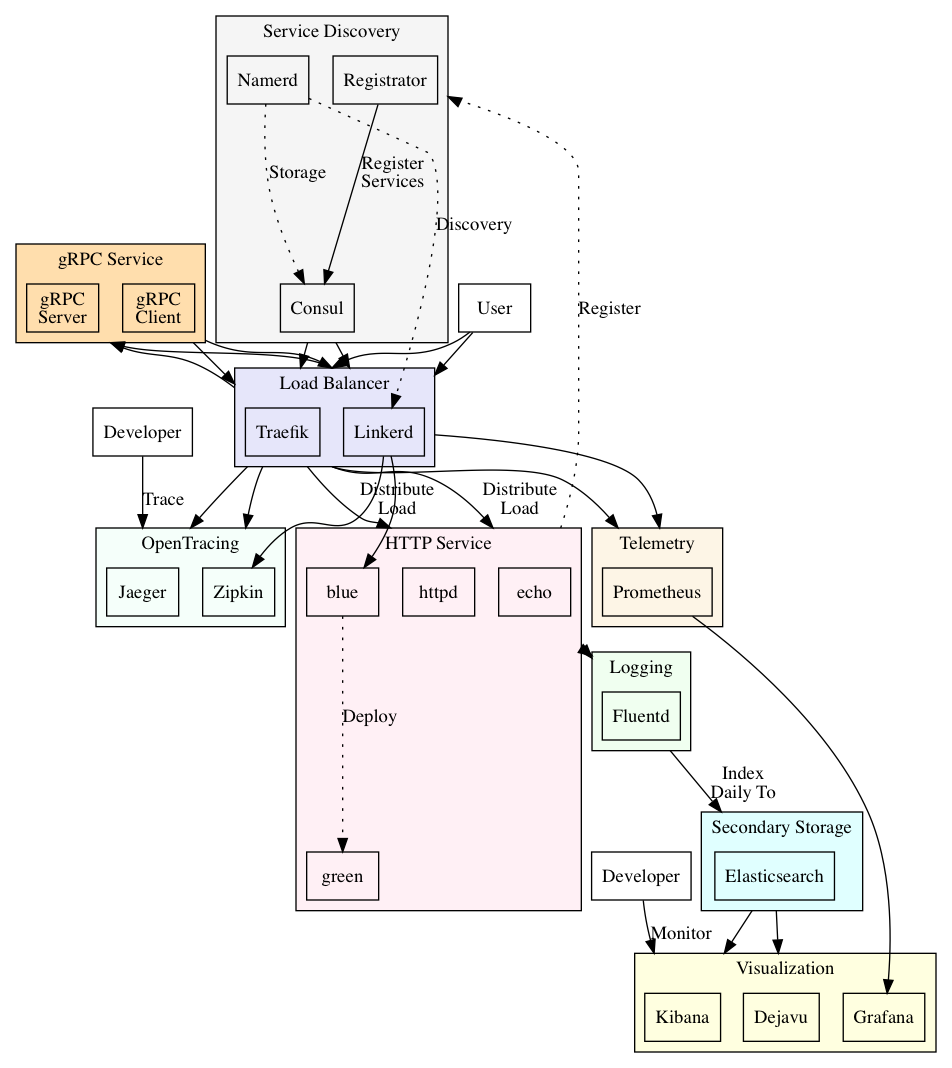
TODO: Cleanup the diagram, and add more services
Requirements
Non-functional requirements:
- system should be highly resilient
- system should be available
- system should be scalable
- system should be observable
Abstract
The following architecture aims to solve several problems
- Load balancing between services
- Service discovery and registration
- Resiliency patterns such as circuit breaker, timeout, retries, rate-limiting
- Centralized logging
- Health checks for services
- Telemetry metrics collection and dashboards
- blue/green deployment (traffic splitting), rolling upgrades
- gRPC load balancing and discovery
- open tracing capabilities
- demonstrates the delegation of several capabilities to the infra, rather than repeating it at the code levels
- add block ip functionality
- add security pipeline
- add log analysis to process incoming logs
- add context logging (request id) that propagates through the system
- enhance/standardize monitoring with opencensus
- harden security (container user/group)
- add policy on resources limit (CPU, memory, number of instance etc)
Start
$ docker-compose up -d
UI
- consul: localhost:8500
- traefik: localhost:8080
- jaeger: localhost:16686
- prometheus: localhost:9090
- grafana: localhost:3000
- linkerd: localhost:9990
- namerd: localhost:9991
- elasticsearch: localhost:9200
- kibana: localhost:9200
- dejavu: localhost:1358
Call the Echo Service
Scale the service:
$ docker-compose up -d --scale node=10
$ repeat 10; curl -H "Host: echo.consul.localhost" localhost:80 && printf "\n";
Output:
{"hostname":"e7d4b1cc317c","text":"hello"}
{"hostname":"0bdb052e096a","text":"hello"}
{"hostname":"62fa842dcf9c","text":"hello"}
{"hostname":"2e7f8dcbbc43","text":"hello"}
{"hostname":"1a59218e8121","text":"hello"}
{"hostname":"bee0e7437024","text":"hello"}
{"hostname":"547af30289ee","text":"hello"}
{"hostname":"fec9b78a7e7c","text":"hello"}
{"hostname":"a27f75db0290","text":"hello"}
{"hostname":"5a9726496329","text":"hello"}
Calling Linkerd
In linkerd.yaml, we set it to listen to consul for changes and register the services there. We expose the port :4040 as the load balancer ingress, and set the identifier to io.l5d.header.token. To call the echo service:
$ curl -H "Host: echo" localhost:4140
Setup Namerd
Creating Egress
$ curl -v -XPUT -d @config/namerd.egress.dtab -H "Content-Type: application/dtab" http://localhost:4180/api/1/dtabs/consul_egress
Output:
*   Trying ::1...
* TCP_NODELAY set
* Connected to localhost (::1) port 4180 (#0)
> PUT /api/1/dtabs/consul_egress HTTP/1.1
> Host: localhost:4180
> User-Agent: curl/7.54.0
> Accept: */*
> Content-Type: application/dtab
> Content-Length: 34
>
* upload completely sent off: 34 out of 34 bytes
< HTTP/1.1 204 No Content
<
* Connection #0 to host localhost left intact
Creating Ingress
$ curl -v -XPUT -d @config/namerd.ingress.dtab -H "Content-Type: application/dtab" http://localhost:4180/api/1/dtabs/consul_ingress
Output:
*   Trying ::1...
* TCP_NODELAY set
* Connected to localhost (::1) port 4180 (#0)
> PUT /api/1/dtabs/consul_ingress HTTP/1.1
> Host: localhost:4180
> User-Agent: curl/7.54.0
> Accept: */*
> Content-Type: application/dtab
> Content-Length: 35
>
* upload completely sent off: 35 out of 35 bytes
< HTTP/1.1 204 No Content
<
* Connection #0 to host localhost left intact
Make Call to Linkerd
$ curl -H "Host: echo" localhost:4140
To simulate running traffic
# To simulate running traffic, runs for 120s
$ wrk -c1 -d120 -t1  -H "Host: echo" http://localhost:4140
Check Dtabs
$ curl http://localhost:4180/api/1/dtabs/consul_ingress
Fluentd logging
# Find the httpd endpoint and trigger it
$ repeat 10 curl http://localhost:32857/
TODO
- cleanup code
- create kubernetes example
Miscellenaous
# Either
  registrator:
    image: gliderlabs/registrator:vendor
    restart: always
    volumes:
      - /var/run/docker.sock:/tmp/docker.sock
    command: -internal=true -deregister=always -ip=docker.for.mac.localhost -cleanup -tags=registrator consul://consul:8500

# Or
  registrator:
    image: gliderlabs/registrator:vendor
    restart: always
    volumes:
      - /var/run/docker.sock:/tmp/docker.sock
    command: -internal=true -deregister=always -ip=docker.for.mac.localhost -cleanup -tags=registrator consul:8500
    network_mode: host