
GoMud
Overview
GoMud is an open-source MUD (Multi-User Dungeon) game server and library, written in Go.
It includes a fully playable default world, and provides built-in tools to customize or create your own.
Playable online demo: http://www.gomud.net
- GoMud
Features
Screenshots
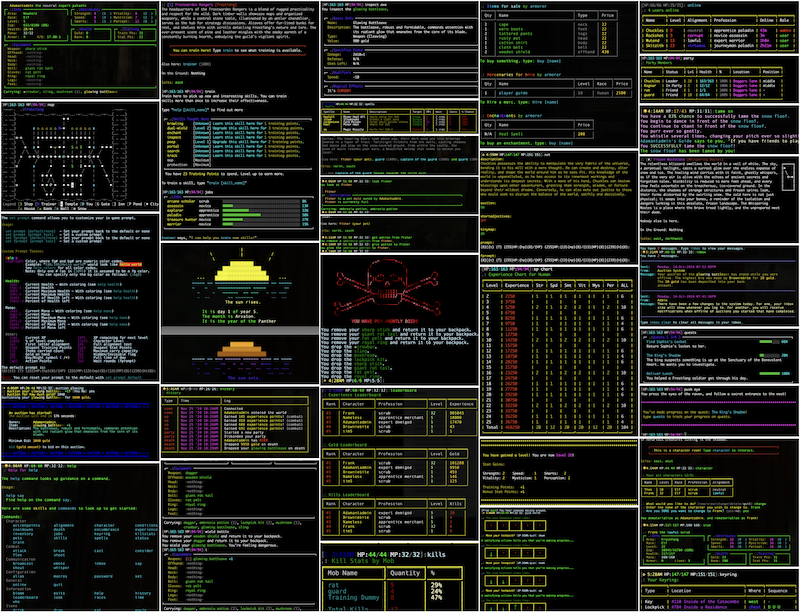
Click below to see in-game screenshots of just a handful of features:
Web Based Admin Tools
There are comprehensive web based admin tools to help build your MUD in addition to the in-game commands. You can browse the admin in read-only mode here:
ANSI Colors
Colorization is handled through extensive use of my github.com/GoMudEngine/ansitags library.
Small Feature Demos
- Web Admin Tool
- Web Map Editor
- Auto-complete input
- In-game maps
- Quests / Quest Progress
- Lockpicking
- Hired Mercs
- TinyMap (okay not much of a "feature")
- 256 Color/xterm
- Customizable Prompts
- Mob/NPC Scripting
- Room Scripting
- Kill Stats
- Searchable Inventory
- Day/Night Cycles
- Web Socket "Virtual Terminal"
- Alternate Characters
Getting Started
Requirements
- Go 1.24 or newer
- Optional: Docker (for container-based runs)
Quick Install
The fastest way to get GoMud running. These scripts install Go and Git if needed, clone the repo, and build the server binary automatically.
Linux / macOS:
curl -fsSL https://raw.githubusercontent.com/GoMudEngine/GoMud/master/scripts/install.sh | sh
Windows (PowerShell):
irm https://raw.githubusercontent.com/GoMudEngine/GoMud/master/scripts/install.ps1 | iex
Both scripts install GoMud to ~/GoMud by default. Set the GOMUD_DIR environment variable before running to choose a different location.
Manual Setup
If you prefer to clone and run the server yourself:
git clone https://github.com/GoMudEngine/GoMud.git
cd GoMud

make reset-admin-pw   # set a new admin password before first run
make run              # build and start the server
To run inside Docker instead:
make run-docker
Other useful commands:
make build        # compile a standalone binary at ./go-mud-server
make run-new      # delete generated room instance data and start fresh
make help         # list all available make targets
Connecting to Your Server
Once the server is running, you can connect in several ways:
| Method | Address |
|---|---|
| Telnet (public) | localhost:33333 or localhost:44444 |
| Telnet (local only) | 127.0.0.1:9999 |
| Web client | http://localhost/webclient |
| Web admin | http://localhost/admin/ |
The web client is the easiest way to jump in without installing a separate telnet client.
First Login
Before starting the server for the first time, run:
make reset-admin-pw
This sets a password of your choosing for the built-in admin account. If you skip this step, the server starts with the default credentials admin / password, which you should change immediately.
The admin account gives you access to in-game admin commands as well as the web-based admin panel at http://localhost/admin/.
Community Modules
GoMud supports optional community modules that add new gameplay features, commands, events, and more. Modules are compiled into the server binary, so they are fast and have full access to the engine.
Module Manager
The module manager is built into the server binary. Run it via the module
subcommand — no separate tool needed:
go run . module
Running it with no arguments and an interactive terminal launches an interactive menu. You can also pass subcommands directly (see below).
A make module shortcut is also available if you prefer:
make module list
make module install <name>
Available Commands
| Command | Description |
|---|---|
go run . module list |
List all modules available in the registry |
go run . module info <name> |
Show full details for a specific module |
go run . module install <name> |
Download, verify, and install a module |
go run . module remove <name> |
Remove an installed module |
go run . module update |
Check for updates to all installed modules |
go run . module update <name> |
Update a specific installed module |
With a built binary, replace go run . with ./go-mud-server.
After Installing or Removing a Module
Modules are compiled into the server binary, so a rebuild is required for any change to take effect:
make build
If a newly installed module depends on a Go package not already in go.mod, run go mod tidy before building.
The manager records what is installed in modules/modules.lock.yaml. This file is managed automatically - do not edit it by hand. You can commit it to source control to track which community modules your server uses.
Configuration
Config Files
GoMud loads configuration in layers so you can keep your own world-specific changes separate from the bundled defaults:
_datafiles/config.yaml
  -> FilePaths.DataFiles (defaults to _datafiles/world/default)
      -> {DataFiles}/config-overrides.yaml
          -> environment variables such as CONFIG_PATH, LOG_PATH, LOG_LEVEL, LOG_NOCOLOR
-
_datafiles/config.yamlis the bundled base config that ships with the repo, and shouldn't be edited or changed. -
FilePaths.DataFilespoints at the active world data directory. By default that is_datafiles/world/default. -
{DataFiles}/config-overrides.yamlis the normal place to save local overrides for a world. -
CONFIG_PATH=/path/to/config.yamlcan point GoMud at a different override file when you want to keep it outside the repo or maintain separate deploy-specific settings. -
For upgrades, treat
_datafiles/config.yamlas a reference file, not your day-to-day edit target. = Keep your custom changes inconfig-overrides.yamlor a separate file selected withCONFIG_PATHso pulling new code does not overwrite your local settings.
Enable Server HTTPS Support
GoMud can serve HTTPS when you provide a certificate and private key, or can be automated using LetsEncrypt provisioning.
For a guided HTTPS setup process, run:
make https-setup
When the admin interface is enabled, /admin/https/ shows the current HTTPS mode, the checks GoMud ran, and the next steps needed to finish setup.
User Support
If you have comments, questions, suggestions (don't be shy, your questions or requests might help others too):
Development Notes
Contributor Guide
Interested in contributing? Check out our CONTRIBUTING.md to learn about the process.
Build Commands
| Command | Description |
|---|---|
make build |
Validates and builds the server binary. |
make run |
Generates module imports and starts the server with go run .. |
make run-new |
Deletes generated room instance data, then starts the server fresh. |
make run-docker |
Builds and starts the server container from compose.yml. |
make https-setup |
Runs the interactive HTTPS certificate setup helper. |
make reset-admin-pw |
Interactively resets the admin user's password. |
make test |
Runs code generation, JavaScript linting, and go test -race ./.... |
make validate |
Runs fmtcheck and go vet. |
make ci-local |
Builds the local CI container and runs workflow validation. |
make help |
Lists the available developer targets. |
Env Vars
When running, several environment variables can be set to alter behaviors of the mud:
| Variable | Example Value | Descripton |
|---|---|---|
CONFIG_PATH |
/path/to/config.yaml |
Use alternate config file |
LOG_PATH |
/path/to/log.txt |
Log to file instead of stderr |
LOG_LEVEL |
LOW / MEDIUM / HIGH |
Set verbosity (rotates at 100MB) |
LOG_NOCOLOR |
1 |
Disable colored log output |
Why Go?
Why not?
Go provides a number of practical benefits:
- Compatible: Easily builds across platforms and CPU architectures (Windows, Linux, MacOS, etc).
- Fast: Execution and build times are quick, and GoMud builds in just a couple of seconds.
- Opinionated: Consistent style/patterns make it easy to jump into any Go project.
- Modern: A relatively new language without decades of accumulated baggage.
- Upgradable: Strong backward compatibility makes version upgrades simple and low-risk.
- Statically linked: Built binaries have no dependency headaches.
- No central registries: Dependencies are pulled directly from source repositories.
- Concurrent: Concurrency is built into the language itself, not bolted on via external libraries.