

Graph sorcery, that makes reading GraphQL schemas easier!





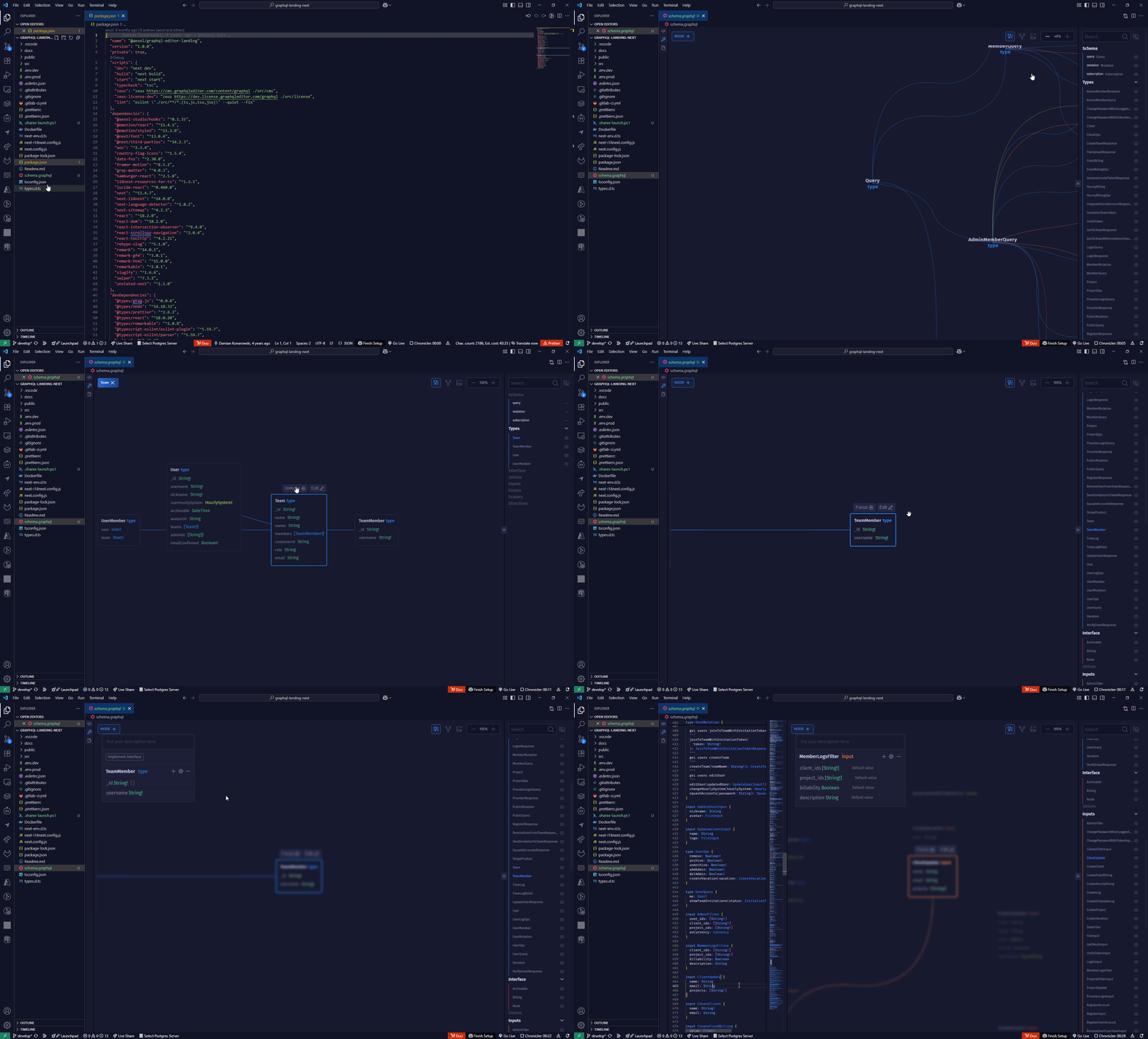
GraphQLEditor makes it easier to understand GraphQL schemas. Create a schema by using visual blocks system. GraphQL Editor will transform them into code.
With GraphQL Editor you can create visual diagrams without writing any code or present your schema in a nice way!
GraphQL Editor is Graph based system for reading and designing the GraphQL schema
GraphQL Editor is a GraphQL visualizer and designer. It allows you to create and display GraphQL schemas as a visual graph.
Table of contents
- How it works
- 💡 What is GraphQL Editor?
- 🚀 Features
- Table of contents
- License
- Installation
- GraphQL SDL Editor
- GraphQL Gql Editor
- Support
- Team
- Underlying Parsing technology
- GraphQL Tutorials
- Authors
How It Works
Create GraphQL nodes and connect them to generate a database schema. You can also use builtin text IDE with GraphQL syntax validation
🚀 Features
- Visual GraphQL Editing.
- GraphQL Monaco based IDE
- Selection observer. When node is clicked in visual Graph it automatically scrolls the code to the same node. When cursor is moved in code space
- Automatically bound interfaces. When interface is implemented on type fields of the interface add to the type. If it is already implemented editing interface edits all implementing nodes
- Writing,generating and displaying GraphQL Documentation in markdown. Generating GraphQL docs out of GraphQL descriptions in markdown
- Comparing different versions of GraphQL schemas with special node-sort sorting nodes and its fields to show the real difference in GraphQL Schema on AST omitting line numbers
Installation
npm i -D worker-loader css-loader file-loader webpack
npm i graphql-editor react react-dom monaco-editor @monaco-editor/react
GraphQL SDL Editor
Usage
import React, { useState } from 'react';
import { render } from 'react-dom';
import { GraphQLEditor, PassedSchema } from 'graphql-editor';

const schemas = {
  pizza: `
type Query{
	pizzas: [Pizza!]
}
`,
  pizzaLibrary: `
type Pizza{
  name:String;
}
`,
};

export const App = () => {
  const [mySchema, setMySchema] = useState<PassedSchema>({
    code: schemas.pizza,
    libraries: schemas.pizzaLibrary,
  });
  return (
    <div
      style={{
        flex: 1,
        width: '100%',
        height: '100%',
        alignSelf: 'stretch',
        display: 'flex',
        position: 'relative',
      }}
    >
      <GraphQLEditor
        setSchema={(props) => {
          setMySchema(props);
        }}
        schema={mySchema}
      />
    </div>
  );
};

render(<App />, document.getElementById('root'));
GraphQLEditor Component Props
GraphQLEditor
| property | type | description | required | default |
|---|---|---|---|---|
| schema | PassedSchema |
value of the schema | true | |
| setSchema | (props: PassedSchema, isInvalid?: boolean) => void; |
Function to be called when schema is set by the editor | true | |
| readonly | boolean |
lock editing | false | false |
| diffSchemas | Record<string, string> |
Record containing graphql schemas with "name" as a key and graphql schema as a "value" | false | |
| theme | EditorTheme |
current theme | MainTheme | |
| routeState | EditorRoutes |
listen to route changes. Don't bind it with routeState though! | false | |
| onStateChange | ( r: EditorRoutes ) => void; |
on route state changed | false | |
| onTreeChange | (tree: ParserTree) => void |
Function that could be fired if tree changes | false | |
| placeholder | string |
placeholder - empty editor | false |
PassedSchema
| property | type | description |
|---|---|---|
| code | string |
value of the schema code |
| libraries | string |
value of the current libraries |
ActivePane
"relation" | "diagram" | "diff"
GraphQL Gql Editor
Usage
import React, { useState } from 'react';
import { render } from 'react-dom';
import { GraphQLEditor, PassedSchema } from 'graphql-editor';

const schema = `
type Query{
	pizzas: [Pizza!]
}
`;

export const App = () => {
  const [gql, setGql] = useState('');
  return ( ||
    <div
      style={{
        flex: 1,
        width: '100%',
        height: '100%',
        alignSelf: 'stretch',
        display: 'flex',
        position: 'relative',
      }}
    >
      <GraphQLGqlEditor
        gql={gql}
        setGql={(gqlString) => setGql(gqlString)}
        schema={{ code: schema }}
      />
    </div>
  );
};

render(<App />, document.getElementById('root'));
GraphQLGqlEditor Component Props
GraphQLEditor
| property | type | description | required | default |
|---|---|---|---|---|
| schema | PassedSchema |
value of the schema | true | |
| gql | string |
value of the gql | true | |
| placeholder | string |
placeholder - empty editor | false | undefined |
| setGql | (props: PassedSchema, isInvalid?: boolean) => void; |
set value of the gql | true | undefined |
| readonly | boolean |
lock editing | false | false |
| theme | EditorTheme |
current theme | false | MainTheme |
GraphQL Embedded Readonly Editor
If you only want to view the schema and embed it somewhere in your app you can use our embedded editor for that reason
import React from 'react';
import { EmbeddedGraphQLEditor } from 'graphql-editor';
import * as schemas from '../schema';

export const embeddedEditor = () => {
  return (
    <div
      style={{
        flex: 1,
        width: '100%',
        height: '100%',
        alignSelf: 'stretch',
        display: 'flex',
        position: 'relative',
      }}
    >
      <EmbeddedGraphQLEditor
        schema={{
          code: schemas.googleDirectionsNew,
          libraries: '',
        }}
      />
    </div>
  );
};
MORE INFO
Support
For support and help, join our Discord Channel.
 About Us
We are devs and contributors to the GraphQL ecosystem with a lot of experience. We want to enter Vendure to create developer-friendly e-commerce solutions that don't rely on clunky and outdated stuff like Shopify's Liquid wrapped with JavaScript.
Authors:
Underlying Parsing Technology
GraphQL-Editor parsing is based on underlying Zeus technology.
GraphQL Tutorials
To learn more about how to use GraphQL, we recommend: