
gtex62-clean-suite



A modular, minimalist Conky desktop suite for Linux Mint (and other distros), inspired by several Rainmeter skins and rebuilt for Conky using Lua, custom widgets, themed slash bars, GPU/VRAM bars, weather arc, calendar, notes, and more.
This is a complete desktop system monitor and information panel set while keeping everything text-first, elegant, and unobtrusive.
Table of Contents
- Screenshots
- Wallpapers
- Features
- System Information (sys-info.conky.conf)
- GPU Widget
- Weather Widget
- Calendar Widget
- Notes Widget
- Music / Now-Playing Widget
- Network & Infrastructure Widgets
- pfSense Widget
- Access Point (Zyxel WBE530) Widget
- Lyrics Window
- Shared Theme System
- Folder Structure
- Requirements
- Installation
- 1. Install Conky + dependencies
- 2. Clone this repo
- 3. Configure OpenWeather variables
- 4. Start widgets
- Screen alignment and positioning
- Customization
- Astronomy: Moon & Planet Positions
- Credits & Inspirations
- License
Screenshots
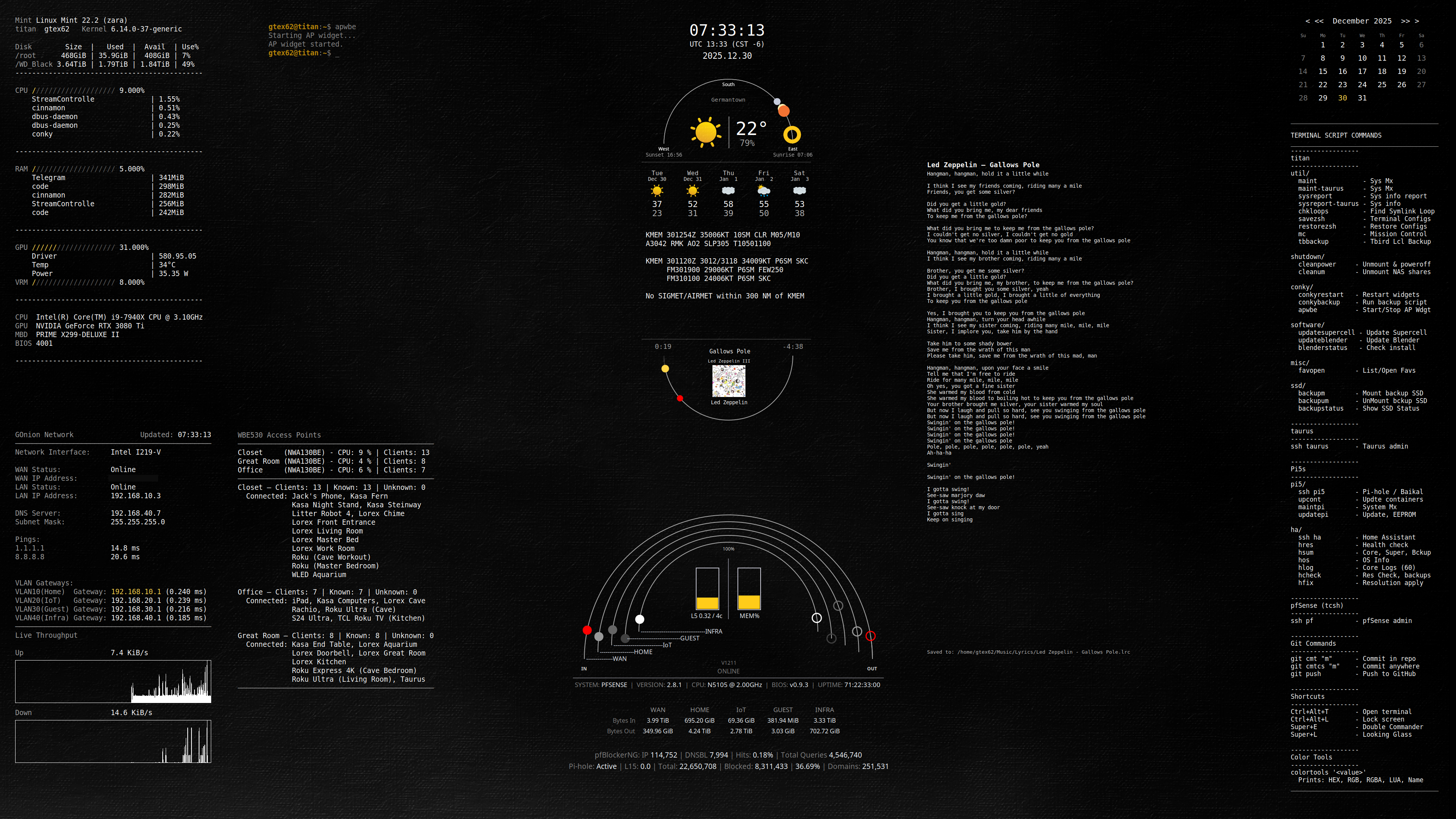
Full Suite
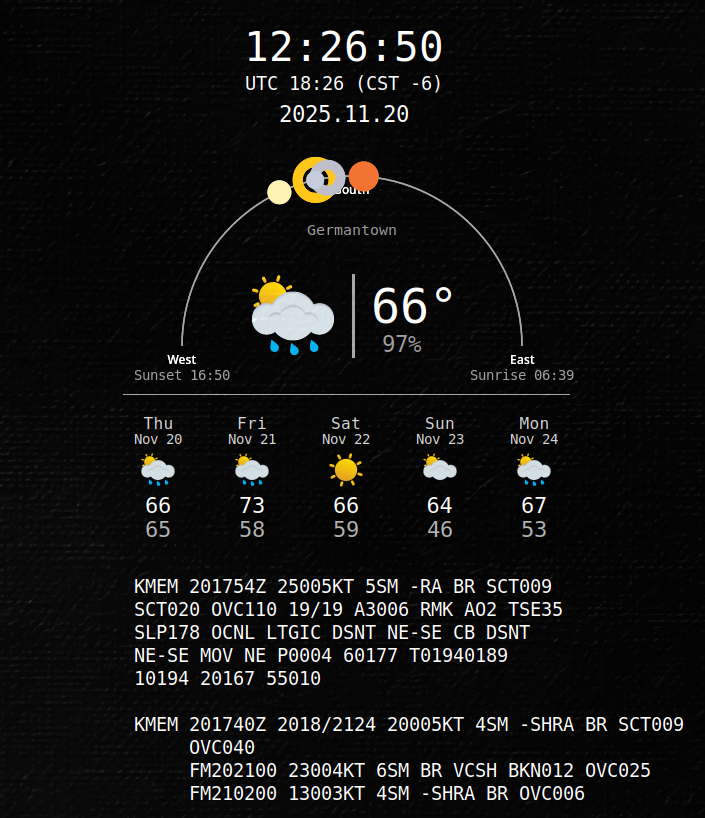
Weather + Horizon Arc
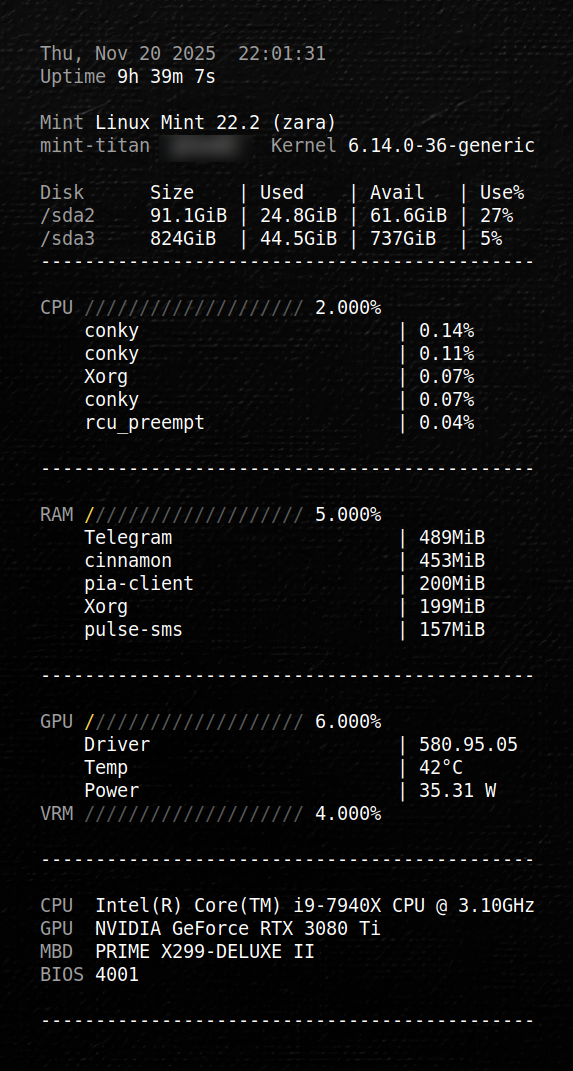
System Info
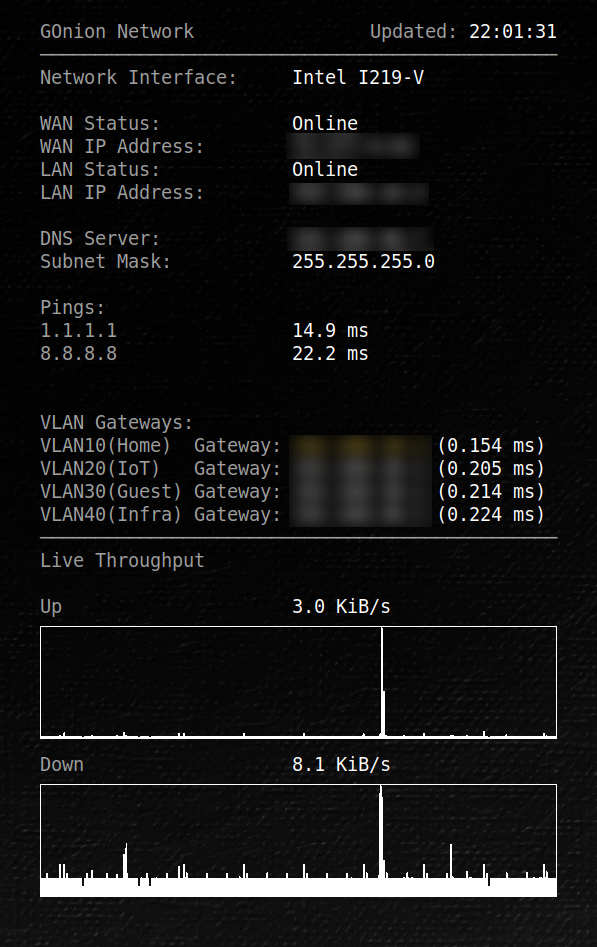
Network Info
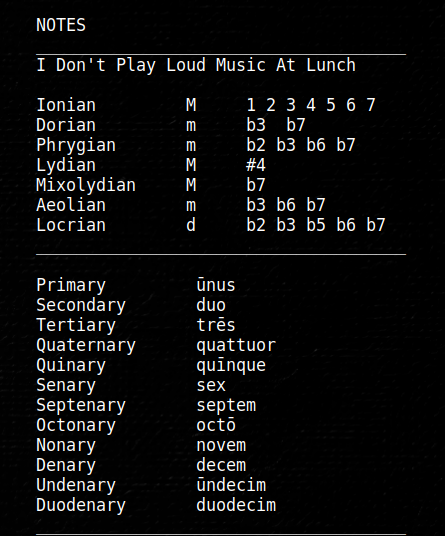
Notes Screenshot
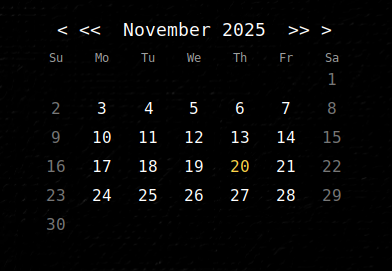
Calendar Screenshot
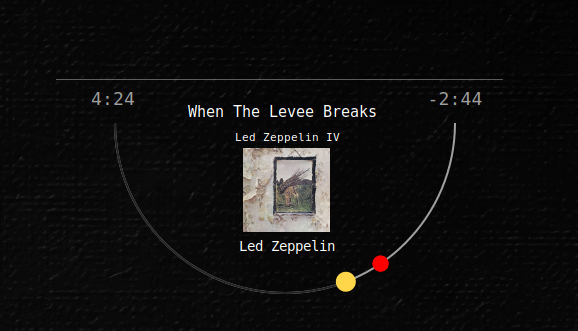
Music Screenshot
Additional states:
music1.pngmusic2.png
Wallpapers
This Conky suite includes original wallpapers created by Geoffrey Greene. They are optional, but recommended to match the aesthetic shown in screenshots. Resolution: 7680x2170.
Files:
wallpapers/painted-canvas-bw-01.png– Black & Whitewallpapers/painted-canvas-db-01.png– Dark Bluewallpapers/painted-canvas-g-01.png– Green
These wallpapers are licensed for personal, non-commercial use.
Features
System Information (sys-info.conky.conf)
- CPU usage, load, and temperatures
- RAM usage
- Disk usage per mount
- OS, kernel, uptime, hostname
- System firmware info
- Logging of network interfaces
- Live throughput graph
- Fully configurable via
theme.lua
GPU Widget
- GPU usage slash bar
- VRAM usage slash bar
- Temperature
- Fan percentage
- Power draw (W)
- Driver version
- Automatic detection for NVIDIA (via
nvidia-smi)
Weather Widget
- Weather arc inspired by ASTROweather
- Current METAR, TAF, AIRMET/SIGMET + OWM blended
- 5-day forecast
- Sunrise/sunset
- Wind, humidity, pressure
- Icons + text
- Icon cache dir override via
theme.weather.icon_cache_dir - Everything styled through Lua
Calendar Widget
- Month calendar with current day highlight
- Clean typography
- Minimalist layout
Notes Widget
- Simple and elegant notes panel
- Readable right-hand column
- Monospaced or themed fonts
Music / Now-Playing Widget
- Track title/artist/album with marquee scrolling
- Arc progress + time labels
- HR baseline line drawn in Lua (tweak with
theme.music.baseline.dy) - Album art (cached cover; anchor is
theme.music.center, offsets intheme.music.art, fallbacktheme.music.art_fixed)
Network & Infrastructure Widgets
pfSense Widget
- Dedicated pfSense monitoring widget (traffic arcs, totals, pfBlockerNG, Pi-hole status)
- Configured via
theme-pf.luaand environment variablePFSENSE_HOST - Built-in SSH safety and self-protection to prevent sshguard lockouts
- See:
README-pfsense-widget.md
Access Point (Zyxel WBE530) Widget
- Live status and client summaries for Zyxel APs
- Configured via environment variables
AP_IPSandAP_LABELS - Uses helper scripts in
scripts/ - AP polling uses SSH and is protected by the shared circuit breaker (
pf-ssh-gate.sh) - When SSH is paused, the widget/scripts may show
SSH PAUSED - AP - This is intentional to prevent sshguard lockouts and clears automatically
Optional: IP-to-label map (ap_ipmap.csv)
The optional scripts/ap_ipmap.csv.example file is an IP-to-label map used by the AP scripts/widget to keep
AP ordering and labels consistent.
To use it, copy scripts/ap_ipmap.csv.example to scripts/ap_ipmap.csv and edit as needed (scripts/ap_ipmap.csv
is gitignored).
The expected format is a simple CSV with columns like IP,label (one AP per line).
Lyrics Window
- Copy
widgets/lyrics.vars.exampletowidgets/lyrics.varsand adjust paths and providers
Provider tiers:
-
NOAPI — default, no keys required Default providers:
lrclib,lyrics_ovh,lololyrics,chartlyrics -
SCRAPE — optional, may break, use at your own risk Optional providers:
azlyrics,songlyrics,elyrics,letras,lyricfind,musixmatch -
API — requires keys Providers:
genius(token required) -
The order listed in
lyrics.varsis the order searched -
widgets/lyrics.varsis gitignored to protect secrets
Manual lyrics:
- Create
Artist - Title.txtor.lrcfiles - Store them in
~/Music/lyrics/ - Copy/paste lyrics from a website
- The widget picks them up automatically on the next track
Shared Theme System
The theme.lua file controls:
- Font family
- Font size
- Colors
- Slash bar width & style
- Column positions
- Spacing and separators
- Optional per-widget tweaks
Folder Structure
Installed under your home config (or ${CONKY_SUITE_DIR:-~/.config/conky/gtex62-clean-suite} if overridden):
${CONKY_SUITE_DIR:-~/.config/conky/gtex62-clean-suite}/
├── theme.lua
├── theme-pf.lua
├── widgets/
│   ├── ap-wbe530.conky.conf
│   ├── sys-info.conky.conf
│   ├── weather.conky.conf
│   ├── calendar.conky.conf
│   ├── date-time.conky.conf
│   ├── notes.conky.conf
│   ├── lyrics.vars.example
│   ├── net-sys.conky.conf
│   ├── music-lyrics.conky.conf
│   ├── owm.env              # your OpenWeather API key (user-provided; not in git)
│   ├── owm.vars             # your OWM config/paths (user-provided; not in git)
│   └── pfsense.conky.conf
├── lua/                     # shared Lua modules for all widgets
├── scripts/                 # helper scripts (data fetch, SSH polling, safety gate, startup)
├── icons/
├── wallpapers/
├── screenshots/
├── AGENTS.md
├── CHANGELOG.md
├── CONTRIBUTING.md
├── LICENSE
├── README-pfsense-widget.md
└── README.md
Requirements
- Conky (with Lua support) — e.g.
conky-allon Debian/Ubuntu/Mint curljqlm-sensors(for temperatures)playerctl(music metadata/status)pactl(optional; volume/mute via PulseAudio/PipeWire)- For GPU widget:
- NVIDIA GPU
- Working
nvidia-smicommand
Installation
1. Install Conky + dependencies
sudo apt install conky-all curl jq lm-sensors playerctl pulseaudio-utils
sudo sensors-detect
2. Clone this repo
mkdir -p ~/.config/conky
cd ~/.config/conky
git clone https://github.com/GTex62/gtex62-clean-suite.git
Optional: Override suite/cache paths
By default the suite uses:
- Suite:
${CONKY_SUITE_DIR:-~/.config/conky/gtex62-clean-suite} - Cache:
${XDG_CACHE_HOME:-~/.cache}/conky
You can override these before launching Conky:
export CONKY_SUITE_DIR="$HOME/.config/conky/gtex62-clean-suite"
export CONKY_CACHE_DIR="${XDG_CACHE_HOME:-$HOME/.cache}/conky"
export CONKY_THEME_PATH="$CONKY_SUITE_DIR/theme.lua"
export CONKY_THEME_PF_PATH="$CONKY_SUITE_DIR/theme-pf.lua"
If you source scripts/conky-env.sh, you can also set these there.
3. Configure OpenWeather variables
There are two files involved:
owm.env— holds your OpenWeather API key (and optionally some settings)owm.vars— holds cache paths and other variables for the forecast logic
Start from the provided examples:
cd "${CONKY_SUITE_DIR:-$HOME/.config/conky/gtex62-clean-suite}/widgets/"
cp owm.env.example  owm.env
cp owm.vars.example owm.vars
Then edit them:
xed owm.env
xed owm.vars
In owm.env:
- Replace
YOUR_OPENWEATHER_API_KEY_HEREwith your actual API key. (Do not commit the real key to Git.)
In owm.vars:
- Set
OWM_DAILY_CACHEto match your cache directory (or full path):OWM_DAILY_CACHE="${CONKY_CACHE_DIR:-${XDG_CACHE_HOME:-$HOME/.cache}/conky}/owm_forecast.json" - Optionally adjust LAT/LON/UNITS/LANG to match your location.
4. Start widgets
The suite includes a helper script to start all widgets at once:
${CONKY_SUITE_DIR:-$HOME/.config/conky/gtex62-clean-suite}/scripts/start-conky.sh &
If you set CONKY_SUITE_DIR, use $CONKY_SUITE_DIR/scripts/start-conky.sh instead.
Optional: Toggle a single widget with a launcher script
Some widgets (like the Zyxel WBE530 AP widget) may require environment exports from scripts/conky-env.sh.
You can create a personal launcher in ~/.local/bin (e.g., apwbe) that sources that file and starts/stops
Conky using widgets/ap-wbe530.conky.conf. This launcher is intentionally not included in the repo because it’s
user-specific.
CFG="${CONKY_SUITE_DIR:-$HOME/.config/conky/gtex62-clean-suite}/widgets/ap-wbe530.conky.conf"
source "${CONKY_SUITE_DIR:-$HOME/.config/conky/gtex62-clean-suite}/scripts/conky-env.sh"
if pgrep -f "conky .*${CFG}" >/dev/null; then
  pkill -f "conky .*${CFG}"
else
  conky -c "$CFG" &
fi
You can also start individual widgets manually if you prefer (use $CONKY_SUITE_DIR if set):
conky -c "${CONKY_SUITE_DIR:-$HOME/.config/conky/gtex62-clean-suite}/widgets/sys-info.conky.conf" &
conky -c "${CONKY_SUITE_DIR:-$HOME/.config/conky/gtex62-clean-suite}/widgets/weather.conky.conf" &
conky -c "${CONKY_SUITE_DIR:-$HOME/.config/conky/gtex62-clean-suite}/widgets/calendar.conky.conf" &
conky -c "${CONKY_SUITE_DIR:-$HOME/.config/conky/gtex62-clean-suite}/widgets/date-time.conky.conf" &
conky -c "${CONKY_SUITE_DIR:-$HOME/.config/conky/gtex62-clean-suite}/widgets/notes.conky.conf" &
conky -c "${CONKY_SUITE_DIR:-$HOME/.config/conky/gtex62-clean-suite}/widgets/music.conky.conf" &
conky -c "${CONKY_SUITE_DIR:-$HOME/.config/conky/gtex62-clean-suite}/widgets/music-lyrics.conky.conf" &
conky -c "${CONKY_SUITE_DIR:-$HOME/.config/conky/gtex62-clean-suite}/widgets/net-sys.conky.conf" &
conky -c "${CONKY_SUITE_DIR:-$HOME/.config/conky/gtex62-clean-suite}/widgets/ap-wbe530.conky.conf" &
conky -c "${CONKY_SUITE_DIR:-$HOME/.config/conky/gtex62-clean-suite}/widgets/pfsense.conky.conf" &
Add the script to your desktop environment’s startup applications to launch the suite automatically on login.
Screen alignment and positioning
Each .conky.conf file has its own alignment, gap_x, and gap_y settings tuned for a dual-monitor setup on the original system (right-side secondary display).
You can also set monitor_head in theme.lua to target a specific monitor ("0" = primary, "1" = secondary). Each widget reads this value and applies it via xinerama_head.
If widgets appear off-screen or stacked incorrectly:
-
Open the
.conky.conffile for the widget you want to move. -
Look for these lines near the top:
alignment = 'top_right', gap_x = 2780, gap_y = 50, -
Adjust
alignment(top_left,top_right,bottom_left,bottom_right, etc.) andgap_x/gap_yuntil the widget sits where you want it. -
Save and reload that widget:
pkill conky
${CONKY_SUITE_DIR:-$HOME/.config/conky/gtex62-clean-suite}/scripts/start-conky.sh &
Tip: You can experiment interactively by changing the numbers in small steps (e.g., ±50 px).
Customization
Most of the visual behavior is controlled from:
${CONKY_THEME_PATH:-~/.config/conky/gtex62-clean-suite/theme.lua}
Things you can change there:
- Fonts (family, size)
- Colors (main text, accents)
- Slash bar style and width
- Column positions (for labels and values)
- Spacing for separators and sections
- Calendar spacing and padding
- Weather arc and planet styling options (if you enable planets)
- Weather main block positioning (weather.center + weather.main.* offsets for icon/city/temp/humidity)
- Weather city label is centered on weather.center (use weather.main.city_dx to offset)
- Weather arc centering (weather.center_mode + weather.center_offset for auto X centering)
- Aviation block offsets (weather.metar/taf/advisories.offset_x, offset_y)
- Aviation text width tuning (weather.aviation.char_px for pad_cols alignment)
- Music widget arc alignment uses weather.center_mode/center_offset to match the weather apex
- Music album art anchors to the apex via theme.music.art (cover_line.lua; art_fixed is a fallback)
- Music album art centering (theme.music.widget_w for auto-x centering in cover_line.lua)
- Music widget arc/bars, volume marker, and album art placement (theme.music.art, with theme.music.art_fixed as fallback)
Each .conky.conf file uses the same shared theme, so adjusting theme.lua lets you redesign the look of the entire suite without editing each widget individually.
Astronomy: Moon & Planet Positions
The weather widget can optionally display the Moon and visible planets (Mercury, Venus, Mars, Jupiter, Saturn) along the horizon arc.
These positions are generated externally and cached in:
${CONKY_CACHE_DIR:-${XDG_CACHE_HOME:-~/.cache}/conky}/sky.vars
Dependency
Planet and moon calculations require PyEphem:
sudo apt install python3-ephem
Note: On Linux Mint / Ubuntu, installing via pip may fail due to
Python's externally managed environment (PEP 668).
The python3-ephem system package is the supported method.
Generator script
This repository includes:
scripts/sky_update.py
This script:
- Calculates current azimuth / altitude for the Moon and planets
- Converts positions to horizon-arc angles
- Writes values into
${CONKY_CACHE_DIR:-${XDG_CACHE_HOME:-~/.cache}/conky}/sky.varsforowm.luato consume
You can test it manually:
${CONKY_SUITE_DIR:-$HOME/.config/conky/gtex62-clean-suite}/scripts/sky_update.py
Automatic updates (recommended)
For live tracking, the generator should be run periodically. A systemd user timer is recommended so updates continue across restarts and Conky reloads.
Credits & Inspirations
- Plainext (Rainmeter → Conky)
- DesktopWidgets -- Network Info (Rainmeter)
- ASTROweather (Rainmeter)
- Amnio/Notes (Rainmeter)
License
This project is licensed under the MIT License.