
🧹 HA Optimizer







🇻🇳 Phiên bản tiếng Việt: README_vi.md
The smart cleanup, analysis and health-check integration for Home Assistant.
Most Home Assistant instances accumulate hundreds of dead entities, broken automations, database bloat, and silently-failing devices over time — and nobody notices until something breaks. HA Optimizer surfaces all of it automatically, so you can clean up with confidence.
⚡ Set it up once. Let it scan. Know exactly what's cluttering your HA instance — and clean it up safely.
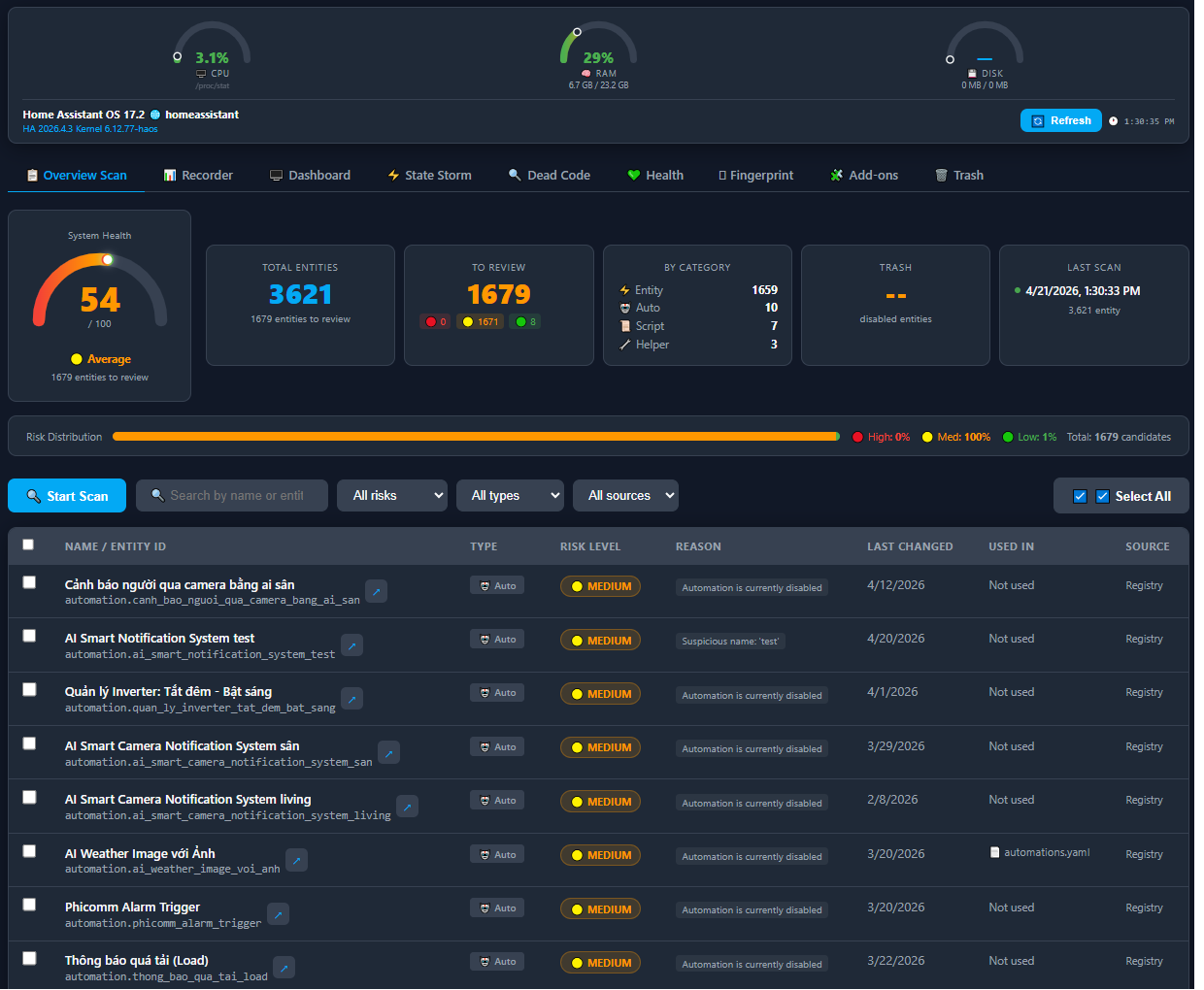
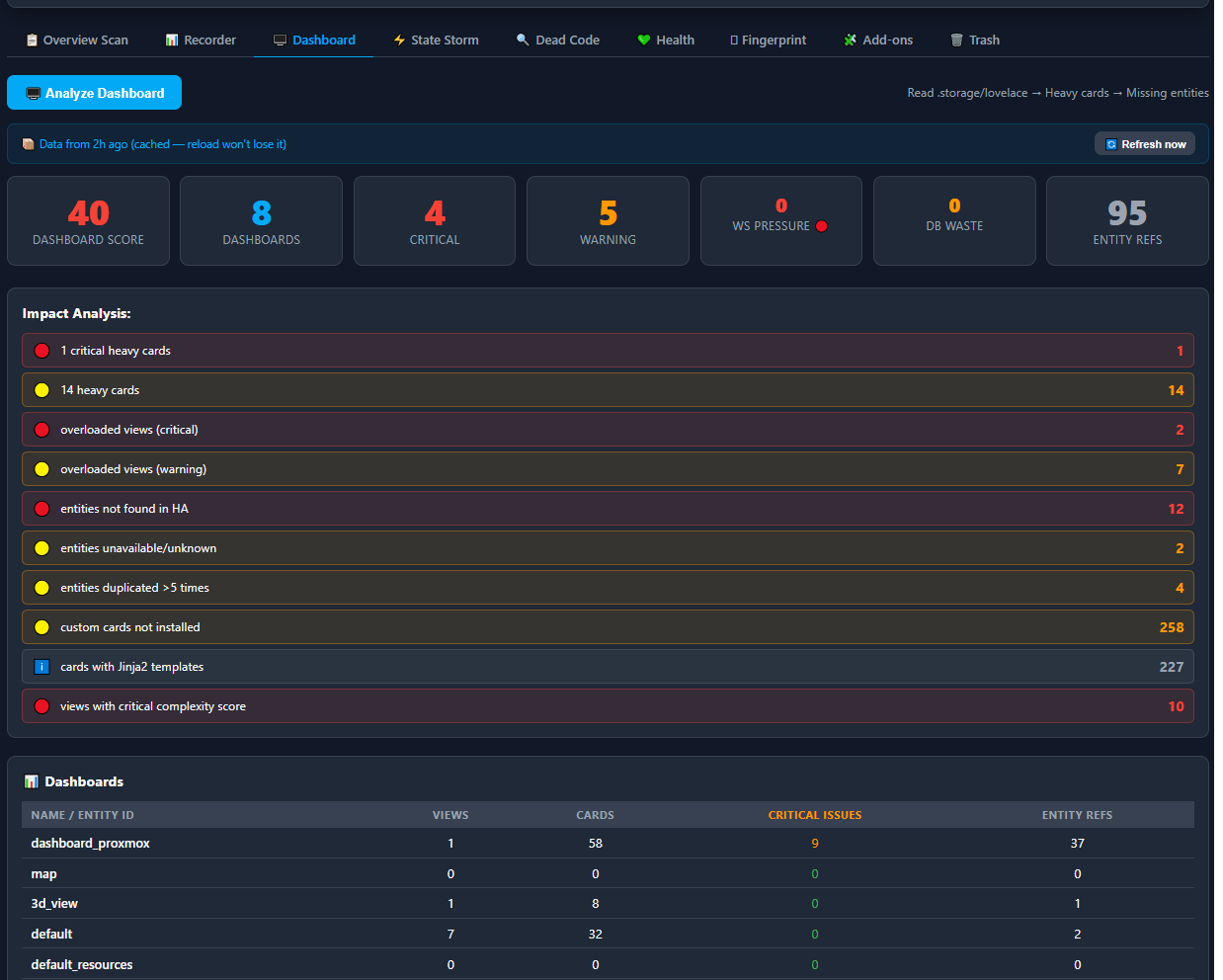
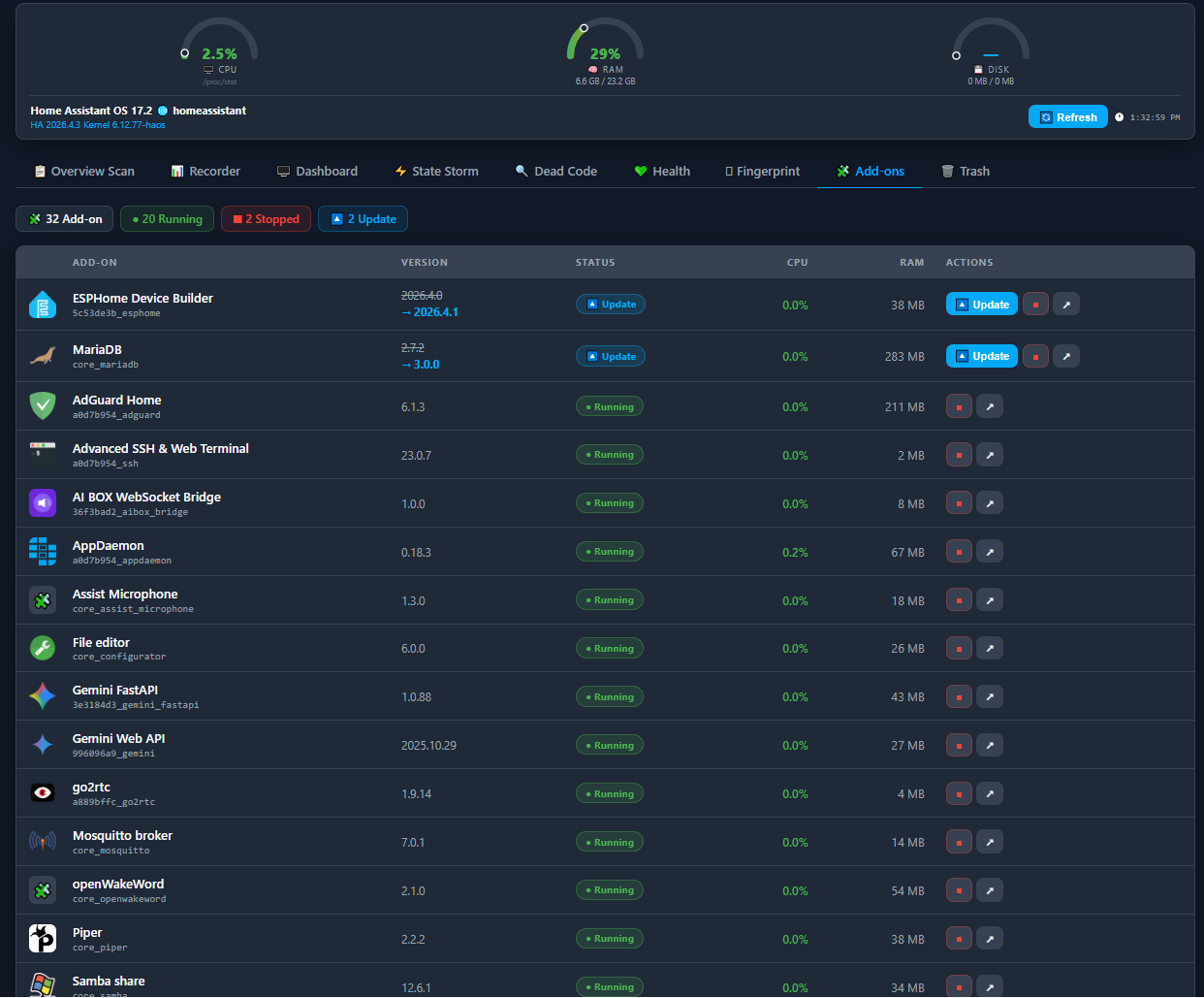
📸 Preview
🔥 Why You Need This
| Problem | HA Optimizer |
|---|---|
| 💀 Dead entities from removed devices | Detects & flags them with risk level |
| 🤖 Broken automations nobody knows about | Dead code scan — triggers/actions pointing to nothing |
| 🗄️ Recorder DB growing out of control | Finds top writers, suggests YAML optimizations |
| 📊 Dashboard cards calling unavailable entities | Full Lovelace audit |
| 🌩️ Entities spamming state updates 100×/minute | State storm detector |
| 🔌 Integration that keeps disconnecting | Integration health scorer with reconnect analysis |
| ❓ "Is my HA acting weird today?" | Fingerprint anomaly detection vs your own history |
| 🧩 Add-ons scattered across HA settings | Unified add-on panel with live CPU/RAM monitoring |
| 🖥️ No visibility into host resource usage | Real-time CPU / RAM / Disk gauges always on screen |
✨ Features
🔍 Smart Entity Scanner
- Scans all entities, automations, scripts, and helpers in one pass
- Assigns risk levels (Low / Medium / High) so you know what's safe to delete
- Detects: stale entities (no change in N days), orphaned registry entries, suspicious naming patterns (
test_,temp_,backup_, etc.), and YAML-defined entities that can't be auto-deleted - Safety first — smoke detectors, door/window sensors, locks, motion sensors, CO/gas detectors are never suggested for deletion (configurable)
- Outputs a
health_score(0–100) for your HA instance
🗑️ Safe Purge Engine with Soft Delete
- Soft delete by default — disables entities instead of deleting them, fully reversible
- Trash bin tab — all soft-deleted entities are listed with timestamps, remaining days before auto-expiry, and a one-click restore button
- Auto-expiry — trash is cleaned up automatically after N days (configurable)
- Handles automations and scripts correctly (UI-created vs YAML-defined)
- Detects already-disabled entities and still tracks them properly
🧩 Add-on Manager (new)
A full-featured add-on control panel built right into the optimizer — no more jumping between HA menus.
- Lists all installed add-ons sorted by priority: updates available first, then running, then stopped
- Shows live CPU % and RAM usage per add-on, refreshing every 5 seconds automatically — no page reload needed
- One-click actions: Update, Start, Stop, and open add-on details — all without leaving the panel
- Clearly highlights add-ons with pending updates (old version struck-through, new version highlighted in blue)
- Summary chips at the top: total count, running count, stopped count, available updates count
🖥️ Real-time System Resource Gauges (new)
Always visible at the top of every tab — you never lose sight of your host's health while using any feature.
- Three animated semi-circle gauges for CPU, RAM, and Disk usage
- Gradient color arc that flows green → orange → red as load increases (0 → 50% → 100%)
- Animated needle that glides smoothly to the exact usage value
- Shows absolute values beneath each gauge (e.g.
6.6 GB / 23.2 GBfor RAM) - Displays OS name, hostname, HA version, and kernel version
- Refreshes every 5 seconds automatically when the Add-ons tab is open; available on all tabs via the Refresh button
📡 Fingerprint Anomaly Detection (unique)
Compares today's HA behaviour against your own historical baseline (up to 30 days). Uses statistical methods (σ or IQR depending on available data) to detect:
- Abnormal spike in state writes (DB load surge)
- Unusual automation trigger volume
- Integration reconnect storms
- HA lifecycle event anomalies (unexpected restarts, reloads)
Confidence level grows with more baseline days (20% → 99%). Completely private — compares only against your own past data, never against other users.
🗄️ Recorder DB Analyzer
- Queries the recorder SQLite/MySQL database directly
- Identifies top-writing entities (DB bloat culprits)
- Detects wasteful records — many writes, few distinct states
- Generates a ready-to-paste YAML snippet for
recorder:optimizations - Domain-level write statistics
📊 Lovelace Dashboard Analyzer
- Reads
.storage/lovelace*config files - Flags: heavy/complex cards, missing entities, duplicate entity references, uninstalled custom cards, Jinja2 template cards, WebSocket push pressure
- Cross-references with recorder data to identify dashboard-driven DB waste
🌩️ State Storm Detector
- Finds entities updating state abnormally fast vs their domain baseline
- Includes severity rating, ratio vs normal, and suggested fixes
- Catches misconfigured sensors before they fill your database
🤖 Automation Dead Code Analyzer
- Scans all UI-created automations for broken references
- Checks: triggers pointing to removed devices, actions calling deleted entities/services, conditions using non-existent entity states
- Silent failures in automations are exposed before they cause problems
🔌 Integration Health Scorer
- Analyzes 7 days of recorder data per integration
- Scores each integration (0–100) based on reconnect frequency and unavailability patterns
- Flags abnormal disconnection bursts vs rolling average
- Detailed score breakdown showing exactly which factors caused deductions
- Diagnosis messages: "📶 Possible RF interference or device too far from hub"
🎨 11 Built-in Themes (new)
Switch the entire panel's look with one click — your preference is saved automatically.
| Theme | Style |
|---|---|
| 🌌 Deep Space | Dark navy + electric blue (default) |
| 🟣 Midnight Purple | Deep dark + violet |
| 🌲 Forest Dark | Dark green + emerald |
| 🌅 Sunset | Warm dark + orange |
| 🌊 Ocean Light | Light blue — bright mode |
| 🪨 Slate Pro | Dark indigo + purple accent |
| 🌹 Rose Gold | Dark crimson + rose |
| ⚡ Cyber Neon | Near-black + cyan glow |
| 🟡 Amber Dark | Dark sepia + golden amber |
| 🧊 Arctic | Icy white — bright mode |
| 🧛 Dracula | Classic Dracula dark + soft purple |
🌍 12 Interface Languages (new)
The entire panel UI — every label, button, message, and error — is fully translated into 12 languages. Switch instantly from the language selector in the top bar; your choice persists across sessions.
Supported: 🇻🇳 Tiếng Việt · 🇬🇧 English · 🇩🇪 Deutsch · 🇫🇷 Français · 🇳🇱 Nederlands · 🇵🇱 Polski · 🇸🇪 Svenska · 🇭🇺 Magyar · 🇨🇿 Čeština · 🇮🇹 Italiano · 🇵🇹 Português · 🇸🇮 Slovenščina
🛠️ Installation
Method 1: HACS (Recommended)
Step 1 — Add this repository to HACS:

If the button doesn't work, add manually:
- Open HACS → Integrations → click the ⋮ menu → Custom repositories
- Add this repository URL and select category Integration
- Find HA Optimizer in the HACS store and click Download
- Restart Home Assistant
- Go to Settings → Devices & Services → Add Integration → search for HA Optimizer
- Complete the setup wizard
Method 2: Manual
- Download or clone this repository
- Copy the
ha_optimizer/folder intoconfig/custom_components/:config/ └── custom_components/ └── ha_optimizer/ ├── __init__.py ├── const.py ├── config_flow.py ├── scanner.py ├── purge_engine.py ├── store.py ├── fingerprint.py ├── manifest.json ├── services.yaml ├── strings.json └── panel.html - Restart Home Assistant
- Go to Settings → Devices & Services → Add Integration → search for HA Optimizer
⚙️ Configuration
During setup you will be asked for:
| Setting | Default | Description |
|---|---|---|
| Auto-scan interval (days) | 7 |
Set to 0 to disable automatic scanning |
| Stale days threshold | 30 |
Days without state change before an entity is flagged |
| Enable soft delete | true |
Disable entities before permanently deleting (reversible) |
| Soft delete days | 7 |
Days in trash before auto-permanent deletion |
| Exclude device classes | (safety defaults) | Comma-separated list of device classes to never suggest deleting |
All settings can be changed at any time via Settings → Devices & Services → HA Optimizer → Configure.
🚀 Using the Panel
Open the 🧹 HA Optimizer panel from the HA sidebar. The panel connects automatically using the HA WebSocket session — no token or extra authentication required. Everything is done through the UI — no YAML or manual service calls needed.
✅ No Long-Lived Access Token needed. The panel uses Home Assistant's own authenticated connection, the same one your browser already has open.
The panel has 9 tabs across the top:
📋 Scan Tab — Overview & Cleanup
The main tab. See your system health at a glance and manage unused entities.
- Click
🔍 Start Scan— the scanner analyzes all entities, automations, scripts and helpers (takes a few seconds) - The Overview Dashboard appears showing:
- Health Score gauge (0–100)
- Total entities, candidates to review, breakdown by risk (🔴 High / 🟡 Medium / 🟢 Low)
- Trash count and last scan timestamp
- The table lists all flagged items. You can filter by risk, type or source, and search by name or entity_id
- Tick the checkboxes to select items, then use the floating action bar at the bottom:
- 🗑️ Disable → soft delete (reversible — entity moves to Trash tab)
- ❌ Hard Delete → permanent removal ⚠️ irreversible
- ✕ Deselect → cancel
⚠️ Always backup your HA before using Hard Delete.
📊 Recorder Tab
- Click
📊 Analyze Recorder - See DB size, top-writing entities, wasteful records and write stats by domain
- Copy the ready-to-paste YAML block into
configuration.yamlunderrecorder:and restart HA to reduce DB growth
🖥️ Dashboard Tab
- Click
🖥️ Analyze Dashboard - The panel reads your Lovelace
.storage/lovelace*files and reports: heavy cards, missing/unavailable entities, duplicate references, uninstalled custom cards, Jinja2 template cards - Issues are marked Critical or Warning
ℹ️ Only UI-mode dashboards stored in
.storage/lovelace*are supported. YAML-mode dashboards cannot be read automatically.
⚡ State Storm Tab
- Click
⚡ Detect State Storms - Entities updating far more frequently than their domain baseline are listed with severity, ratio vs normal, and fix suggestions
- These are the most common cause of database bloat and slow Lovelace
🔍 Dead Code Tab
- Click
🔍 Analyze Dead Code - UI-created automations are scanned for broken references: triggers pointing to removed devices, actions targeting deleted entities/services, conditions using non-existent states
- Each automation with issues shows a direct "Open Editor" link to fix it immediately
💚 Health Tab
- Click
💚 Check Integration Health - Each integration gets a score (0–100) based on 7 days of reconnect and unavailability data
- Problem devices show: reconnect count today vs daily average, battery level (if available), and diagnosis messages
- Status badges: Good / Warning / Critical
Fingerprint Tab
Compares today's HA behaviour against your own historical baseline — private to your instance, never compared to other users.
First-time setup:
- Click
📥 Collect Baseline— saves yesterday's metrics snapshot - Repeat daily, or it runs automatically at 00:05 every night
- After 3–7 days, results become meaningful (confidence reaches 75%+)
Running an analysis:
- Click
Analyze Fingerprint - Results show confidence level, anomaly count, hours elapsed today (extrapolated to 24h for fair comparison)
- Each anomaly shows today's value vs baseline average with the method used (σ or IQR)
- ✅ green = normal · ⚠️ orange = anomaly detected
🧩 Add-ons Tab
Full add-on control panel with live host resource data.
- Lists all add-ons with status, version, and update availability
- Live CPU % and RAM per running add-on, auto-refreshing every 5 seconds
- System gauges at the top always show host CPU / RAM / Disk
- One-click Update / Start / Stop without leaving the panel
ℹ️ Requires Home Assistant OS or Supervised (Supervisor API). Not available on Container or Core installs.
🗑️ Trash Tab
All soft-deleted entities appear here with the date they were disabled.
- ♻️ Restore — re-enables the entity and removes it from trash
- ❌ Hard Delete — permanently removes from HA
- Entities are auto-hard-deleted after the configured number of days (default: 7)
Automation Example — Weekly Scan & Notify
automation:
  alias: "HA Optimizer - Weekly Scan"
  trigger:
    - platform: time
      at: "03:00:00"
    - platform: template
      value_template: "{{ now().weekday() == 6 }}"  # Sunday
  action:
    - service: ha_optimizer.scan
    - wait_for_trigger:
        platform: event
        event_type: ha_optimizer_scan_complete
      timeout: "00:05:00"
    - service: notify.mobile_app_your_phone
      data:
        title: "🧹 HA Optimizer"
        message: >
          Scan complete. Found {{ trigger.event.data.statistics.candidates_found }}
          candidates. Health score: {{ trigger.event.data.statistics.health_score }}/100
📋 Services Reference
| Service | Description |
|---|---|
ha_optimizer.scan |
Full scan — entities, automations, scripts, helpers |
ha_optimizer.purge |
Disable (soft) or permanently delete entities |
ha_optimizer.restore |
Re-enable a soft-deleted entity |
ha_optimizer.get_results |
Return last scan results as service response |
ha_optimizer.analyze_recorder |
Recorder DB deep analysis + YAML suggestions |
ha_optimizer.analyze_dashboard |
Lovelace dashboard audit |
ha_optimizer.analyze_storms |
State storm / high-frequency writer detection |
ha_optimizer.analyze_dead_code |
Broken trigger/action/condition scanner |
ha_optimizer.analyze_health |
Integration health scoring (7-day window) |
ha_optimizer.analyze_fingerprint |
Anomaly detection vs personal baseline |
ha_optimizer.analyze_addons |
Add-on list + live CPU/RAM + host resource data |
ha_optimizer.collect_baseline |
Manual baseline snapshot collection |
🛡️ Safety
- Soft delete is the default — entities are disabled, not removed. Fully reversible.
- Safety device classes are hardcoded — smoke, CO/gas, moisture, motion, occupancy, door, window, lock, vibration, sound, battery, problem sensors are never suggested.
- YAML entities are flagged, never auto-deleted — they require manual action.
- Risk scoring — every result has a risk level so you make informed decisions.
🖥️ Compatibility
| Home Assistant | 2023.7+ (2023.1+ for most features) |
| Database | SQLite (default) and MySQL/MariaDB |
| Config | UI config flow — no YAML required |
| Dependencies | None — uses only HA built-ins |
| Python | 3.11+ |
Why 2023.7+? The panel uses
return_responseon service calls (introduced in HA 2023.7). All other features work on 2023.1+.
📋 Changelog
v1.0.0 — Initial Release
- 🔍 Smart entity scanner with risk levels and health score
- 🗑️ Soft delete + restore + auto-expiry trash bin tab
- 📡 Fingerprint anomaly detection (σ / IQR, 30-day baseline)
- 🗄️ Recorder DB analyzer with YAML suggestions
- 📊 Lovelace dashboard auditor
- 🌩️ State storm detector
- 🤖 Automation dead code analyzer
- 🔌 Integration health scorer with reconnect analysis
- 🧩 Add-on manager with live CPU/RAM per add-on (5s auto-refresh)
- 🖥️ Real-time system gauges (CPU / RAM / Disk) — always visible
- 🎨 11 built-in themes, saved per session
- 🌍 12 UI languages, fully translated
- ⚙️ Full UI config flow with options
- 🔐 No Long-Lived Access Token required — panel authenticates via HA WebSocket session
📄 License
MIT License — free to use, modify, and distribute. If you find this useful, please ⭐ star the repo — it helps a lot!
🙏 Credits
Designed and developed by @doanlong1412 from 🇻🇳 Vietnam.
☕ Support
If HA Optimizer saves you time and keeps your Home Assistant clean, consider buying me a coffee!

Every contribution is greatly appreciated and motivates further development. Thank you! 🙏