
Pi-hole V6 Integration for Home Assistant






Original component : Pi-hole
The Pi-hole integration allows you to retrieve statistics and interact with a Pi-hole system.
Description
Due to major changes in the Pi-hole API, the native integration with Home Assistant was no longer functional for several months in 2025, until August 2025.
The 'Pi-hole V6 Integration' added compatibility with the new API in Home Assistant. This integration aimed to restore compatibility and provide Pi-hole management directly from Home Assistant.
[!NOTE] Today, this integration remains active and not only restores full functionality but also offers additional and complementary features to the native integration. Users can now enjoy enhanced capabilities and a seamless experience when managing Pi-hole through Home Assistant.
Features
- Monitor Pi-hole status.
- Enable/Disable Pi-hole via Home Assistant.
- Retrieve filtering statistics.
- Compatibility with the Pi-hole V6 API.
The following sensors are currently implemented :
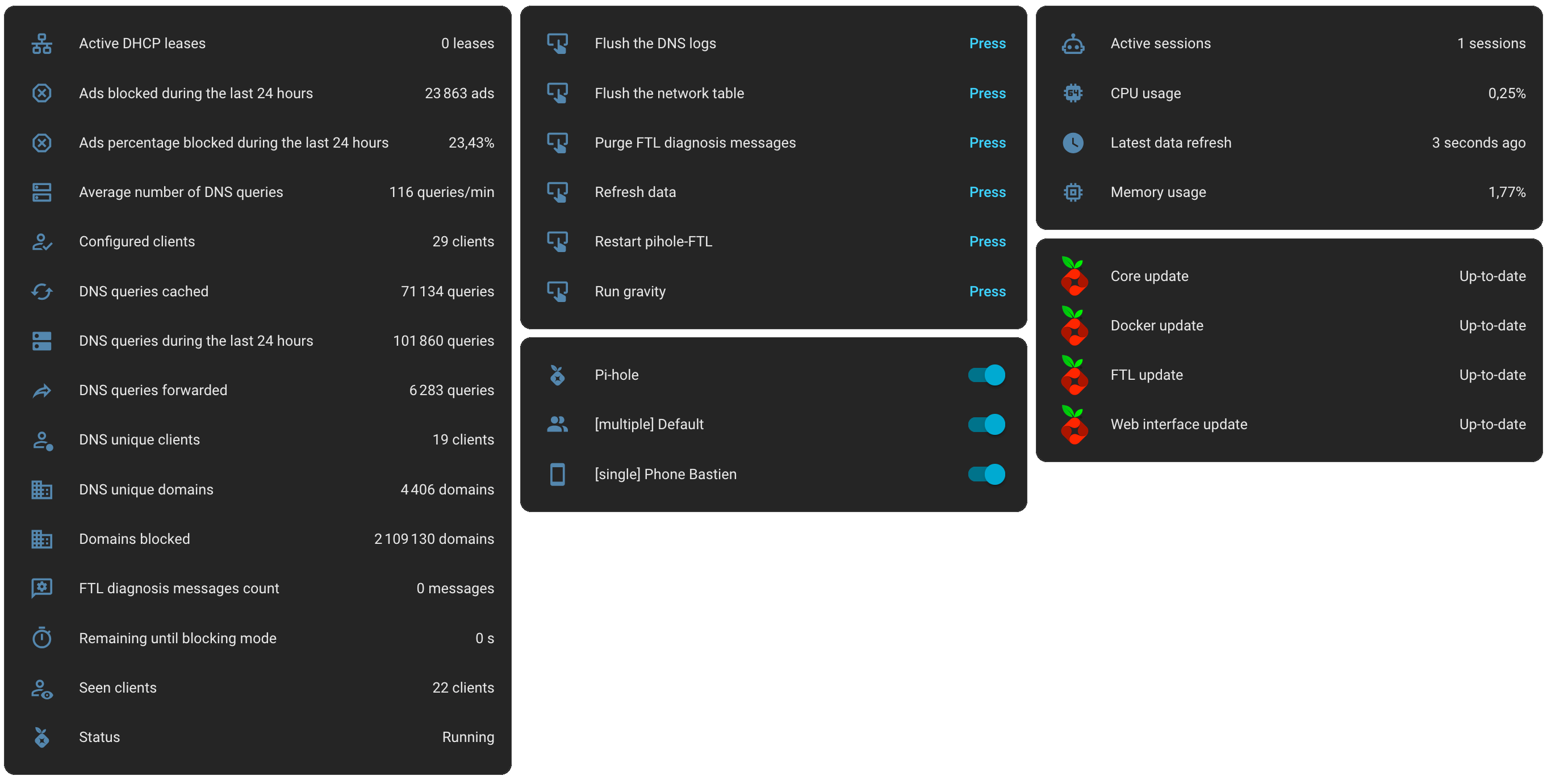
A complete list with explanations is available on this page.
Translation
The integration is currently translated in few langages :
- Czech (thanks @kukulich)
- Dutch (thanks @jverlaan)
- English
- French
- German (thanks Christian)
- Greek (thanks @ChriZathens)
- Norwegian (thanks @emigrating)
- Polish (thanks @jacksonafide)
- Russian (thanks @ProFiLeR4100)
- Portuguese (Brazil) (thanks @tangobones)
- Slovak (thanks @milandzuris)
- Spanish (thanks @dmbuil)
- Swedish (thanks @aleexolsson)
- Turkish (thanks @habil)
- Ukrainian (thanks @ProFiLeR4100)
Installation
Installation via HACS
- Add this repository as a custom repository to HACS:

- Use HACS to install the integration.
- Restart Home Assistant.
- Set up the integration using the UI:

Manual Installation
- Download the integration files from the GitHub repository.
- Place the integration folder in the custom_components directory of Home Assistant.
- Restart Home Assistant.
- Set up the integration using the UI:
Pi-hole Card
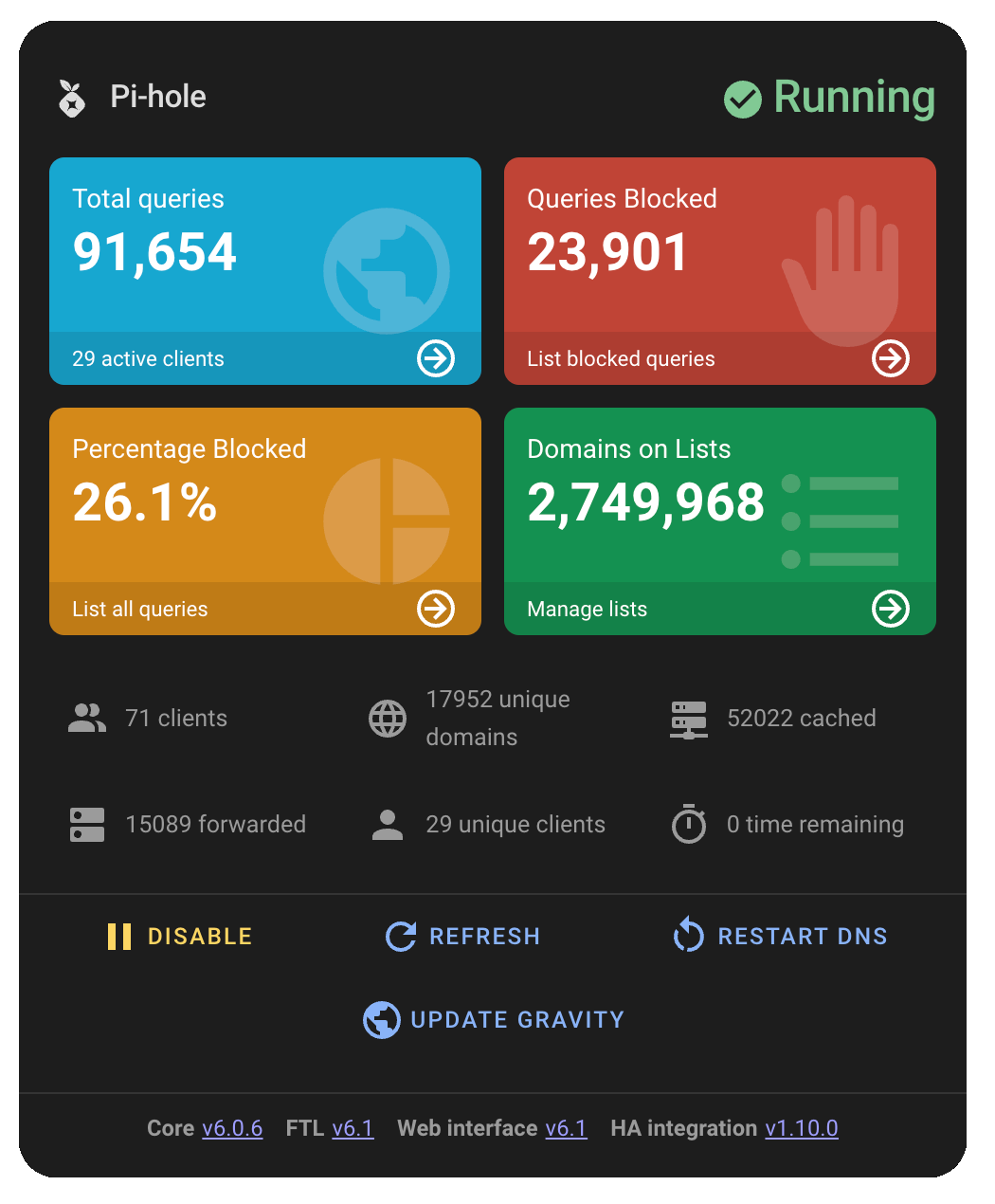
After installing this integration, you can enhance your Home Assistant setup with the Pi-hole Card.
This lovelace card offers a comprehensive and user-friendly dashboard designed specifically for managing and monitoring your Pi-hole DNS ad blocker. It provides real-time statistics and intuitive controls, all presented in a visually appealing interface that aligns with Pi-hole's design aesthetics.
The card is developed by @warmfire540.
The installation instructions are available on the repository: homeassistant-extras / pi-hole-card.
Debugging
It is possible to show the info and debug logs for the Pi-hole V6 integration, to do this you need to enable logging in the configuration.yaml, example below:
logger:
  default: warning
  logs:
    # Log for Pi-hole V6 integation
    custom_components.pi_hole_v6: debug
Logs do not remove sensitive information so careful what you share, check what you are about to share and blank identifying information.
Frequently Asked Questions
How do I configure the refresh frequency?
By default, the data is updated every 5 minutes. You can configure a different frequency as explained on the following page.
Need more (noobs) information to install/configure the integration?
Some additional information is available if you encounter any problems while adding a new service on this page.
Need to implement Pi-hole Controls in your dashboard?
A quick example to integrate controls in a dashboard is available on this page.
Need to optimize your Home Assistant database?
A useful tip to exclude unnecessary sensors from the Recorder is available on this page.
Advantages of using the integration compared to the Core one?
I listed the implemented features in the HA Pi-hole V6 Integration and the Core Integration.
Compatibility
| Compatibility | Pi-hole V6 Integration | Core Integration |
|---|---|---|
| Pi-hole v5 (Latest release: December 29, 2024) | ❌ | ✅ |
| Pi-hole v6 (current version) | ✅ | ✅ |
Features
✅ : Implemented
❌ : Not Implemented
🕜 : Countdown
ℹ️ : Data in attributes
[!NOTE] I hope you will continue to use or install the Pi-hole V6 Integration. 😃
Support & Contributions
If you encounter any issues or wish to contribute to improving this integration, feel free to open an issue or a pull request on the GitHub repository.

Enjoy!