
Sankey Chart Card
A Home Assistant lovelace card to display a sankey chart. For example for energy/power/water consumption.




This card is intended to display connections between entities with numeric state. It is not a general graph card.

Installation
Install through HACS
Options
| Name | Type | Default | Description |
|---|---|---|---|
| type | string | custom:sankey-chart |
|
| autoconfig | object | Experimental. See autoconfig | |
| nodes | list | List of entities/nodes to display. See nodes object. Required unless using autoconfig. | |
| links | list | Connections between nodes. See links object | |
| sections | list | Section-level configuration (sorting, min_width). See sections object | |
| layout | string | auto | Valid options are: 'horizontal' - flow left to right, 'vertical' - flow top to bottom & 'auto' - flips to vertical when the available width is smaller than the sum of all sections' min_width (default 150 each) |
| energy_date_selection | boolean | false | Integrate with the Energy Dashboard. Filters data based on a sibling energy-date-selection card. Use only for accumulated sensors (energy/water/gas). You still need to declare your entities and links — the card just uses the date range from the sibling card. Not compatible with time_period. For automatic node/link generation, see autoconfig. |
| energy_collection_key | string | Key of the energy collection to bind to. Auto-detected by default. Set this if you have multiple energy dashboards and the chart binds to the wrong one. The key follows the pattern _energy_<dashboard_url>, e.g. _energy_energy-dashboard |
|
| title | string | Optional header title for the card | |
| unit_prefix | string | Metric prefix for the unit of measurement. Supported values are m, k, M, G, T, and 'auto'. With 'auto', the appropriate prefix is chosen per value based on its magnitude (m for values <1, k for ≥1000, M for ≥1,000,000, etc.). See https://en.wikipedia.org/wiki/Unit_prefix. | |
| round | number | 0 | Round the value to at most N decimal places. May not apply to near zero values, see issue #29 |
| height | number | 200 | The height of the card in pixels. Only matters while in horizontal layout. Vertical layout height is dynamic based on content |
| show_icons | boolean | false | Display entity icons |
| show_names | boolean | false | Display entity names |
| show_states | boolean | true | Display entity states |
| show_units | boolean | true | Display unit of measurement |
| min_box_size | number | 3 | Minimum size of an entity box |
| min_box_distance | number | 5 | Minimum space between entity boxes in the same section (perpendicular to flow) |
| box_thickness | number | 15 | Thickness in px of the colored bar on each entity box (its width in horizontal layout, height in vertical) |
| connection_margin | number | 0 | Gap in px between a box and where its connection curves start/end (along the direction of flow). Increase to separate the curves from the box bars |
| min_state | number | >0 | Any entity below this value will not be displayed. Only positive numbers above 0 are allowed. The default is to show everything above 0. |
| throttle | number | Minimum time in ms between updates/rerenders | |
| static_scale | number | State value corresponding to the maximum size (height for horizontal layout and width in vertical) of the card. For example, if this is set to 1000, then a box with state 500 will take up half of its section. If some section exceeds the value of static_scale, the card will dynamically rescale overriding this option. See #153. |
|
| convert_units_to | string | If entities are electricity (kWh) or gas (ft³) usage, convert them to energy (MJ), cost (monetary) or carbon (gCO2). For cost, you must also specify electricity_price and/or gas_price, as well as the monetary_unit of the price(s). For gCO2, all kWh values will be multiplied by the varying grid CO2 intensity, as with the Energy Dashboard. |
|
| co2_intensity_entity | string | sensor.co2_signal_co2_intensity | Entity providing carbon intensity of electricity (gCO2eq/kWh). If you have solar or storage, you may wish to create a template sensor to convert grid CO2 intensity to consumption CO2 intensity. |
| gas_co2_intensity | number | 66.6 g/ft³ or 2352 g/m³ | Carbon intensity of gas, e.g. in gCO2eq/ft³. Default value depends on locale; units must match those of gas entities. |
| electricity_price | number | Unit price of electricity, e.g. in USD/kWh. Automatic conversion does not support varying electricity prices like the Energy Dashboard does. | |
| gas_price | number | Unit price of gas, e.g. in USD/ft³. | |
| monetary_unit | string | Currency of the gas or electricity price, e.g. 'USD' | |
| sort_by | string | Sort the entities. Valid options are: 'state' (sort by current state) and 'none' (no sorting; useful in sections[].sort_by to override a top-level value). If your values change often, you may want to use the throttle option to limit update frequency |
|
| sort_dir | string | desc | Sorting direction. Valid options are: 'asc' for smallest first & 'desc' for biggest first |
| time_period_from | string | Start of custom time period (e.g., "now-1d", "now/d"). Not compatible with energy_date_selection. See Time period |
|
| time_period_to | string | now | End of custom time period. Not compatible with energy_date_selection. See Time period |
| ignore_missing_entities | boolean | false | If true, missing entities will be treated as having a state of 0 instead of throwing an error |
Nodes object
| Name | Type | Requirement | Default | Description |
|---|---|---|---|---|
| id | string | Required | Unique node id in the chart graph. Defaults to the entity to read, unless entity_id is set. |
|
| entity_id | string | Optional | value of id |
Entity id to read state from. Lets a synthetic id (e.g. sensor.foo__copy) reference a real entity, so two nodes can render the same entity from different angles. See filters. |
| section | number | Optional | Index of the section this node belongs to (0-based). Determines horizontal/vertical position | |
| attribute | string | Optional | Use the value of an attribute instead of the state of the entity. unit_of_measurement and id will still come from the entity. For more complex customization, please use HA templates. | |
| type | string | Optional | entity | Possible values are 'entity', 'passthrough', 'remaining_parent_state', 'remaining_child_state', 'high_carbon_energy', 'low_carbon_energy'. See entity types |
| name | string | Optional | entity name from HA | Custom label for this entity |
| icon | string | Optional | entity icon from HA | Custom icon for this entity |
| unit_of_measurement | string | Optional | unit_of_measurement from HA | Custom unit_of_measurement for this entity. Useful when using attribute. If it contains a unit prefix, that must be in latin. Ex GВт, not ГВт |
| color | string/object | Optional | var(--primary-color) | Color of the box. Can be a simple color string ('red', '#FFAA2C', 'rgb(255, 170, 44)', 'random') or a range object for state-based coloring. See color ranges |
| add_entities | list | Optional | Experimental. List of entity ids. Their states will be added to this entity, showing a sum. | |
| subtract_entities | list | Optional | Experimental. List of entity ids. Their states will be subtracted from this entity's state | |
| filters | list | Optional | List of value transforms applied before the positive clamp. See filters. | |
| tap_action | action | Optional | more-info | Home assistant action to perform on tap. Supported action types are more-info, zoom, navigate, url, toggle, call-service, fire-dom-event. Ex: action: zoom |
| double_tap_action | action | Optional | Home assistant action to perform on double tap | |
| hold_action | action | Optional | Home assistant action to perform on hold | |
| children_sum | object | Optional | reconcile config. Determines how to handle mismatches between parents & children. For example if the sum of the energy from all rooms shouldn't exceed the energy of the whole house. See #37 and its related issues | |
| parents_sum | object | Optional | reconcile config. Determines how to handle mismatches between parents & children. For example if the sum of the energy from all rooms shouldn't exceed the energy of the whole house. See #37 and its related issues |
Links object
| Name | Type | Requirement | Default | Description |
|---|---|---|---|---|
| source | string | Required | Entity id of the parent/source node | |
| target | string | Required | Entity id of the child/target node | |
| value | string | Optional | Entity id of a sensor that determines how much of the parent flows into the child (connection entity) |
Filters
Filters transform a node's raw state before the chart's automatic clamp to ≥ 0. Each entry is a single-key object naming the transform (ESPHome/Plotly style).
| Filter | Argument | Effect |
|---|---|---|
multiply |
number | Multiplies the raw value. Use -1 to flip the sign of a signed sensor. |
divide |
number | Divides the raw value. |
offset |
number | Adds the argument to the raw value (use a negative number to subtract). |
Filters apply in order, so [{ multiply: 0.001 }, { offset: -5 }] first scales then offsets.
Pair filters with entity_id to render the negative half of a signed sensor as its own node — the sibling node reads the same entity but applies multiply: -1, so positive readings collapse to 0 (via the chart's positive clamp) and negative readings flow as their absolute value. This is how power-mode autoconfig surfaces grid export and battery charging from a single signed stat_rate.
nodes:
  # Import flow: positive part of the signed sensor (negative readings clamp to 0).
  - id: sensor.grid_power
    section: 0
  # Export flow: flip sign first, then clamp — surfaces only the negative readings.
  - id: sensor.grid_power__export
    entity_id: sensor.grid_power
    filters:
      - multiply: -1
    section: 2
Color ranges
You can color nodes based on their state value by using an object instead of a simple color string:
nodes:
  - id: sensor.temperature
    color:
      red:
        from: 30  # red when >= 30
      orange:
        from: 20
        to: 30    # orange when >= 20 and <= 30
      green:
        to: 20    # green when <= 20
Sections object
| Name | Type | Requirement | Default | Description |
|---|---|---|---|---|
| sort_by | string | Optional | Sort the entities in this section. Overrides the top level option | |
| sort_dir | string | Optional | desc | Sorting direction for this section. Overrides the top level option |
| sort_group_by_parent | boolean | Optional | false | Group entities by parent before sorting. See #135 |
| min_width | number | Optional | Minimum section width in pixels. Only relevant while in horizontal layout |
Reconcile config
| Name | Type | Requirement | Default | Description |
|---|---|---|---|---|
| should_be | string | Required | Valid options are 'equal', 'equal_or_less', 'equal_or_more' | |
| reconcile_to | string | Required | Which value to display in case of inconsistency. Valid options are 'min', 'max', 'mean', 'latest' |
Entity types
entity- The default value, representing an entity from HApassthrough- A visual pass-through box in an intermediate section. Passthroughs are ordinary nodes in the link graph — you connect them with explicitlinkslike any other node. Node ids must be unique, so a passthrough cannot reuse the id of the entity it represents. If you link across a section gap without declaring a passthrough, the card auto-inserts one (or more) in the intermediate sections. V3 configs are migrated on load; v3 passthroughs are renamed to{entity_id}__passthrough_{section}and wired with explicit links. See issue #9. Example — a flow fromsensor.parenttosensor.childthat passes through a visual box in section 1:
nodes:
  - id: sensor.parent
    section: 0
  - id: child_passthrough
    section: 1
    type: passthrough
  - id: sensor.child
    section: 2
links:
  - source: sensor.parent
    target: child_passthrough
  - source: child_passthrough
    target: sensor.child
remaining_parent_state- Used for representing the unaccounted state from this entity's parent. Useful for displaying the unmeasured state as "Other". See issue #2 & #28. Only 1 is allowed per group. If you add 2, the state will not be split between them but an error will appear. Obviously it must be listed as a target in some link. Example:
nodes:
  - id: other_consumption  # as long as it is unique
    type: remaining_parent_state
    name: Other
remaining_child_state- Used for representing the unaccounted state in this entity's children. Likeremaining_parent_statebut in reverse. Useful for displaying discrepancies where the children add up to more than the parent. See issue #2 & #15. Example:
nodes:
  - id: discrepancy  # as long as it is unique
    type: remaining_child_state
    name: Discrepancy
links:
  - source: discrepancy
    target: sensor.child1
  - source: discrepancy
    target: sensor.child2
high_carbon_energy/low_carbon_energy- Split an energy flow into its carbon-intensive and low-carbon portions, computed for the selected period via Home Assistant'senergy/fossil_energy_consumptionAPI. Requires eitherenergy_date_selection: trueortime_period_fromso a date range is available, plus a CO2 intensity source — either setco2_intensity_entityexplicitly, or rely on auto-discovery from the energy dashboard's configured CO2 Signal entity. The source entities are taken fromentity_id(or the nodeidif it's a real entity) plus anyadd_entities. See issue #54. Example:
type: custom:sankey-chart
energy_date_selection: true
# co2_intensity_entity: sensor.co2_signal_co2_intensity  # optional — auto-discovered from energy dashboard
nodes:
  - id: grid
    entity_id: sensor.grid_consumption
    section: 0
  - id: low_carbon
    type: low_carbon_energy
    entity_id: sensor.grid_consumption
    name: Low-carbon
    section: 1
  - id: high_carbon
    type: high_carbon_energy
    entity_id: sensor.grid_consumption
    name: High-carbon
    section: 1
links:
  - source: grid
    target: low_carbon
  - source: grid
    target: high_carbon
Autoconfig
This card supports automatic configuration generation based on the HA energy dashboard. It will set default values for some config parameters and populate the nodes and links arrays. This is meant to show energy data and assumes you have configured your Energy Dashboard in HA. Use it like this:
- type: energy-date-selection # you can put this anywhere you want but it is required for energy dashboard integration
- type: custom:sankey-chart
  # ...any other options
  autoconfig:
    print_yaml: false # optional
    # any additional autoconfig options (listed below)
or like this:
- type: custom:sankey-chart
  autoconfig: true
  time_period_from: "now/d" # today
| Name | Type | Requirement | Default | Description |
|---|---|---|---|---|
| mode | string | Optional | energy |
One of energy, power, water, water_flow. power and water_flow are real-time and require HA 2025.12+ (they use the stat_rate fields exposed by the energy dashboard). |
| print_yaml | boolean | Optional | false | Prints the auto generated configuration after the card so you can use it as a starting point for customization. It shows up like an error. Don't worry about it. |
| group_by_floor | boolean | Optional | true | Display data per floor |
| group_by_area | boolean | Optional | true | Display data per area |
| net_flows | boolean | Optional | true | Show net energy flows. Set to false to show gross energy flows instead, making grid export and battery charge/discharge visible even for net importers |
| carbon_split | boolean | Optional | false | Replace the grid source node with a high_carbon_energy / low_carbon_energy split (energy mode only). Requires a CO2 signal entity configured in the energy dashboard. See entity types. |
Time Period
The time_period_from and time_period_to options allow you to specify a custom time period for data retrieval. The format is based on Grafana's time range format.
Time units: s (seconds), m (minutes), h (hours), d (days), w (weeks), M (months), y (years)
Note that while seconds and minutes are supported, there is a delay in the statistics data in HA of up to 1 hour, so showing small periods like the last 30 mins probably won't work.
Examples:
now-5m: 5 minutes agonow-1h: 1 hour agonow-1d: 1 day agonow-1w: 1 week agonow-1M: 1 month agonow/d: Start of the current daynow/w: Start of the current weeknow/M: Start of the current monthnow/y: Start of the current yearnow-1d/d: Start of the previous daynow/d+7h: Today at 07:00now-1d/d+23h: Yesterday at 23:00now/d-1h: Yesterday at 23:00 (equivalent)
Modifiers can be combined: offsets and roundings are applied left-to-right, so anchors like now/d+7h (round to today's midnight, then add 7 hours) are supported.
If time_period_to is not specified, it defaults to now.
Example configurations:
type: custom:sankey-chart
title: Last 7 days up to the current moment
time_period_from: "now-7d"
type: custom:sankey-chart
title: Yesterday
time_period_from: "now-1d/d"
time_period_to: "now/d"
type: custom:sankey-chart
title: Quiet hours (23:00–07:00)
time_period_from: "now-1d/d+23h"
time_period_to: "now/d+7h"
Examples
Simple
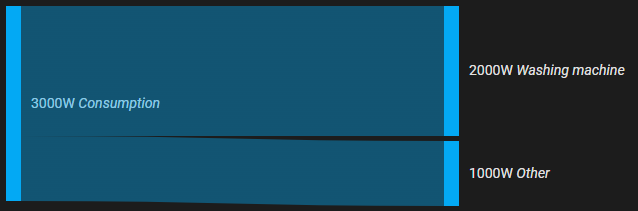
- type: custom:sankey-chart
  show_names: true
  nodes:
    - id: sensor.power
      section: 0
    - id: sensor.washing_machine_power
      section: 1
    - id: sensor.other_power
      section: 1
  links:
    - source: sensor.power
      target: sensor.washing_machine_power
    - source: sensor.power
      target: sensor.other_power
Energy use

- type: custom:sankey-chart
  show_names: true
  unit_prefix: k
  round: 1
  nodes:
    # Section 0 - Sources
    - id: sensor.solar
      section: 0
      color: var(--warning-color)
    - id: sensor.grid
      section: 0
    - id: sensor.battery
      section: 0
      color: var(--success-color)
    # Section 1 - Total
    - id: sensor.total_energy
      section: 1
    # Section 2 - Distribution
    - id: sensor.garage
      section: 2
      color: purple
    - id: sensor.floor1
      section: 2
    - id: sensor.floor2
      section: 2
    # Section 3 - End consumers
    - id: sensor.ev_charger
      section: 3
      tap_action:
        action: toggle
    - id: garage_other
      section: 3
      type: remaining_parent_state
      name: Other
    - id: sensor.living_room
      section: 3
    - id: sensor.washer
      section: 3
  links:
    # Sources -> Total
    - source: sensor.solar
      target: sensor.total_energy
    - source: sensor.grid
      target: sensor.total_energy
    - source: sensor.battery
      target: sensor.total_energy
    # Total -> Distribution
    - source: sensor.total_energy
      target: sensor.floor1
    - source: sensor.total_energy
      target: sensor.floor2
    - source: sensor.total_energy
      target: sensor.garage
    # Distribution -> End consumers
    - source: sensor.garage
      target: sensor.ev_charger
    - source: sensor.garage
      target: garage_other
    - source: sensor.floor1
      target: sensor.living_room
    - source: sensor.floor1
      target: sensor.washer
      value: sensor.washer_energy_net  # connection entity
Reconcile state
Example config where the state of the children must not exceed their parent. reconcile_to: max means to take the bigger of the two values. In other words, if the sum of the children is more than the state of the parent, the parent state will be set to the sum of its children within the card. reconcile_to: min would do the opposite and reduce the state of the children so they fully fit within the parent. latest just takes whichever value was updated last.
- type: custom:sankey-chart
  show_names: true
  nodes:
    - id: sensor.power
      section: 0
      children_sum:
        should_be: equal_or_less
        reconcile_to: max
    - id: sensor.washing_machine_power
      section: 1
    - id: sensor.other_power
      section: 1
  links:
    - source: sensor.power
      target: sensor.washing_machine_power
    - source: sensor.power
      target: sensor.other_power
You can find more examples and help in the HA forum https://community.home-assistant.io/t/anyone-using-the-sankey-chart-card/423125
Energy Dashboard
For automatic configuration from your Energy Dashboard setup, see autoconfig. To bind the chart's date range to an energy-date-selection card while keeping a manual config, see the energy_date_selection option.
FAQ
Q: How do I migrate my config from the old format (v3) to the new format (v4)?
A: See the Migration Guide for step-by-step instructions on converting your configuration.
Q: Do my entities need to be added to the energy dashboard first?
A: This card doesn't know/care if an entity is in the energy dashboard. Unless you use autoconfig because that relies entirely on the energy dashboard.
Q: How do I get total [daily] energy?
A: There isn't a general Consumed Energy sensor in the HA Energy dashboard AFAIK. HA calculates it based on all the in/out kWh values. I can't tell you exactly how to calculate it because it depends on what values you can monitor. Some people already have a Total Consumption sensor, others have a Current Consumption and create an integration sensor from that, etc.
Q: Can I group/sum entities in the chart?
A: The easiest way is to do it with a template sensor in HA. However it can be done in the chart without a new HA entity. If you have an entity with type: remaining_parent_state and it is the only child of its parents, it will just be a sum of all the parents. Similarly if you have an entity with type: remaining_child_state and it is the only parent of all its children, it will be a sum of all the children.
Q: How do I zoom back out after using the zoom action?
A: Tap the same (currently top level) entity again to reset the zoom level.
Q: My (template) sensor doesn't work with energy_date_selection!?
A: Sensors should have a proper state_class in order for statistics to work. Most commonly state_class: total. See https://developers.home-assistant.io/docs/core/entity/sensor/#long-term-statistics
Q: Can you add feature X, so I don't have to create template entities in HA?
A: Most probably no. There is nothing wrong with template entities and they should be the preferred approach instead of duplicating HA functionality in every card. I do make exceptions for often required features like remaining_parent_state but prefer to rely on HA functionality whenever I can.
Q: My entities are not rendered where I expected
A: By default entities are displayed in the order in which they appear in the config. You can rearrange them in the YAML or use the sorting options.
Q: Does the order of links matter, and how should I order them?
A: Yes — but it matters per shared source and per shared target, not globally. The chart walks sections left-to-right, then nodes in nodes[] order, then each node's outgoing links in the order you wrote them. Each link subtracts from the remaining state of both its source and its target, so the first link out of a given source gets first claim on that source's value, and the first link into a given target gets first claim on that target's value. remaining_parent_state / remaining_child_state nodes absorb whatever is left after the earlier links are accounted for. Rule of thumb: for each source, list its outgoing links from highest priority to lowest, with any remaining_* sink last. If reordering to fix one flow keeps breaking another, the conflict usually isn't solvable by ordering alone — split the shared node or set the link's value (entity id) so the flow isn't inferred from "remaining."
Q: The font size is too small sometimes
A: The font size is determined by the available space, so you can increase the minimum font size by increasing min_box_size and/or min_box_distance
Development
npm inpm start- The compiled
.jsfile will be accessible onhttp://127.0.0.1:3000/ha-sankey-chart.js. - On a running Home Assistant installation add this to your Lovelace
resources:
- url: 'http://127.0.0.1:3000/ha-sankey-chart.js'
  type: module