

Hermes Secure Email Gateway and Email Server
Self-hosted email security, mail server, and Nextcloud — one stack.
Open-source SEG + Dovecot 2.4 mail server + Nextcloud + Authelia SSO, deployed as one Docker Compose file.
Features · Pro · Pricing · Docs · Support






Deployable as a gateway in front of Microsoft 365 / Google Workspace / Exchange, as a full mail server with built-in mailboxes, or in hybrid mode.
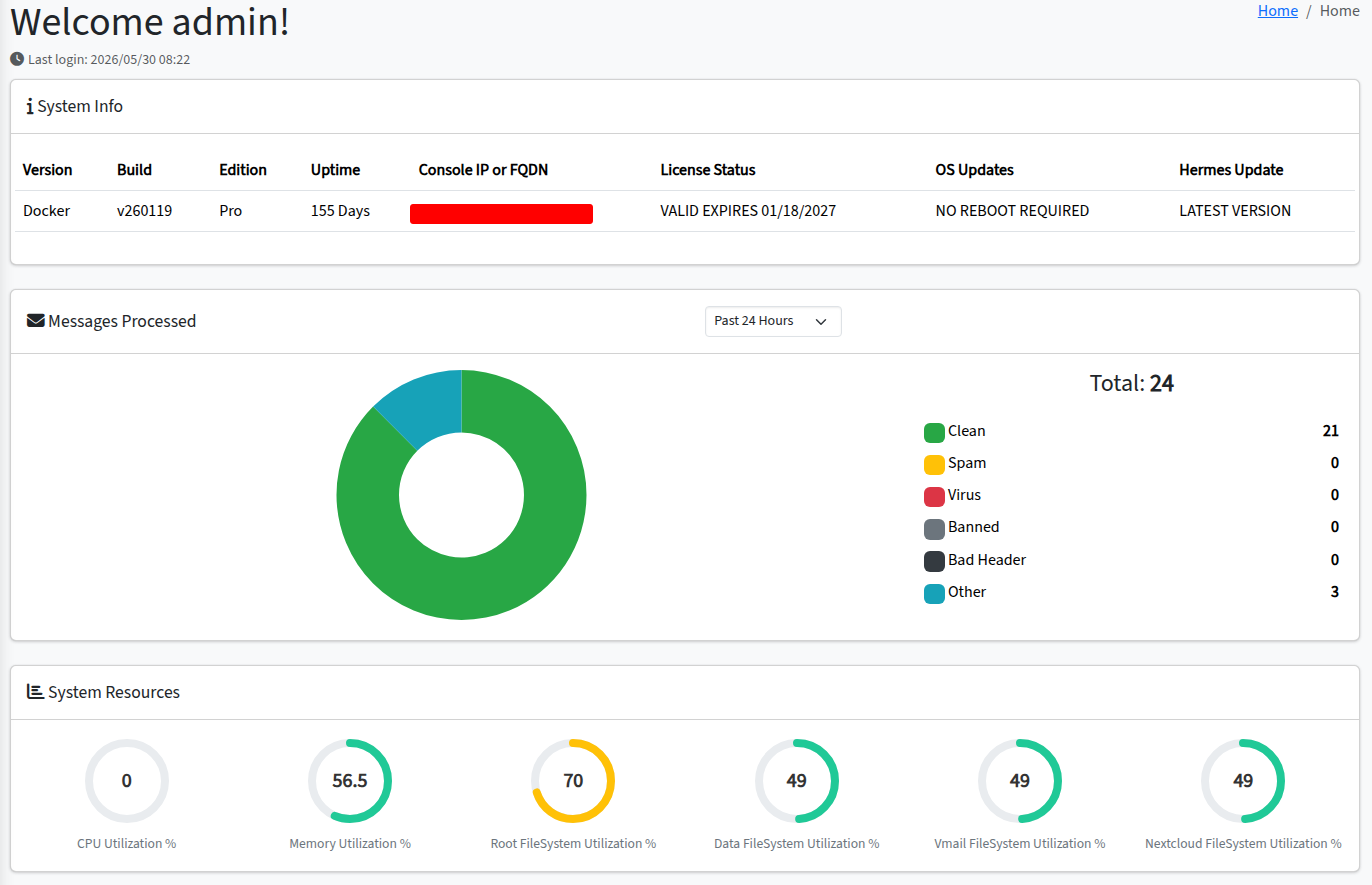
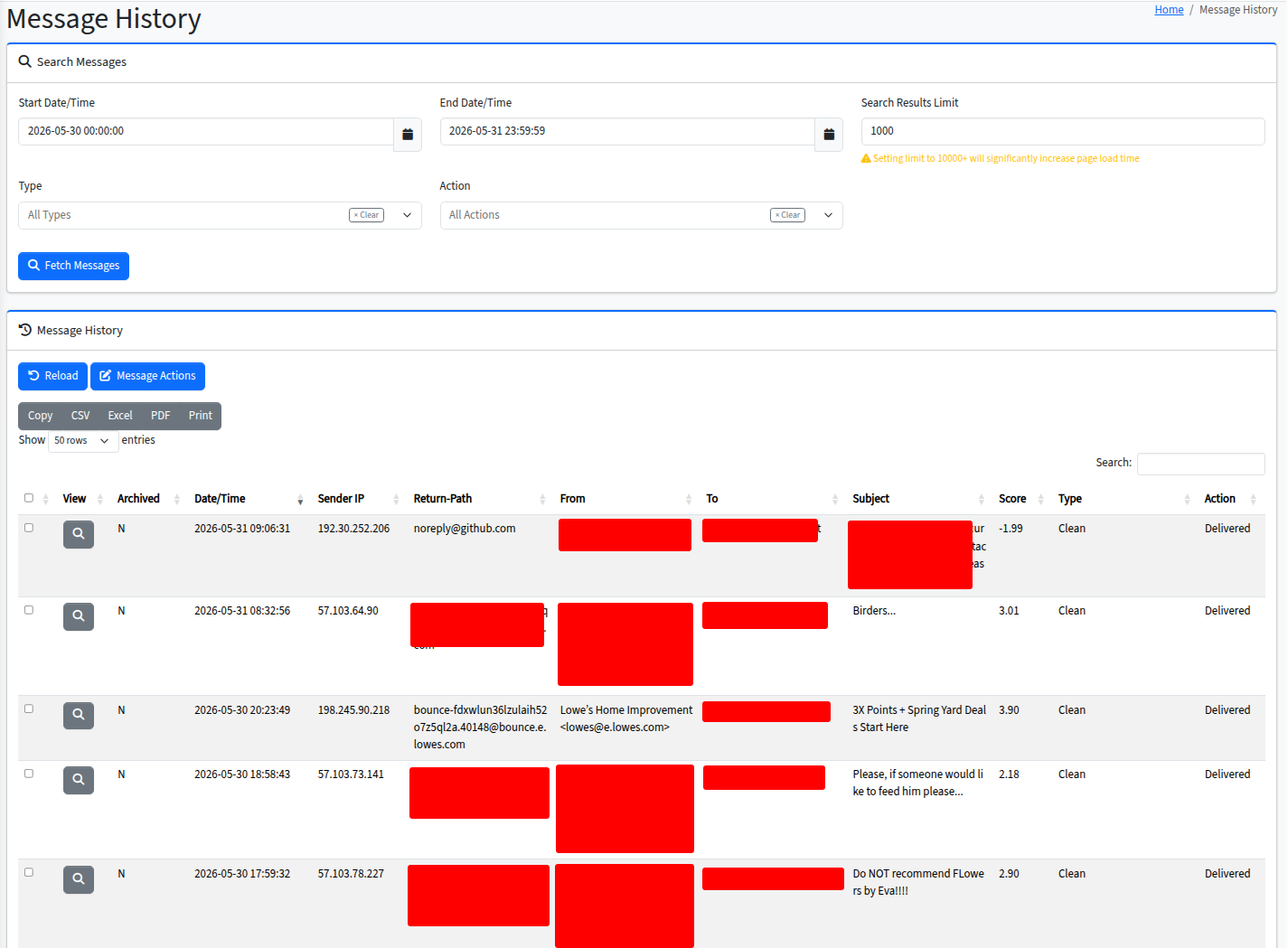
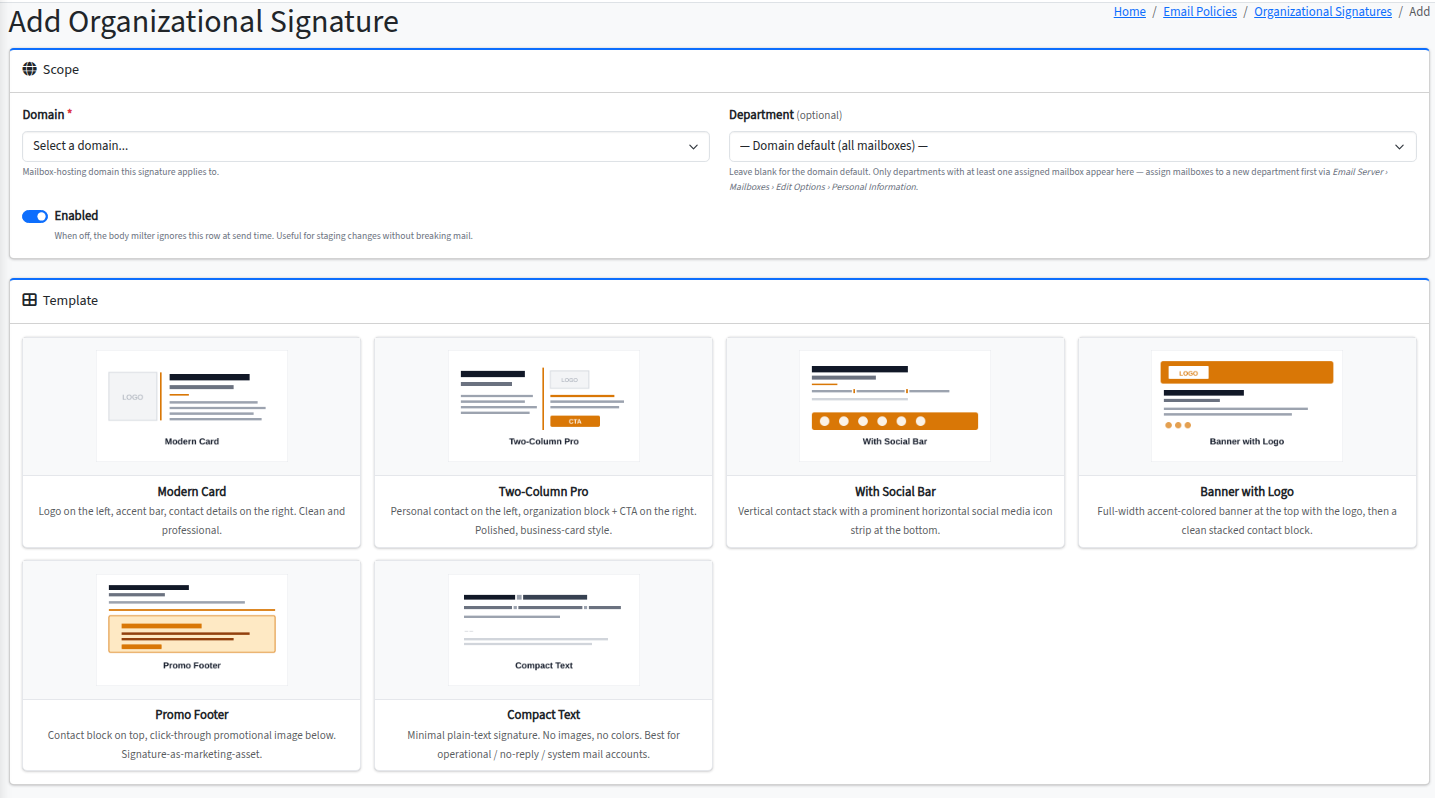
Table of contents
- About
- Editions
- Features
- Architecture
- Storage topology
- Requirements
- Installation
- Updating
- Configuration
- Recovery and maintenance tools
- Documentation
- Support
- License
About
Hermes Secure Email Gateway is a Free Open Source Secure Email Gateway and Email Server.
It provides spam, virus, and malware protection through Apache SpamAssassin, ClamAV, and Amavisd-new; full in-transit and at-rest email encryption via SMTP TLS, S/MIME, PGP, encrypted PDF (powered by CipherMail), and Dovecot mail-crypt; email archiving; integrated mailbox hosting on Dovecot with per-user quotas, aliases, shared folders, Sieve rules, vacation auto-reply, and mobile-device autoconfiguration; file sync, webmail, calendars (CalDAV), and contacts (CardDAV) through Nextcloud; a local user directory and single sign-on via OpenLDAP and Authelia — with multi-factor authentication via TOTP, WebAuthn, and Duo Push; and modern email authentication standards including SPF, DKIM signing and verification, DMARC, and ARC through OpenDKIM, OpenDMARC, and OpenARC.
Hermes combines these Open Source technologies under one unified web-based administration console for easy management of your organization's inbound and outbound email, mailbox users, encryption keys, and authentication policies. End users get a self-service portal for managing their own signatures, sieve rules, vacation messages, app passwords, and mobile-device profiles.
Hermes can be deployed three ways:
- As a gateway in front of an existing mail solution (in-house Exchange / Postfix, Google Workspace, Microsoft 365). Hermes scans, filters, encrypts, and relays mail to your backend.
- As a full mail server with built-in mailbox hosting, webmail, file sync, calendars, and contacts. No external mail backend required.
- As a hybrid — gateway for some domains AND mail server for others on the same install. Relay (gateway) domains and mailbox (mail server) domains coexist in a single Hermes deployment.
This Docker Edition packages the entire stack as a set of containers managed by Docker Compose, replacing the legacy bare-metal Ubuntu installer with a portable, reproducible deployment.
Looking for a managed version? Hermes is self-hosted by design. If you want to support development and get vendor support, see Pro pricing — per-server licensing, no per-mailbox fees.
Editions
Hermes ships in two editions:
| Edition | License | What you get |
|---|---|---|
| Community | AGPL v3 — free, open source | The entire mail gateway and email server stack. All core security, encryption, mailbox hosting, and administration features. |
| Pro | Commercial — see EULA | Everything in Community plus 6 advanced features (see Pro Features below). Pricing → |
A Pro license is purchased separately. Community Edition needs no license file and works fully without one.
Features
A condensed list. See hermesseg.io/features for the full feature page with screenshots.
Mail security (Community)
- Spam protection (Apache SpamAssassin, postscreen, RBL configuration, sender/recipient/network block-allow lists, global sender filters)
- Anti-virus protection (ClamAV via Amavisd-new, with built-in feeds: ClamAV official + URLhaus)
- Malware feeds management (managed via Fangfrisch) — configure additional 3rd-party signature feeds including SaneSecurity, MalwarePatrol, SecuriteInfo, TwinWave, ClamPunch, RFXN, InterServer, Ditekshen, and more
- Per-recipient spam/virus/file policies
- Custom message rules, score overrides, custom file expressions/extensions/rules
- Quarantine, message-history search, queue management, train as spam/ham, release to recipient, download messages
- ARC (Authenticated Received Chain) integration via OpenARC
- Multi-instance OpenDKIM for differential outbound-sign vs inbound-verify behavior
Encryption and authentication (Community)
- In-transit email encryption: SMTP TLS, S/MIME, PGP (via CipherMail)
- At-rest encryption: Dovecot mail crypt
- Encrypted PDF email for recipients without S/MIME or PGP
- Multi-factor authentication (Authelia): TOTP, WebAuthn, Duo Push
- Local LDAP user store (built-in OpenLDAP) for admins, mailbox users, and relay users
- App passwords for SMTP / IMAP / DAV clients (separate from main account password)
- 3rd-party SSL certificate support
- haveibeenpwned password check integration
Email standards (Community)
- SPF check, DKIM check + sign, DMARC verification (OpenDMARC)
- DKIM key generation and management (UI)
- DMARC report aggregation and reporting
Email server / mailbox hosting (Community)
- Local mailbox hosting (Dovecot 2.4) with IMAPS / POP3S / Submission (587/465) / LMTP
- Per-domain and per-mailbox quotas
- Mailbox aliases and forwarders
- Shared mailboxes and shared folders
- User-defined Sieve rules
- Vacation auto-reply with date scoping and per-address filtering
- Mobile device autoconfiguration via signed
.mobileconfigprofiles (iOS) and CalDAV/CardDAV autodiscovery - Personal email signatures (rich HTML, with template gallery)
- External Sender Banner (inbound mail from outside the org gets a visual banner)
Nextcloud integration (Community)
- File sync (Nextcloud Files)
- Webmail (Nextcloud Mail)
- Calendars (CalDAV) and contacts (CardDAV)
- Single sign-on via Authelia OIDC
- Pre-provisioning of Nextcloud user accounts on first login
Admin and user experience (Community)
- Modern AdminLTE 4 / Bootstrap 5 administrator console
- User self-service portal (per-mailbox)
- Real-time dashboard with system-resource monitoring
- Message statistics with visual charts
- Scheduled tasks UI (DB-backed Ofelia job management)
- Searchable system event logs
- Internal CA management (S/MIME)
- DNS resolver (Unbound, local-recursive)
- Console host and domain management
Pro features
Pro Edition adds the following capabilities on top of everything in Community. Full Pro feature page →
| Pro Feature | What it does |
|---|---|
| Let's Encrypt (ACME) automation | Automated issuance and renewal of free Let's Encrypt SSL certificates for the console and per-domain. Community Edition can still request and use Let's Encrypt certificates, but the issuance and renewal automation is Pro-only. |
| Email disclaimers | Per-domain outbound disclaimer templates, applied at the milter level. Form-based template renderer with reusable templates. |
| Organizational signatures | Centrally-managed per-domain employee signature templates with placeholder substitution (employee name, title, phone, email, department, organization info). Renders on every outbound message. Community Edition has Personal Signatures (per-user, free-form) only. |
| Intrusion Prevention (IPS) | Web UI for managing Fail2ban jails, ban thresholds, ban duration, whitelists. Real-time view of active bans. |
| Console firewall | Web UI for managing the host firewall protecting the admin console (port allowlisting, source-IP restriction). |
| LDAP RemoteAuth | Per-domain pass-through authentication to one or more external LDAP servers (including Microsoft Active Directory). End users authenticate against your existing directory; Hermes provisions mailboxes on first successful login. Supports STARTTLS and LDAPS. |

Architecture
Hermes SEG Docker Edition runs as 18 containers orchestrated by Docker Compose:
| Container | Purpose |
|---|---|
hermes_unbound |
Recursive DNS resolver for the stack |
hermes_db_server |
MariaDB — Hermes, Authelia, Nextcloud, OpenDMARC, CipherMail, Syslog databases |
hermes_ofelia |
Scheduled task runner (cron replacement) |
hermes_nginx |
Reverse proxy + SSL termination (admin console, user portal, Nextcloud, CipherMail UI) |
hermes_authelia |
SSO portal with MFA (TOTP / WebAuthn / Duo Push) |
hermes_authelia_redis |
Session store for Authelia |
hermes_commandbox |
CFML application server (Lucee) — hosts admin console + user portal |
hermes_postfix_dkim |
Postfix MTA + OpenDKIM signer / verifier |
hermes_dmarc |
OpenDMARC verifier + report aggregator |
hermes_openarc |
OpenARC chain signer / verifier |
hermes_mail_filter |
Amavisd-new + SpamAssassin + ClamAV content filter |
hermes_body_milter |
Outbound body-modification milter (signatures, disclaimers, banners) |
hermes_ciphermail |
S/MIME, PGP, encrypted-PDF encryption gateway |
hermes_fail2ban |
Brute-force prevention (Dovecot, Authelia jails) |
hermes_dovecot |
IMAP / POP3 / Submission / LMTP / Sieve server |
hermes_ldap |
OpenLDAP — local user directory (admins, mailboxes, relay users) |
hermes_nextcloud |
File sync, webmail, CalDAV, CardDAV |
hermes_nextcloud_redis |
Cache + locking backend for Nextcloud |
Storage topology
Hermes splits storage across five independent tiers so each can live on the right type of disk for its workload:
| Tier | Default path | Contents | Storage profile |
|---|---|---|---|
| Config | install root (implicit) | Repo working tree, generated config, secrets, .env |
Fast SSD; sized by repo location |
| Data | /mnt/data |
Databases, service logs, mail-filter state, Postfix queue | Fast SSD; sized for DB growth and log retention. High write rate, backup-critical. |
| Archive | /mnt/archive |
Amavis quarantine archive | Cheap bulk; sized for retention policy × quarantine inflow. Grows unboundedly, cold access. |
| Vmail | /mnt/vmail |
Dovecot mailboxes | Cheap bulk; sized for users × quota |
| Nextcloud | /mnt/files |
Nextcloud app + user files + Redis cache | Cheap bulk; sized for user file storage |
Smaller deployments can collapse tiers — point Archive, Vmail, and Nextcloud at the same path as Data for a single-disk install. The installer prompts for each path; all four operator-selected mount points are mandatory (empty values risk relative path resolution during compose substitution).
See the canonical reference at docs.deeztek.com · Storage Topology (5 tiers) or docs/install/storage-topology.md in the repo.
Requirements
| Item | Recommendation |
|---|---|
| Host OS | Any Linux distribution capable of running Docker Engine 24.0+ and Compose v2. Tested reference: Ubuntu 24.04 Server. |
| Docker | Engine 24.0+ |
| Docker Compose | v2 |
| CPU | 4 vCPUs minimum, more for higher mail volume |
| RAM | 8 GB minimum, 16 GB+ recommended for production |
| Disk | 275 GB minimum (thin provisioning enabled), more depending on mail volume and archive retention |
| Network | Static IP or DHCP reservation. See docs for the full inbound + outbound port list (anti-spam services need TCP/2703, UDP/6277, TCP/24441, etc.) |
Optional but recommended
A separate physical or virtual disk for the Data tier (databases, logs, mail-filter state, Postfix queue) is not strictly required but highly recommended for performance. Database write patterns and log churn benefit from being isolated from the OS disk. The same applies to the Archive, Vmail, and Nextcloud tiers if you expect significant quarantine, mailbox, or file-storage growth — commodity bulk storage works well for these.
If you don't want to use a secondary drive for any tier, simply create the directory on your primary disk (e.g., mkdir /mnt/data /mnt/archive /mnt/vmail /mnt/files) and point the installer at it.
Installation
1. Clone the repository
Clone the repository wherever you'd like Hermes installed:
sudo git clone https://github.com/deeztek/Hermes-Secure-Email-Gateway.git
cd Hermes-Secure-Email-Gateway
2. Run the installer
sudo ./scripts/install_hermes_docker.sh
The installer runs the full install in a single session and takes 10–30 minutes on a fresh host (mostly image downloads and fail2ban container build).
The installer will:
- Display the Pro EULA and ask for acceptance (Community Edition users can accept; the EULA only takes effect if a Pro license is later activated).
- Prompt for mail-server hostname (FQDN), console address, host IP, upstream DNS forwarders, and the four storage mount paths (Data, Archive, Vmail, Nextcloud).
- Generate all secrets and per-service config files (LDAP secrets, DB passwords, Authelia session keys, OIDC keypair, self-signed bootstrap cert, etc.).
- Render
docker-compose.override.ymlto bind the tier paths into the right containers. - Run
docker compose up -d --buildto pull images and start the stack. - Initialize all databases (Hermes, Authelia, Nextcloud, OpenDMARC, CipherMail, Syslog), populate the LDAP base structure, create the initial admin user, and pre-provision the Nextcloud admin.
- Print an installation summary with the admin console URL and one-time admin credentials.
3. Access the consoles
After install completes:
- Admin Console:
https://<console-host>/admin/ - User Portal:
https://<console-host>/users/ - Nextcloud:
https://<console-host>/nc/
The installer prints the initial admin username and password on completion. Change the password on first login.
Updating
Hermes SEG ships a single-command update orchestrator that handles git pull, image refresh, schema migrations, service restarts, and post-upgrade hooks in one go.
Update to the latest release
cd /opt/hermes-seg-docker-gl
sudo ./scripts/system_update_docker.sh
This polls GitHub for the latest release, fetches the new tag, pulls updated images, applies any per-release schema/CFML/script artifacts, restarts services that need to be restarted, and runs the post-upgrade hook.
Update to a specific release
sudo ./scripts/system_update_docker.sh v260601
Preview without applying changes
sudo ./scripts/system_update_docker.sh --dry-run
Other flags
| Flag | Purpose |
|---|---|
--skip-git |
Don't pull new code (containers + artifacts only) |
--skip-compose |
Don't touch docker images (git + artifacts only) |
--yes |
Skip the interactive confirmation prompt |
--help |
Show full usage |
For the full release-and-update methodology — including how artifacts are organized, idempotency rules, and the orchestrator's five-phase pipeline — see docs/install/release-and-update-methodology.md.
Configuration
After the installer completes, the admin will be guided through first-run configuration tasks in the admin console:
- Confirm console host — the install captures this at prompt time; admins can change it later under System > Console Settings.
- Configure DNS records — install summary prints the recommended SPF, DKIM, DMARC, and MX records to add. Use a real DNS-resolvable hostname before requesting any production Let's Encrypt certificate.
- Add domains — under Email Server > Domains (mailbox hosting) or Email Relay > Domains (gateway / relay mode).
- Create mailboxes or relay recipients — under Email Server > Mailboxes or Email Relay > Recipients.
- Set up SSL — either upload a 3rd-party certificate (System > System Certificates) or, on Pro, request a Let's Encrypt certificate via the same page.
Detailed configuration walkthroughs — including SPF/DKIM/DMARC setup, mailbox provisioning, relay vs. mail-server modes, and the encryption gateway — live in the Documentation section.
Recovery and maintenance tools
The install script also provides a set of recovery and maintenance flags:
| Command | Purpose |
|---|---|
sudo ./scripts/install_hermes_docker.sh --show-config |
Display current storage paths and configuration |
sudo ./scripts/install_hermes_docker.sh --show-summary |
Reprint the post-install summary (admin URL, credentials reminder) |
sudo ./scripts/install_hermes_docker.sh --apply-schema |
Lower-level schema-only update (the canonical update path is system_update_docker.sh) |
sudo ./scripts/install_hermes_docker.sh --init-db |
Re-run phase 2 (post-container) initialization only — recovery flag for partial installs |
sudo ./scripts/install_hermes_docker.sh --generate-secrets |
Regenerate per-service secrets and re-render derived configs |
sudo ./scripts/install_hermes_docker.sh --configure-storage |
Re-prompt for storage mount paths and regenerate the override file |
sudo ./scripts/install_hermes_docker.sh --wipe |
Destructive. Tear down everything (containers, volumes, credentials, install state) for a fresh start. Requires double confirmation. |
Run any of the above with --help for full usage. The installer is idempotent: re-running it (or any of its sub-steps) on an already-installed system skips already-completed work via state guards.
Documentation
In-repo documentation
docs/install/release-and-update-methodology.md— canonical reference for how Hermes is released, distributed, and upgradeddocs/install/storage-topology.md— the five-tier storage model (Config / Data / Archive / Vmail / Nextcloud)
Per-release change log
Each release's change log lives on its GitHub Release page — one body per tag, scoped to that release only.
Online documentation
Operator and end-user documentation is published at docs.deeztek.com/shelves/hermes-seg-docker, organized into:
- Installation & Reference — Get Started, Release & Update Methodology, Storage Topology, Email Flow
- Administrator Guide — full reference for system administrators (60 pages across 7 chapters)
- User Guide — end-user portal documentation (11 pages)
Support
| Channel | Use it for |
|---|---|
| GitHub Discussions | Long-form Q&A, "how do I…", configuration help. Searchable. |
Matrix #hermesseg:matrix.org |
Real-time community chat. |
Telegram HermesSEG |
Same audience as Matrix, different client. |
| GitHub Issues | Bugs and feature requests. |
| helpdesk.deeztek.com | Paid support tickets (Pro license holders). |
| hermesseg.io/support | All support options in one place + Support Terms & Conditions. |
Stay updated: subscribe to release notes and security advisories at hermesseg.io (newsletter signup in the footer).
License
Hermes Secure Email Gateway Community Edition is free software licensed under the GNU Affero General Public License v3.0.
Hermes Secure Email Gateway Pro Edition is not free software. It is covered by the Hermes Secure Email Gateway Pro End-User License Agreement.
Copyright Dionyssios Edwards 2011–2026. All Rights Reserved.