
Home Assistant Automation Suggestions

A custom Home Assistant integration that analyzes your manual actions from the logbook and suggests automations you might want to create. Stop doing the same things manually - let your smart home learn your patterns.
https://www.dan-malone.com/blog/home-assistant-automation-integration-part-4
Features
- Pattern Detection: Analyzes logbook history to find repeated manual actions
- Time-based Suggestions: Identifies actions performed at consistent times (e.g., turning on lights every evening at 7pm)
- Configurable Thresholds: Adjust sensitivity via options flow to match your preferences
- User & Domain Filtering: Exclude service accounts, children, or specific integration domains from analysis
- Rich Sensors: Exposes suggestion count, top suggestions, and last analysis time
- On-demand Actions:
analyze_nowto trigger analysis,dismissto hide unwanted suggestions - Persistent Notifications: Shows all suggestions after each analysis run - no dev tools needed
- Stale Automation Detection: Identifies automations that haven't triggered in 30+ days
Installation via HACS
- Open HACS in Home Assistant
- Click the three dots menu → Custom repositories
- Add repository:
https://github.com/Danm72/home-assistant-automation-suggestions - Category: Integration
- Click Add
- Search for "Automation Suggestions" and install
- Restart Home Assistant
- Go to Settings → Devices & Services → Add Integration → "Automation Suggestions"
Configuration Options
| Option | Default | Description |
|---|---|---|
| Analysis Interval | 7 days | How often to run pattern analysis |
| Lookback Days | 14 | How far back to analyze history |
| Min Occurrences | 2 | Minimum times an action must occur to be suggested |
| Consistency Threshold | 30% | How consistent the timing must be |
| User Filter Mode | none | Filter users: none, exclude, or include |
| Filtered Users | (empty) | Comma-separated user IDs to filter |
| Domain Filter Mode | none | Filter domains: none, exclude, or include |
| Filtered Domains | (empty) | Comma-separated context domains to filter |
Filtering Users and Domains
Control which actions are analyzed by filtering users or domains.
Use Cases
- Service accounts: Exclude Node-RED, AppDaemon, or other automation tool users
- Children: Don't base suggestions on kids' irregular usage patterns
- Guests: Ignore temporary users
- Integration noise: Filter out specific integration domains
How to Configure
- Go to Settings → Devices & Services → Automation Suggestions
- Click Configure
- Choose a filter mode:
none- Analyze all actions (default)exclude- Analyze all EXCEPT the listed users/domainsinclude- ONLY analyze the listed users/domains
- Enter user IDs or domain names (comma-separated)
Finding User IDs
User IDs are UUIDs that identify Home Assistant users. To find them:
- Go to Settings → People
- Click on a user
- The URL will contain the user ID (e.g.,
/config/users/detail/abc123-def456-...)
Common Domain Filters
| Domain | Use Case |
|---|---|
nodered |
Node-RED automations |
appdaemon |
AppDaemon scripts |
pyscript |
Python scripts |
Finding Your Suggestions
Quick Start
- Install the integration: Go to Settings → Devices & Services → Add Integration → "Automation Suggestions"
- Wait for notification: Analysis runs automatically on install. You'll see a notification with your suggestions.
- Create automations: Use the suggestions to create automations in Settings → Automations & Scenes
Want to run analysis again? Call automation_suggestions.analyze_now from Developer Tools → Actions.
Entities Created
| Entity | Type | Description |
|---|---|---|
sensor.automation_suggestions_count |
Sensor | Number of pending suggestions |
sensor.automation_suggestions_top |
Sensor | Top 5 suggestions with details in attributes |
sensor.automation_suggestions_last_analysis |
Sensor | Timestamp of last analysis run |
binary_sensor.automation_suggestions_available |
Binary Sensor | On when suggestions exist |
Dashboard Card
Add a button to your dashboard to trigger analysis on demand:
type: button
name: Scan Now
tap_action:
  action: call-service
  service: automation_suggestions.analyze_now
icon: mdi:magnify-scan
View All Suggestions Card
For viewing all suggestions (not just top 5), add the custom Lovelace card:
- Go to Settings → Dashboards → Resources
- Add resource:
/automation_suggestions/automation-suggestions-card.js(type: JavaScript Module) - Add a card to your dashboard with this YAML:
type: custom:automation-suggestions-card
Card Features:
- Tabbed Interface: Switch between Suggestions and Stale Automations
- Displays all suggestions (not just top 5)
- Grouped by domain with collapsible sections
- Dismiss button per suggestion
- "Scan Now" button to trigger immediate analysis
- Live updates via WebSocket subscription
- Stale automation detection with last-triggered dates
Understanding Suggestion Output
Each suggestion in sensor.automation_suggestions_top attributes includes:
| Field | Example | Description |
|---|---|---|
description |
"Turn on light.kitchen around 07:00 (85% consistent, seen 12 times)" | Human-readable summary |
entity_id |
light.kitchen |
The entity you've been controlling manually |
action |
turn_on |
What action you perform |
suggested_time |
07:00 |
When you typically do this |
consistency_score |
0.85 |
How reliably you do this at this time (0-1) |
occurrence_count |
12 |
Total times this pattern was detected |
id |
light_kitchen_turn_on_07_00 |
Unique ID (use with dismiss service) |
Stale Automation Detection
Find automations that may need attention - either because they're broken, obsolete, or simply forgotten.
What It Detects
- Never triggered: Automations that have never run (999+ days)
- Long inactive: Automations that haven't triggered in 30+ days
- Disabled automations: Clearly marked so you can review if still needed
Viewing Stale Automations
Via the Card: The Automation Suggestions card has two tabs:
- Suggestions - New automation ideas based on your patterns
- Stale Automations - Automations that may need review
Via WebSocket API:
# List stale automations with pagination
type: automation_suggestions/list_stale
page: 1
page_size: 20
UI Mockup
┌─────────────────────────────────────────────────────────┐
│  Automation Suggestions                      [Scan Now] │
├─────────────────────────────────────────────────────────┤
│  ┌──────────────────┐ ┌─────────────────────────┐       │
│  │  Suggestions (3) │ │  Stale Automations (5)  │       │
│  └──────────────────┘ └─────────────────────────┘       │
├─────────────────────────────────────────────────────────┤
│                                                         │
│  ┌─────────────────────────────────────────────────┐   │
│  │ Morning Lights                              [x]  │   │
│  │ Last triggered: Never (Never triggered)          │   │
│  └─────────────────────────────────────────────────┘   │
│                                                         │
│  ┌─────────────────────────────────────────────────┐   │
│  │ Climate Away Mode               [Disabled] [x]  │   │
│  │ Last triggered: 2025-10-15 (103 days ago)        │   │
│  └─────────────────────────────────────────────────┘   │
│                                                         │
│  ┌─────────────────────────────────────────────────┐   │
│  │ Doorbell Alert                              [x]  │   │
│  │ Last triggered: 2025-11-28 (59 days ago)         │   │
│  └─────────────────────────────────────────────────┘   │
│                                                         │
│  ┌─────────────────────────────────────────────────┐   │
│  │ Guest Room Lights                           [x]  │   │
│  │ Last triggered: 2025-12-01 (56 days ago)         │   │
│  └─────────────────────────────────────────────────┘   │
│                                                         │
│  ┌─────────────────────────────────────────────────┐   │
│  │ Movie Time Scene                            [x]  │   │
│  │ Last triggered: 2025-12-20 (37 days ago)         │   │
│  └─────────────────────────────────────────────────┘   │
│                                                         │
└─────────────────────────────────────────────────────────┘
Stale Automation Properties
| Field | Example | Description |
|---|---|---|
automation_id |
automation.morning_lights |
Entity ID |
friendly_name |
Morning Lights |
Display name |
last_triggered |
2025-12-20T08:00:00Z |
Last trigger timestamp (null if never) |
days_since_triggered |
37 |
Days since last trigger (999 if never) |
is_disabled |
false |
Whether automation is disabled |
Why Automations Go Stale
- Seasonal: Holiday decorations, summer/winter routines
- Broken triggers: Device renamed, integration changed
- Obsolete: Old routines you no longer need
- Redundant: Replaced by a better automation
- Never worked: Created but never properly triggered
Taking Action
For each stale automation, you can:
- Review it: Check if the trigger conditions are still valid
- Test it: Manually trigger to verify it works
- Update it: Fix broken entity references
- Disable it: If seasonal, disable until needed
- Delete it: Remove if truly obsolete
- Dismiss it: Hide from the list if intentionally inactive
Actions
automation_suggestions.analyze_now
Trigger immediate pattern analysis instead of waiting for the scheduled interval.
Use cases:
- After adjusting configuration options
- To refresh suggestions after dismissing some
- To re-run analysis before the scheduled interval
How to call: Developer Tools → Actions → automation_suggestions.analyze_now → Call Service
automation_suggestions.dismiss
Permanently hide a suggestion you don't want to see again.
Parameters:
suggestion_id(required): The unique ID from the suggestion'sidfield
Example: To dismiss light_kitchen_turn_on_07_00, call the service with that ID.
Note: Dismissed suggestions persist across restarts and won't reappear.
Background
This integration was built using Claude Code with ha-mcp - an MCP server that gives Claude direct access to Home Assistant's API. The full story of how this was created, including the design decisions and lessons learned, is documented in this blog series:
- Part 1: The Audit - Cataloging three years of tech debt
- Part 2: The Implementation - Building with Claude Code and ha-mcp
Bonus: Dashboard Template
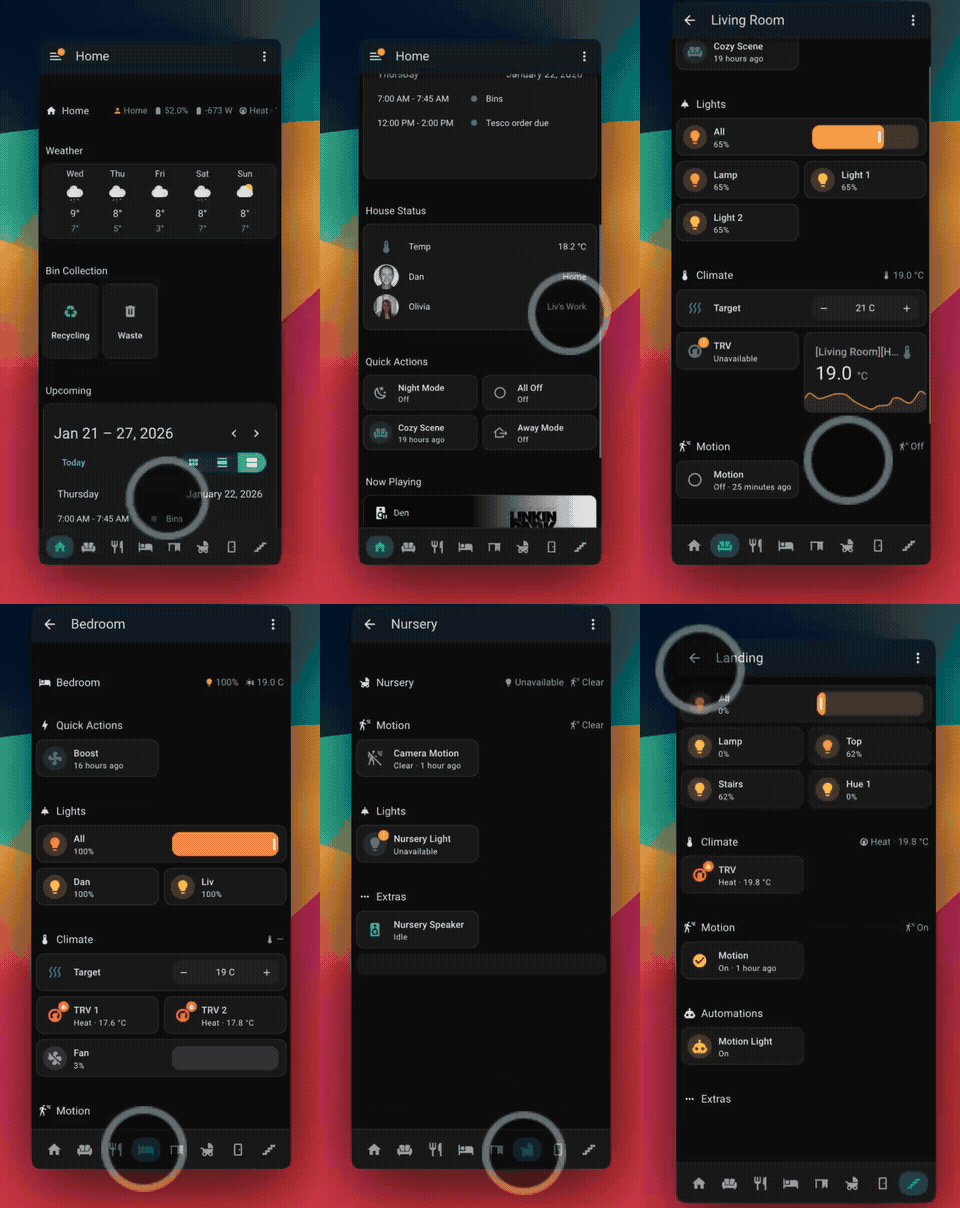
This repository also includes a modern, room-based sections dashboard template for Home Assistant.
Dashboard Features
- Room-based navigation with dedicated subviews (Living Room, Kitchen, Bedroom, Office, etc.)
- Quick status badges for presence, solar, heating, and bin collection
- Climate controls with TRV temperature management
- Weather and calendar integration
- Conditional visibility based on entity states
Dashboard Installation
Requires: navbar-card from HACS
- Install navbar-card via HACS → Frontend
- Go to Settings → Dashboards → Add Dashboard
- Create a new dashboard and switch to YAML mode (Raw configuration editor)
- Copy contents of
lovelace.dashboard_template.yaml - Replace UPPERCASE placeholders with your entity names:
LIVING_ROOM→ your room namePERSON_1→ your person entity- etc.
- Save
See the template file for full placeholder documentation.
Development & Testing
Running Tests
# Unit and integration tests
pytest

# E2E tests with Docker
pytest tests/e2e/ -c tests/e2e/pytest.ini
Setting Up Test Data
For development and testing, you can inject synthetic usage patterns into a Home Assistant database to test the suggestion analyzer.
- Create test entities in your
configuration.yaml:
input_boolean:
  morning_coffee:
    name: Morning Coffee
    icon: mdi:coffee
  evening_lights:
    name: Evening Lights
    icon: mdi:lamp
  bedtime_mode:
    name: Bedtime Mode
    icon: mdi:bed
  lunch_break:
    name: Lunch Break
    icon: mdi:food
- Find your user ID from
.storage/auth:
cat .storage/auth | grep -A5 '"is_owner": true'
# Look for the "id" field of your admin user
- Stop Home Assistant cleanly to release database locks:
# Docker
docker stop --timeout=30 <container>

# Supervised/Core
ha core stop
- Inject test data using the provided script:
python tests/e2e/inject_test_data.py \
  --db-path /path/to/home-assistant_v2.db \
  --user-id YOUR_USER_ID \
  --days 14
- Restart Home Assistant and the integration will analyze the injected patterns.
The inject script creates state changes with realistic timing patterns:
- Morning Coffee: ~07:00 daily
- Lunch Break: ~12:00 daily
- Evening Lights: ~18:30 daily
- Bedtime Mode: ~22:00 daily
Each pattern has slight variance to simulate real user behavior.
License
MIT License - Feel free to use and modify for your own Home Assistant setup.
Contributing
Contributions welcome! Please open an issue or PR if you have improvements to suggest.