
🌿 OpenPlantbook Integration for Home Assistant


Connects Home Assistant to the OpenPlantbook API for searching plant species, fetching care data, and uploading sensor readings. Used as the data backend for the Plant Monitor integration. To set up plant monitoring and tracking of your plant related sensors, you need to install that integration.
📑 Table of Contents
📦 Installation
Via HACS (recommended)
- Add this repo as a Custom Repository with type Integration
- Click Download in the "OpenPlantbook" card in HACS
- Restart Home Assistant
Manual Installation
- Copy
custom_components/openplantbook/to your<config>/custom_components/directory - Restart Home Assistant
🔧 Setup
You need an OpenPlantbook account (free) with API credentials.
- Register at open.plantbook.io
- Find your
client_idandsecretat https://open.plantbook.io/apikey/show/ - In Home Assistant: Settings → Devices & Services → Add Integration → OpenPlantbook
- Enter your credentials — the integration validates them and shows an error if incorrect
- Configure upload settings (optional but recommended)
⚙️ Configuration Options
After setup, click Configure on the integration card to access additional options.
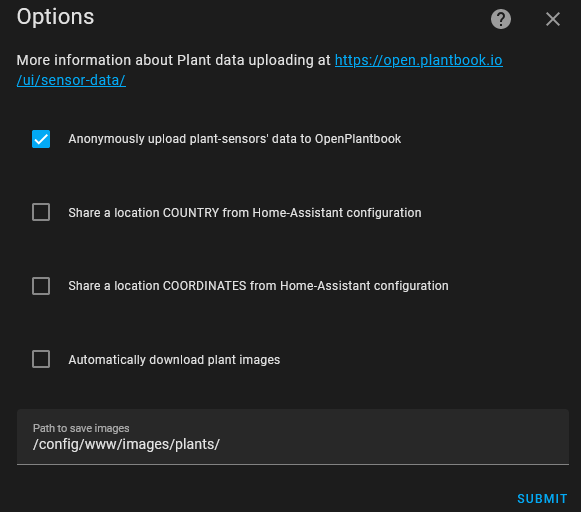
📤 Upload Plant Sensor Data
[!NOTE] All data is shared anonymously.
When enabled, the integration periodically (once a day) uploads sensor data from your plants to OpenPlantbook. This helps build a useful community dataset. More info: https://open.plantbook.io/ui/sensor-data/
- First upload: last 24 hours of data
- If sensors are disconnected, it retries daily for up to 7 days of historical data
- Can also be triggered manually via the
openplantbook.uploadaction - Daily uploads are scheduled at a randomized time-of-day per installation (stable for a given config entry) to even load distribution
🌍 Share Location
Optionally share your Home Assistant location to complement sensor data. Two levels:
| Option | What is shared |
|---|---|
| Country only | Country from HA configuration |
| Coordinates | Lat/lon from HA configuration |
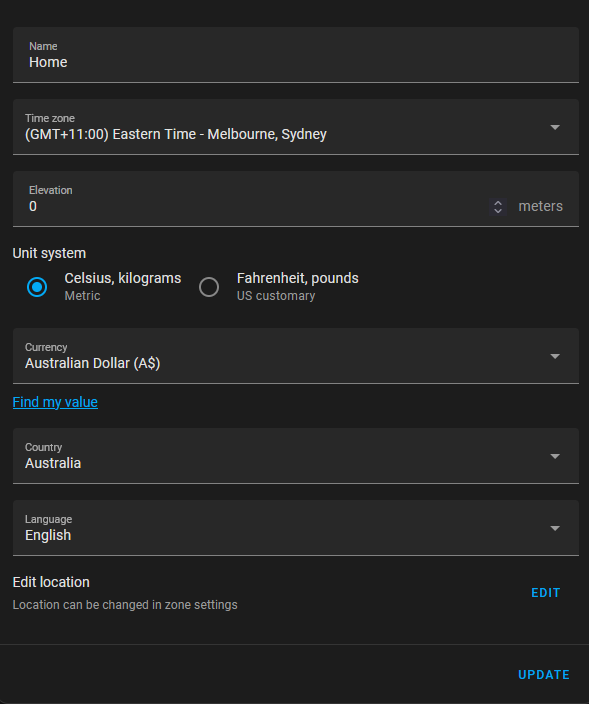
Location is configured in HA under Settings → System → General.
[!TIP] Enable DEBUG logging for the integration to see exactly what data is being shared.
🌐 International Common Names
When enabled, the integration sends your Home Assistant language to OpenPlantbook so the API can return common names in that language when available.
More information about this OpenPlantbook feature.
🖼️ Automatically Download Images
Available in the integration's Options (click Configure after setup).
- Default path:
/config/www/images/plants - Specify any directory the HA user has write access to
- Relative paths are relative to your config directory
Path behavior:
- If the path contains
www/→image_urlis replaced with a/local/reference - If the path does not contain
www/→ the full OpenPlantbook URL is kept
[!NOTE] Existing files are never overwritten. The target directory must exist before configuring.
📡 Actions (Service Calls)
openplantbook.search
Search for plants matching a string:
action: openplantbook.search
data:
  alias: Capsicum
Read results from openplantbook.search_result:
Number of plants found: {{ states('openplantbook.search_result') }}
{%- for pid in states.openplantbook.search_result.attributes %}
  {%- set name = state_attr('openplantbook.search_result', pid) %}
  * {{ pid }} -> {{ name }}
{%- endfor %}
Example output:
Number of plants found: 40
  * capsicum annuum -> Capsicum annuum
  * capsicum baccatum -> Capsicum baccatum
  * capsicum chinense -> Capsicum chinense
  (...)
openplantbook.get
Get detailed data for a single species:
action: openplantbook.get
data:
  species: capsicum annuum
[!NOTE] The species string must match exactly the
pidreturned byopenplantbook.search.
Extra data categories
Request additional categories with the optional include parameter (comma-separated). Currently the API supports care, which adds watering, sunlight, soil, pruning, and fertilization:
action: openplantbook.get
data:
  species: monstera deliciosa
  include: care
The extra fields are merged into the same entity and returned in the service response. Cached entries remember which categories they already contain, so requesting care for a plant that was previously fetched without it triggers a fresh API call.
After an include: care call, the care fields are available as attributes on the entity:
* Watering: {{ state_attr('openplantbook.monstera_deliciosa', 'watering') }}
* Sunlight: {{ state_attr('openplantbook.monstera_deliciosa', 'sunlight') }}
* Soil: {{ state_attr('openplantbook.monstera_deliciosa', 'soil') }}
* Pruning: {{ state_attr('openplantbook.monstera_deliciosa', 'pruning') }}
* Fertilization: {{ state_attr('openplantbook.monstera_deliciosa', 'fertilization') }}
Read results from openplantbook.capsicum_annuum:
Details for plant {{ states('openplantbook.capsicum_annuum') }}
* Max moisture: {{ state_attr('openplantbook.capsicum_annuum', 'max_soil_moist') }}
* Min moisture: {{ state_attr('openplantbook.capsicum_annuum', 'min_soil_moist') }}
* Max temperature: {{ state_attr('openplantbook.capsicum_annuum', 'max_temp') }}
* Image: {{ state_attr('openplantbook.capsicum_annuum', 'image_url') }}
openplantbook.upload
Manually trigger uploading of plant sensor data:
action: openplantbook.upload
Returns null if nothing was uploaded or an error occurred. Check the HA log for details.
🖥️ GUI Example
An example of using the actions to build a plant search UI in Home Assistant:
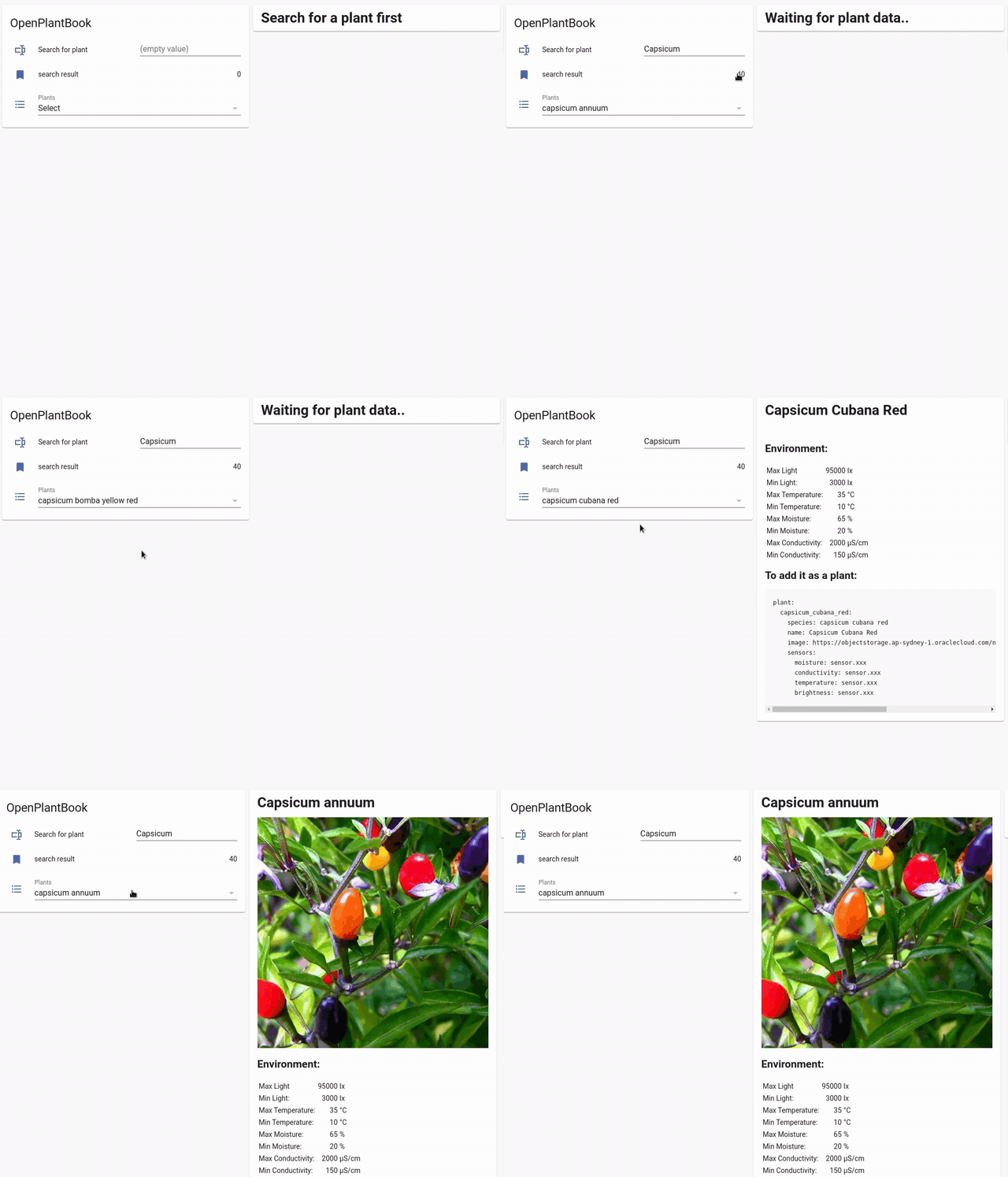
[!NOTE] This UI is not part of the integration — it's an example of what you can build with the actions.
For a full walkthrough with helpers, automations, and Lovelace cards, see examples/GUI.md.
☕ Support
