
Production-Grade Open Source IoT Hydroponic Control System


HydroponicOne is a robust, modular, and professional-grade hydroponic monitoring and control system. It aims to bridge the gap between hobbyist DIY setups and expensive industrial automation. Featuring a modern tech stack including MQTT, InfluxDB telemetry, and a sleek React-based dashboard.
✨ Features
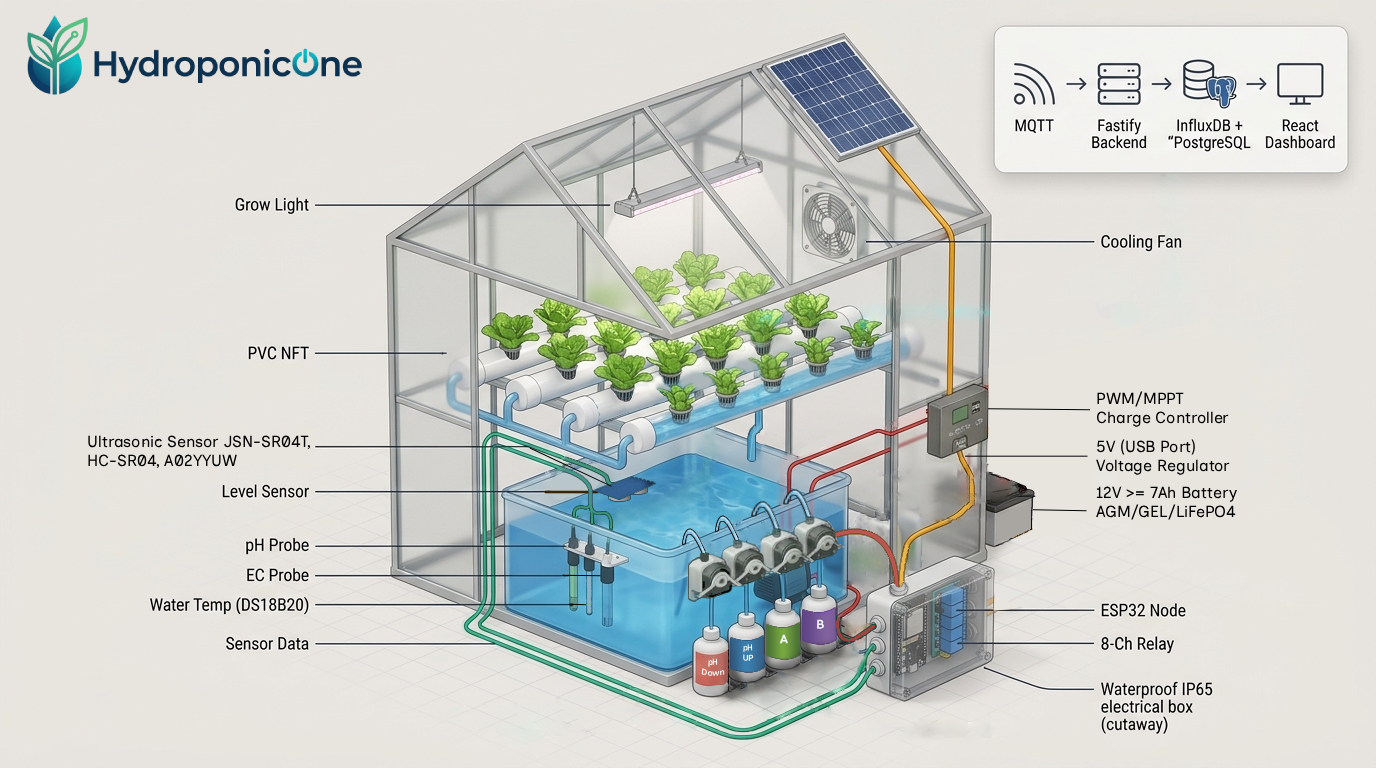
- Real-Time Environment Monitoring: High-precision tracking of pH, EC, water level, temperature, and humidity.
- Automated Actuator Control: Smart relays for dosing pumps, main circulation, grow lights, and ventilation.
- Secure Architecture: Async MQTT with TLS, offline robust modes, and RSA-2048 Signed OTA updates.
- Edge-First Local Dashboard: Lightning fast React SPA communicating over real-time WebSockets to a Fastify backend.
- Enterprise Data Management: PostgreSQL for persistent config state and InfluxDB for time-series telemetry.
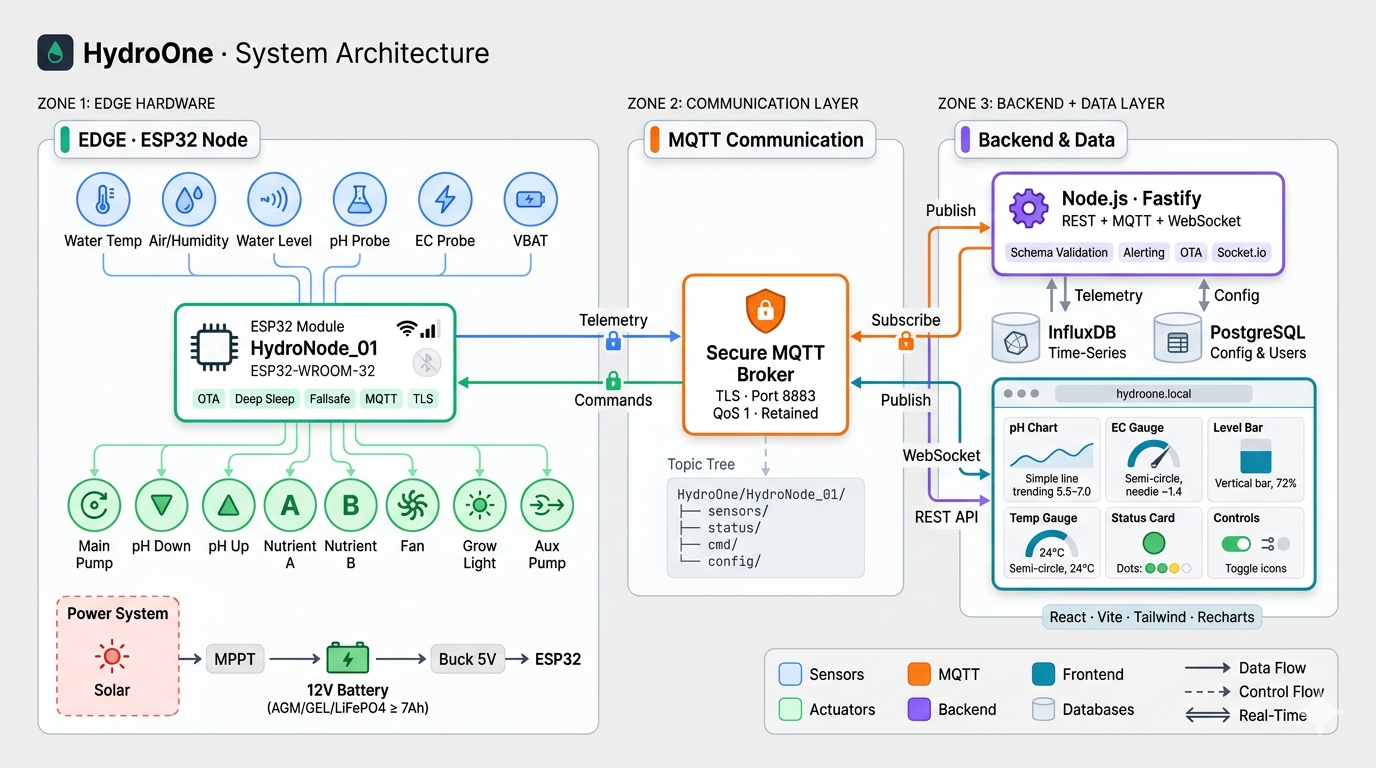
🏗 System Architecture
| Layer | Stack |
|---|---|
| Frontend | React 19, Vite, Tailwind CSS, Recharts, Zustand, Lucide Icons |
| Backend | Node.js, Fastify, Prisma ORM, Socket.io |
| Database | PostgreSQL (relational), InfluxDB (time-series) |
| Firmware | C++ / Arduino, PlatformIO, Async MQTT |
| DevOps | Docker support, GitHub Actions, Secure OTA deployment |
🛠 Prerequisites
Ensure you have the following installed before proceeding:
- Node.js (v20+ recommended)
- PostgreSQL (v14+)
- InfluxDB (v2.0+)
- MQTT Broker (Mosquitto/HiveMQ)
- ESP32 Development Board
- PlatformIO IDE
⚡ Quickstart & Installation
1. Clone the repository
git clone https://github.com/40rbidd3n/Hydro0x01.git
cd HydroponicOne
2. Setup Backend Configure the environment and seed the database.
cd backend
npm install
cp .env.example .env
# Edit .env with your DB credentials and a secure JWT Secret
npx prisma db push
npm run dev
3. Setup Frontend
cd ../frontend
npm install
cp .env.example .env
npm run dev
4. Build & Flash Firmware Review the Hardware Setup and connect your sensors to the ESP32.
cd ../firmware

# IMPORTANT: Clone the configuration template before compiling
cp include/config.example.h include/config.h
# Edit include/config.h with your network and MQTT details

# Edit platformio.ini to choose your hardware environment (e.g., env:esp32_dht_bmp)
pio run -t upload
📖 Documentation
Explore our comprehensive guides located in the docs/ folder:
| # | Guide | Description |
|---|---|---|
| 1 | System Overview | How everything connects |
| 2 | Hardware Setup | Wiring diagrams and assembly |
| 3 | Firmware Guide | Configuration and flashing |
| 4 | Integration Guide | Home Assistant, Telegram & Discord |
| 5 | Calibration Guide | Sensor tuning procedures |
| 6 | Troubleshooting | Common issues and fixes |
| 7 | API Reference | REST API documentation |
| 8 | MQTT Guide | Topics and payload specifications |
| 9 | Security & OTA | Firmware signing and RSA keys |
🚑 Troubleshooting
- Database Errors: Ensure you have run
npx prisma generateand your credentials in.envare accurate. - MQTT Connectivity: Ensure you are using
mqtts://if using port 8883, and check your base topic. - Sensor Readings: Refer to Troubleshooting Docs for I2C and ADC calibration solutions.
🚀 Releases & Changelog
All code modifications and versioning are strictly documented. Check the CHANGELOG.md for version histories or the GitHub Releases page to download pre-compiled bins and read full production release notes.
🤝 Contributing & Community
We actively welcome community contributions to improve HydroponicOne! Please see our Contributing Guidelines and our Code of Conduct before submitting pull requests.
🗺️ Future Roadmap
We have an extensive development plan ranging from LoRa Master/Slave setups to AI diagnostics. View the complete Development Roadmap to see where we are heading.
📄 License
This project is licensed under the MIT License. See the LICENSE file for more details.
💬 Support & Contact
If you have a feature request or found a bug, please use the GitHub Issue Tracker.
Built with ❤️ for the future of sustainable farming.