

Hys — RSS Reader for Digital Minimalists





Features • Quick Start • Installation • Usage • Configuration • Contributing • License
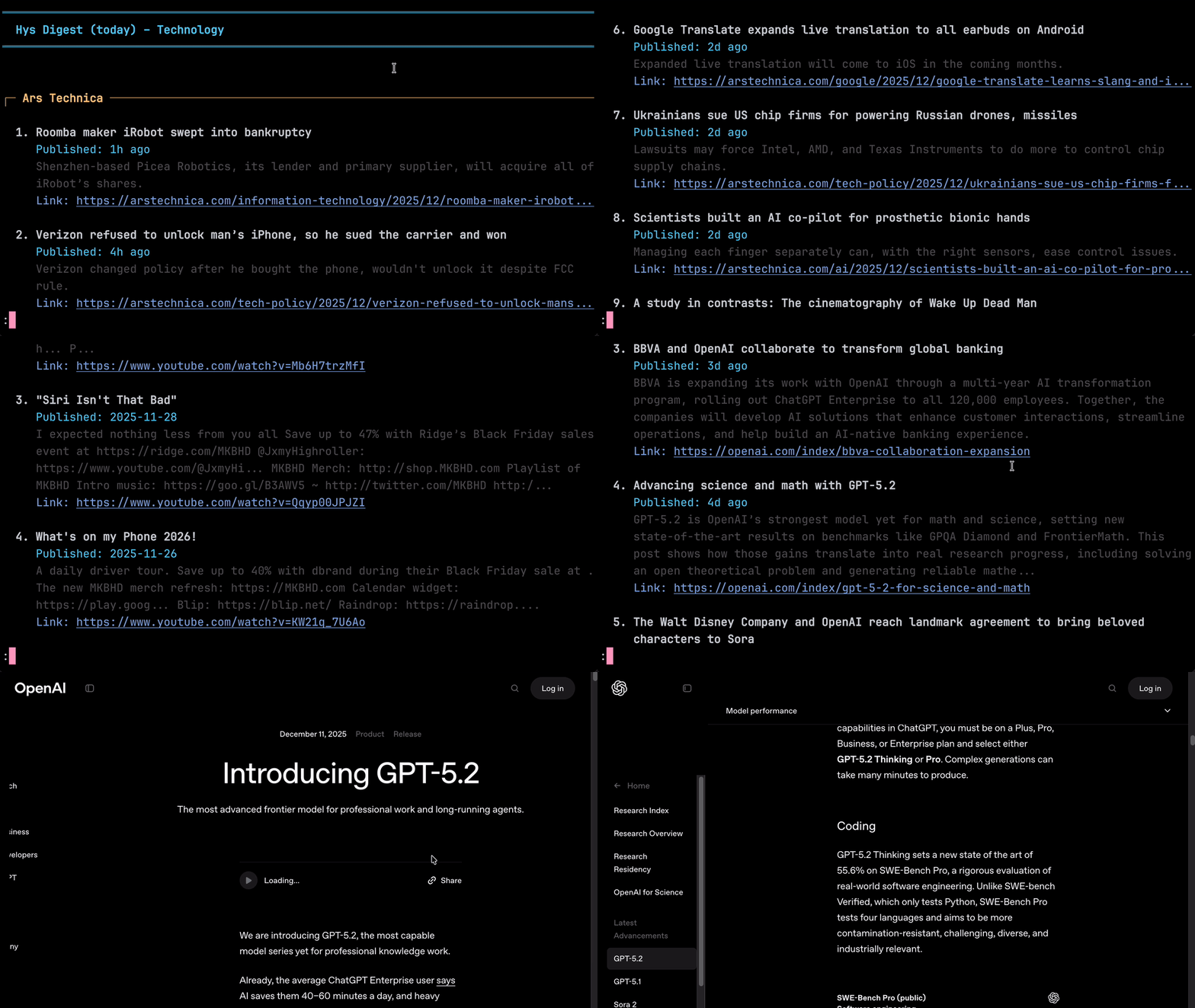
Hys is a fast, lightweight, and opinionated terminal RSS reader written in Zig that helps you avoid doom-scrolling. It enforces a once-per-day fetch limit, encouraging you to gather new information in a single daily batch like a morning newspaper, rather than receive an endless stream of pings and notifications throughout the day.
✨ Features
| Feature | Description |
|---|---|
| 🧠 Doomscroll-Free | Designed as a "Daily Digest." Enforces a fetch limit to help you stay informed without the infinite scroll. |
| ⚡ Blazing Fast | Built with Zig. Starts in milliseconds and parses hundreds of items in seconds. |
| 🔗 Open Links | OSC 8 hyperlink support to open articles in your default browser from URLs and links. |
| 🔌 OPML Ready | Import your existing subscriptions from any standard RSS reader or export your feeds effortlessly. |
| 🌍 Multilingual Support | Native support for Chinese, Japanese, Korean, Indic, Cyrillic etc. |
| 📁 Feed Groups | Organize your feeds into groups (e.g. tech, science, art) and read them individually or all at once. |
| 📖 Pager TUI | Automatically pipes into less for a distraction-free reading experience with intuitive vim-style keybindings. |
| 🤖 AI-Friendly | Optional plain JSON output for seamless integration with AI agents and LLM workflows. |
| 🔎 Search | Find text in your feeds with the search functionality integrated into less. |
| 📰 Universal Feed Support | RSS 2.0 and Atom 1.0 with robust parsing, HTML entity decoding, and UTF-8 validation |
🚀 Quick Start (macOS/Linux)
Homebrew
brew install superstarryeyes/tap/hys
Arch Linux (AUR)
yay -S hys          # Latest release
yay -S hys-git      # Latest development version
Add your first feed and start reading:
hys --sub "https://news.ycombinator.com/rss"
hys
📦 Installation (macOS/Linux/Windows)
Prerequisites
- Zig 0.16.0: For building from source. Install instructions
- libcurl: Robust HTTP/2 and TLS support. Install via your package manager:
- macOS: Pre-installed (no action needed)
- Ubuntu/Debian:
sudo apt-get install libcurl4-openssl-dev - Fedora:
sudo dnf install libcurl-devel - Arch:
sudo pacman -S curl - Windows:
choco install curl(using Chocolatey) orvcpkg install curl:x64-windows
Build from Source
-
Clone the repository:
git clone https://github.com/superstarryeyes/hys.git cd hys -
Build and Install:
# Install to ~/.local/bin (make sure it's in your PATH)
zig build -Doptimize=ReleaseSafe install -p ~/.local
💻 Usage
Reading Feeds
# Add a feed to your main group
hys --sub "https://site.com/feed"

# Add a feed to a specific group
hys tech --sub "https://site.com/feed"

# Read the main group
hys

# Read a specific group
hys tech

# Read multiple groups combined
hys tech,science,art

# Read all groups at once
hys --all

# One-off read of a URL (doesn't save to config)
hys https://example.com/rss.xml
Manage Feeds and Groups
| Action | Command |
|---|---|
| Subscribe to a feed (title optional) | hys --sub "https://site.com/feed" "Title" |
| Import OPML into main group | hys --import ~/downloads/feeds.opml |
| Export main group's feeds (OPML) | hys --export backup.opml |
| Set display name for a group | hys <group> --name "Pretty Name" |
| List all groups | hys --groups |
Daily Flow and History
| Action | Command |
|---|---|
| Read from all groups | hys --all |
| View previous days' fetches | hys --day 1 or hys --day 2 |
| Reset today's daily limiter | hys --reset |
Config and Pager
| Action | Command |
|---|---|
| Display help with all available flags | hys --help |
| Display version information | hys --version |
| Show config file path | hys --config |
| Force-enable pager | hys --pager |
| Disable pager for this run | hys --no-pager |
| Output as JSON (no pager) | hys --json |
Navigation (Pager Mode)
When Hys opens in your system pager (less), these keys are available:
-
Line-by-line
jorDown: Scroll down one linekorUp: Scroll up one lineEnter: Scroll down one liney: Scroll up one line
-
Paging
SpaceorforPageDown: Page down one screenborPageUp: Page up one screend: Half-page downu: Half-page up
-
Jumps
g: Jump to topG: Jump to bottom
-
Search
/text: Search forward?text: Search backwardn: Next matchN: Previous match
-
Misc
h: Show help for all less commandsq: Exit back to terminal
⚙️ Configuration
Hys creates a JSON configuration file at ~/.hys/config.json on first run.
{
  "display": {
    "maxTitleLength": 120,
    "maxDescriptionLength": 300,
    "maxItemsPerFeed": 20,
    "showPublishDate": true,
    "showDescription": true,
    "showLink": true,
    "truncateUrls": true,
    "pagerMode": true,
    "underlineUrls": true,
    "dateFormat": "%Y-%m-%d"
  },
  "history": {
    "retentionDays": 50,
    "fetchIntervalDays": 1,
    "dayStartHour": 0
  },
  "network": {
    "maxFeedSizeMB": 0.2
  }
}
[!NOTE] Apple's default Terminal does not support OSC 8 hyperlinks. If you're using Apple Terminal, you need to set
truncateUrlstofalsein your config. For a better experience, consider using a terminal that supports OSC 8 hyperlinks, such as Ghostty, Wezterm, Kitty, or iTerm2.
Managing Feeds
Feeds are stored in JSON files within ~/.hys/feeds/. Each group has its own file corresponding to its name (e.g., main is stored in ~/.hys/feeds/main.json).
To remove or edit a feed:
- Open the group's JSON file (e.g.,
~/.hys/feeds/main.json). - Locate the feed object within the
feedsarray. - Delete the object to unsubscribe, or edit fields like
xmlUrlortext. - Save the file.
🛠️ Contributing
Contributions are welcome! Please feel free to submit a Pull Request.
Join our Discord community for discussions, support and collaboration.

📄 License
This project is licensed under the MIT License. See the LICENSE file for details.
⭐ Star this repo if you find it useful!