
ImageOCR
php 验证码识别库,对于非粘连字符具有很好的识别效果,对于一般粘连字符也能有较为良好的识别 除噪算法支持孤立点除杂和连通域除噪,分割算法支持等宽分割、连通域分割以及滴水算法分割
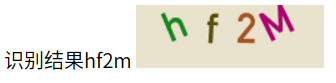
示例效果
Install
composer require mohuishou/image-ocr
使用方法
例子详见 example
use docker
docker run --rm -p 8088:8088 mohuishou/image-ocr
点击 http://localhost:8088 查看效果
大致流程:
初始化 -> 灰度化 ---> 二值化 ---> 除噪点 -> 分割 -> 标准化 -> 识别
初始化
对象初始化
$image=new Image($img_path);
$image_ocr=new ImageOCR($image)
初始化二值化阈值
$image_ocr->setMaxGrey(90);
$image_ocr->setMinGrey(10);
初始化标准化图片宽高
$image_ocr->setStandardWidth(13);
$image_ocr->setStandardHeight(20);
开启 Debug
$image_ocr->setDebug(true);
灰度化
try{
    $image_ocr->grey();
}catch (\Exception $e){
    echo $e->getMessage();
}
二值化
注意:这一步的前提是需要先执行上一步灰度化,不然会抛出一个错误
try{
    $image_ocr->hash($max_grey=null,$min_grey=null);
}catch (\Exception $e){
    echo $e->getMessage();
}
二值化支持两种方式,第一种$image_ocr->hash($max_grey=null,$min_grey=null)即为上面那种固定的阈值范围,第二种为hashByBackground($model=self::MAX_MODEL,$max_grey=null,$min_grey=null),通过背景图像的灰度值,动态取阈值,支持三种模式MAX_MODEL,MIN_MODEL,BG_MODEL分别是最大值、最小值和背景模式,最大值模式会用背景的灰度值替换阈值的上限,最小值模式替换下限,背景模式上下限都替换,即为只去除背景
除噪点
前置条件为二值化
孤立点除噪法
try{
    $image_ocr->removeSpots();
}catch (\Exception $e){
    echo $e->getMessage();
}
连通域除噪法
[如果要使用连通域分割法,可以跳过连通域除噪点,分割的同时可以一并除噪]
try{
    //使用之前需要初始化连通域对象
    $image_ocr->setImageConnect();
    //除噪
    $image_ocr->removeSpotsByConnect();
}catch (\Exception $e){
    echo $e->getMessage();
}
分割
非粘连字符串
连通域分割法
try{
    //使用之前需要初始化连通域对象
    $image_ocr->setImageConnect();
    //分割
    $image_ocr->splitByConnect();
}catch (\Exception $e){
    echo $e->getMessage();
}
粘连字符串
滴水算法分割
TODO: 待测试
标准化
try{
    $standard_data=$image_ocr->standard();
}catch (\Exception $e){
    echo $e->getMessage();
}
识别
TODO:待完善
API
ImageOCR::__construct(Image $image)
ImageOCR::saveImage($path)
ImageOCR::grey()
ImageOCR::hash($max_grey=null,$min_grey=null)
ImageOCR::hashByBackground($model=self::MAX_MODEL,$max_grey=null,$min_grey=null)
ImageOCR::removeSpots()
ImageOCR::removeSpotsByConnect()
ImageOCR::standard()
ImageOCR::setImageConnect()
ImageOCR::setImage(Image $image)
ImageOCR::getStandardData()
ImageOCR::setMaxGrey($max_grey)
ImageOCR::setMinGrey($min_grey)
ImageOCR::setStandardWidth($standard_width)
ImageOCR::setStandardHeight($standard_height)

//ImageTool的方法均为静态方法
ImageTool::removeZero($data)
ImageTool::removeZeroColumn($hash_data)
ImageTool::drawBrowser($data)
ImageTool::transposeAndRemoveZero($hash_data)
ImageTool::hashTranspose($hash_data)
ImageTool::img2hash($img)
ImageTool::hash2img($hash_data,$padding=0)
CHANGELOG
0.2 [2017-4-1]
0.1 [2016-10-7]
- 默认模板保存方式由数据库改为文件,保存路径为./db/db.json
- 使用 composer 安装