
imprint
Teach your AI agent any website. Once.
Record a real browser session, get a deterministic MCP tool back.
No tokens burned on exploration. No "the LLM clicked the wrong button."
The recording is the executable.




Quick Start · Examples · How It Works · Docs
Quick Start
bun install -g imprint-mcp
imprint teach southwest --url https://www.southwest.com
A browser opens. You drive the workflow and narrate what you're doing. Imprint records every request and interaction, then compiles a deterministic MCP tool your agent can call forever.
Want to try a finished MCP before recording anything?
imprint install google-flights --source examples --platform claude-desktop
That registers the checked-in Google Flights example as an MCP server in your client. Swap claude-desktop for claude-code, codex, openclaw, or hermes, or add --print to see the config without changing anything.
On a Hermes agent or Docker host, register the examples directly into Hermes:
for site in google-flights google-hotels southwest discoverandgo echo; do
  imprint install "$site" --source examples --platform hermes --no-interactive
done
When HERMES_HOME is set, Imprint writes Hermes MCP entries to $HERMES_HOME/config.yaml; outside Hermes it uses ~/.hermes/config.yaml. For browser-backed MCPs, imprint install also installs Playwright Chromium into $HERMES_HOME/.cache/ms-playwright and writes PLAYWRIGHT_BROWSERS_PATH into the MCP config so Hermes can find it. Use --skip-browser-install only for offline builds where you preinstall the browser yourself. In a fresh Linux image that is missing browser system libraries, install those during image build with bunx playwright install --with-deps chromium.
See It in Action
Teach once. imprint teach google-flights records one real search and compiles a 4-tool MCP server from that single session — the compile agent reverse-engineers Google's batchexecute wire format itself and wires the search→booking token chain, with no hand-written request code. Here is the actual run (6 recordings → 4 tools, every tool live-verified):
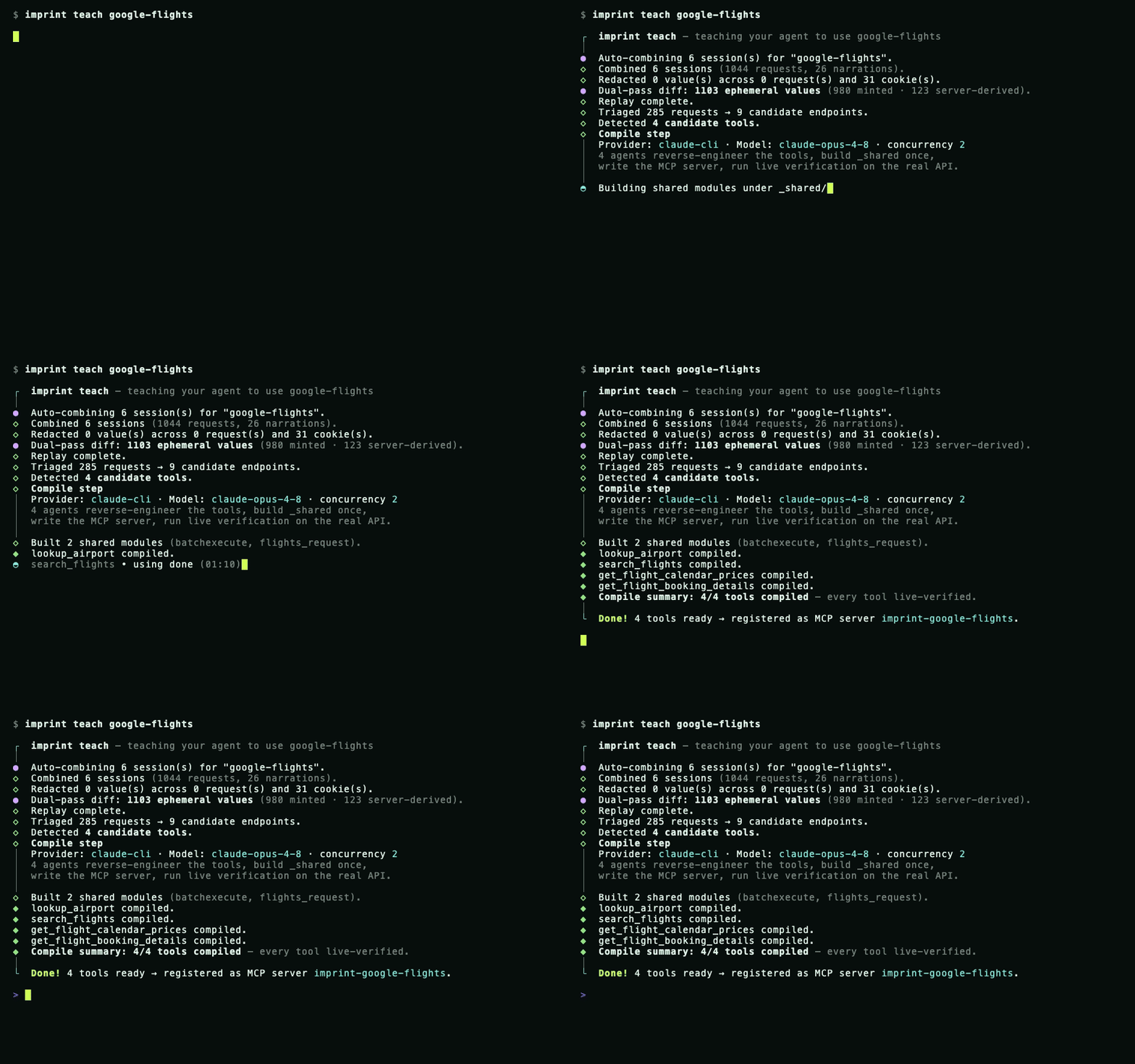
Then your agent calls those tools like any other — real-time results through a live trusted-Chrome (cdp-replay) backend:
$ claude "cheapest nonstop SJC→SAN the first week of July, with a carry-on"

  Alaska     AS1623   SJC→SAN   6:00a→7:32a   nonstop   $137
  Southwest  WN2412   SJC→SAN   8:15a→9:45a   nonstop   $158
  Delta      DL2901   SJC→SAN   7:10a→8:44a   nonstop   $169
The suite was one-shot compiled from one recording and audited at 92.6%, every tool live-verified. (The terminal above is a faithful replay — regenerate/record it with bun scripts/demo-teach.ts.)
How It Works
1. TeachOpen a real browser, drive the workflow, narrate what you're doing. Imprint records every network request and DOM interaction. |
2. CompileGenerates two replay artifacts: |
3. UseA typed MCP tool your agent calls like any other tool. Works with Claude Code, Codex, Claude Desktop, and any MCP client. |
[!TIP] All three steps happen in a single
imprint teachcommand. Credentials and PII are redacted automatically before anything reaches the LLM.
Why Imprint?
Other browser-tool frameworks ask the LLM to decide every click at runtime. Imprint takes a fundamentally different approach:
| Imprint | browser-use / Computer Use | |
|---|---|---|
| Approach | Record once, replay deterministically | LLM decides every click at runtime |
| Token cost | Zero at runtime | Scales with workflow complexity |
| Reliability | Deterministic — same input, same output | Variable — exploration can diverge |
| Bot detection | Real Chromium + stealth-fetch | Detectable automation fingerprint |
| Fallback | Automatic ladder (API → DOM) | None |
| Speed | 200ms – 9s | 30s+ |
Installation
Recommended
bun install -g imprint-mcp
Requires Bun >= 1.3. Or run without installing:
bunx imprint-mcp teach <site> --url <url>
Standalone Binary
curl -fsSL https://raw.githubusercontent.com/ashaychangwani/imprint/main/scripts/install.sh | bash
From Source
git clone https://github.com/ashaychangwani/imprint.git && cd imprint
bun install && bun link
Browser setup & LLM providers
Browser commands (teach, record, login, playbook) and browser-backed imprint install targets auto-install Playwright Chromium when it is missing. For offline CI or prebuilt Linux images where you pass --skip-browser-install, preinstall it ahead of time:
bunx playwright install chromium
LLM providers are auto-detected. Run imprint doctor to see what's available.
| Priority | Provider | Detected via |
|---|---|---|
| 1 | Claude Code | claude on PATH |
| 2 | Codex CLI | codex on PATH |
| 3 | Anthropic API | ANTHROPIC_API_KEY env var |
| 4 | Cursor | cursor on PATH |
Override with --provider <name> and --model <name>.
The Backend Ladder
When an API call gets blocked, Imprint doesn't jump to DOM replay. It escalates through the cheapest backend that works:
  fetch            ~200ms    Plain APIs, persisted cookies
    │
    ▼
  fetch-bootstrap  browser   Mints cookies, CSRF tokens, storage
    │               + API
    ▼
  cdp-replay       ~2-35s    API calls run inside a live, trusted Chrome —
    │                        a protected POST refreshes its anti-bot token
    │                        between calls (multi-step state-changing flows)
    ▼
  stealth-fetch    ~1-12s    Defeats Akamai, Cloudflare, DataDome
    │
    ▼
  playbook         ~9s       Full DOM replay — universal fallback
The full order is fetch → fetch-bootstrap → cdp-replay → stealth-fetch → playbook; auto mode walks it and stops at the first backend that works.
Every recording compiles to both workflow.json and playbook.yaml, so the ladder always has a DOM fallback.
Platform Support
At the end of imprint teach, pick your AI platform and Imprint wires it up:
| Platform | Integration |
|---|---|
| Claude Code | Automatic — runs claude mcp add |
| Codex CLI | Automatic — runs codex mcp add |
| Claude Desktop | Paste-ready JSON config |
| OpenClaw | MCP config + SKILL.md export |
| Hermes | MCP config + SKILL.md + cron mapping |
Each site registers as its own MCP server (imprint-southwest, imprint-google-flights, ...) so tools never collide.
Examples
Every example below was one-shot compiled from a single real browser-session recording (imprint teach) — the generated artifacts are committed verbatim as a proof of concept of what the compiler produces, not as maintained integrations. Recording-derived defaults (dates, geo) age out; pass explicit values.
★ Star examples — multi-tool suites, each compiled from one recording and scored by the headless differential audit:
| Example | Tools | Audit | What it shows |
|---|---|---|---|
| google-flights | 4 | 92.6% | batchexecute wire-format decode + search→booking producer-token chain, live cdp-replay |
| google-hotels | 4 | 91.7% | autocomplete → search → reviews/booking producer-token chaining |
Other examples:
| Example | Description |
|---|---|
| southwest | Live fare search — defeats Akamai bot detection |
| discoverandgo | Authenticated booking via per-site credential store |
| echo | MCP smoke-test fixture |
Install any example into your MCP client:
imprint install google-flights --source examples --platform claude-desktop
Examples are real generated MCPs, not handwritten SDK samples. imprint install <site> --source examples points the MCP server at this repo's examples/ directory with IMPRINT_HOME, ensures Playwright Chromium for browser-backed tools, and lets your client list and call the checked-in tools immediately:
imprint install google-hotels --source examples --platform codex
imprint install southwest --source examples --platform claude-code
imprint install echo --source examples --platform claude-desktop --print
For your own generated tools, leave off --source examples:
imprint install mysite --platform claude-code
imprint install mysite --platform codex
CLI Reference
imprint --help              # all commands
imprint <command> --help    # per-command options
| Category | Commands |
|---|---|
| Pipeline | teach · record · redact · generate · compile-playbook · emit |
| Runtime | cron · mcp-server · playbook · probe-backends · audit |
| Credentials | credential set · credential list · credential export · credential import · credential migrate |
| Utilities | mcp · login · assemble · check · doctor · install · uninstall |
Sharing Skills
Teach on your laptop, ship to a remote agent. Generated MCP folders contain the portable tool artifacts: workflow.json, playbook.yaml, index.ts, optional shared modules, and cron/backend metadata. Copy ~/.imprint/<site> into the receiver's ~/.imprint/<site> or commit it to a private repo, install Imprint there, then register it:
bun install -g imprint-mcp
imprint install mysite --platform claude-code
Credentials stay separate. Skill folders contain zero plaintext credentials — only ${credential.NAME} placeholders and a manifest listing what the receiver must provision.
# Export (encrypted with libsodium + argon2id)
imprint credential export southwest --out southwest.imprintbundle

# Import on another machine
imprint credential import southwest southwest.imprintbundle
Send the bundle over any channel. Pass the passphrase out-of-band.
See Sharing Skills for the full flow.
Documentation
| Getting Started | Full walkthrough |
| Architecture | Data flow and module map |
| Integrations | Per-platform setup |
| Security | Redaction, credential handling, what gets stored |
| Sharing Skills | Credential export/import and remote provisioning |
| MCP Maintenance | Audit, disable, restore, and prune MCP state |
| Troubleshooting | Common failures and fixes |
| Tracing | OpenTelemetry tracing, cost rollup, and Phoenix setup |
More docs
- Decisions — design rationale
- Glossary — terms and concepts
- Capture Protocol — CDP recording details
- Playbook Debugging — DOM replay debugging
- Notifications — alert setup
Contributing
Conventional Commits enforced in CI. Run bun run check before submitting.
Good first contributions: replay backends, notification predicates, auth extractors, example sites, docs.
See CONTRIBUTING.md for full guidelines.