
IntelliDeck
News Intelligence Agent



RSS Deck has been renamed to IntelliDeck.
Same project, new identity. The name better reflects what this tool has grown into — not just a feed reader, but an active news intelligence layer that reads, analyzes, and briefs you. All existing data is forward-compatible. Just pull the new image or update your clone.
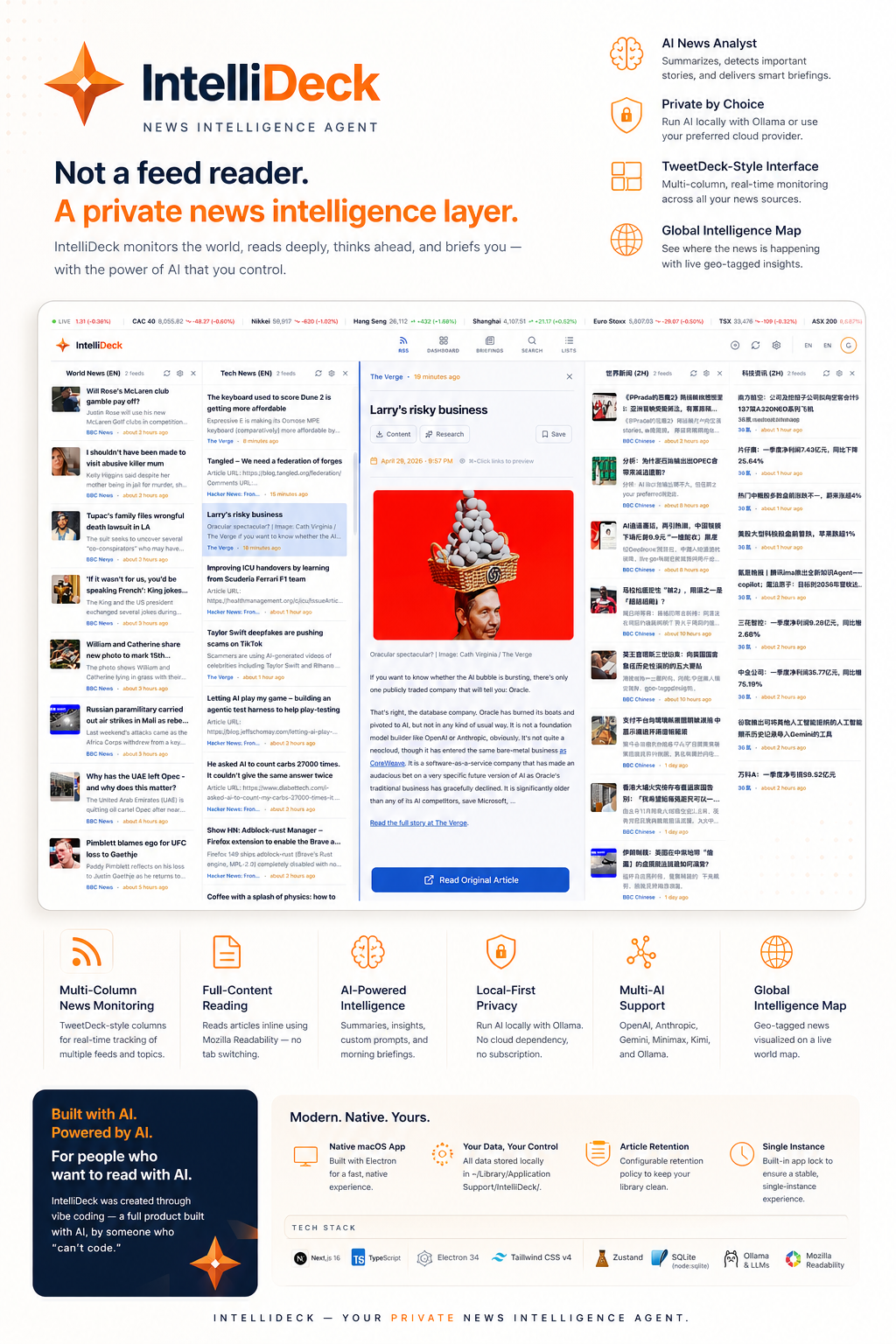
Remember TweetDeck? That feeling of having everything in view — your feeds laid out in columns, nothing hidden, nothing buried? IntelliDeck brings that back. Except now there's an AI sitting alongside you, reading with you, summarizing for you, and alerting you to exactly what matters.
This is not a reader with AI bolted on. The AI is the point.
What's New in v3.3
Feed Wall. Smarter ranking. MCP built in.
- Feed Wall — a new ambient fullscreen view that spreads all your feeds across the screen. Passive reading mode for when you want the news to wash over you
- Today Priority Feed — AI-ranked daily reading list that learns from your feedback. Thumbs up/down teaches IntelliDeck what matters to you, improving every session
- Server-side similarity scoring — related stories are now detected and scored at ingest, not just client-side. IntelliDeck surfaces cross-source coverage of trending topics automatically
- MCP server bundled —
intellideck-mcp.mjsandintellideck-mcp.pynow ship directly with IntelliDeck. Connect to Claude Desktop or any MCP-compatible agent without a separate install
What's New in v3.0
New name. New logo. Native desktop app.
- Renamed from RSS Deck → IntelliDeck — a name that matches what the product actually does
- New origami north star logo — a 4-pointed compass star built from 12 shaded facets, representing precision, direction, and intelligent synthesis
- macOS native app — download the
.dmgand run IntelliDeck as a first-class Mac app. No browser tab, no Docker required. Standalone bundled server, native window chrome, dock integration, system tray, and menu bar
Core Features
🤖 Local AI — Zero Cloud
Powered by Ollama. Your AI runs entirely on your own machine. No data leaves your network, no subscriptions, no API quotas.
☀️ Morning Briefing
Your AI acts as a News Intelligence Officer — reading across all feeds, selecting strategic headlines, and writing a concise brief. Delivered to Telegram if you want it there.
🔔 Keyword Alerts
Define topics that matter — company names, people, technologies. IntelliDeck highlights matching articles across all feeds in real time.
📖 Inline Full-Content Reading
Click an article and it opens as a dedicated column beside the feed — full text via Mozilla Readability, no paywalls, no ad pages, no tab switching.
🗂 Feed Lists
Organize feeds into named lists. Switch between topic-specific views without rebuilding your layout.
🌍 Intelligence Map
Geo-tagged article extraction builds a live world map of where your news is coming from.
Quick Start
macOS App (new)
Download the .dmg from Releases, open it, drag to Applications. Done. IntelliDeck runs its own embedded Next.js server — no other dependencies.
"IntelliDeck is damaged and can't be opened"? macOS blocks unsigned apps downloaded from the internet. Run this once in Terminal, then open the app normally:
xattr -cr /Applications/IntelliDeck.app
Docker (web / NAS / server)
docker run -d -p 3000:3000 -v intellideck-data:/app/data \
  --name intellideck kianfong/intellideck:latest
Access at http://localhost:3000
Docker Compose
git clone https://github.com/mephistophelesbits/intellideck.git
cd intellideck
docker-compose up -d
Local Development
git clone https://github.com/mephistophelesbits/intellideck.git
cd intellideck
npm install
npm run dev         # web only
npm run electron:dev  # Electron desktop
Ollama Setup
# Install from https://ollama.ai, then pull a model
ollama pull llama3.2
# IntelliDeck auto-connects at http://localhost:11434
Full Feature List
- Multi-column deck layout — add, reorder, resize columns freely
- Feed Lists — named feed collections with auto-migration from existing columns
- OPML Import/Export — compatible with Feedly, Inoreader, Google Reader
- Similar Articles — client-side text similarity surfaces related stories
- Telegram Briefings — AI-curated daily news pushed to your phone
- Custom AI Prompts — configure your own summarization and briefing instructions
- Multiple AI Providers — Ollama, OpenAI, Anthropic, Gemini, Minimax, Kimi — per-provider keys
- Article Retention — configurable cleanup policy (7/14/30/60/90 days)
- Two Themes — dark and light, with full color system
- English / Simplified Chinese UI
- Bookmarks — save articles for later
- Responsive — desktop and mobile
Tech Stack
| Layer | Technology |
|---|---|
| Framework | Next.js 16 + TypeScript |
| Desktop | Electron 34 |
| Styling | Tailwind CSS v4 |
| State | Zustand |
| Database | SQLite (node:sqlite) |
| AI | Ollama · OpenAI · Anthropic · Gemini · Minimax · Kimi |
| RSS | Custom parser + Mozilla Readability |
| Deployment | Docker · macOS DMG |
🦞 IntelliDeck MCP — For AI Agents
IntelliDeck ships a built-in MCP server (intellideck-mcp.mjs / intellideck-mcp.py) that lets Claude Desktop or any MCP-compatible agent read directly from your local IntelliDeck database — no HTTP, no separate install, no OPML export step.
Register it once in your claude_desktop_config.json:
"intellideck": {
  "command": "node",
  "args": ["/path/to/IntelliDeck/intellideck-mcp.mjs"]
}
Your agent can then call get_today_priority_feed, get_column_articles, get_latest_briefing, and list_columns against your live feed data.
A standalone companion repo is also available at IntelliDeck-MCP for users who run IntelliDeck on a separate machine.
Changelog
v3.3.0 — May 2026
- Feed Wall — ambient fullscreen multi-feed view
- Today Priority Feed — AI-ranked reading list with preference feedback loop
- Server-side article similarity scoring — related story detection and boost at ingest
- MCP server bundled —
intellideck-mcp.mjsandintellideck-mcp.pyship with the app - Stored content API — preview panel loads saved article content from DB when available
- Dev database corruption recovery
v3.0.0 — April 2026
- Rebranded RSS Deck → IntelliDeck
- New origami north star logo and brand identity
- macOS native Electron app — standalone
.dmginstaller for arm64 and x64 - Article retention policy — configurable auto-cleanup from Settings → Data
- DB path fix — user data stored in
~/Library/Application Support/IntelliDeck/(survives app updates) - Single-instance lock — prevents multiple copies from launching
v2.0.0 — March 2026
- Top navigation bar replacing side rail
- Stitch design system — deep contrasts for dark mode
- Glassmorphism components
- Feed Lists — organize feeds into named collections
v1.4.0 — February 2026
- Similar Posts — zero-API client-side text similarity
- Custom AI Prompts
- Keyword Alerts
v1.3.0 — February 2026
- Multi-provider AI settings
- Morning Briefing — AI News Intelligence Officer mode
- Telegram HTML formatting and bot management
The Story
I built this because I missed TweetDeck and wanted something modern — full article content, local AI, beautiful themes. The twist: I can't code. The entire thing was built through vibe coding with AI tools.
IntelliDeck is a project built with AI, powered by AI, for people who want to read with AI. That's not a coincidence.
Contributing
Contributions welcome — features, bugs, docs, themes. Open an issue or submit a PR.
License
MIT — use it, fork it, ship it.
Built with AI, by Wong Kian Fong
If this is useful to you, give it a star ⭐ or buy me a coffee ☕