
isUpMap — Service Status Heatmap

Live: isUpMap (Official) Live: map.warmindex.com (Backup)
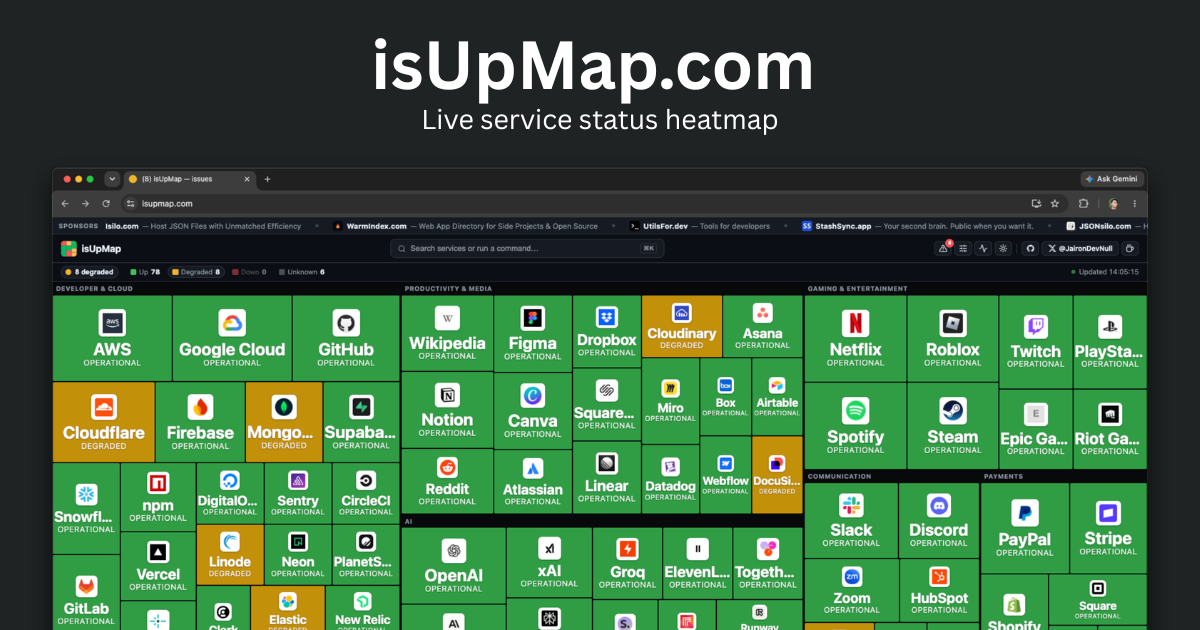
A live up / down heatmap for 80+ popular internet services, rendered as a stock-map style treemap with brand logos. Built on a single Cloudflare Worker: a Cron Trigger polls each service's official status and persists snapshots + an incident log to D1, and a static frontend renders the treemap with per-service uptime, an incident history, a command palette, light/dark themes, and a mobile-friendly detail sheet.
Features
- Treemap heatmap — services grouped into category "sectors", tiles sized by prominence and colored by status, each with a brand logo.
- Per-service detail — tap a tile (mobile) or click it (desktop) for status, 24h/7d uptime, component rollup, active incident, status-page host, and a "Visit status page" link.
- Incident history — server-recorded incidents (open/close/duration), persisted in D1 and shown in a side panel and per-service (last 2 shown).
- Community "report it's down" — users can vote a service is down with a
reason (
Can't connect,Errors,Can't log in,Slow,Other). Votes are deduplicated per IP-hash per 24 h, buffered through a Cloudflare Queue, and persisted in a separate D1. The per-service detail page shows aggregate counts, a 7-day volume chart, per-country and per-reason breakdowns, and a Protomaps world map of recent report origins. - Command palette (⌘K) — fuzzy-search services and run commands.
- Local customization — show/hide services or categories and a
"problems only" filter, persisted in
localStorage. - Notifications — in-page toasts on status changes, plus optional opt-in desktop notifications.
- Light / dark theme, deep links (
?service=,?filter=problems), and a favicon/title that reflect overall state.
How it works
Cron (every 5m) ─▶ scheduled() ─▶ resolveStatus() × N      ┌─▶ Statuspage JSON   ({base}/api/v2/summary.json)
                       │           (1 retry on a blip)      ├─▶ RSS / Atom feed   (fast-xml-parser)
                       │   (src/sources.ts) ────────────────┘
                       │                                    └─▶ HTTP reachability ping
                       │       each fetch attempt ──────────────▶ Analytics Engine (FETCH_ANALYTICS)
                       │                                          (service id, url, latency, status code, attempt)
                       ├─▶ persist to D1 (src/db.ts): flap-dampen → upsert `current`,
                       │   open/close `incidents`; daily retention sweep
                       └─▶ publish finished snapshot to KV (SNAPSHOT_KV)
Browser (public/) ─poll /api/status every 45s─▶ Worker reads KV (Cache-API fronted) ─▶ treemap + uptime
                  └─open detail / panel ───────▶ GET /api/incidents (D1, cached)     ─▶ incident history

Community reports:
User taps "Report it's down" ─▶ POST /api/report/:id (VOTE_RATE_LIMITER: 10/60s per IP)
                                        │  hash IP → VOTE_QUEUE (Cloudflare Queue)
                                        └─▶ queue consumer → batch-insert into REPORTS_DB (D1)
GET /api/report/:id ─▶ KV hit (10-min TTL) → or D1 aggregate query → report JSON
                                                                       (total, countries, reasons,
                                                                        recent 10, 7-day timeline)
/status/:id page ─▶ server-rendered with Protomaps world map (report locations) + analytics panel
- A Cron Trigger (
*/5 * * * *) invokesscheduled(), which resolves every service concurrently (Promise.allSettled, each upstream guarded by a 15s timeout + edge caching, with one retry on a transient blip so a flaky connection doesn't read asunknown). It persists the result to D1, then publishes the finished snapshot to KV for the read path. - Flap-dampening (
src/db.ts) — a non-upstatus must hold for 2 consecutive polls before it is committed tocurrentor opens an incident; recovery toupis immediate, and anunknown(timed-out) probe holds the last status rather than resolving a real incident. A single glitchy upstream read therefore never paints a false outage. Resolved incidents older than 90 days are pruned once a day (~03:00 UTC). GET /api/statusis a fast KV read of the snapshot the cron publishes (no D1 query on the hot path), with per-service uptime (24h / 7d). It's fronted by the Cache API; before the first cron run it serves a "warming" snapshot (never a live fan-out). The response carries astaleflag (older than 3 cron cycles) so the UI warns instead of showing frozen data.GET /api/incidentsreturns the recent incident log from D1 (Cache-API fronted). An optional?service=<id>filter scopes it to a single service.POST /api/report/:idaccepts a community down-report ({ reason }) for a known service. The IP is hashed withVOTE_SALT(SHA-256; never stored raw), deduplicated per IP-hash per 24 h, and enqueued toVOTE_QUEUEfor async batch-insert intoREPORTS_DB. Tighter rate limit: 10 req / 60s per IP (VOTE_RATE_LIMITER). Returns503ifVOTE_SALTis not set.GET /api/report/:idreturns aggregated community-report data for a service: 7-day total, per-country and per-reason breakdowns, up to 10 most-recent individual reports, and a 7-day daily volume timeline. Cached inSNAPSHOT_KV(reportcount:<id>) with a 10-min TTL.GET /api/summaryreturns a single overall-status rollup (worst status wins) plus a headline ("All systems operational"/"2 down, 1 degraded"), per-status counts, and the samestaleflag — handy for compact embeds, badges, or a status banner. Add?format=shieldsfor a shields.io endpoint badge payload (status-colored), which powers the live badge at the top of this README. Same KV-read + Cache-API fronting as/api/status.- All API routes are rate-limited per IP (60 req / 60s) via a Workers rate-limit binding.
- Crawlable pages — the dashboard is a client-rendered SPA, so for SEO the
Worker also server-renders (no-JS)
GET /status/<id>(per-service status + uptime + community report summary + Protomaps world map) andGET /status(a directory), plus a generated/sitemap.xmland a staticrobots.txt. These give crawlers real content for queries like "is GitHub down?". See src/pages.ts. The map and report widget assets are only shipped when the service actually has community report data (showMapflag). - The frontend (public/app.js) lays services out with a
squarified treemap; tiles are sized by a per-service
weight(layout only).
Status model
Every service is normalized to one of: up · degraded · down · unknown.
| Source type | How status is derived |
|---|---|
| Statuspage | Reads {base}/api/v2/summary.json (Atlassian). status.indicator maps: none→up, minor/maintenance→degraded. A major/critical indicator is tempered by breadth — since the indicator reflects peak component severity, not how much is affected — so it only reads down when the major outage is broad (≥50% of components, or too few components to judge); a localized one (e.g. a single region) → degraded. The summary also yields component rollups and active incidents for the detail view. |
| RSS / Atom | Parses the latest feed entry (via fast-xml-parser). Entries older than 48h are treated as resolved (up). A fresh entry mentioning resolved/restored/operational → up; outage/down/major/critical → down; anything else fresh → degraded. Heuristic. |
| HTTP ping | A plain GET. 2xx/3xx → up; other response → degraded; network error or timeout → down. |
| (any) | A failed fetch or timeout → unknown (treated as "no data" — never opens an incident or counts as downtime). |
Statuspage JSON is authoritative where available. RSS-based status is a best-effort heuristic, since incident feeds describe history rather than a current-state field.
Data sources
All data comes from each service's own public status page / feed. IsUpMap is a
read-only aggregator and is not affiliated with any of these services. The list
lives in src/services.ts; for Statuspage entries the
/api/v2/summary.json path is appended to the base shown below.
Rows marked ⊘ disabled have an upstream that no longer publishes a usable
machine-readable feed, so their status can't be resolved. They are shown as
permanently unknown (grey), hidden from the heatmap, and appear locked in the
Customize panel with the reason on hover — see
Disabled services below.
| Service | Category | Source | Endpoint / base |
|---|---|---|---|
| GitHub | Developer & Cloud | Statuspage | https://www.githubstatus.com |
| Cloudflare | Developer & Cloud | Statuspage | https://www.cloudflarestatus.com |
| npm | Developer & Cloud | Statuspage | https://status.npmjs.org |
| DigitalOcean | Developer & Cloud | Statuspage | https://status.digitalocean.com |
| Vercel | Developer & Cloud | Statuspage | https://www.vercel-status.com |
| Netlify | Developer & Cloud | Statuspage | https://www.netlifystatus.com |
| MongoDB | Developer & Cloud | Statuspage | https://status.mongodb.com |
| Sentry | Developer & Cloud | Statuspage | https://status.sentry.io |
| CircleCI | Developer & Cloud | Statuspage | https://status.circleci.com |
| Linode | Developer & Cloud | Statuspage | https://status.linode.com |
| Render | Developer & Cloud | Statuspage | https://status.render.com |
| AWS | Developer & Cloud | RSS | https://status.aws.amazon.com/rss/all.rss |
| Google Cloud | Developer & Cloud | RSS | https://status.cloud.google.com/en/feed.atom |
| Microsoft Azure | Developer & Cloud | RSS · ⊘ disabled | https://azure.status.microsoft/en-us/status/feed/ |
| Supabase | Developer & Cloud | Statuspage | https://status.supabase.com |
| Fly.io | Developer & Cloud | Statuspage | https://status.flyio.net |
| Railway | Developer & Cloud | RSS · ⊘ disabled | https://railway.betteruptime.com/feed.rss |
| Neon | Developer & Cloud | RSS | https://neonstatus.com/pages/6878fc85709daa75be6c7e3c/rss |
| PlanetScale | Developer & Cloud | Statuspage | https://www.planetscalestatus.com |
| Bunny.net | Developer & Cloud | Statuspage | https://status.bunny.net |
| Auth0 | Developer & Cloud | Statuspage · ⊘ disabled | https://auth0.statuspage.io |
| Clerk | Developer & Cloud | Statuspage | https://status.clerk.com |
| HashiCorp | Developer & Cloud | Statuspage | https://status.hashicorp.com |
| Snowflake | Developer & Cloud | Statuspage | https://status.snowflake.com |
| Elastic | Developer & Cloud | Statuspage | https://status.elastic.co |
| New Relic | Developer & Cloud | Statuspage | https://status.newrelic.com |
| Grafana | Developer & Cloud | Statuspage | https://status.grafana.com |
| PagerDuty | Developer & Cloud | RSS · ⊘ disabled | https://status.pagerduty.com/history.rss |
| Algolia | Developer & Cloud | RSS · ⊘ disabled | https://status.algolia.com/history.rss |
| GitLab | Developer & Cloud | RSS | https://status.gitlab.com/pages/5b36dc6502d06804c08349f7/rss |
| Docker | Developer & Cloud | RSS | https://www.dockerstatus.com/pages/533c6539221ae15e3f000031/rss |
| Appwrite | Developer & Cloud | RSS | https://status.appwrite.online/feed.rss |
| Firebase | Developer & Cloud | RSS (Atom) | https://status.firebase.google.com/en/feed.atom |
| Firecrawl | Developer & Cloud | RSS | https://status.firecrawl.dev/feed.rss |
| OpenAI | AI | RSS | https://status.openai.com/feed.rss |
| Anthropic | AI | Statuspage | https://status.claude.com |
| xAI | AI | RSS | https://status.x.ai/feed.xml |
| Groq | AI | Statuspage | https://groqstatus.com |
| ElevenLabs | AI | Statuspage | https://status.elevenlabs.io |
| Cohere | AI | Statuspage | https://status.cohere.com |
| Replicate | AI | Statuspage | https://www.replicatestatus.com |
| Pinecone | AI | Statuspage | https://status.pinecone.io |
| Runway | AI | Statuspage | https://status.runwayml.com |
| Hugging Face | AI | RSS | https://status.huggingface.co/feed.rss |
| Together AI | AI | RSS | https://status.together.ai/feed.rss |
| Perplexity | AI | RSS | https://status.perplexity.com/default/history.rss |
| Stability AI | AI | Statuspage | https://status.stability.ai |
| Deepgram | AI | Statuspage | https://status.deepgram.com |
| AssemblyAI | AI | Statuspage | https://status.assemblyai.com |
| Cursor | AI | RSS | https://status.cursor.com/history.rss |
| Cerebras | AI | Statuspage | https://status.cerebras.ai |
| Fireworks AI | AI | RSS | https://status.fireworks.ai/feed.rss |
| DeepSeek | AI | Statuspage | https://status.deepseek.com |
| Mistral AI | AI | HTTP ping | https://status.mistral.ai |
| Stripe | Payments | Statuspage | https://www.stripestatus.com |
| Coinbase | Payments | Statuspage | https://status.coinbase.com |
| Shopify | Payments | Statuspage | https://www.shopifystatus.com |
| Plaid | Payments | Statuspage | https://status.plaid.com |
| Paddle | Payments | Statuspage | https://paddlestatus.com |
| Lemon Squeezy | Payments | RSS · ⊘ disabled | https://ohdear.app/status-page/lemon-squeezy-status/subscribe-rss |
| Square | Payments | Statuspage | https://www.issquareup.com |
| Klarna | Payments | Statuspage | https://status.klarna.com |
| PayPal | Payments | RSS | https://www.paypal-status.com/feed/rss |
| Discord | Communication | Statuspage | https://discordstatus.com |
| Slack | Communication | RSS | https://slack-status.com/feed/rss |
| Zoom | Communication | Statuspage | https://www.zoomstatus.com |
| Twilio | Communication | Statuspage | https://status.twilio.com |
| SendGrid | Communication | Statuspage | https://status.sendgrid.com |
| Resend | Communication | Statuspage | https://resend-status.com |
| Mailgun | Communication | Statuspage | https://status.mailgun.com |
| Intercom | Communication | Statuspage | https://www.intercomstatus.com |
| HubSpot | Communication | Statuspage | https://status.hubspot.com |
| Atlassian | Productivity & Media | Statuspage | https://status.atlassian.com |
| Dropbox | Productivity & Media | Statuspage | https://status.dropbox.com |
| Datadog | Productivity & Media | Statuspage | https://status.datadoghq.com |
| Figma | Productivity & Media | Statuspage | https://status.figma.com |
| Box | Productivity & Media | Statuspage | https://status.box.com |
| Squarespace | Productivity & Media | Statuspage | https://status.squarespace.com |
| Wikipedia | Productivity & Media | HTTP ping | https://www.wikipedia.org |
| Linear | Productivity & Media | Statuspage | https://linearstatus.com |
| Notion | Productivity & Media | Statuspage | https://www.notion-status.com |
| Cloudinary | Productivity & Media | Statuspage | https://status.cloudinary.com |
| Asana | Productivity & Media | Statuspage | https://status.asana.com |
| Airtable | Productivity & Media | Statuspage | https://status.airtable.com |
| Miro | Productivity & Media | Statuspage | https://status.miro.com |
| Canva | Productivity & Media | Statuspage | https://www.canvastatus.com |
| Webflow | Productivity & Media | Statuspage | https://status.webflow.com |
| DocuSign | Productivity & Media | Statuspage | https://status.docusign.com |
| Twitch | Gaming & Entertainment | Statuspage | https://status.twitch.com |
| Epic Games | Gaming & Entertainment | Statuspage | https://status.epicgames.com |
| Netflix | Gaming & Entertainment | HTTP ping | https://www.netflix.com |
| Roblox | Gaming & Entertainment | RSS | https://status.roblox.com/pages/59db90dbcdeb2f04dadcf16d/rss |
| Steam | Gaming & Entertainment | HTTP ping | https://store.steampowered.com |
| PlayStation Network | Gaming & Entertainment | HTTP ping | https://www.playstation.com |
| Riot Games | Gaming & Entertainment | HTTP ping | https://www.riotgames.com |
| Spotify | Gaming & Entertainment | HTTP ping | https://open.spotify.com |
| X (Twitter) | Social Media | HTTP ping | https://x.com |
| Social Media | HTTP ping | https://www.facebook.com |
|
| Social Media | HTTP ping | https://www.instagram.com |
|
| YouTube | Social Media | HTTP ping | https://www.youtube.com |
| TikTok | Social Media | HTTP ping | https://www.tiktok.com |
| Social Media | HTTP ping | https://www.whatsapp.com |
|
| Social Media | HTTP ping | https://www.linkedin.com |
|
| Telegram | Social Media | HTTP ping | https://telegram.org |
| Social Media | Statuspage | https://www.redditstatus.com |
|
| Social Media | HTTP ping | https://www.pinterest.com |
|
| Snapchat | Social Media | HTTP ping | https://www.snapchat.com |
| Bluesky | Social Media | HTTP ping | https://bsky.app |
| Threads | Social Media | HTTP ping | https://www.threads.net |
| Mastodon | Social Media | HTTP ping | https://mastodon.social |
| Tumblr | Social Media | HTTP ping | https://www.tumblr.com |
Disabled services
A service is disabled when its upstream no longer provides a status feed we can
trust — it stopped publishing a machine-readable feed, or the feed reports stale /
incorrect state. Rather than show a stale or misleading status, a disabled service is set to
unknown (grey), kept out of the heatmap, and listed — locked and labelled
disabled, with the reason on hover — in the Customize panel. The resolver
skips disabled services entirely (no fetch). To disable one, add a disabled: "<reason>" string to its entry in src/services.ts.
Currently disabled (upstream no longer exposes a machine-readable feed, verified 2026-06-05):
| Service | Reason |
|---|---|
| Microsoft Azure | Global status feed publishes no machine-readable incident items (empty channel). |
| Auth0 | Statuspage JSON (auth0.statuspage.io) is stale — reports a phantom "minor outage" with no active incident while the live page shows all operational. |
| Railway | Migrated to a JS-rendered status page (status.railway.com); the old Betterstack feed is empty. |
| PagerDuty | history.rss now returns an HTML page instead of XML. |
| Algolia | history.rss now returns an HTML page instead of XML. |
| Lemon Squeezy | The Oh Dear feed URL now serves an HTML subscribe page instead of a feed. |
To add a service, append an entry to src/services.ts with its
category, a weight (tile size), and a source. Brand logos are
self-hosted: add the service id to LOGO_DOMAIN (public/app.js)
and drop a matching <id>.png (a ~128px favicon) in
public/images/logo/services/.
Tips: Statuspage hosts often
302-redirect to a canonical domain (e.g.status.zoom.us→www.zoomstatus.com) — use the canonical host to avoid an extra hop. Some hosts (e.g.status.x.ai) put the JSON behind a Cloudflare bot challenge; use their RSS feed instead.
Security
- Rate limiting —
/api/*is capped at 60 requests / 60s per IP (API_RATE_LIMITER); the vote endpoint (POST /api/report/:id) has its own tighter cap of 10 requests / 60s per IP (VOTE_RATE_LIMITER); over-limit returns429. - IP privacy — the vote path never stores raw IPs. The IP is SHA-256-hashed
with a
VOTE_SALTsecret before storage; without a real salt the endpoint returns503rather than persisting a reversible hash. - Vote deduplication — one vote per IP-hash per service per 24-hour bucket (enforced by a D1 primary key), so burst-voting during an outage doesn't inflate counts.
- Caching —
/api/status,/api/summary,/api/incidents, and/api/report/:idare wrapped in the Cache API or KV; D1 stays off the hot read path for all of these. - Headers / CSP — public/_headers sets a strict
Content-Security-Policy(no inline scripts),X-Content-Type-Options,X-Frame-Options,Referrer-Policy, andPermissions-Policyon static assets; the Worker addsnosniff+Referrer-Policyto API responses. The/status/:idpage uses a relaxed CSP (script-src 'self') only when the report widget and map are present; all other server-rendered pages usescript-src 'none'.
Analytics
Frontend (GA4)
Google Analytics (GA4) is wired in public/analytics.js
and loads only in production — it's gated to non-localhost hosts (so it's
off during wrangler dev) and injected from a same-origin module to avoid an
inline script under the CSP. Update or remove GA_ID there to change it.
Upstream fetch analytics (Workers Analytics Engine)
Every upstream fetch attempt made by the cron is logged to a Workers
Analytics Engine dataset (isupmap_fetches) via the FETCH_ANALYTICS
binding (see src/analytics.ts). This gives a
queryable record of each HTTP call the Worker makes — useful for spotting slow
status pages, tracking retry rates, and debugging unknown spikes.
Schema (query via wrangler analytics-engine sql or the AE SQL API):
| Column | Type | Description |
|---|---|---|
timestamp |
auto | When the fetch was made |
index1 |
string | Service ID (use in WHERE / GROUP BY) |
blob1 |
string | URL fetched |
blob2 |
string | Source type: statuspage · rss · http |
blob3 |
string | Error message (empty string on success) |
double1 |
number | HTTP status code (0 for network / timeout errors) |
double2 |
number | Round-trip latency in milliseconds |
double3 |
number | Attempt index (0 = first try, 1 = retry) |
double4 |
number | 1 if the response was ok (2xx), 0 otherwise |
Example queries:
-- Average latency per service over the last hour
SELECT index1 AS service, avg(double2) AS avg_latency_ms, count() AS fetches
FROM isupmap_fetches
WHERE timestamp > NOW() - INTERVAL '1' HOUR
GROUP BY service ORDER BY avg_latency_ms DESC;

-- Retry rate per source type
SELECT blob2 AS source_type,
       sum(double3) AS retries,
       count() AS total,
       round(sum(double3) / count() * 100, 1) AS retry_pct
FROM isupmap_fetches
WHERE timestamp > NOW() - INTERVAL '24' HOUR
GROUP BY source_type;

-- Services with the most errors in the last day
SELECT index1 AS service, count() AS errors
FROM isupmap_fetches
WHERE double4 = 0 AND timestamp > NOW() - INTERVAL '24' HOUR
GROUP BY service ORDER BY errors DESC LIMIT 20;
Development
| Command | Purpose |
|---|---|
npm install |
Install dependencies (fast-xml-parser, wrangler). |
npm run db:schema:local |
Apply schema.sql to the local status D1 (run once before first dev). |
npm run db:schema:reports:local |
Apply schema-reports.sql to the local reports D1. |
npm run dev |
Local dev server at http://localhost:8787. |
npm run dev:cron |
Dev server with --test-scheduled so the cron can be triggered locally. |
npm run types |
Regenerate Worker types (wrangler types) after editing wrangler.jsonc. |
npm run typecheck |
tsc --noEmit. |
npm run deploy |
Deploy to Cloudflare. |
Trigger the cron and inspect the API locally:
npm run dev:cron
curl "http://localhost:8787/__scheduled"      # runs scheduled() once → persists to D1 + publishes to KV
curl -s http://localhost:8787/api/status | jq # served from KV, includes per-service uptime + stale flag
curl -s http://localhost:8787/api/incidents | jq
curl -s http://localhost:8787/api/summary | jq # overall status rollup + headline
Local cron note: under plain
wrangler dev, the documented/cdn-cgi/handler/scheduledtest route currently throws aDataCloneError: ... ScheduledController(a wrangler local-shim bug). Usenpm run dev:cron(--test-scheduled) and the/__scheduledroute instead. Production crons invokescheduled()natively and are unaffected.
Deploying
Deploy Button (recommended)
Click the button at the top of this README. Cloudflare will fork the repo, provision a D1 database, and deploy — no manual config needed.
After deploy, attach a custom domain / route in the Cloudflare dashboard (or add a
routesentry towrangler.jsonc), sinceworkers_dev: falsedisables the*.workers.devURL.
Manual deploy
npx wrangler d1 create isupmap                                   # status DB; paste the printed id into wrangler.jsonc
npx wrangler d1 create isupmap-reports                           # community reports DB; paste the id into wrangler.jsonc
npx wrangler kv namespace create SNAPSHOT_KV                     # snapshot cache; paste the id into wrangler.jsonc
npx wrangler queues create isupmap-votes                         # vote queue
npx wrangler queues create isupmap-votes-dlq                     # dead-letter queue
wrangler secret put VOTE_SALT                                    # random string; protects IP hashes from reversal
npm run deploy                                                   # deploys the Worker + applies schema.sql to the remote D1
npm run db:schema:reports:remote                                 # applies schema-reports.sql to REPORTS_DB
Re-run
npm run db:schema:remote/db:schema:reports:remoteafter adding indexes/tables (CREATE … IF NOT EXISTSis idempotent).
Set
PROTOMAPS_KEY(viawrangler secret putor inwrangler.jsonc) to enable the world map on/status/:idpages. A free key is available at protomaps.com. Leave it empty to skip the map.
Rate-limit binding
wrangler.jsonc declares a rate-limit binding with namespace_id: 1001. This
number is an arbitrary local identifier — you do not need to create or change it;
Cloudflare provisions the binding automatically on deploy.
Project structure
public/            Static frontend (served directly by Cloudflare)
  index.html         Page shell: header/toolbar, treemap, panels, detail modal, palette
  styles.css         Treemap palette, hover card, panels, command palette, bottom sheet, themes
  app.js             Poll loop, treemap, logos, detail sheet, palette, customization, toasts
  report.js          Community report widget + Protomaps world map (loaded on /status/:id only)
  report.css         Styles for the report widget and world-map layout
  analytics.js       GA4 loader, production-only
  robots.txt         Crawl rules + sitemap pointer
  _headers           Security headers / CSP for static assets
  images/            OG image + self-hosted service icons (logo/services/<id>.png)
  lib/               Vendored MapLibre GL and Protomaps basemap assets (world map rendering)
src/
  index.ts           Worker entry: scheduled() cron + rate-limited/cached /api/* + SSR /status pages & /sitemap.xml
  services.ts        Curated service list + status data sources + shared types
  sources.ts         Per-source-type fetch + normalize (Statuspage/RSS/HTTP); logs each attempt to AE
  analytics.ts       logFetch() helper — writes per-attempt fetch events to the Analytics Engine dataset
  db.ts              D1 persistence: flap-dampening, snapshot upserts, incident transitions, uptime, retention
  pages.ts           Server-rendered status pages (/status, /status/<id>) + sitemap.xml
  reports.ts         Community report write/read/aggregate logic (REPORTS_DB + SNAPSHOT_KV cache)
schema.sql           D1 schema (current / incidents / meta / probe_state) + indexes
schema-reports.sql   D1 schema for REPORTS_DB (reports table + index)
wrangler.jsonc       Worker config (main, assets, cron, D1 × 2, KV, Queues, rate limits × 2, Analytics Engine)
Notes & limitations
- Persistence lives in two D1 databases.
DB(status): thecurrentsnapshot (one row per service), anincidentslog (one row per non-upepisode), and ametarow for the last run. Uptime is derived from incident intervals — no high-volume per-poll table — and incident queries are index-backed.REPORTS_DB(community reports): one row per vote (service_id, ip_hash, bucketPK); isolated so vote storms during an outage don't compete with status writes. - Queue (
VOTE_QUEUE) — vote POSTs are enqueued and flushed in batches (up to 100 messages, 60s max wait) by the consumer, so a burst of reports during an outage resolves to a handful of D1 inserts rather than one per request. - History horizons — resolved incidents are pruned after 90 days
(
RETENTION_MSin src/db.ts); community report rows after 30 days (RETENTION_MSin src/reports.ts); raise either for longer history. - Granularity — status/uptime update every 5 minutes (the cron cadence); the UI polls every 45s and serves cached data in between.
- RSS status is heuristic (see the status-model table).
cf: { cacheTtl }edge caching and the Cache API are no-ops/limited underwrangler dev, so local runs hit upstreams live on each cache miss; production caches aggressively. The native rate limiter is eventually-consistent and per-location, so its cutoff is best-effort rather than an exact count.
Sponsors
Thanks to our sponsors for supporting this project:
| Sponsor | Description | |
|---|---|---|
 |
StashSync.app | Your second brain. Public when you want it. |
 |
JSONsilo.com | Host JSON Files with Unmatched Efficiency |
 |
WarmIndex.com | Web App Directory for Side Projects & Open Source |
 |
UtilsFor.dev | Tools for developers |