
JS Diary
In browser live coding environment with markdown & JSX support for JavaScript 🎉



Install
npm i js-diary
Usage
npx js-diary serve
Run this command and navigate to https://localhost:4050
Now you have a live code editor running in your browser 🎉
Features
- Live code execution
- Auto code formatting
- Write comprehensive documentation using markdown
- Use NPM packages without installing them on your local machine
- Run JSX in browser
Usecase
Useful for small code snippets and trying NPM packages
How To Use
- On starting the application you will see two options - Code and Text.
- The code in each code editor is all joined together in one file. For eg: If you define a variable in one cell you can refer it in any of the following cells.
- You can show any string, number, etc. and even React components by calling the
displayfunction.- Note:
displayfunction is a function built in this environment. Calldisplaymultiple times to display multiple values.
- Note:
- You can delete cells or re-order them (move up or down) using buttons on the top right corner.
- To add new cells, hover on the divider between each cell.
- The code cells and text cells are resizable.
Example
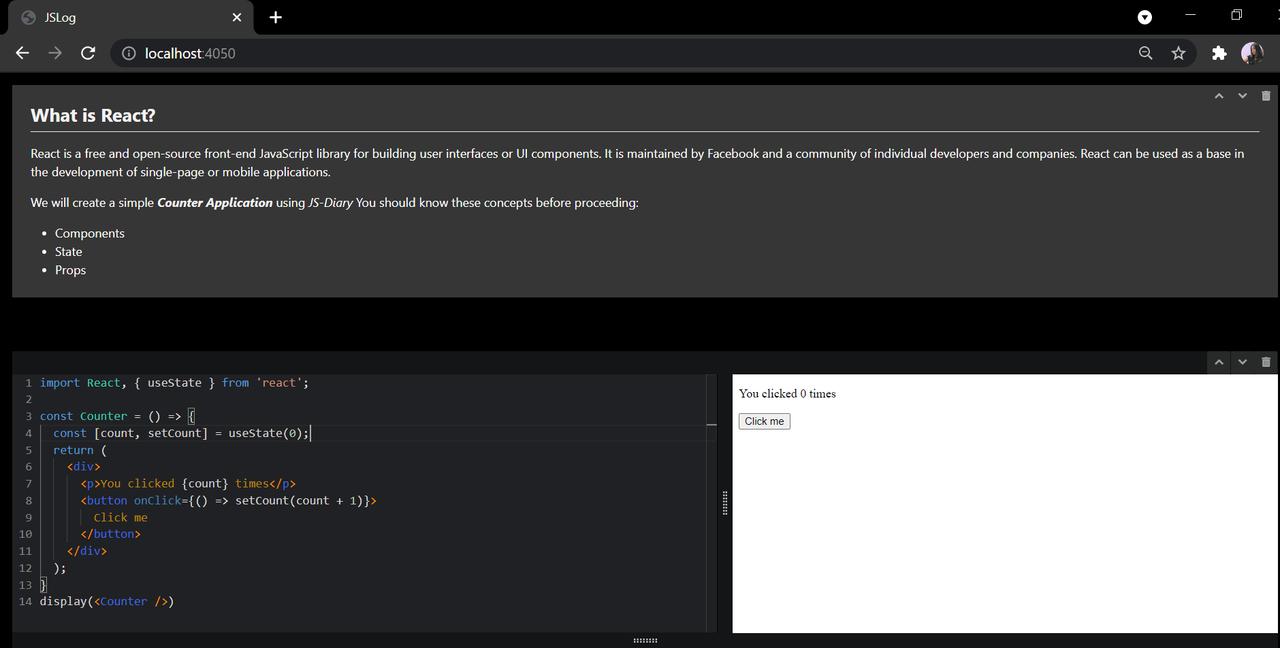
All of your changes get saved to a file you opened js-diary with.
If you run npx js-diary serve notebook.js then all your code and text will be saved to a file named notebook.js
By default, the name of the file is notes.js
Currently the file gets saved in JSON format ( Working on saving it in JS Format in future release )
Issues
Raise an Issue if you find any bugs/got ideas.
Copyright 2021 Karishma Shukla