
🕉️ JyotishMantra
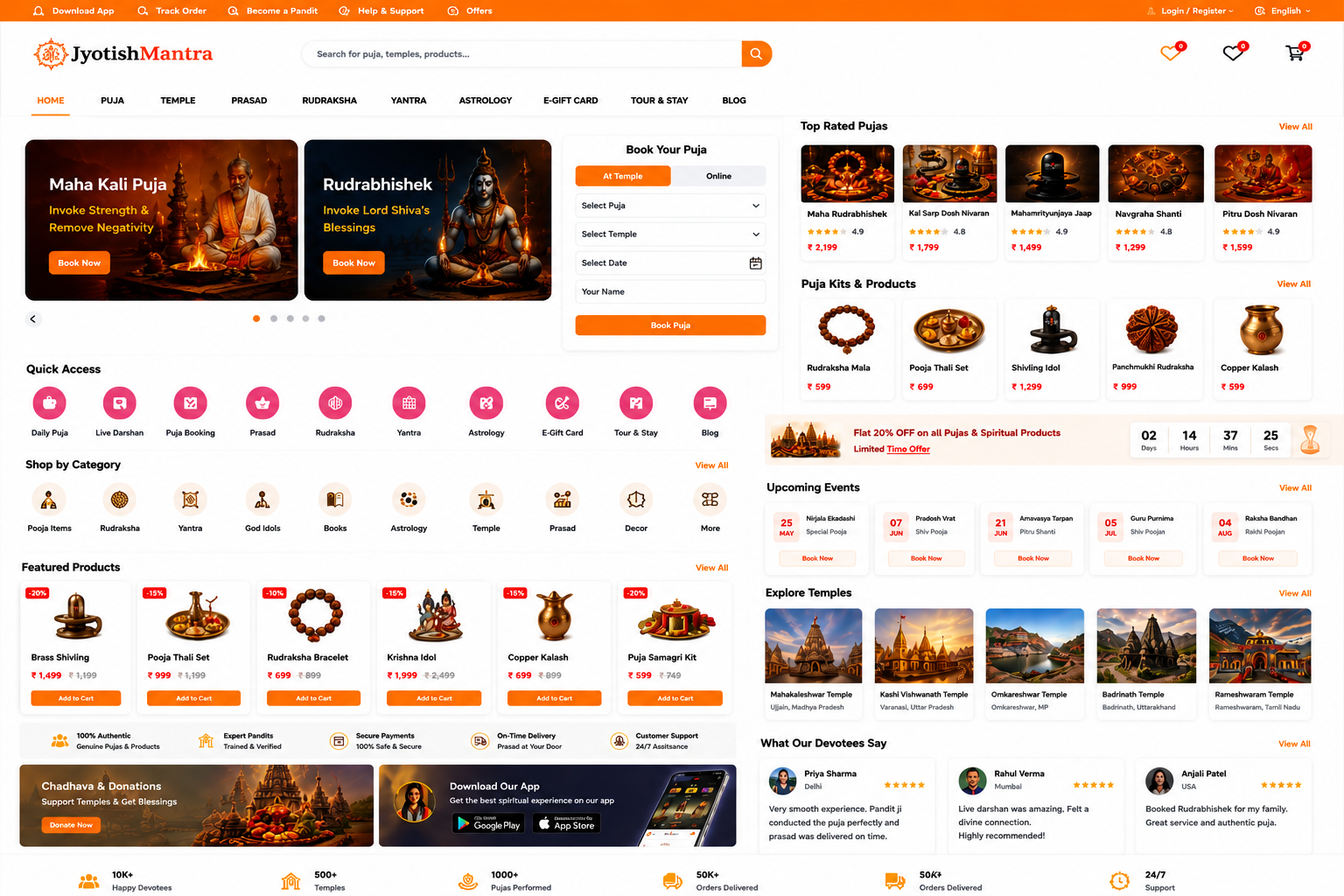
JyotishMantra is a comprehensive spiritual and religious platform that connects devotees with temples, pandits, astrology services, puja bookings, donations, darshan services, religious products, yatras, and various Hindu spiritual offerings.
🛕 Temple Booking & DarshanBook temple visits, VIP darshan, and spiritual experiences. |
🔱 Online & Offline Puja ServicesSchedule personalized pujas performed by verified priests. |
📿 Rudraksha & Spiritual ProductsShop authentic spiritual products and religious items. |
🔮 Astrology ConsultationConsult experienced astrologers for guidance and predictions. |
🎁 Religious Gift CardsSend spiritual gifts and blessings to your loved ones. |
🚕 Tour & Travel ServicesExplore pilgrimage destinations with curated travel packages. |
🎥 Live DarshanWatch live temple darshan and religious events online. |
🙏 Donations & ChadhavaOffer donations and temple contributions securely online. |
📚 Spiritual Content & BlogsRead articles, scriptures, spiritual guides, and insights. |
👨🏫 Verified Pandits & PriestsConnect with trusted priests for rituals and ceremonies. |
Landing Page
🏗️ Tech Stack
| Layer | Technology |
|---|---|
| Backend | Laravel 10 |
| Frontend | Blade Templates |
| Database | MySQL 8 |
| Web Server | Nginx |
| Containerization | Docker |
| Admin Panel | Laravel Admin |
| Authentication | Laravel Auth |
| File Storage | Laravel Storage |
🐳 Docker Setup
Prerequisites
- Docker
- Docker Compose
Verify installation:
docker --version
docker compose version
Start Containers
docker compose up -d
Build again if required:
docker compose up -d --build
Check running containers:
docker ps
Application URLs
| Service | URL |
|---|---|
| Website | http://localhost:8000 |
| PhpMyAdmin | http://localhost:8080 |
🗄️ Database Configuration
Main Database
DB_CONNECTION=mysql
DB_HOST=database
DB_PORT=3306
DB_DATABASE=mahakal_admin
DB_USERNAME=root
DB_PASSWORD=root
Blog Database
DB_CONNECTION_SECOND=mysql
DB_HOST_SECOND=database
DB_PORT_SECOND=3306
DB_DATABASE_SECOND=mahakal_blog
DB_USERNAME_SECOND=root
DB_PASSWORD_SECOND=root
📦 Create Required Databases
Enter MySQL container:
docker exec -it database mysql -uroot -proot
Create databases:
CREATE DATABASE IF NOT EXISTS mahakal_admin;
CREATE DATABASE IF NOT EXISTS mahakal_blog;
Verify:
SHOW DATABASES;
🔄 Laravel Installation
Enter container:
docker exec -it application bash
Install dependencies:
composer install
Generate application key:
php artisan key:generate
🧱 Database Migration
Run main database migrations:
php artisan migrate
Blog Database Migration
php artisan migrate --database=mysql2
Fresh Migration
php artisan migrate:fresh
Seed database:
php artisan db:seed
Or:
php artisan migrate:fresh --seed
🔧 Cache Commands
Clear config cache:
php artisan config:clear
Clear application cache:
php artisan cache:clear
Clear route cache:
php artisan route:clear
Clear views:
php artisan view:clear
Rebuild config:
php artisan config:cache
📁 Storage Permissions
If using Linux:
chmod -R 775 storage bootstrap/cache
chown -R www-data:www-data storage bootstrap/cache
For Docker:
docker exec -it application chmod -R 775 storage bootstrap/cache
🐛 Common Issues
SQLSTATE[HY000] [2002]
Check database connection:
php artisan config:clear
php artisan cache:clear
Verify environment:
php artisan tinker

config('database.connections.mysql')
config('database.connections.mysql2')
Permission Denied
chmod -R 775 storage
chmod -R 775 bootstrap/cache
Container Not Running
docker compose ps
Restart:
docker compose restart
🤝 Contributing
- Fork repository
- Create feature branch
git checkout -b feature/new-feature
- Commit changes
git commit -m "Add new feature"
- Push
git push origin feature/new-feature
- Create Pull Request
📄 License
This project is proprietary software owned by JyotishMantra.
Owner
© Yash Sharma. All Rights Reserved. For support, questions, or issue reporting, feel free to email: [email protected]