
Dataiku's Kiji Privacy Proxy











An intelligent privacy layer for AI APIs. Kiji automatically detects and masks personally identifiable information (PII) in requests to AI services, ensuring your sensitive data never leaves your control.
Built by 575 Lab - Dataiku's Open Source Office.
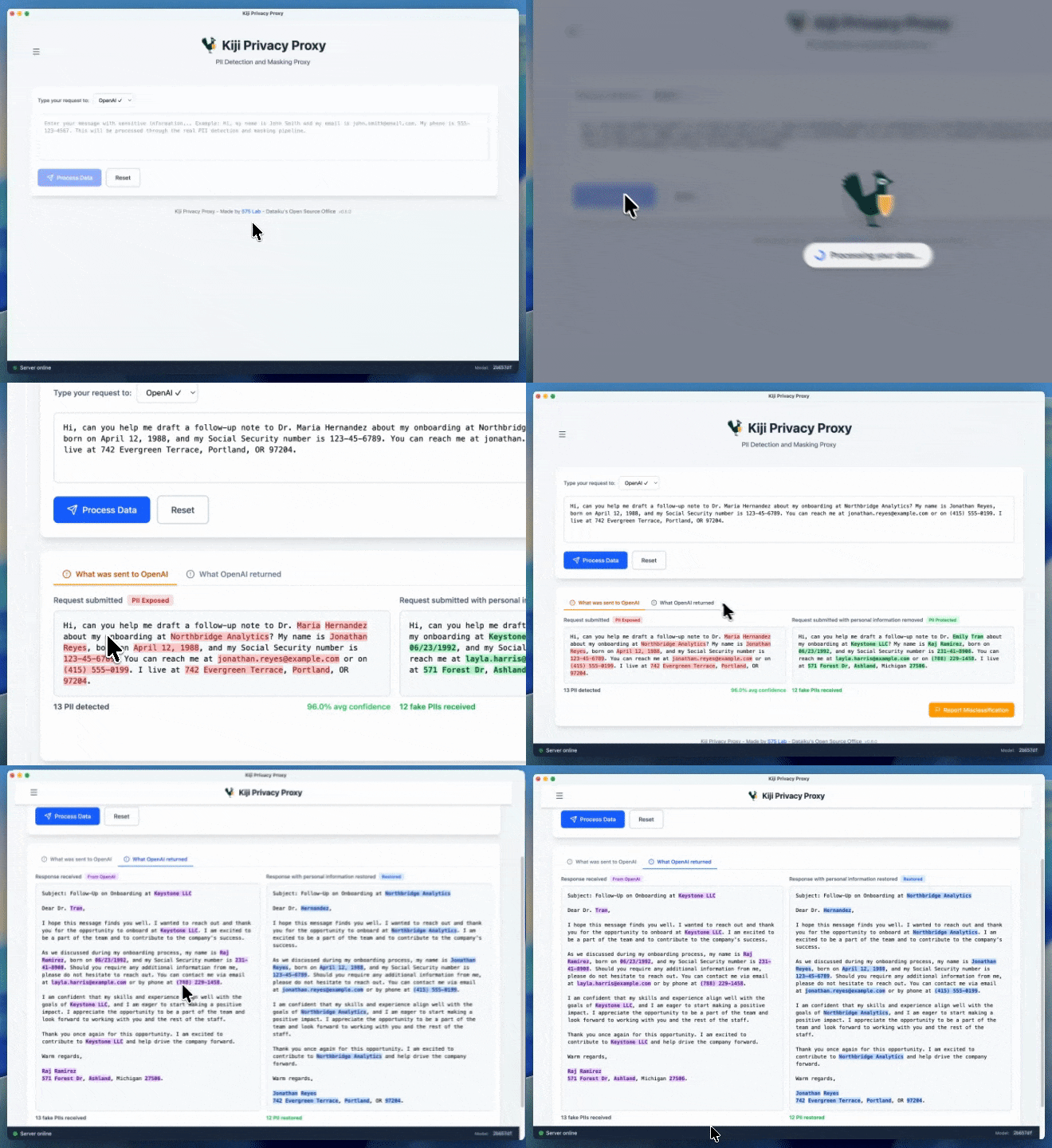
🎯 Why Kiji Privacy Proxy?
When using AI services like OpenAI or Anthropic, sensitive data in your prompts gets sent to external servers. Kiji solves this by:
- 🔒 Automatic PII Protection - ML-powered detection of 26 PII types (emails, SSNs, credit cards, etc.)
- 🎭 Seamless Masking - Replaces sensitive data with realistic dummy values before API calls
- 🔄 Transparent Restoration - Restores original data in responses so your app works normally
- 🎚️ Configurable Masking - Disable specific entity types or add your own regex rules for domain-specific PII (details)
- 🗂️ Review & Delete Mappings - Inspect every masked value and clear mappings from the app
- 🚀 Zero Code Changes - Works as a transparent proxy with automatic configuration (PAC) on macOS
- 🌐 Browser-Ready - Automatic proxy setup for Safari, Chrome - no environment variables needed
- 🧩 Chrome Extension - Inline PII detection for ChatGPT, Claude, Gemini, and other AI chat sites (details)
- 🏃 Fast Local Inference - ONNX-optimized model runs locally, no external API calls
- 💻 Easy to Use - Desktop app for macOS, standalone server for Linux
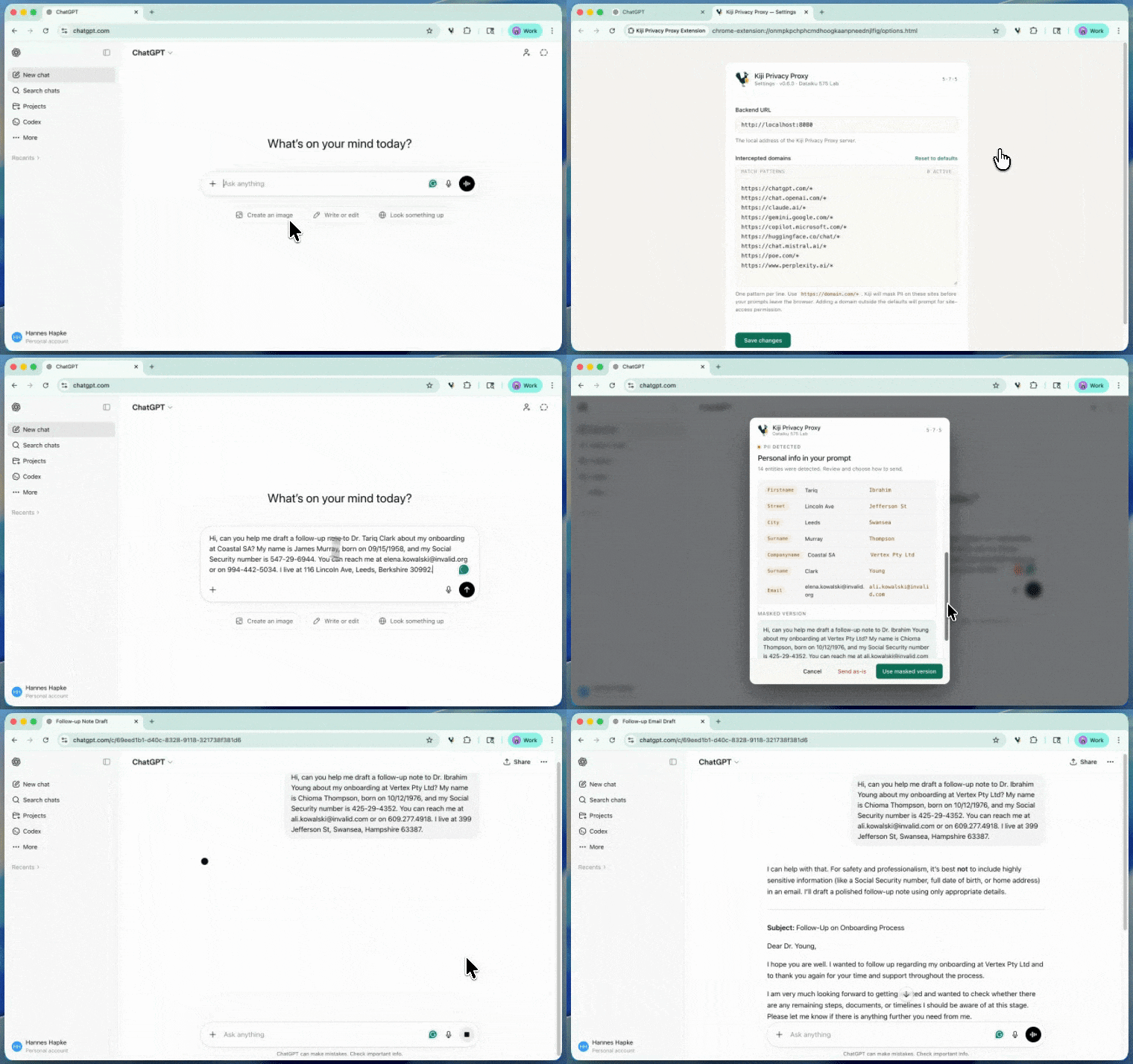
Use Cases:
- Protect customer data when using ChatGPT for customer support
- Sanitize logs before sending to AI for analysis
- Comply with privacy regulations (GDPR, HIPAA, CCPA)
- Prevent accidental data leaks in development/testing
⚡ Quick Start
For Users
macOS (Desktop App):
Homebrew (recommended):
brew install --cask dataiku/tap/kiji-privacy-proxy
Or download manually:
# Download the latest DMG from
# https://github.com/dataiku/kiji-proxy/releases
open Kiji-Privacy-Proxy-*.dmg
# Drag to Applications folder
Linux (Standalone Server):
Debian / Ubuntu (.deb):
wget https://github.com/dataiku/kiji-proxy/releases/download/vX.Y.Z/kiji-privacy-proxy_X.Y.Z_amd64.deb
sudo dpkg -i kiji-privacy-proxy_X.Y.Z_amd64.deb

# The systemd unit is installed but not enabled by default.
sudo systemctl enable --now kiji-privacy-proxy
# Or run in the foreground:
kiji-proxy
Other distros (tarball):
wget https://github.com/dataiku/kiji-proxy/releases/download/vX.Y.Z/kiji-privacy-proxy-X.Y.Z-linux-amd64.tar.gz
tar -xzf kiji-privacy-proxy-X.Y.Z-linux-amd64.tar.gz
cd kiji-privacy-proxy-X.Y.Z-linux-amd64

./run.sh
Unix socket listener (optional):
PROXY_UNIX_SOCKET_PATH="${XDG_RUNTIME_DIR:-/run/kiji-proxy}/kiji-proxy.sock" kiji-proxy
PROXY_UNIX_SOCKET_PATH behavior
When PROXY_UNIX_SOCKET_PATH is set, Kiji listens on the given Unix socket path instead of binding the main HTTP API to PROXY_PORT.
- If
PROXY_UNIX_SOCKET_PATHis unset, Kiji keeps the default TCP listener behavior and binds toPROXY_PORT. - If the socket file already exists, Kiji removes the stale socket before listening.
- The configured path is treated the same as the
UnixSocketPathconfig field. - The proxy creates the socket with permissions
0600. If broader access is required, the calling process or service wrapper should adjust permissions after startup.
Example:
PROXY_UNIX_SOCKET_PATH="${XDG_RUNTIME_DIR:-/run/kiji-proxy}/kiji-proxy.sock" kiji-proxy
Test It:
macOS (with automatic PAC):
# Start with sudo for automatic browser configuration
sudo "/Applications/Kiji Privacy Proxy.app/Contents/MacOS/kiji-proxy"

# Open browser - requests to api.openai.com automatically go through proxy!
# No configuration needed for Safari/Chrome

# For CLI tools, set environment variables:
export OPENAI_API_KEY="sk-..."
export HTTP_PROXY=http://127.0.0.1:8081
export HTTPS_PROXY=http://127.0.0.1:8081

curl https://api.openai.com/v1/chat/completions \
  -H "Content-Type: application/json" \
  -H "Authorization: Bearer $OPENAI_API_KEY" \
  -d '{
    "model": "gpt-4",
    "messages": [{"role": "user", "content": "My email is [email protected]"}]
  }'
Linux (manual proxy configuration):
# Set environment variables
export OPENAI_API_KEY="sk-..."
export HTTP_PROXY=http://127.0.0.1:8081
export HTTPS_PROXY=http://127.0.0.1:8081

curl https://api.openai.com/v1/chat/completions \
  -H "Content-Type: application/json" \
  -H "Authorization: Bearer $OPENAI_API_KEY" \
  -d '{
    "model": "gpt-4",
    "messages": [{"role": "user", "content": "My email is [email protected]"}]
  }'
What happens:
# Check logs - "[email protected]" was masked before sending to OpenAI
# Response contains the original email (restored automatically)
For Developers
# Clone and setup
git clone https://github.com/dataiku/kiji-proxy.git
cd kiji-proxy

# Install dependencies
make electron-install
make setup-onnx

# Run with debugger (VSCode)
# Press F5

# Or run directly
make electron
See full documentation: docs/README.md
✨ Key Features
- 26 PII Types Detected - Email, phone, SSN, credit cards, addresses, URLs, and more
- ML-Powered - DistilBERT transformer model with ONNX Runtime (model, dataset)
- Configurable Masking - Disable entity types, tune sensitivity, or add custom regex patterns
- Mapping Review - Sortable view of masked values with per-entry and bulk delete
- Automatic Configuration - PAC (Proxy Auto-Config) for zero-setup browser integration on macOS
- Real-Time Processing - Sub-100ms latency for most requests
- Thread-Safe - Handles concurrent requests with isolated mappings
- Desktop UI - Native Electron app for macOS with visual request monitoring
- Production Ready - Systemd service, Docker support, comprehensive logging
- Privacy First - All processing happens locally, no external dependencies
📚 Documentation
Complete documentation is available in docs/README.md:
- Getting Started - Installation, configuration, first release
- Development Guide - Dev setup, debugging, workflows
- Building & Deployment - Building from source, production deployment
- Release Management - Versioning, changesets, CI/CD
- Advanced Topics - MITM proxy, model signing, troubleshooting
- Chrome Extension - Building, configuring, and publishing the PII Guard extension
- Customizing the PII Model - Training a model with your own entity types
- Masking Controls & Review - Disable entity types, custom regex, mapping review
Quick Links:
- Installation Guide
- Automatic Proxy Setup (PAC)
- VSCode Debugging
- Build for macOS
- Build for Linux
- Masking Controls - disable entities, custom regex, review mappings
🤗 HuggingFace Models & Data
The PII detection model and training data are published on HuggingFace:
| Resource | Link |
|---|---|
| Quantized ONNX model | DataikuNLP/kiji-pii-model-onnx |
| Trained SafeTensors model | DataikuNLP/kiji-pii-model |
| Training dataset | DataikuNLP/kiji-pii-training-data |
You can train your own model or fine-tune the existing one. See Customizing the PII Model for the full workflow.
🏗️ Architecture
┌─────────────────┐    ┌──────────────---───┐        ┌─────────────────┐
│  Your App/CLI   │───►│ Kiji Privacy Proxy │───────►│  Provider API   │
│                 │    │  Forward     :8080 │        │  (Masked Data)  │
│                 │◄───┤  Transparent :8081 │◄───────┤                 │
│  Original Data  │    │  Detect / Mask /   │        │  OpenAI,        │
│                 │    │  Restore           │        │  Anthropic, ... │
└─────────────────┘    └────────────────────┘        └─────────────────┘
What Happens:
- Your app sends request to Kiji Privacy Proxy
- Kiji detects PII using the ML model (plus any custom regex rules) for the entity types you've enabled
- PII is replaced with dummy data
- Request forwarded to the provider (OpenAI, Anthropic, Gemini, Mistral) with masked data
- Response received and PII restored
- Original-looking response returned to your app
You control which entity types are masked and can review or delete recorded mappings from the app — see Masking Controls & Review.
🤝 Contributing
We welcome contributions! Here's how to help:
- Report Issues - Found a bug? Open an issue
- Submit PRs - See docs/02-development-guide.md for dev setup
- Improve Docs - Documentation PRs are always welcome
- Share Feedback - Start a discussion
- Join our Slack - Slack Community
Quick Contribution Guide:
# 1. Fork and clone
git clone https://github.com/YOUR-USERNAME/kiji-proxy.git

# 2. Create feature branch
git checkout -b feature/my-feature

# 3. Make changes and add changeset
cd src/frontend
npm run changeset

# 4. Test
make test-all
make check

# 5. Submit PR
A few things to know before your first PR:
- Sign the CLA — our CLA Assistant bot will comment on your first PR with a one-click link to sign Dataiku's Individual CLA. Required before we can merge.
- Add yourself to CONTRIBUTORS.md once your PR is merged — every kind of contribution counts (code, docs, triage, training data).
See CONTRIBUTING.md for detailed guidelines.
💖 Support the Project
If you find Kiji useful, here's how you can support its development:
⭐ Star the Repository
Click the ⭐ button at the top of this page - it helps others discover the project!
🐛 Report Issues & Request Features
Found a bug or have an idea? Open an issue
📝 Contribute Code or Documentation
Pull requests are welcome! See CONTRIBUTING.md for guidelines.
💬 Spread the Word
- Share on Twitter/LinkedIn
- Write a blog post about your experience
- Present at meetups/conferences
🎓 Improve the ML Model
- Contribute training data samples
- Improve PII detection accuracy
- Add support for new PII types
📚 Write Tutorials
- Create video tutorials
- Write integration guides
- Share use cases and examples
Every contribution, big or small, makes a difference!
🧪 Development
Prerequisites
- Go 1.25+ with CGO enabled
- Node.js 20+
- Python 3.13+
- Rust toolchain
Quick Setup
# Install dependencies
make electron-install

# Run with VSCode debugger (F5)
# Or run directly
make electron
Available Commands
make help              # Show all commands
make electron          # Build and run Electron app
make build-dmg         # Build macOS DMG
make build-linux       # Build Linux tarball
make test-all          # Run all tests
make check             # Code quality checks
See docs/02-development-guide.md for detailed development guide.
📦 Releases
Download the latest release from GitHub Releases:
- macOS:
Kiji-Privacy-Proxy-{version}.dmg(~400MB) - Linux (tarball):
kiji-privacy-proxy-{version}-linux-amd64.tar.gz(~150MB) - Linux (Debian/Ubuntu):
kiji-privacy-proxy_{version}_amd64.deb
Automated Builds: CI/CD builds both platforms in parallel on every release tag.
See docs/04-release-management.md for release process.
🔒 Security
Reporting Vulnerabilities:
Do not open public issues for security vulnerabilities.
Email: [email protected] (or contact maintainers privately)
Security Features:
- All processing happens locally
- No external API calls for PII detection
- Optional encrypted storage for mappings
- MITM certificate for local use only
See docs/05-advanced-topics.md#security-best-practices for security guidelines.
📄 License
Copyright (c) 2026 Dataiku SAS
This project is licensed under the Apache 2.0 License - see the LICENSE file for details.
🚀 Contributors
🤝 Project Partners
Kiji is built in collaboration with these partners (read the announcement):


- Outerbounds — ML infrastructure: Metaflow orchestrates the model training pipelines
- HumanSignal — Data labeling: Label Studio powers dataset annotation and refinement
- Doubleword — Inference platform used to generate the synthetic training data
🙏 Acknowledgments
- ONNX Runtime - Microsoft's cross-platform ML inference engine
- HuggingFace - DistilBERT model and tokenizers
- Electron - Cross-platform desktop framework
- Go Community - Excellent libraries and tools
Made with ❤️ for privacy-conscious developers
GitHub • Issues • Discussions • Slack • Documentation