
ktop
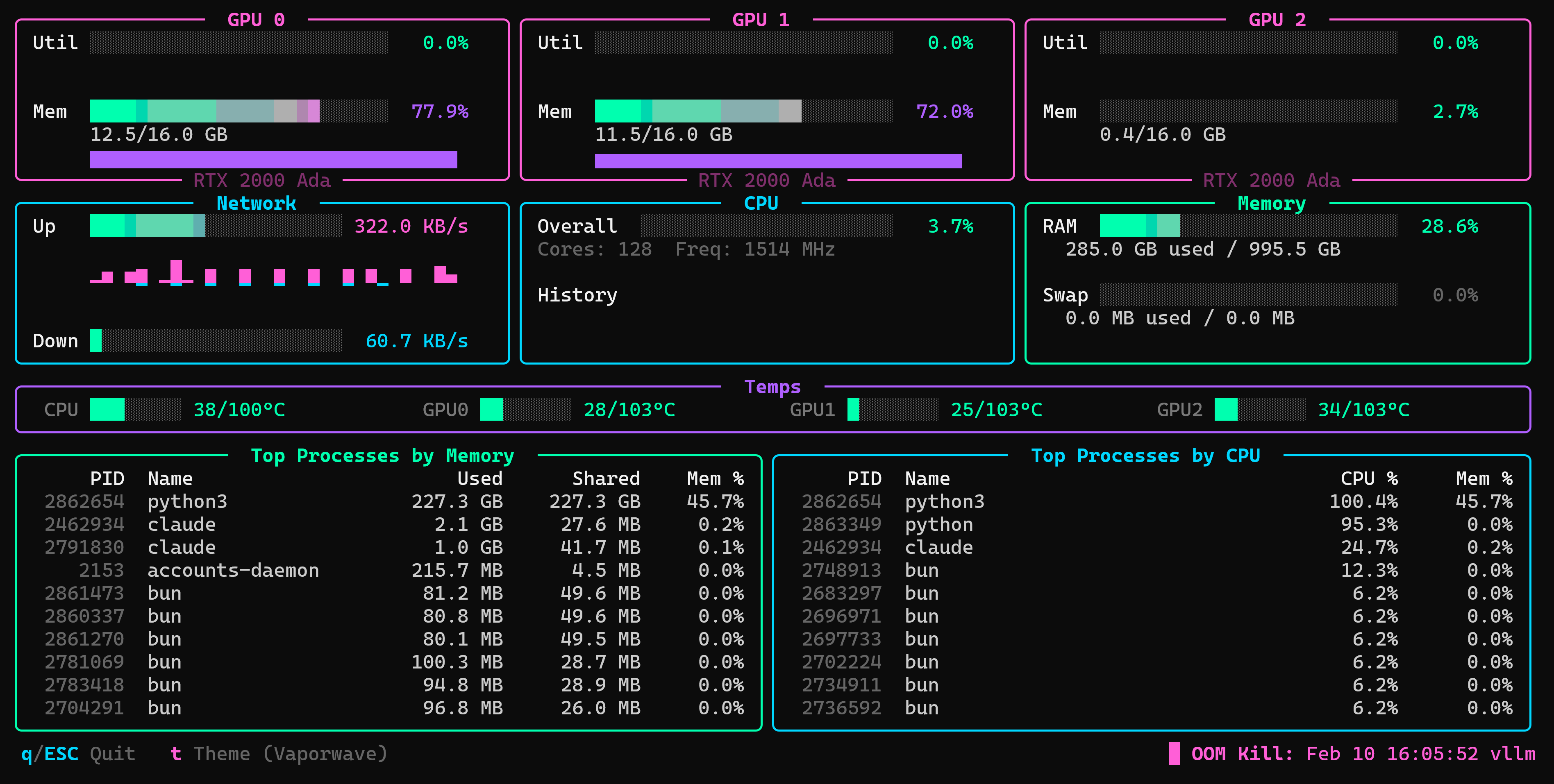
A terminal-based system resource monitor built for tracking resource usage when running hybrid LLM workloads.

Features
Latest
- Rewritten from Python to Rust — single static binary, near-zero CPU overhead, instant startup
- One-line install and upgrade:
curl -sSfL https://raw.githubusercontent.com/brontoguana/ktop/master/install.sh | bash - No runtime dependencies — no Python, no pip, no venv
Core
- GPU Monitoring — Per-GPU utilization and memory usage with color-coded sparkline history (NVIDIA + AMD)
- Network Monitoring — Upload/download speeds with separate colored sparklines (upload extends up, download extends down)
- CPU Monitoring — Overall CPU usage with gradient bar chart and sparkline history
- Memory Monitoring — RAM and swap usage with gradient progress bars
- Temperature Strip — CPU, memory, and per-GPU temps with mini bar charts and hardware-accurate thresholds
- OOM Kill Tracker — Status bar shows the most recent OOM kill from the last 8 hours (kernel OOM and systemd-oomd)
- Process Tables — Top 10 processes by memory (Used/Shared) and CPU usage (Core % + system-wide CPU %)
- 50 Color Themes — Press
tto browse and switch themes with live preview; persists across sessions - Color Mode Toggle — Press
cto switch between truecolor and safe Basic color output; persists across sessions - Gradient Bar Charts — Smooth per-block color gradients from low to high across all bars
- Responsive UI — 50ms input polling for snappy keyboard navigation
Install
curl -sSfL https://raw.githubusercontent.com/brontoguana/ktop/master/install.sh | bash
Downloads the latest binary and installs it to /usr/local/bin (will prompt for sudo if needed). Run the same command again to upgrade.
Installed versions can also update themselves:
ktop update
To remove only the installed ktop executable and leave user config untouched:
ktop uninstall
Build from source
git clone https://github.com/brontoguana/ktop.git
cd ktop/ktop-rs
cargo build --release
sudo cp target/release/ktop /usr/local/bin/
Usage
# Run with defaults (1s refresh)
ktop

# Custom refresh rate
ktop -r 2

# Start with a specific theme
ktop --theme "Tokyo Night"

# Simulation mode (fake OOM kills, profiling to /tmp/ktop_profile.log)
ktop --sim

# Remote terminal fallback if the display flashes
ktop --compat

# Report terminal size and resize behavior
ktop diagnose-terminal

# Isolate which terminal repaint behavior flashes
ktop diagnose-render --case full-paint

# Show version
ktop --version

# Update or remove ktop
ktop update
ktop uninstall
Keybindings
| Key | Action |
|---|---|
q / ESC |
Quit |
t |
Open theme picker |
c |
Toggle color mode between truecolor and safe Basic color output |
| Arrow keys | Navigate theme picker |
Enter |
Select theme |
Remote Terminal Compatibility
If a web or remote-support terminal flashes while repainting, try:
ktop --compat
Compatibility mode disables alternate screen and synchronized redraws, slows the default refresh to 2s, and uses lower-churn rendering by suppressing moving sparklines and refreshing process tables less often. It also uses coarse progress bars instead of per-cell gradients, avoids dark-gray ANSI styling and shaded filler glyphs, and clears the current screen on entry/exit so stale styled cells do not remain behind the shell prompt.
You can also set KTOP_COMPAT=1.
If a terminal flashes on extended color output, press c in the main view to switch Color from Truecolor to Basic. Basic mode avoids RGB and indexed foreground color escapes and is saved in ~/.config/ktop/config.json.
To check whether a terminal is reporting unstable sizes or repeated resize events:
ktop diagnose-terminal --duration 8
If the size report is stable but ktop still flashes, isolate the repaint trigger:
ktop diagnose-render --case plain --duration 4
ktop diagnose-render --case cursor --duration 4
ktop diagnose-render --case color --duration 4
ktop diagnose-render --case rgb --duration 4
ktop diagnose-render --case unicode --duration 4
ktop diagnose-render --case full-paint --duration 4
ktop diagnose-render --case clear --duration 4
ktop diagnose-render --case alternate --duration 4
ktop diagnose-render --case sync --duration 4
Report which cases visibly flash. Each case exits by itself.
If a command unexpectedly starts the monitor, check ktop --version; terminal diagnostics and compatibility mode require ktop 1.0.10 or newer.
Requirements
- Linux (reads
/procand sysfs directly) - NVIDIA GPU + drivers (optional — for NVIDIA monitoring)
- AMD GPU +
amdgpudriver (optional — for AMD monitoring) - No runtime dependencies — single static binary
License
MIT