🚀 Kubernetes Complete Hands‑On Guides 🌟

















🚀 Community-Driven Knowledge Hub
We welcome contributions to build the most comprehensive Kubernetes hands-on resource!
📢 How You Can Help:
- 🐛 Report Issues
- 💡 Suggest New Guides
- ✍️ Submit Article Improvements
- 📚 Add Missing Concepts
- ✅ Review Open PRs


Table of Contents
- Why These Guides?
- Introduction
- My Blogs On Kubernetes
- Concepts Covered in This Repository
- Architecture
- Basic Concepts
- Conclusion
- References
Why These Guides? 💡
✅ Battle-Tested Content - Lessons from managing 1000+ pods in production
✅ Cloud-Agnostic - Works on AWS EKS, GCP GKE, Azure AKS, and bare metal
✅ Version Current - Updated for Kubernetes 1.32+ features
✅ Zero Fluff - Direct executable examples with explanations
Introduction
Kubernetes, also known as K8s, is an open-source container orchestration platform designed to automate the deployment, scaling, and management of containerized applications. It groups containers into logical units for easy management and discovery, ensuring high availability and scalability.
My Blogs On Kubernetes
Here is a List of My Blog Posts on Kubernetes
Concepts Covered in This Repository
EKS Getting Started
1. A Hands-On Guide to AWS EKS Fargate Cluster
2. A Hands-On Guide to AWS EKS Cluster with Managed Node Groups
3. A Hands-On Guide to AWS EKS Cluster with Self-Managed Worker Nodes
4. A Hands-On Guide to AWS EKS Cluster with Managed Node Groups
5. AWS Load Balancer Controller on EKS: A Comprehensive Guide
6. Amazon EKS Auto Mode: A Hands-On Guide
7. Amazon EKS Kubecost: A Hands-On Guide
8. EKS Node Viewer: A Hands-On Guide
9. EKS Pod Density with Prefix Delegation: A Complete Guide
Cluster Setup and Configuration
1. Spin Up a Local Kubernetes Cluster with kind in Minutes
2. Step-by-Step Guide: Setting Up a Kubernetes Cluster on AWS EC2 Using kubeadm
3. 🐳 Getting Started with Minikube
Deployment Strategies
1. Blue-Green Deployment Strategy
2. Canary Deployment Strategy
3. Rolling Update Deployment Strategy
4. Recreate Deployment Strategy
FluxCD Getting Started
1. Hands-On FluxCD: GitOps for Kubernetes at Scale
Monitoring Getting Started
1. Grafana Loki: Log Aggregation for Kubernetes
2. Prometheus and Grafana: Monitoring Kubernetes Clusters
3. Alertmanager: Managing Alerts in Kubernetes
4. ELK Stack: Centralized Logging for Kubernetes
Scaling Getting Started
1. Horizontal Pod Autoscaler (HPA)
2. Vertical Pod Autoscaler (VPA)
3. Karpenter + EKS: The Smart Way to Scale
4. KEDA (Kubernetes Event-Driven Autoscaling)
Backup and Restore Guides
1. Velero: Backup and Restore for Kubernetes
Security in Kubernetes
1. HashiCorp Vault: Secrets Management for Kubernetes
2. CoreDNS: DNS and Service Discovery in Kubernetes
AI in Kubernetes
1. Building an Intelligent EKS Troubleshooting Assistant: AI-Driven Kubernetes Operations
2. Kubectl-AI: Enhance Kubernetes Management with AI
Architecture

Master Node Components
The master node is responsible for managing the Kubernetes cluster. It oversees the nodes and the pods running within the cluster. Key components of the master node include:
- API Server: Exposes the Kubernetes API, acting as the front end for the Kubernetes control plane.
- Etcd: A consistent and highly-available key-value store used for all cluster data.
- Scheduler: Assigns workloads to the worker nodes based on resource availability.
- Controller Manager: Runs controller processes to regulate the state of the cluster, handling tasks like node failures and endpoint management.
- Cloud Controller Manager: Manages cloud-specific controller processes.
Worker Node Components
Worker nodes run the applications and handle the containerized workloads. Each worker node has its own set of components:
- Kubelet: Ensures that containers are running in a pod by communicating with the master node.
- Kube-proxy: Maintains network rules and handles network communication within and outside the cluster.
- Container Runtime: Runs the containers. Common runtimes include Docker, containerd, and CRI-O.
📚 Guides Covered in This Repository
This repository contains a comprehensive set of hands-on guides and practical examples for mastering Kubernetes. Below is a categorized list of topics covered:
Kubernetes Basics
- Introduction to Kubernetes Architecture
- Understanding Master and Worker Node Components
- Pods, Services, and Deployments
- Namespaces and Resource Management
- Volumes and Persistent Storage
Advanced Kubernetes Concepts
- Rolling Updates and Recreate Deployment Strategies
- Blue-Green and Canary Deployment Strategies
- Kubernetes RBAC (Role-Based Access Control)
- Kubernetes Resource Quotas and Limit Ranges
- Kubernetes Pod Disruption Budgets (PDBs)
Kubernetes Tools
- Using
kubectlfor Cluster Management - Helm: Kubernetes Package Manager
- Velero: Backup and Restore for Kubernetes
- ArgoCD: Continuous Delivery for Kubernetes
- FluxCD: GitOps for Kubernetes
- eksctl: Managing Amazon EKS Clusters
Kubernetes Networking
- Kubernetes Ingress and Routing
- Transitioning to HTTPS with Self-Signed Certificates
- Kubernetes Taints and Tolerations
- Kubernetes Endpoints and EndpointSlices
Kubernetes Scaling and Performance
- Horizontal and Vertical Pod Autoscalers
- Kubernetes Priority Classes and QoS Classes
- Scaling with Karpenter on AWS EKS
Kubernetes on Cloud
- Setting Up Amazon EKS Clusters with eksctl
- Using Fargate Profiles in Amazon EKS
- Azure DevOps Self-Hosted Agents on Kubernetes
🚀 How to Use This Repository Effectively
1. Clone the Repository
Start by cloning the repository to your local machine:
git clone https://github.com/anveshmuppeda/kubernetes.git
cd kubernetes
2. Explore the Guides
The repository is organized into directories and files for each topic. Navigate through the folders to find the guide you are interested in.
3. Run the Examples
Each guide includes practical examples. Follow the instructions provided in the guide to execute the examples in your Kubernetes environment.
4. Use the Docker Images
This repository also includes Dockerfiles for Kubernetes tools like kubectl, helm, velero, argocd, fluxcd, and eksctl. You can build and use these images as follows:
Build the All-in-One Docker Image:
docker build \
  --build-arg KUBECTL_VERSION=<kubectl_version> \
  --build-arg HELM_VERSION=<helm_version> \
  --build-arg VELERO_VERSION=<velero_version> \
  --build-arg ARGOCD_VERSION=<argocd_version> \
  --build-arg FLUX_VERSION=<flux_version> \
  --build-arg EKSCTL_VERSION=<eksctl_version> \
  -t anvesh35/k8s-tools:allinone \
  -f dockerfiles/k8s-tools/allinone/Dockerfile .
Run the All-in-One Docker Image:
docker run --rm -it anvesh35/k8s-tools:allinone bash
5. Contribute to the Repository
We welcome contributions! If you find an issue or have an idea for improvement, feel free to open an issue or submit a pull request.
Conclusion
This repository is a one-stop resource for learning Kubernetes with hands-on examples and practical guides. Whether you are a beginner or an advanced user, you will find valuable content to enhance your Kubernetes knowledge and skills.
References
- Kubernetes Documentation
- Kubernetes GitHub Repository
- Kubernetes API Reference
- Kubernetes Icon Set
- Minikube Play Ground
- K8s Labs
- Killercoda Play Ground
Project Maintainers & Contributors
 Anvesh Muppeda |
 Sai Manasa Kota |
 Rohini Gundala |
 Devansh Bharadwaj |
 Ajay Muppeda |
License
This project is licensed under the GNU License - see the LICENSE file for details.
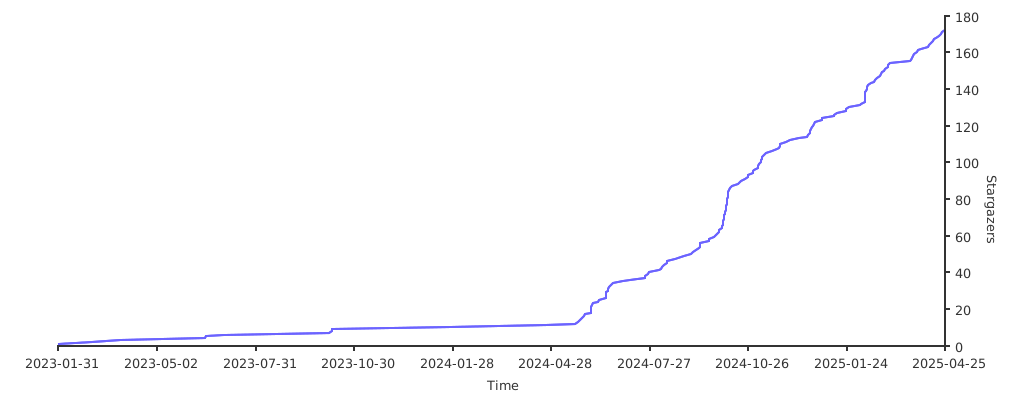
Stargazers over time