
 Kumiho






Ultra-lightweight, High-performance, Self-hosted Web Media Server
🌐 Language: English | 日本語 | 한국어
[!IMPORTANT]
v0.15.0 Library Rescan Notice: The recursive leaf-series scanner changes how nested folders are interpreted. After updating, a library rescan is required, and existing reading progress or metadata links are not guaranteed to carry over for libraries whose series layout is rebuilt.
v0.14.0 Plugin Secret Key A
PLUGIN_SECRET_KEYenvironment variable has been added to encrypt plugin credentials (API keys, tokens, etc.).If not set, a key is auto-generated and saved to
data/.plugin_secret_key. The server will start without any configuration, but without the original generated key file, stored plugin credentials cannot be decrypted. For reliable operation, it is recommended to setPLUGIN_SECRET_KEYexplicitly in your environment.v0.10.x Docker update: Docker base images were changed for CGO/native-library compatibility. Please re-pull the image and recreate the container when updating.
v0.9.0 Security Enhancement & Breaking Change For improved security, the container execution privilege has been changed from
rootto a standard user (appuser).Note for existing users: If thumbnails are broken or you encounter "Permission Denied" errors, please ensure you set the
PUIDandPGIDenvironment variables to match your account IDs (check with theidcommand in your terminal).
🇺🇸 What is Kumiho?
Kumiho is a self-hosted web media server designed to manage and stream your personal collection of comics and e-books.
It was originally developed by a developer for personal convenience, after feeling limitations with existing solutions. Written in Golang, Kumiho is lightweight and fast.
✨ Key Features
| Feature | Description |
|---|---|
| 🚀 Blazing Fast | Built with Golang, Kumiho runs as a native binary without JVM overhead, offering incredible scan speeds. |
| 📂 Recursive Leaf Discovery | It recursively scans nested folders and collects actual readable leaf series without requiring complex metadata matching. |
| ⚡ Lightweight | Optimized for low-resource environments. It runs smoothly with minimal memory footprint. |
| 📱 Responsive Viewer | Provides a seamless streaming experience on PC, Tablet, and Mobile devices. Supports 'Webtoon' scrolling mode. |
| 🎧 Audiobook Support | Supports audiobook libraries with chapter list, resume playback, progress tracking, bookmarks, and sleep timer. |
| 🎵 Immersive BGM | Automatically plays audio files (.mp3) within the series folder when the filename matches. |
Supported Formats
| Category | Supported Extensions |
|---|---|
| Images | .jpg, .jpeg, .png, .webp, .gif, .bmp |
| Archives | .zip, .cbz |
| E-books | .epub, .pdf, .txt |
| Audio | .mp3, .wav, .ogg, .oga, .flac, .m4a, .m4b, .aac, .wma, .opus, .mp4 |
📁 Folder Structure: Automatically recognizes image files in folders or archive files and organizes them into volumes/chapters.
🔜 Coming Soon
| Category | Planned Extensions |
|---|---|
| Archives | .cbr, .rar, .cb7, .7z |
- Support
comicInfo.xml- Metadata management interaction
- OPDS Support
- Mobile viewer application support
📁 Recommended Library Structure
1) Series folder with volume/chapter files directly
/books
└── My Series
    ├── 001.zip
    ├── 002.pdf
    └── 003.epub
2) Series folder with chapter/volume subfolders
/books
└── My Series
    ├── Chapter 01
    │   ├── 001.zip
    │   └── 002.zip
    ├── Chapter 02
    │   └── 001.pdf
    └── Chapter 03
        └── 001.epub
3) Nested Folders (Infinite Hierarchy)
Kumiho supports infinite folder hierarchy through recursive leaf discovery. You can organize your files with any level of subfolders, and Kumiho will scan down to the actual readable leaf series.
/books
└── Grand Parent Category
    └── Parent Category
        └── My Series
            ├── Volume 01
            │   ├── Chapter 01
            │   │   └── 001.zip
            │   └── Chapter 02.pdf
            └── 002.epub
In the example above, Kumiho uses the nested folders for discovery, then adds the resulting leaf series to the library list instead of rendering the entire folder tree as a separate browse UI.
🎵 BGM Auto-Play Rule
- Supported audio formats:
.mp3,.ogg,.wav,.flac,.m4a - BGM auto-plays when the audio file has the same base filename as the currently opened volume/chapter file.
- Example:
001.zip↔001.mp3,001.epub↔001.mp3
🎧 Audiobook Support
- Supported audiobook formats:
.mp3,.wav,.ogg,.oga,.flac,.m4a,.m4b,.aac,.wma,.opus,.mp4 - Supports resume playback, chapter-based navigation, progress tracking, bookmarks, and sleep timer
- Audiobooks can be organized with the same nested folder structure used for books
- When creating a library for audiobooks, set the library type to Audiobook
🛠 Installation (Docker)
Docker Compose (Recommended)
version: "3.8"
services:
  kumiho:
    image: ahahyeong/kumiho:latest
    container_name: kumiho
    restart: unless-stopped
    ports:
      - "9999:9999"
    volumes:
      - ./data:/app/data # Path to store database and data
      - ./config:/app/config # Path to store configuration
      - ./books:/books # Path to your library
    environment:
      - PUID=1000 # User ID (Can be found via `id` command)
      - PGID=1000 # Group ID
      - TZ=Asia/Seoul
      - JWT_SECRET=your_secret_key # Recommended for security
      - PLUGIN_SECRET_KEY=your_plugin_secret_key # Required: without this, plugin credentials cannot be decrypted after reinstall
Docker Run
docker run -d \
  --name kumiho \
  -p 9999:9999 \
  -v $(pwd)/data:/app/data \
  -v $(pwd)/config:/app/config \
  -v $(pwd)/books:/books \
  -e PUID=1000 \
  -e PGID=1000 \
  -e TZ=Asia/Seoul \
  -e JWT_SECRET=your_secret_key \
  -e PLUGIN_SECRET_KEY=your_plugin_secret_key \
  --restart unless-stopped \
  ahahyeong/kumiho:latest
📂 Library Path Setup Guide
If you mounted ./books:/books in your Docker Compose volumes configuration, you must enter the container internal path /books on the Kumiho settings page.
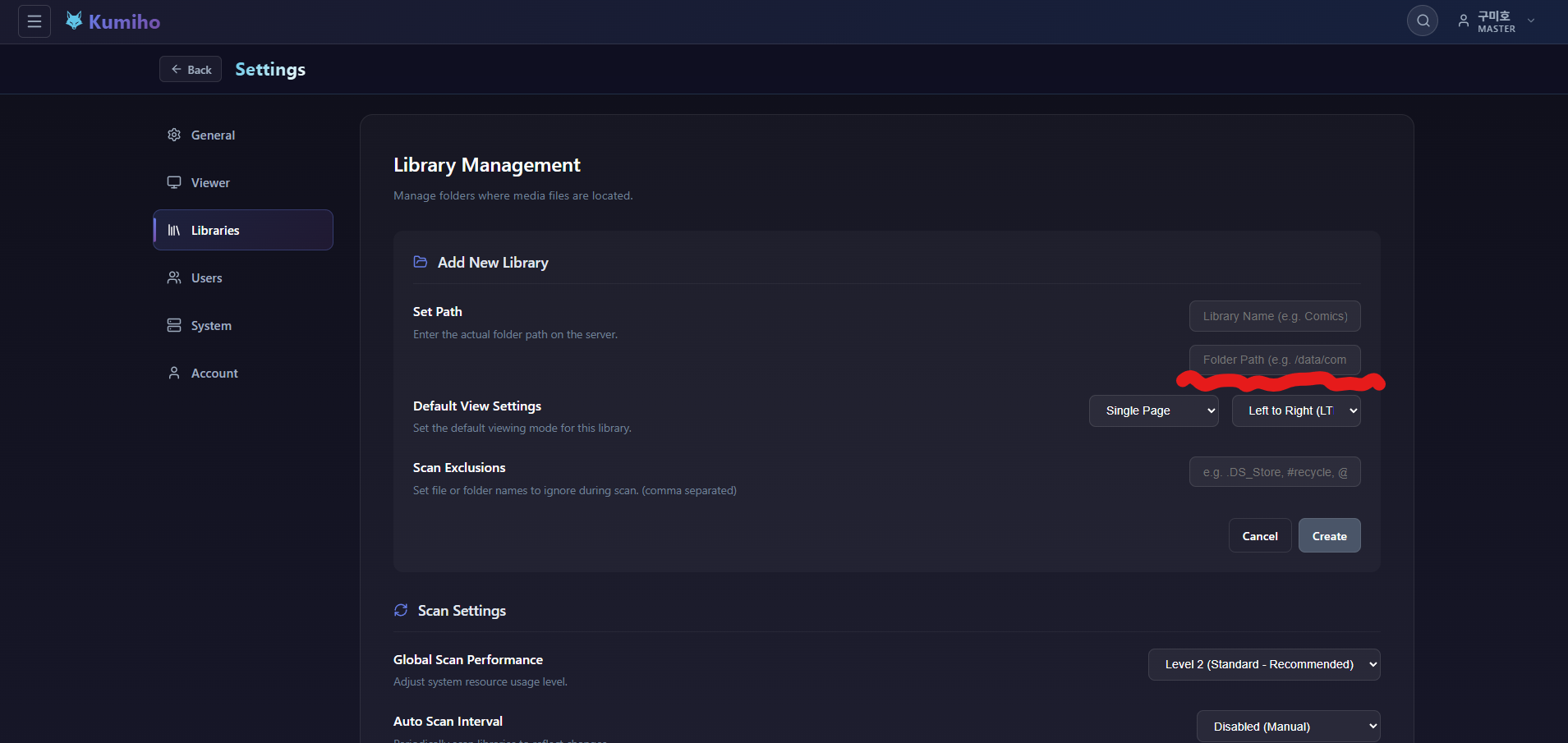
- Go to the Settings > Libraries tab.
- Click the Add New Library button.
- Enter
/booksin the Set Path field. (Do NOT use the host path./books!)
Note: The scanner automatically excludes
@eaDir,#recycle,.DS_Store, andThumbs.db.