
Layr - Production System for AI-Built Apps
A modular production system for turning AI-built interfaces into production-grade apps. Layr turns proven UX, design, accessibility, security, performance, SEO, CRO, marketing, and copywriting principles into enforceable constraints that reduce friction, build trust, and drive action.
Works with Claude, Codex, Cursor + all other agentic AI models.
Join the Reddit community for updates, ideas and feedback from other builders using Claude, Codex, Cursor and modern AI workflows.
reddit.com/r/Layr
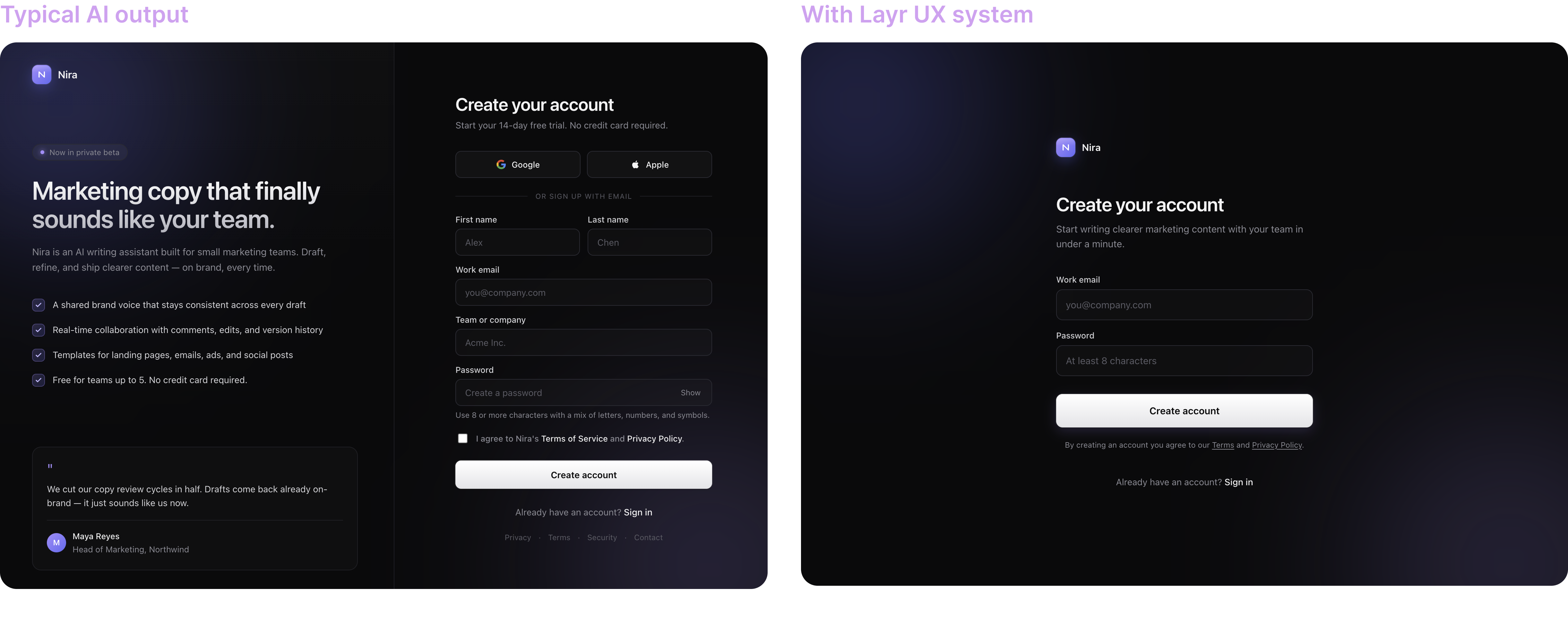
Before vs After
Turn typical AI output into a clearer, more usable, more production-ready interface.
Quick Setup Guide
Layr works with zero setup.
Start with Option 1. If your AI tool cannot read GitHub URLs, use Option 2.
Option 1 - Paste the repo URL
Use this when your AI tool can read GitHub URLs.
Copy this prompt, paste it into your AI model, then replace the task line with your own request:
Use https://github.com/layr-hq/layr as the production system for AI-built apps.

Read RUN.md first, then follow it.

Scope: Auto
Depth: Standard

Task:
Improve the pricing page so users can choose a plan faster.
Option 2 - Add Layr to your project
Use this when your AI tool works best with local files or cannot reliably read GitHub URLs.
- Download or clone this repo into your project root as
layr. - Copy this prompt and paste it into your AI model.
- Replace the task line with your own request.
Use ./layr/RUN.md for this task.

Scope: Auto
Depth: Standard

Task:
Improve the pricing page so users can choose a plan faster.
Option 3 - Add optional product context
This is optional. Use it when you want stronger product and brand fit.
- Copy this file:
layr/layr.config.example.md
- Rename the copy to:
layr/layr.config.md
- Fill only what you know. Leave the rest blank.
Do not edit modules/, methods/, or RUN.md.
Option 4 - Add optional screen context
This is optional. Use it for important screens where precision matters.
- Copy the screen template:
layr/screens/screen-template.md
- Rename the copy to match the screen:
layr/screens/pricing.md
layr/screens/onboarding.md
layr/screens/dashboard.md
- Fill only the fields that materially affect the result.
Example
“Create a dashboard for a project management app”
→ Layr selects the relevant modules and improves the output against production rules.
Table of Contents
- What this is
- What it’s based on / Methods
- Why it matters
- How the system works
- Quality modes
- Module system
- Instructions
- Files
- Version history
- Goal
- License
What this is
Layr is a rule-based production system for AI-built software.
It gives AI tools a structured way to select the right product modules, apply proven methods, score the result, and improve weak areas before the output ships.
What it’s based on / Methods
- Hick’s Law - reduce choices
- Cognitive Load - reduce thinking
- Fitts’s Law - make actions easier
- Jakob’s Law - use familiar patterns
- Peak-End Rule - improve memorable moments
- Goal Gradient - show progress
- Gestalt - create clear structure
- Signal vs Noise - remove clutter
- Default Bias - guide decisions
- Colour Theory - guide attention
- Typography - improve readability
- Spacing Rhythm - clarify structure
- Accessibility - make interfaces usable for more people
- Security - catch unsafe patterns before shipping
- Performance - keep the product fast and stable
- Analytics - measure behaviour and product learning
- QA - catch edge cases and release risks
- AI Product - make AI features trustworthy and controllable
- CRO - reduce friction and increase action
- SEO and AI Search - make content easier for search engines and AI systems to understand
- Marketing - sharpen positioning and value communication
- Copywriting - make messages clear, specific, and persuasive
- and more
Most AI tools know these ideas. Layr makes them operational.
Why it matters
AI can generate working screens quickly, but working is not the same as production-ready.
Without a system, AI output often has:
- weak hierarchy
- too many decisions
- unclear flows
- inconsistent design
- missing accessibility
- fragile security
- poor performance
- weak conversion paths
- vague copy
Layr pushes the AI toward:
- clarity
- speed
- trust
- accessibility
- measurable behaviour
- obvious next steps
- production quality
Build with real production standards, not AI guesses.
How the system works
flowchart TD
    A["Task or repo URL"] --> B{"Optional context?"}
    B -- "No setup" --> C["Infer from task + codebase"]
    B -- "Config or screen brief" --> D["Read layr.config.md / screens"]
    C --> E["Scope + depth control"]
    D --> E
    E --> F["Selected module rules"]
    F --> G["Methods index + selected methods"]
    G --> H["Build or improve interface"]
    H --> I["Scorecard with evidence"]
    I --> J{"Score >= 85?"}
    J -- "No" --> K["Improve weak areas"]
    K --> I
    J -- "Yes" --> L["Clear, usable output"]

    classDef input fill:#0f172a,stroke:#64748b,color:#f8fafc;
    classDef rules fill:#111827,stroke:#818cf8,color:#f8fafc;
    classDef action fill:#172554,stroke:#60a5fa,color:#f8fafc;
    classDef decision fill:#312e81,stroke:#a5b4fc,color:#f8fafc;
    classDef output fill:#064e3b,stroke:#34d399,color:#ecfdf5;

    class A,C,D input;
    class E,F,G rules;
    class H,I,K action;
    class B,J decision;
    class L output;
Quality modes
| Mode | Best for | What the user provides | Quality |
|---|---|---|---|
| Zero setup | Trying Layr quickly, simple fixes, reviews | Task only | Strong production improvement |
| Recommended | Real product work | Task + optional layr.config.md |
Better product, user, and brand fit |
| Screen-level | High-value screens and flows | Task + config + optional screen brief | Highest precision |
Layr should never block on missing context unless the missing detail would materially change the product direction.
If context is missing, the AI should infer it and state assumptions briefly.
Module system
Layr started with UX and Design because that is where AI-built products usually break first: unclear flows, weak hierarchy, messy screens, and interfaces that work but do not feel production-ready.
Layr now works as a broader production layer for AI-built software.
Active modules cover UX, Design, Accessibility, Security, Performance, Analytics, QA, AI Product, CRO, SEO, Marketing, and Copywriting.
AI Search is supported through the SEO module when the task involves AI answers, retrieval visibility, GEO, ChatGPT search, Copilot visibility, or answer-engine discoverability.
The system is designed so new modules can be added without making Layr harder to use.
The prompt stays simple:
Use Layr for this task.

Scope: Auto
Depth: Standard
Layr chooses the relevant active modules automatically, so you don't have to understand the whole system.
See ROADMAP.md for the planned module direction.
Instructions
Use this system to build, review, or improve AI-generated product work until it is clearer, safer, faster, more accessible, more measurable, and more production-ready.
Step 1 - Load Layr
If your AI tool can read GitHub URLs, copy this prompt and paste it into your AI model:
Use https://github.com/layr-hq/layr as the production system for AI-built apps.
Read RUN.md first, then follow it.

Scope: Auto
Depth: Standard

Task:
Improve the pricing page so users can choose a plan faster.
If your AI tool cannot read GitHub URLs, download or clone this repo into your project root as layr.
Then copy this prompt and paste it into your AI model:
Use ./layr/RUN.md for this task.

Scope: Auto
Depth: Standard

Task:
Improve the pricing page so users can choose a plan faster.
If your AI tool cannot read GitHub URLs reliably, use the local folder option.
Step 2 - Describe the task
Replace the example task with what you want the AI to build, fix, review, or improve.
Good:
Improve the pricing page so users can choose a plan faster.
Better:
Improve the pricing page for early-stage SaaS founders.
The primary action is starting a free trial.
Preserve the existing design system.
Step 3 - Add context only when useful
This step is optional.
For better product fit, copy layr.config.example.md, rename the copy to layr.config.md, and fill only what you know.
Minimum useful context:
Product name:
Primary user:
Core user goal:
Primary product action:
Design source:
This is optional. Layr still works without it.
Step 4 - Add screen briefs only for important screens
This step is optional.
For important screens, copy layr/screens/screen-template.md, rename the copy, and fill only what matters.
Minimum useful screen context:
Screen name:
User intent:
Primary goal:
Primary action:
This is optional. Layr should infer missing screen context from the task and codebase.
Step 5 - Let the AI build and refine
The AI will:
- read Layr rules
- select relevant methods
- infer missing context when safe
- ask at most 3 questions only when context is truly blocking
- build, review, or improve the product surface
- score the result with evidence
- fix weak areas
- repeat until the output scores at least 85
Files
| File | Purpose | User edits? |
|---|---|---|
RUN.md |
Main entry point for AI tools | No |
modules/index.md |
Active and planned module routing | No |
modules/ux.md |
UX behaviour, rules, scoring, and validation | No |
modules/design.md |
Layout, hierarchy, spacing, and visual clarity | No |
modules/accessibility.md |
Accessibility rules and validation | No |
modules/security.md |
Security rules and risk checks | No |
modules/performance.md |
Performance rules and interaction checks | No |
modules/analytics.md |
Measurement and event tracking rules | No |
modules/qa.md |
QA, edge case, and release readiness rules | No |
modules/ai.md |
AI product behaviour and trust rules | No |
modules/cro.md |
Conversion and friction reduction rules | No |
modules/seo.md |
SEO and AI Search rules | No |
modules/marketing.md |
Positioning and messaging rules | No |
modules/copywriting.md |
Copy clarity and persuasion rules | No |
methods/index.md |
Helps the AI choose relevant methods | No |
methods/*/*.md |
Science-backed production methods by module | No |
scorecard.md |
Evidence-based UX scoring | No |
layr.config.example.md |
Optional product context template | Copy to layr.config.md |
screens/screen-template.md |
Optional screen brief template | Copy for important screens |
prompts/master.md |
Compatibility prompt for users who prefer /prompts |
No |
ROADMAP.md |
Future module direction | No |
CHANGELOG.md |
Version history and release notes | No |
Version history
See CHANGELOG.md for version history.
Use GitHub Releases when publishing a tagged release.
Use CHANGELOG.md for the in-repo history that readers can see directly from the repository.
Goal
The user should:
- understand instantly
- know exactly what to do
- take action without hesitation
- never feel confused or overwhelmed
- move through the flow with minimal effort
- reach value as quickly as possible
The experience should feel:
- obvious
- fast
- clear
- predictable
- low effort
If the user has to:
- think
- re-read
- hesitate
- search for what to do
It failed.
License
Free to use in personal and commercial projects.
Not allowed to resell or redistribute this as a standalone product.
Build with real production standards, not AI guesses.