

LinkedIn OSINT Toolkit
An OSINT toolkit for discovering companies by region, scraping their employee data, and building organizational charts with role classification.
The toolkit follows a four-phase funnel: discover target companies in any region, scrape their employee data from LinkedIn, classify each person's role by hierarchy and division, and optionally deep dive into individual profiles. A single unified script (osint_funnel.py) chains all phases with one browser session. Results are explored in the interactive viewer (src/org_chart_viewer.html). For a detailed look at the architecture, see the Architecture document.
Features
- OSINT Company Discovery - Find companies in any region via LinkedIn search (configurable geo codes)
- Employee Scraping - Extract employee names, titles, and profile URLs from company pages
- Role Classification - Classify job titles by hierarchy (Executive to Junior) and division (Cyber, IT, Finance, etc.)
- Org Chart Generation - Build structured organizational data and interactive visualizations
- Batch Support - Optionally process multiple companies with session management
- Profile Deep Dive - Extract detailed profile data (about, experience, education, skills)
- AI Enhancement - Optional Groq LLM integration for smarter classification and relevance scoring (
--use-ai) - Anti-Detection / Stealth - Browser fingerprint evasion: UA rotation, viewport randomization, WebDriver hiding, human-like timing, WebRTC/telemetry disabling
- Proxy Support - Route traffic through SOCKS5 or HTTP proxies (
--proxy socks5://host:port) - Graceful Interruption - Ctrl+C or OTP timeout saves partial results; resume later with
--input
Demo / Example Output
The standalone viewer (src/org_chart_viewer.html) supports two visualization modes -- load any pipeline JSON and toggle between them:
| Tree View | Matrix View |
|---|---|
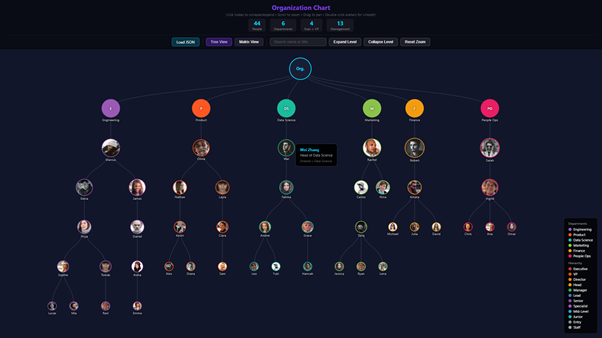 |
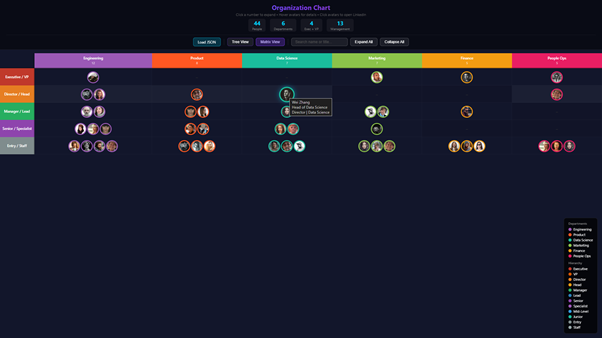 |
A demo dataset is included at examples/demo_org_chart.json for testing.
Prerequisites
- Python 3.8+
- Firefox browser (the toolkit uses Selenium with the Firefox WebDriver)
- geckodriver (auto-installed at runtime via
webdriver-manager)
Installation
# Clone the repository
git clone https://github.com/OWNER/linkedin-osint-toolkit.git
cd linkedin-osint-toolkit

# Create and activate a virtual environment
python -m venv venv
source venv/bin/activate  # Linux / macOS
# venv\Scripts\activate   # Windows

# Install dependencies
pip install -r requirements.txt
Configuration
Copy the example environment file and fill in your credentials:
cp .env.example .env
| Variable | Required | Description |
|---|---|---|
LINKEDIN_EMAIL |
Yes | Your LinkedIn login email |
LINKEDIN_PASSWORD |
Yes | Your LinkedIn password |
GROQ_API_KEY |
No | Groq API key for AI-enhanced classification (--use-ai flag). Free at console.groq.com |
LOG_LEVEL |
No | Logging verbosity: DEBUG, INFO, WARNING, ERROR (default INFO) |
LOG_FILE |
No | Path to a log file, e.g. output/toolkit.log |
PROXY_URL |
No | Default proxy URL (e.g., socks5://127.0.0.1:9050) |
See the Usage Guide for details on session handling, OTP approval, and troubleshooting.
Usage
Quick Start -- Full Funnel (recommended)
The unified funnel script chains all phases (discover, scrape, classify) with one browser session:
# Discover cybersecurity companies in the USA, scrape employees, classify
python src/osint_funnel.py --geo-code 103644278 --keyword "cybersecurity" --limit 5

# Resume from an existing file (auto-detects format and starting phase)
python src/osint_funnel.py --input output/discovered_companies_usa_20260215_120000.json

# Include deep dive on top 20 profiles
python src/osint_funnel.py --geo-code 103644278 --keyword "fintech" --limit 3 --deep-dive --deep-dive-limit 20

# Route through a SOCKS5 proxy for IP rotation
python src/osint_funnel.py --geo-code 103644278 --keyword "defense" --limit 5 --proxy socks5://127.0.0.1:9050
Approve the OTP on your phone when prompted (one-time).
Quick Start -- Single Company
For a single company, the pipeline script is a simpler entry point:
python src/osint_pipeline.py acme-corp -e [email protected] -p yourpassword

# Re-run classification on an existing CSV (no browser needed)
python src/osint_pipeline.py --skip-scrape -c output/linkedin_company_acme_20260214.csv
All output files are saved to a flat output/ directory with unique timestamped names:
output/discovered_companies_*_TIMESTAMP.json-- discovered companiesoutput/all_companies_people_TIMESTAMP.json-- batch scraped peopleoutput/linkedin_company_*_TIMESTAMP.csv-- single company scraped dataoutput/org_chart_TIMESTAMP.json-- classified org chart data
To visualize results, open src/org_chart_viewer.html in your browser and load any JSON file. The viewer supports Tree and Matrix views with search, zoom, and expand/collapse.
Additional flags: --max-pages, --max-profiles (scraping limits), --headless, -v (verbose), --use-ai (AI-enhanced classification), --proxy (SOCKS5/HTTP proxy).
Anti-Detection: All scripts automatically apply stealth measures (UA rotation, viewport randomization, human-like timing). Use
--proxyfor IP rotation. Press Ctrl+C at any time to save partial results.
AI Enhancement (Optional)
Add --use-ai to any command to enable Groq LLM-powered classification. This requires a GROQ_API_KEY in your .env file (free at console.groq.com). AI never replaces the keyword classifier -- it only enhances results when confidence is high.
# AI-enhanced classification during the pipeline
python src/osint_pipeline.py acme-corp -e [email protected] -p yourpassword --use-ai

# AI relevance scoring for company discovery
python src/osint_discover.py --geo-code 103644278 --keyword "cybersecurity" --use-ai --search-objective "defense contractors with SOC teams"

# AI deep classification using full profile data (about, experience, education)
python src/osint_scrape_profiles.py results.json --use-ai
The toolkit supports three independent depth levels -- enter at any level:
| Level | What it does | AI enhancement |
|---|---|---|
| Macro | Discover companies by industry/country | Score relevance to your search objective |
| Medium | Scrape employee lists + classify titles | Refine hierarchy/department using title context |
| In-depth | Deep dive into individual profiles | Classify using full bio, career history, education |
Advanced: Individual Scripts
For more control, each pipeline phase can be run as a standalone script. See the Usage Guide for full details.
| Script | Purpose |
|---|---|
src/osint_funnel.py |
Unified funnel: discover -> scrape -> classify -> deep dive |
src/osint_pipeline.py |
Single-company pipeline: scrape -> classify -> org chart |
src/osint_discover.py |
Discover companies by region (--list-geo-codes, --list-industries) (OSINT Methodology, Reference Tables) |
src/osint_scrape_company.py |
Scrape a single company's employees |
src/osint_scrape_batch.py |
Batch scrape from a TXT/JSON list |
src/osint_scrape_profiles.py |
Deep dive into individual profiles (about, experience, education, skills) |
src/osint_build_orgchart.py |
Build org chart data from scraped CSV |
src/osint_generate_html.py |
Generate org chart HTML (legacy matrix view) |
src/osint_stats.py |
Analyze classification statistics |
src/osint_scan.py |
Scan results and suggest classification overrides |
Note: All scripts read
LINKEDIN_EMAILandLINKEDIN_PASSWORDfrom.envautomatically. You can also pass-e/-pflags to override.
For the full step-by-step walkthrough, login/session handling, and troubleshooting, see the Usage Guide.
Project Structure
linkedin/
├── src/
│   ├── osint_funnel.py                # Unified funnel: discover -> scrape -> classify -> deep dive
│   ├── osint_pipeline.py              # Single-company pipeline (login + scrape + classify)
│   ├── osint_auth.py                  # Shared login & session module (with stealth integration)
│   ├── osint_stealth.py               # Anti-detection: UA rotation, viewport, timing, proxy
│   ├── osint_discover.py              # Macro: find companies by region
│   ├── osint_scrape_company.py        # Medium: scrape single company employees
│   ├── osint_scrape_batch.py          # Medium: batch scrape multiple companies
│   ├── osint_scrape_profiles.py       # In-depth: deep dive individual profiles
│   ├── osint_classify_rules.py        # Classify: keyword-based title classifier
│   ├── osint_classify_ai.py           # Classify: optional Groq AI enhancement
│   ├── osint_build_orgchart.py        # Output: build org chart JSON from CSV
│   ├── osint_generate_html.py         # Output: legacy HTML chart generator
│   ├── osint_stats.py                 # Analysis: classification statistics
│   ├── osint_scan.py                  # Analysis: classification scanner
│   ├── org_chart_viewer.html          # Standalone interactive org chart viewer (D3.js)
│   ├── classification_rules.json      # Classification rules (~30K profiles)
│   └── prompts/                       # AI system prompts and skill definitions
│       ├── system_prompt.md
│       ├── skill_classify.md
│       ├── skill_score.md
│       └── tool_definitions.md
├── tests/
│   └── __init__.py                     # Test package (tests are run via Makefile)
├── docs/
│   ├── ARCHITECTURE.md                 # System design & data flow diagrams
│   ├── USAGE.md                        # Step-by-step usage guide
│   ├── REFERENCE.md                    # Role levels, geo codes, industry categories
│   └── OSINT_METHODOLOGY.md           # Discovery strategies & enrichment techniques
├── examples/
│   ├── companies_list.txt.example      # Example batch input file
│   └── demo_org_chart.json             # Demo dataset for the org chart viewer
├── assets/                             # Logo and screenshot images
├── .github/
│   ├── workflows/ci.yml               # GitHub Actions CI pipeline
│   ├── ISSUE_TEMPLATE/                 # Bug report & feature request templates
│   └── PULL_REQUEST_TEMPLATE.md        # PR checklist
├── pyproject.toml                      # Packaging & tool configuration
├── requirements.txt                    # Python dependencies
├── Makefile                            # install / lint / test shortcuts
├── .env.example                        # Environment variable template
├── .editorconfig                       # Editor formatting rules
├── CONTRIBUTING.md                     # Contributor guidelines
├── CHANGELOG.md                        # Version history
├── CODE_OF_CONDUCT.md                  # Community standards
├── SECURITY.md                         # Vulnerability disclosure policy
├── LICENSE                             # MIT License
└── output/                             # Runtime results (gitignored)
Documentation
| Document | Description |
|---|---|
| Usage Guide | Step-by-step usage, login/session handling, troubleshooting |
| Architecture | System design, data flow diagrams, module relationships |
| Reference Tables | Role classification levels, geo codes, industry categories |
| OSINT Methodology | Company discovery strategies and enrichment techniques |
Legal Disclaimer
This tool is for educational and security research purposes only. Ensure compliance with LinkedIn's Terms of Service and applicable laws. The authors are not responsible for misuse.
Contributing
Contributions are welcome! Please read the Contributing Guide before opening a pull request. For security vulnerabilities, see SECURITY.md.
License
This project is licensed under the MIT License.