

LIPTunnel
Your Tunnel. Your Domain. Your Control.
🌐 LIPTunnel — Self-Hosted Ngrok Alternative
LIPTunnel is a fast, lightweight, self-hosted tunneling system that exposes your local server to the internet using your own VPS + domain.
No subscriptions.
No limits.
No tracking.
Just a simple Node.js tunnel that YOU control.
Created by Lasisi Ibrahim Pelumi (Full-Stack Engineer).
⚡ What's New in v1.1.0
🚀 Multi-Tunnel Support
Run multiple tunnels with a single command!
Before:
# Need 3 terminal windows
liptunnel http 3000 --server yourdomain.com
liptunnel http 8080 --server yourdomain.com
liptunnel http 5000 --server yourdomain.com
Now:
# Just one command!
liptunnel http 3000,8080,5000 --multi --server yourdomain.com
Output:
Multi-Tunnel Mode: Active

Forwarding 1: http://tunnel1-abc.yourdomain.com → http://localhost:3000
Forwarding 2: http://tunnel2-def.yourdomain.com → http://localhost:8080
Forwarding 3: http://tunnel3-ghi.yourdomain.com → http://localhost:5000
Perfect for:
- 🔧 Microservices development
- 🌐 Full-stack projects (frontend + backend)
- 🔌 Webhook testing (API + webhook receiver)
- 📱 Mobile app development
📁 Repository Folder Structure
liptunnel/
 ├─ bin/
 │   └─ liptunnel.js        # CLI client (runs on user machine)
 ├─ server/
 │   └─ server.js           # Tunnel server (runs on VPS)
 ├─ docs/
 │   ├─ architecture.md
 │   └─ multi-tunnel.md
 ├─ assets/
 │   ├─ liptunnel-banner.gif
 │   ├─ liptunnel-demo.png
 │   └─ server-pm2.png
 ├─ package.json
 ├─ README.md
 └─ LICENSE
🚀 Features
- 🔥 Expose any local port over HTTP
- 🌍 Generates public URLs like:
http://abcd12.yourdomain.com - 🚀 NEW: Multi-tunnel support - run multiple ports simultaneously
- 🎯 NEW:
--multiflag for numbered forwarding display - 🛰 Works with ANY VPS (even old VPN servers)
- ⚡ Real-time request forwarding
- 🖥 Local dashboard:
http://127.0.0.1:4040 - 🔐 No third-party services (no Ngrok, no Cloudflare Tunnels)
- 💻 Works on Windows, macOS, Linux
- 🛠 Zero configuration required
- 🧩 Full open-source control
- ✅ Fully backward compatible
📸 Demo Screenshot
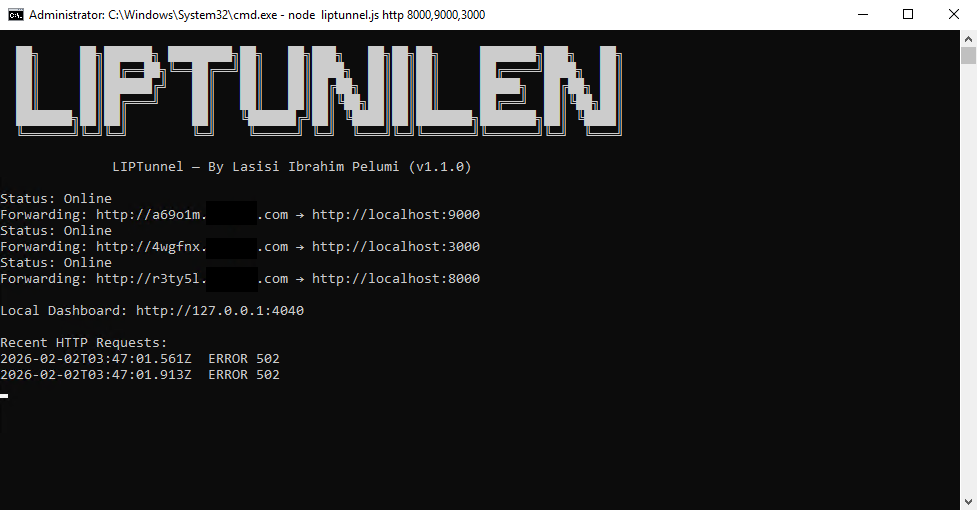
Below is an actual output of LIPTunnel running live:
Screenshot 1 → Client side (your CMD window)
Screenshot 2 → Server side (PM2)
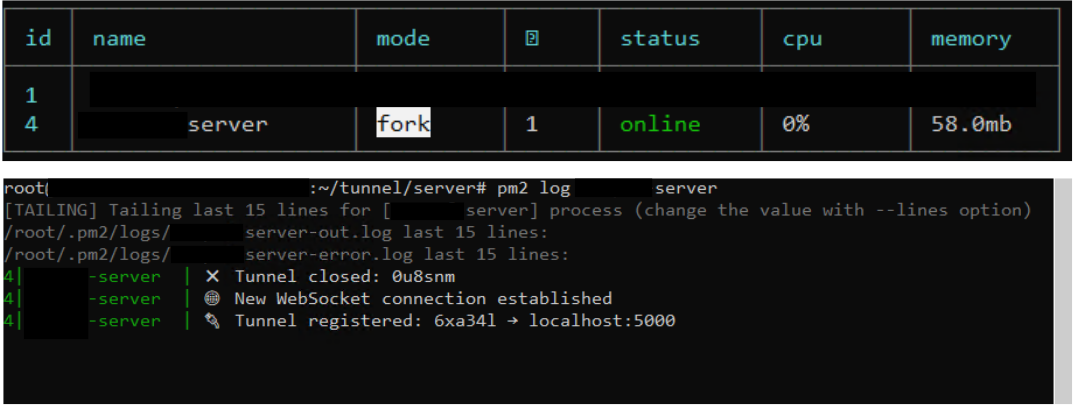
This shows:
✔ Tunnel status
✔ Forwarding URL
✔ Live request logs
✔ Dashboard URL
✔ Version + region
✔ Successful POST requests
🧠 How It Works
- You run the tunnel server on your VPS.
- You run the LIPTunnel client on your computer:
liptunnel http 5000 --server yourdomain.com
-
The client opens a WebSocket connection to your VPS.
-
Your VPS assigns a random subdomain, e.g.:
http://u8smnt.yourdomain.com
- Incoming HTTP requests are forwarded directly to your local machine.
🏗 Architecture
User → yourdomain.com → LIPTunnel VPS → WebSocket → your computer → localhost:5000
Reverse tunneling, simple and fast.
⚙ Requirements
- Node.js 18+
- A domain you control
- A VPS (1 CPU / 512MB RAM is enough — even old servers work)
- Port 80 available (or use Nginx reverse proxy)
📥 Installation
- Clone the project
git clone https://github.com/ibrahimpelumi6142/liptunnel.git
cd liptunnel
npm install
-
Configure your domain (Optional)
Edit
bin/liptunnel.jsline 50:
let serverHost = "your-actual-domain.com"; // Replace with your domain
Or use the --server flag when running (see usage below).
🚀 Start the VPS Tunnel Server
On your VPS:
npm run start:server
This starts the server on port 80.
DNS Setup (recommended)
Create this DNS record:
*.yourdomain.com A <your-vps-ip>
💻 Usage
Single Tunnel (Normal Mode)
On your local machine:
liptunnel http 5000 --server yourdomain.com
Output:
Status: Online
Forwarding: http://abcd12.yourdomain.com → http://localhost:5000
Visit this URL from anywhere in the world — it hits your local machine.
Multiple Tunnels (Multi Mode)
Run multiple services at once:
liptunnel http 3000,8080,5000 --multi --server yourdomain.com
Output:
Multi-Tunnel Mode: Active

Forwarding 1: http://tunnel1-abc.yourdomain.com → http://localhost:3000
Forwarding 2: http://tunnel2-def.yourdomain.com → http://localhost:8080
Forwarding 3: http://tunnel3-ghi.yourdomain.com → http://localhost:5000
Use Cases:
Microservices Development:
liptunnel http 3000,4000,5000 --multi --server yourdomain.com
# 3000 → User Service
# 4000 → Auth Service
# 5000 → Payment Service
Full-Stack Development:
liptunnel http 3000,8080 --multi --server yourdomain.com
# 3000 → React frontend
# 8080 → Express API
API + Webhook Testing:
liptunnel http 8000,8001 --multi --server yourdomain.com
# 8000 → Main API
# 8001 → Webhook receiver (Stripe, GitHub, etc.)
🔧 Local Dashboard
Open:
http://127.0.0.1:4040
It shows:
- Recent requests
- HTTP status
- Tunnel info
- Multi-tunnel view (when using
--multi)
🛡 Why LIPTunnel?
| Feature | LIPTunnel | Ngrok | Cloudflare Tunnel |
|---|---|---|---|
| Free | ✅ | Limited | ✅ |
| Unlimited tunnels | ✅ | ❌ | ✅ |
| Use your own domain | ✅ | Paid only | ✅ |
| Self-hosted | ✅ | ❌ | ❌ |
| Logs stored locally | ✅ | ❌ | ❌ |
| No tracking | ✅ | ❌ | ❌ |
| Identity branding | You | Ngrok | Cloudflare |
| Multi-tunnel | ✅ | ❌ | ✅ |
| Setup time | 5 min | 2 min | 10 min |
LIPTunnel gives you full control, privacy, and freedom.
📚 Documentation
- Architecture - System design and flow
- Multi-Tunnel Guide - Detailed multi-tunnel usage
🧱 Roadmap
- Multi-tunnel support ✅ v1.1.0
- HTTPS support (Let's Encrypt)
- Named fixed subdomains
- Authentication tokens
- Configuration file support
- Web-based management UI
- Docker containers
🤝 Contributing
Contributions are welcome! Please feel free to submit a Pull Request.
- Fork the repository
- Create your feature branch (
git checkout -b feature/amazing-feature) - Commit your changes (
git commit -m 'feat: add amazing feature') - Push to the branch (
git push origin feature/amazing-feature) - Open a Pull Request
👨💻 Author
Lasisi Ibrahim Pelumi
Full-Stack Engineer • Automation Developer
- GitHub: @ibrahimpelumi6142
- Email: [email protected]
- YouTube: @bestspotsolution
- Website: onlinequicktools.com
If you like this project, please ⭐ star the repo.
📝 Changelog
v1.1.0 (2026-01-22)
- ✨ Added multi-tunnel support with comma-separated ports
- ✨ Added
--multiflag for numbered forwarding display - ✨ Enhanced dashboard for multiple tunnels
- ✨ Per-tunnel logging in multi mode
- ✅ Fully backward compatible with v1.0.x
v1.0.1
- 🐛 Bug fixes and improvements
v1.0.0
- 🎉 Initial release
📜 License
MIT License — free to use, modify, and distribute.
Made with ❤️ for developers who value privacy and control